
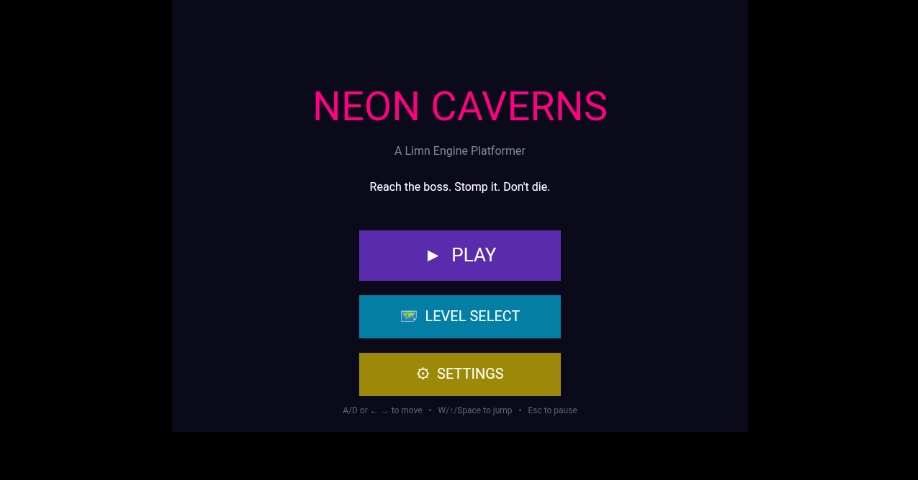
🎮 Neon Caverns: A Platformer Built with Limn Engine — Play It Now A neon-lit platformer with 3 levels, a boss fight, and a full scene system — built entirely in the browser with Limn Engine. 🎯 Live Demo Play Neon Caverns right now: 👉 limn-engine-doc.vercel.app/arcade/game.html?slug=noen-caverns-thc5 The game is live on the Limn Arcade and ready to play. Click the link, and you're in the main menu within seconds. No downloads, no installation, no sign-up required to play. Source code is underway and will be released soon for anyone who wants to learn how it was built or modify it for their own projects. 📖 Introduction Neon Caverns is a 2D platformer built with Limn Engine — a lightweight game engine that runs entirely in the browser. You play as a pink square navigating neon-lit caverns, dodging enemies, collecting coins, and fighting a boss at the end of each level. The game was designed to be easy to pick up but hard to master. Three levels of increasing difficulty, a boss with multiple HP stages, and a full menu system with settings, pause, and level select — all in a single JavaScript file. Here's what makes it interesting: 3 hand-designed levels — Caverns, Towers, and Boss Arena Intelligent enemies — they patrol, detect the player, chase, and return home A boss fight — with health, chase AI, and a hurt-flash effect Moving platforms — horizontal and vertical, with proper player carrying Full scene management — Menu, Game, Over, Win, Pause, Settings, Level Select Persistent settings — volume sliders saved to localStorage Touch + keyboard support — playable on phones and desktops Responsive canvas — scales to fit any screen This article introduces the game, explains how it works, and shows you the key parts of the code — so you can see exactly how a complete Limn Engine platformer is structured. 🎮 How to Play Action Keyboard Touch Move Left A or ← Left button Move Right D or → Right button Jump W, ↑, or Space Jump button Pause Esc or P II button (top right) Goal: Reach the boss at the end of the level, jump on its head to damage it, and defeat it to win. Collect coins for score. Avoid enemies and spikes. Enemies: Red squares that patrol and chase you when they see you. Jump on their head to defeat them. Boss: A larger red square with multiple HP. Stomp it repeatedly to win the level. Lives: You have 3 hearts. Get hit by an enemy or spike and you lose one. Lose all three and it's game over. 🏗️ How the Game Is Structured Before we look at any code, let me explain the architecture of the game. Understanding the structure first makes the code much easier to follow. Neon Caverns uses a scene system. A scene is a distinct screen or state of the game — like a menu, gameplay, or a game-over screen. Only one scene is active at a time, and the game switches between them in response to player actions. Scene 0: Main Menu ↓ Scene 6: Level Select ↓ Scene 1: Gameplay ↓ (if the player dies) Scene 2: Game Over ↓ (if the player wins) Scene 3: Win Screen ↓ (if the player pauses) Scene 4: Pause Menu ↓ (if the player opens settings) Scene 5: Settings Enter fullscreen mode Exit fullscreen mode Each scene is a number. The display.scene property tracks which scene is currently active, and only components assigned to that scene are drawn and updated. This is a core feature of Limn Engine — it lets you build complex games without destroying and recreating objects on every state change. 🧩 The Core Game Elements Here's what the game is built from. Each of these is a Limn Engine Component — a game object. Element Type Purpose Player Component 28×40 pink square, moves with keyboard/touch Ground & walls Component Tiles from the level map — solid, collidable Spikes Component Tiles with ID 4 — damage on contact Coins Component 16×16 yellow squares, +10 score each Hearts Tctxt HUD hearts in the top-right corner PatrolEnemy Custom class Extends Component — patrols, detects, chases MovingPlatform Custom class Extends Component — sine-wave movement BossEnemy Custom class Extends Component — larger, more HP, chase AI HUD Tctxt Score, coins, and boss HP display Pause button Component Pinned to screen via .fixed() Menu buttons Component + Tctxt Each scene has its own buttons The game uses custom classes that extend the base Component class — a technique that lets you give each game object its own behaviour while still using the engine's built-in rendering and collision systems. 🎨 The Neon Aesthetic The visual style of Neon Caverns is simple but deliberate. Each tile type has its own colour: Tile ID Colour Meaning 1 #39ff14 (neon green) Grass — walkable 2 #7c3aed (purple) Stone — walkable 3 #ffdd00 (yellow) Gold — walkable 4 #ff0033 (red) Spike — hurts the player 5 #5c4a72 (muted purple) Brick — walkable The player is #ff0080 (hot pink), the boss is #8b0000 (dark red), and the background is #0a0a1a (very dark blue). This palette creates the neon-cavern feel — bright, saturated objects against a dark backdrop. 🔍 Understanding the Code The source code is a single JavaScript file. I'm not going to paste all of it here — that would be overwhelming — but I'll walk through the most important parts so you understand how everything fits together. 1. Setting Up the Display What this code does: Creates the game engine instance and starts it. const display = new Display(); display.perform(); Enter fullscreen mode Exit fullscreen mode What's happening: new Display() creates the engine. It must be named display because the engine references that variable internally. display.perform() switches the render loop to requestAnimationFrame, which gives us smooth 60fps and accurate deltaTime. 2. Configuring the World What this code does: Sets the game world to be larger than the visible canvas, so the camera has something to scroll through. const TILE = 64; const COLS = 30, ROWS = 12; const WORLD_W = COLS * TILE; // 1920 const WORLD_H = ROWS * TILE; // 768 fake.canvas.width = WORLD_W; fake.canvas.height = WORLD_H; display.camera.worldWidth = WORLD_W; display.camera.worldHeight = WORLD_H; Enter fullscreen mode Exit fullscreen mode What's happening: The world is 30 tiles wide and 12 tiles tall. Each tile is 64 pixels. So the world is 1920×768 pixels — much bigger than the 800×600 canvas. The camera follows the player and scrolls the visible window across this world. 3. Building a Level What this code does: Each level is a 2D array where each number refers to a tile type. The engine builds the level from this map. const LEVELS = [ { name: "Caverns", map: [ [1,1,1,1,1,1,1,1,1,1,1,1,1,1,1,1,1,1,1,1,1,1,1,1,1,1,1,1,1,1], [1,0,0,0,0,0,0,0,0,0,0,0,0,0,0,0,0,0,0,0,0,0,0,0,0,0,0,0,0,1], // ... more rows ... [2,2,2,2,2,2,2,2,2,2,2,2,2,2,2,2,2,2,2,2,2,2,2,2,2,2,2,2,2,2], ], enemyCount: 7, bossHP: 3, bossX: 1750, bossChaseSpeed: 2.4, }, // ... more levels ... ]; Enter fullscreen mode Exit fullscreen mode What's happening: Each row is an array of tile IDs. 1 is grass (solid), 2 is stone (solid), 0 is empty space, 3 is gold, 4 is spike, 5 is brick. The engine's TileMap class reads this map and creates the visible tiles. Each level also has metadata: how many enemies, the boss's HP, where the boss starts, and how fast it chases the player. 4. Creating Custom Enemy Behaviour What this code does: Defines a PatrolEnemy class that extends Component — enemies patrol, detect the player, chase, and return home. class PatrolEnemy extends Component { constructor(x, y, cfg) { super(30, 30, cfg.color || "#ff4500", x, y, "rect"); // ... setup ... this.state = "patrol"; } think(player) { const dx = player.x - this.x, dy = player.y - this.y; const canSee = Math.abs(dx) < this.detectRangeX && Math.abs(dy) < this.detectRangeY; if (canSee) { this.state = "chase"; } // ... rest of the AI ... } } Enter fullscreen mode Exit fullscreen mode What's happening: The enemy has three states: Patrol — walks back and forth between two points Chase — moves toward the player at a faster speed Return — walks back to its patrol centre after losing sight of the player This is a simple but effective AI pattern. The think() method runs every frame and updates the enemy's state based on what it can "see." 5. Handling Collision with Tiles What this code does: Resolves collisions between the player and any solid tile, snapping the player to the correct side. function resolveTileCollisions(entity, tiles) { entity.onGround = false; for (let i = 0; i < tiles.length; i++) { const t = tiles[i]; if (!t.crashWith(entity)) continue; const oL = (entity.x + entity.width) - t.x; const oR = (t.x + t.width) - entity.x; const oT = (entity.y + entity.height) - t.y; const oB = (t.y + t.height) - entity.y; const minX = Math.min(oL, oR), minY = Math.min(oT, oB); if (minX < minY) { // Horizontal collision if (oL < oR) entity.x = t.x - entity.width; else entity.x = t.x + t.width; } else { // Vertical collision if (oT < oB) { entity.y = t.y - entity.height; entity.gravitySpeed = 0; entity.onGround = true; } // ... handle ceiling ... } } } Enter fullscreen mode Exit fullscreen mode What's happening: For each tile the entity overlaps, we calculate how much they overlap on each axis. We pick the smallest overlap — that tells us which direction the collision came from — and push the entity out of the tile on that axis. The entity.onGround = true flag is what allows the player to jump — jumping only works when onGround is true. 6. Managing Scenes What this code does: Switches between the different game screens. function goToScene(n) { currentScene = n; display.scene = n; sceneEnterTime = Date.now(); clearHitAreas(); if (n === SCENE_GAME) { fake.tileFace.show(); display.once = true; display.camera.x = 0; display.camera.y = 0; } // ... handle other scenes ... } Enter fullscreen mode Exit fullscreen mode What's happening: Setting display.scene = n tells the engine to only draw and update components assigned to that scene. Components are assigned to a scene by passing the scene number as a second argument to display.add(): display.add(player, SCENE_GAME); display.add(menuPlayBtn, SCENE_MENU); Enter fullscreen mode Exit fullscreen mode This is what makes the scene system work. The player only exists on scene 1, so it's invisible on the menu. 7. Handling Player Damage What this code does: Reduces HP, grants invincibility frames, and updates the heart display. function damagePlayer() { if (Date.now() < invincibleUntil) return; playerHP--; invincibleUntil = Date.now() + 1500; for (let i = 0; i < hearts.length; i++) { hearts[i].color = i < playerHP ? "#ff3366" : "rgba(255,51,102,0.15)"; } if (playerHP <= 0) { gameOver = true; goToScene(SCENE_OVER); } } Enter fullscreen mode Exit fullscreen mode What's happening: The invincibleUntil timestamp prevents the player from taking damage multiple times in quick succession — a technique called invincibility frames. When the player has HP left, the corresponding heart stays bright red. When they lose HP, the heart fades to a dim colour. 📝 A Note on the Source Code The full source code is underway and will be released soon. When it's ready, you'll be able to: See the complete JavaScript file Run it locally by downloading epic.js from the Limn Engine site Modify it to add your own levels, enemies, or mechanics Publish your own version to the Limn Arcade The code is already live on the arcade — this article is just the introduction. The full release will include: Line-by-line explanations of every class and function A guide to adding new levels A guide to building your own custom enemies A guide to publishing to the arcade Follow Kehinde Owolabi on DEV.to to get notified when the source code is released. 🎯 What You've Learned Concept Why It Matters Scene system Lets you build menus, gameplay, pause, and game-over screens without destroying objects Custom component classes Extending Component lets you give each game object its own behaviour TileMap levels 2D arrays are an easy way to design levels Custom AI states The patrol → chase → return pattern is a simple, effective AI AABB collision resolution Snapping to the smallest overlap prevents sticking and jittering Invincibility frames A timestamp prevents rapid repeated damage Persistent settings localStorage keeps volume settings between sessions Touch and keyboard The same game logic handles both input methods 🚀 What's Next? If you enjoyed Neon Caverns, here's what you can do next: Play the other arcade games — browse the Limn Arcade and see what others have built Build your own platformer — use Limn Studio's Platformer template to get started fast Read the platformer tutorial — a step-by-step guide to building a simpler version from scratch Watch for the Neon Caverns source code — follow Kehinde on DEV.to for the release 🔗 Resources 🎯 The One-Line Summary "Neon Caverns is a 3-level platformer with intelligent enemies, a boss fight, and full scene management — playable right now on the Limn Arcade, with source code coming soon." 🎮🚀 Draw your game into existence — one stomp at a time. 🎮🚀
🎮 Neon Caverns: A Platformer Built with Limn Engine — Play It Now
Full Article
Original Source
Read the full article at Dev →KhanList aggregates and links to publicly available news content. We do not host full articles from third-party sources. Always verify important information with original sources.