
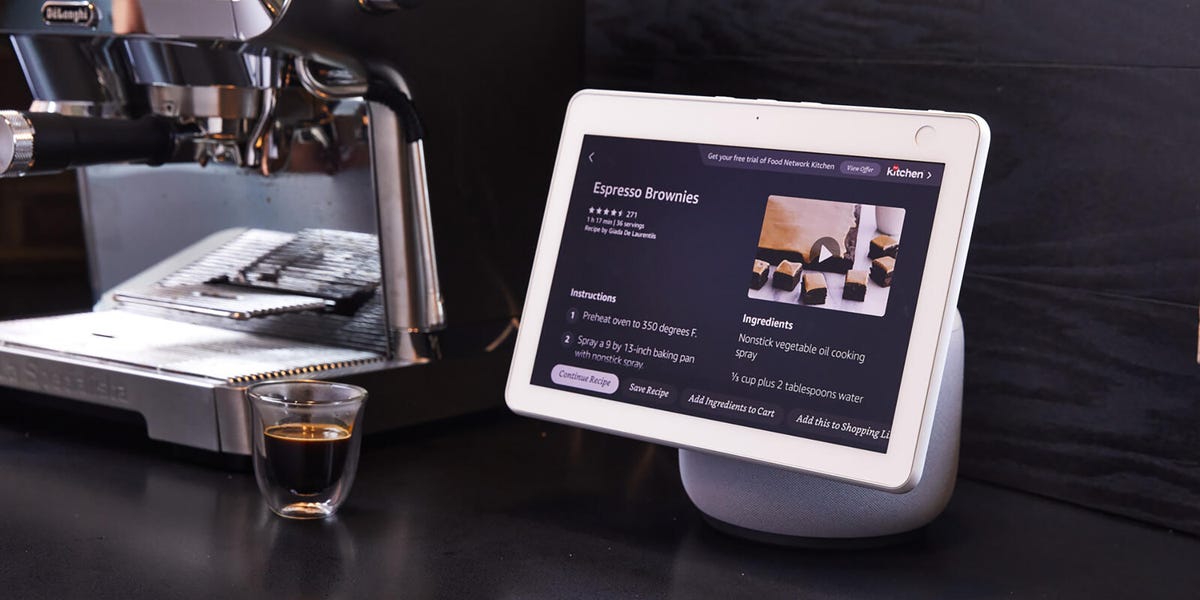
11 min readWhether you’ve just screwed in new Wi-Fi controlled light bulbs or installed the latest video doorbell camera, you may have noticed that each smart home device requires its own app for both setup and operation. Smart home hubs excel in tidying up that operation, tying all of your gadgets together so that you can access and control them from a central point. You control a hub through voice commands and touchscreens and don’t have to reach for your phone every time you want to perform an action. You can even automate and set up routines at scheduled times or by designating a trigger word. With one word or press of a button, you can kick off a series of actions. For example, telling your smart hub “goodnight” can lock your door, lower your thermostat, and turn off all of your lights.Best Smart HubsBest Overall: Amazon Echo StudioBest Value: Amazon Echo Dot MaxBest TV Smart Hub: Google TV Streamer (4K)Best Mesh Wi-Fi Router: Amazon Eero Pro 7Best Smart Sisplay: Amazon Echo Show 8Best for Google Users: Google Home SpeakerTo find the best smart hubs available, we researched critic reviews and tested the top models ourselves to evaluate usability, features, and reaction time. Read on below for our top picks to make your home tech life easier.ProsBest sound in the Echo line, with Dolby Atmos and spatial audioRoom adaptation auto-tunes playback to your spaceAmazon’s best-sounding Echo is also its most capable hub, making the Studio our top pick. It’s built around a 3.75-inch woofer and three full-range drivers, with Dolby Atmos and spatial audio for a wider, more immersive soundstage than any other Echo. Room adaptation technology measures the acoustics of wherever you place it and fine-tunes playback to match, so it sounds balanced on a bookshelf or out in the open. The device features a familiar circular design that’s 40 percent smaller than the original Studio, though it no longer features a 3.5mm input jack for wired playback.It’s also a very capable hub, with Zigbee, Matter, and Thread all on board, so it connects to nearly any smart home device without a separate bridge. Set routines and it will lock the doors, dim the lights, or let you adjust your thermostat, and its Omnisense sensors can trigger custom routines by temperature or presence rather than voice. With Eero built in, it doubles as a mesh Wi-Fi extender on an Eero network, and you can pair it with a compatible Fire TV for a Dolby Atmos home theater or add a second Studio for true stereo.Like the rest of Amazon’s Echo lineup, the Studio runs Alexa Plus, which is free for Prime members or $19.99 for non-Prime users. Alexa Plus is a more conversational assistant that handles natural phrasing, follow-up questions, and several requests chained together. For the best sound in Amazon’s lineup and excellent device compatibility, the Studio is a great pick. However, if you mostly want that same hub for less money, the Echo Dot Max below is a solid option.ProsRoom-filling sound with real bass for the sizeZigbee, Matter, and Thread control built-inFront-facing controlsConsPrice at $100 for a DotAlexa Plus is still a work in progressThe Echo Dot Max is the Alexa speaker to get if you want one gadget that runs your smart home and actually sounds good doing it. It sits between the compact Echo Dot and the pricier Echo Studio, with a knit fabric body that comes in white, gray, and a very striking purple. The speaker packs a separate tweeter and woofer, and Amazon claims it produces nearly triple the bass of the standard Dot. That’s enough to fill a living room or medium-sized space rather than just a bedroom.As a hub, the Dot Max connects to more of your gear than most speakers its size, with Zigbee, Matter, and Thread radios built-in, so you don’t need separate bridges to get devices talking to Alexa. Like the Echo Studio, it supports routines and doubles as an Eero Wi-Fi extender. Amazon also made a few hardware changes that make the Dot Max easier to use than previous models, including moving the controls to the front, so muting or changing the volume when it’s up on a shelf is much easier. And a new AZ3 processor drives a four-microphone array, up from three on the standard Dot, which should mean it catches your voice from across a room even while music is playing.At $99, you’re paying over the entry-level Dot for better sound, more sensors, and broad device compatibility.ProsPuts Google Home controls and camera feeds on your TVMatter support built inFast processor and gigabit EthernetConsBest only if you’re in the Google / Nest ecosystemThe Google TV Streamer (4K) plays all your usual apps in 4K HDR with Dolby Vision, but the reason it earns a spot here is what it does when you’re not watching Netflix. It runs Google Home and Matter devices directly, so you can pull up a live Nest camera feed on your TV, dim the lights, or check a sensor without reaching for your phone. Google recently widened camera support well beyond Nest, adding live viewing for Eufy, Tapo, Wyze, Reolink, and Nanit feeds inside Google Home.The hardware is a real step up from the old Chromecast dongle it replaces. It’s a flat, tabletop box closer to an Apple TV, with a faster processor, far more storage, and a gigabit Ethernet port for a wired connection. Setup runs through the Google Home app, and if you already manage lights, locks, or a thermostat there, the set-top box slots in nicely. The Bluetooth remote handles voice search by pressing a button to talk rather than simply saying a wake word.This is a Google-first device, which means the deeper your home is embedded with Nest and Google Home, the more you get out of it. As a way to see and control your smart home from the couch, the Google TV Streamer is the one to get.ProsFeatures Wi-Fi 7 with tri-band coveragePairs easily with Echo speakersConsSome advanced features are behind a paywallThe Eero Pro 7 does two jobs at once: it blankets your home in Wi-Fi 7 and acts as the hub your smart home runs through. Each unit is a Matter and Thread border router with Zigbee on board, so it talks directly to the current generation of smart home gear without a separate bridge. That makes the router itself part of your setup, not just the pipe everything else connects through.On the network side, the Pro 7 is a tri-band system. It adds the 6 GHz band that keeps newer devices off the crowded 2.4 and 5 GHz lanes, and you add nodes to match your home’s size. Setup runs entirely through the Eero app, which walks you through placement and handles the firmware updates on its own, so you’re not digging through a browser admin panel.Eero’s smart home runs through Alexa, so it fits best in an Alexa household and pairs naturally with an Echo speaker; Google-first homes are better served by a Nest system. And some features people expect from a router, like advanced security and detailed controls, sit behind the Eero Plus subscription, which is $9.99 per month or $99.99 annually.ProsBright touchscreen that’s great for the kitchen13MP auto-framing camera for video callsConsNo physical camera shutterThe Echo Show 8 essentially puts a screen on the Echo Dot Max. Tap the 8.7-inch display to pull up a doorbell camera, adjust your thermostat, or check which lights are on, or just ask Alexa and let the display show you the answer. It runs the same built-in Zigbee, Matter, and Thread hub as Amazon’s other current Echo devices, so it connects to your gear directly. At $179.99 for the 8-inch model (an 11-inch version is $219.99), it sits in the sweet spot between the tiny Show 5 and the wall-size Show 15.The display is the reason to pick this over a plain speaker. It’s bright and sharp enough to follow a recipe, make a video call on the 13MP auto-framing camera, or play Prime Video and Netflix while you cook. Spatial audio on the woofer and dual drivers fills a room better than a display this size has any right to, and the AZ3 Pro chip ensures the device is responsive. When you’re not using it, the home screen turns into a photo slideshow of your favorite memories.Amazon dropped the physical camera shutter on this generation, so you’ll have to either press a button on the side to deactivate the camera, disable it in the device’s settings, or in the Alexa app. Beyond that, the Show 8 is a great device to put in a kitchen or office, where you’re likely to interact with it throughout the day.ProsOffers room-filling 360-degree soundCan tap into Google’s more conversational Gemini AssistantConsSome advanced features are behind a paywallThe Google Home Speaker is the pick for homes that run on Google instead of Alexa. At $99.99, it matches the Echo Dot Max on price, and like that speaker, it doubles as a smart home hub, offering a Thread border router and Matter support, allowing it to connect to the current wave of smart home gear through the Google Home app. The Home Speaker comes in four colors, including a deep Berry and a soft Jade, if you prefer a pop of color.Sound comes from a single 58mm full-range driver tuned for 360-degree audio, so it fills a room evenly with music, podcasts, or a movie when you pair it with a Google TV Streamer. Gemini for Home handles the voice side, promising a more conversational experience than the old Google Assistant, fielding follow-up questions and everyday requests without the rigid phrasing of older speakers.The Home Speaker doesn’t support older Zigbee-only devices, like some early smart bulbs and locks. And the most advanced Gemini abilities, like live back-and-forth conversations and the ability to easily create automations, sit behind a Google Home Premium subscription, which starts at $9.99 a month or $99.99 a year.How to Decide If You Need a Hub & Which One to GetBecause most smart devices come with an app or voice assistant for control, you may not need a smart hub. However, once you start adding many different gadgets to your smart-home ecosystem, you may want to streamline their automation by connecting them all to one device, through which you can control them all via a single app or voice assistant.While there will likely be cross-compatibility with third-party smart-home brands, there’s no guarantee that any singular hub will work with every device. So it can help to settle on one brand’s system—such as Google Nest, Amazon Alexa, or Apple HomePod—and stick with it for the most seamless integration. Before you decide on a hub, take stock of all of your current devices (or the ones on your wishlist) to determine what other systems they’re compatible with.One of the most important features to consider is if the hub only uses Wi-Fi and Bluetooth connectivity, or if it also supports Zigbee and Z-Wave connection. Most smart devices will connect to your Wi-Fi, but Z-Wave offers wireless mesh connection that won’t interfere with your Wi-Fi signal, and it uses less battery. Zigbee functions similarly, but its wireless connection operates at a higher frequency, meaning it might interfere with 2.4-gigahertz Wi-Fi, though it can be faster and support more devices. And be sure to check your Wi-Fi’s bandwidth to ensure it can handle more devices on the network. If not, consider investing in a new dual- or tri-band router, or even opt for a mesh Wi-Fi router with smart hub features built-in.Speaking of, consider the form. While smart speakers have made their way into many homes, they’re just one type of smart hub. Smart displays offer a touchscreen atop a smart speaker to provide a visual dashboard. This means you can see a list of all your connected smart devices, control them with a tap, and receive picture and video context for questions you ask. Mesh Wi-Fi routers with built-in smart assistants turn each satellite base into a smart hub that boosts network signals to each room of your house while also serving as a smart speaker. Lastly, streaming devices like the Apple TV and Fire Stick serve as hubs with built-in smart assistants. You can go from watching a movie on the big screen to pulling up a live view of your doorbell camera.Alexa Versus Google AssistantAmazon’s Alexa and Google’s Assistant are far and away the most-used smart assistants. This comes as no surprise—these are two of the best AI helpers available, a majority of people use Amazon and Google services already, and virtually every new smart device seamlessly pairs with these ecosystems. Both Google and Amazon offer a wide lineup of first-party hubs and have even extended their presence into third-party product categories such as wearables and dash cams.Trevor RaabWith years of feedback and research, both Alexa and Google hubs offer intuitive user interfaces with or without a screen. Creating automations or routines for either assistant takes little effort, and each app guides you with pre-created examples. Your automations can be as simple as going with the presets or as complex as using If This Then That (IFTT) open-source software to create a more complex set of actions based on things like motion detection, proximity, or temperature changes. Alexa and Google Assistant differ in various way (which we’ve gone in depth on here), but the right assistant for you boils down to the one that supports your existing smart-home equipment.In my experience, I’ve found the Google Home app to have the clearest user interface. You simply swipe top to bottom to see information and connected devices at a glance without the need to bounce between submenus. Google makes suggestions at the top of its app if it discovers a compatible device on your network and isn’t bogged down with suggestions. On top of that, Google Assistant has a more knowledgable database and provides more thorough context when it answers your questions.Trevor RaabAlexa’s App offers easier access to everyday tools such as communication options, entertainment services, and devices, but the UI often gets in its own way. Important actions are pushed aside to a section vaguely labeled “More,” and visual suggestions bloat your Home feed. Alexa is integrated into far more third-party devices and focuses on features, such as Amazon Sidewalk, which extends your network to help devices work better. For example, Amazon Sidewalk-enabled hubs can provide an extended range for a Tile tracker or keep your devices online over Bluetooth and radio frequencies should your Wi-Fi go out.How We TestedWith a lifelong passion for automating my daily routines, I’ve experimented with smart hubs since the first generation of Amazon's Echo smart speakers. And after spending the past three years professionally reviewing gadgets, I’ve accrued a collection of smart home devices that range from basic bulbs to complex Switchbots—little robots that can push buttons like those on my coffee maker and garage door. I’ve installed smart locks, video doorbells, and contact sensors, along with creating action sets and triggers around the hardware for every major smart home ecosystem. With a background in the hardware and software knowledge needed to make the most of a hub, I have a sense of what a good smart hub should offer and how it should perform.For this test, I researched critic reviews and consumer feedback—in addition to relying on my previous experience with smart hubs—to create a pool of the most promising options available. Noting ease of use, capabilities, and reaction times of each hub over the course of a month, I ranked these devices by value and performance. Since the essential purpose of a smart home hub is to control devices, I benchmarked the time it took for each hub to trigger an action by setting each hub on the same marked point from a 5-GHz router and asking each device to turn on the same light. I recorded the speed three times to get an average from request to result. While I was also able to test the throughput speeds of the Nest Wi-Fi router, each hub is heavily experience-based. I listened to various albums on each speaker to understand sound quality, tested touchscreen capabilities, and video chatted with camera-equipped hubs.Brandon Russell is a freelance writer covering gear and technology. He started his journey as a news writer at a small newspaper and later began reviewing smartphones, movies, and video games. In his free time, he enjoys the slower, more intentional experience of using a 35mm film camera and making short videos about movies he grew up watching.Hunter Fenollol, our resident expert of all things consumer tech, from smart home to VR gaming headsets, has years of knowledge creating product explainers, in-depth reviews, and buying guides to help you get the most from the latest electronics. Throughout college, he covered and reviewed the latest gadget releases for sites like Tom’s Guide, Laptop Magazine, and CNN Underscored. If he’s not elbow-deep in the latest hardware, you can find Hunter at one of Long Island’s many beaches, in Manhattan, or gambling away his paycheck.
The Best Smart Home Hubs to Control All Your Devices
Full Article
Original Source
Read the full article at Popularmechanics →KhanList aggregates and links to publicly available news content. We do not host full articles from third-party sources. Always verify important information with original sources.