
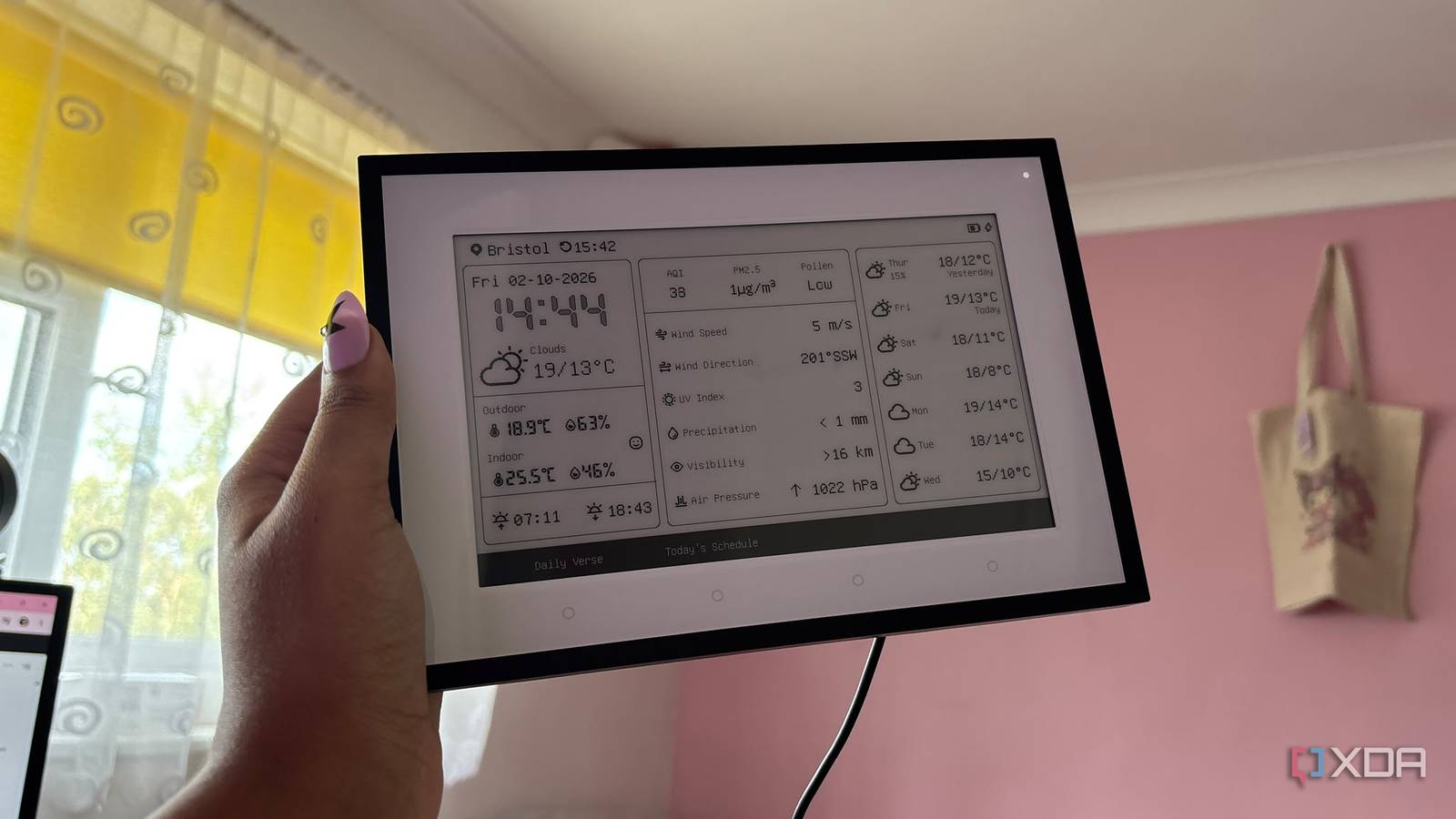
Published Oct 3, 2026, 8:00 AM EDT Jasmine is Software and PC Hardware Author at XDA with years of tech reporting experience ranging from AI chatbots right down to gaming hardware, she's covered just about everything. Whether it's breaking news about the latest AMD NPUs or creating video tutorials on social media platforms, Jasmine has contributed to the world of AI and tech in a variety of ways including interviewing the CEO of Razer, AMD's Director of Product Marketing and the VP of Lenovo. Passionate about gaming and PC technology, she has built countless computers, keyboards and other peripherals - knowing them inside and out. For a lot of smart home weather automations, you rely on a weather report pulled from an API station located elsewhere. This means it can completely ignore the blazing sun baking your front patio or the microclimate pocket trapping cold air in your backyard. Relying on commercial weather services, whether that's OpenWeatherMap, AccuWeather, or Weather Underground, means your smart home is tied to external internet connectivity. API rate limits and delayed telemetry updates can leave your HVAC running blindly during a sudden temperature swing. Instead of relying on external cloud weather feeds, you can deploy a dedicated battery-operated or solar-charged local environment station reporting directly over Zigbee or ESPHome into Home Assistant. Weather is inherently hyperlocal. By replacing generalized information, you eliminate so many issues and make your heating and cooling automations genuinely feel intelligent. Relying on the cloud isn't the best way forward It doesn't truly reflect your home Cloud weather APIs notoriously fail in smart homes due to the architectural limits of routing your home climate controls through remote commercial servers. There's a geographic disconnect. Weather APIs aggregate data from regional airports or municipal stations that can be miles away from your actual home. This means there can be a temperature variance or localized wind chill difference, and these differences can cause a problem with your home automations, like your smart blinds closing automatically or your air conditioning kicking on prematurely even though they don't need to On top of this, you're relying heavily on the internet. Meaning if your internet drops or the third-party API changes its authentication endpoints or throttles your free tier requests, your intelligent climate automations can instantly break, turning your smart home into a not-so-smart home. I've had multiple instances where it's a chilly temperature outside and a cloud weather API has, in turn, led to my heating system switching on. In reality the sun is blaring into my living room window and heating up the whole room and what I actually want is maybe a little bit of air conditioning. There are so many benefits to swapping Your own local weather station comes with a range of perks By building a local environmental station, you get hyper-local telemetry. This can absolutely transform your HVAC and home automation ecosystem. By deploying a low-power microcontroller like an ESP32 running ESPHome, paired with precision sensors like the SwitchBot temperature and humidity sensor, you can get reported data every few seconds directly to your Home Assistant instance. I was able to place sensors in very specific locations around my home. That way they could monitor exterior solar gain on the south-facing wall versus in shaded patio areas. The needs for these different locations across my house can be different. This allows my HVAC automations to anticipate temperature changes rather than reacting after the fact and I didn't have to deal with any discomfort in the interim. And on top of that, you get true air-gapped reliability. It ensures your home climate routines continue running smoothly even if your ISP drops out or external servers go down. You get predictive solar gain control, as you can use local temperature and light sensors to drop smart blinds or adjust AC preemptively before the afternoon sun superheats the living room. Dew point and condensation management were also key for me. I could monitor real-time local humidity and dew point metrics to drive smart ventilation fans and dehumidifiers more precisely when moisture thresholds were crossed. I got the benefit of seamless multi-zone balancing as I could feed granular outdoor and room-by-room telemetry into Home Assistant's advanced thermostat integrations to balance heating zones efficiently. How to get your own local weather station set up Ensure your devices are weatherproof Before getting started, it's worth noting that there are some practical hurdles when building your own local environmental station. You have to ensure that your ESP32 or Zigbee sensor node is housed in a proper radiation shield, like a Stevenson screen, protected from direct rain and solar glare, which can otherwise falsely inflate any temperature readings. Weatherproofing is fundamental here. The next step is power management. You have to balance reporting frequency with battery life if you're running on battery setups. You don't want to have to be replacing the batteries in your sensors too often. I decided to opt for a report every 15 minutes or if there was a significant change in temperature and humidity, rather than when there was a single percentage change. Now that you're ready to get started, here's how to implement your own local weather station. You have to start off by choosing your hardware. Select an ESP32 microcontroller running ESPHome or a weather-hardened Zigbee sensor node paired with a reliable environmental sensor. I opted for a SwitchBot temperature and humidity sensor as it was already weatherproof and paired it with an ESP32 board running ESPHome's Bluetooth proxy, as these are pieces of kit I already had at home. Next, flash your ESPHome configuration over the air and bring the sensor nodes into Home Assistant to verify real-time data streams. Double-check that everything looks realistic. If it feels like your temperature or humidity is way off, it might be down to the location you've put the sensor in not being accurate or the fact that you haven't built a good enough radiation shield. Once you have this information, it's time to rewrite your HVAC and other home automations. You can swap out your old cloud weather trigger templates for your new local environmental sensor entities and enjoy flawless hyper-local climate control. A completely optional step is pairing your sensors with a display or weather station. That way you can have all the information about your home ready at a glance. I chose the SwitchBot weather station, which allowed me to have a detailed feed of information right at my desk at all times without even having to actually open Home Assistant if I didn't want to. SwitchBot Weather Station The SwitchBot Weather Station allows you to see all of your information from your local weather station. SwitchBot IP65 Indoor Outdoor Hygrometer Thermometer If you're looking for a smart sensor that is already weather proof, then the SwitchBot IP65 Indoor Outdoor Hygrometer Thermometer is great as you don't need to worry about it becoming damaged no matter the temperature. Stop counting on external data to control your home Make your smart home feel truly smart with local information Relying on distant weather stations to control your home's HVAC feels like an unnecessary compromise. Building a low-cost local environmental station puts precise real-time climate data back in your hands. Disconnect from the cloud weather feeds, build a local ESPHome or Zigbee sensor node, and let your heating and cooling run on real hyperlocal data.
I stopped using cloud weather APIs after setting up a local environmental station, and my HVAC automations run flawlessly
Full Article
Original Source
Read the full article at Xda-developers →KhanList aggregates and links to publicly available news content. We do not host full articles from third-party sources. Always verify important information with original sources.