
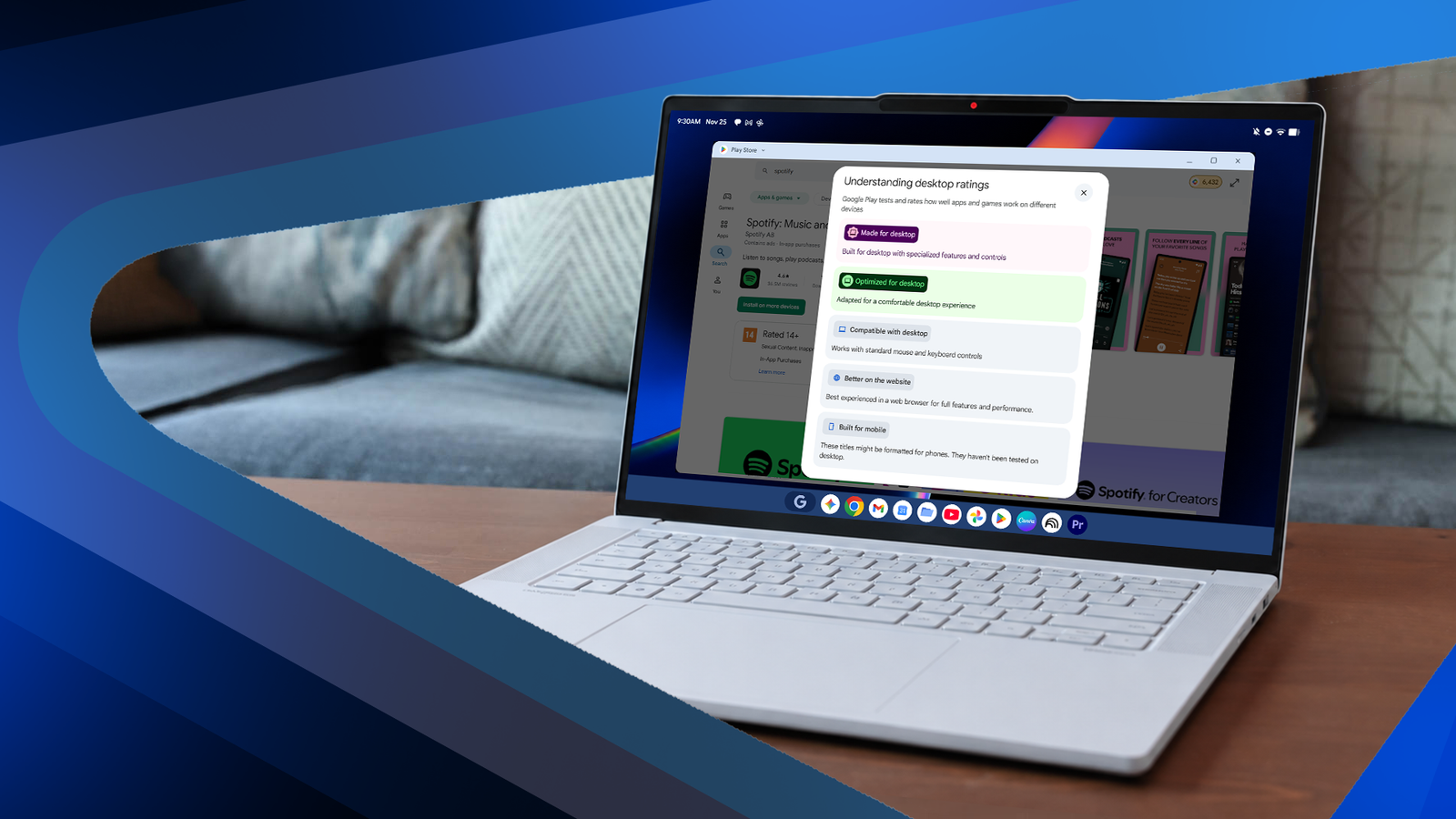
Published Oct 19, 2026, 6:30 AM EDT If you've ever wondered whether an AI feature on your phone is doing anything useful, Ben Khalesi has probably asked the same question. He has covered AI and Android for Android Police since 2023, with Pixel, Galaxy, Google's apps, and the rest of the Android ecosystem never far behind. Ben is a lifelong geek who trained as an AI engineer and earned a bachelor's in IT, so when the industry announces something new, he's the one who wants to know how everything works behind the scene and what can be trusted. Google and its hardware partners just released their premium Googlebook laptops. Five models went on sale in early October 2026. Base prices run from $899 to $1,299, and upgraded configurations climb well past that. The partners went all out on the hardware, with OLED screens on four of the five models and premium metal builds. Inside is a brand-new operating system built on the Android 17 stack, because Google wants this to become the default computer for anyone carrying an Android phone. That's a big promise for a laptop whose app store still treats it like a stretched-out phone. If Google wants its own MacBook, it has to fix the Play Store first. Google grades every app on a five-step scale A warning system dressed up as badges Credit: Lucas Gouveia / Android Police Google built a five-tier labeling system for Android apps. From top to bottom, they are "Made for desktop," "Optimized for desktop," "Compatible with desktop," "Better on the website," and "Built for mobile." Let's call a spade a spade. The badges warn you how awkward a phone app can get on a 14-inch screen. To me, that's the heart of the Googlebook problem. Putting a capable OS on premium hardware doesn't turn mobile apps into desktop software. Only the top two badges are worth it And even those come with asterisks Credit: Lucas Gouveia / Android Police "Made for desktop" is Google's top grade. It goes to apps Google says were built for desktop use, with features and controls designed around a mouse, a keyboard, and a big display. Think Adobe Photoshop, which carries the badge, or newcomers like the rebuilt Luminar photo editor and Fantastical, which skipped Android phones to launch on Googlebooks first. These are the rare apps that resize windows gracefully and support proper keyboard shortcuts. "Optimized for desktop" sets a lower bar. These apps started on phones but got enough developer attention to feel reasonably at home on a laptop. My idea of "at home" and Google's don't always match. Imagine my disappointment when I saw that a supposedly optimized app like Spotify scales so poorly. Native desktop apps are also scarce on Googlebook OS. Google puts Adobe Photoshop front and center in its marketing. I had my fingers crossed on this one. I've said before. Googlebooks would sink or swim based on one thing, and that's whether the creative apps were the real deal or watered-down stand-ins. Sadly, we got the stand-ins. The Photoshop here is the limited Android version, nowhere near the full suite on a Mac or Windows PC. The 'Compatible' middle is where it gets murky It works, in the loosest sense Credit: Lucas Gouveia / Android Police Most of the usable software is badged as "Compatible with desktop." The label means the app technically understands mouse clicks and/or standard keyboard input. Don't read it as a sign that anyone has reworked the interface for how people use a computer. "Compatible" mostly means you can poke at a phone app with a cursor. It can also mean right-click does nothing. It can mean missing keyboard shortcuts. These are things you take for granted on a laptop. Google's store tells you to skip its apps Two badges that hollow out the whole promise Credit: Lucas Gouveia / Android Police "Built for mobile" warns that the app hasn't been tested on a desktop and may keep its phone layout. Then there's "Better on the website." Google uses it to tell you the browser version gives you a better experience than the app you were about to download. The Play Store steers people away from Android apps for huge services like Facebook and Twitch. Sit with that for a second. Google is selling a premium laptop built to run Android apps, and its own storefront tells buyers to open a browser instead. Laptops are paying for tablet neglect None of this came out of nowhere. Google more or less walked away from Android tablets, and the app shortage followed. The company struggled to enforce strict large-screen design rules. Without a big market share to force the issue, developers let their apps stretch awkwardly across bigger displays. Now, these laptops inherit all the technical debt nobody paid down. An aluminum chassis and built-in AI features can't undo years of software neglect. I want desktop-grade apps before I call any of this a desktop platform. Until developers catch up, Googlebooks will be a compromised laptop experience. Could that happen down the road? Sure. If Googlebooks sell well enough, good apps will follow, because the hardware is there and developers go where the money is. But it's a gamble. There's a real chance this doesn't take off, and we all know how quickly Google sends things to its now-infamous graveyard. So for now, stick with DeX or Android's Desktop Mode if you want your phone on a bigger screen, and get a proper laptop if you have real work to do.
I decoded the Play Store's five Googlebook app labels, but only two are good news
Full Article
Original Source
Read the full article at Androidpolice →KhanList aggregates and links to publicly available news content. We do not host full articles from third-party sources. Always verify important information with original sources.