
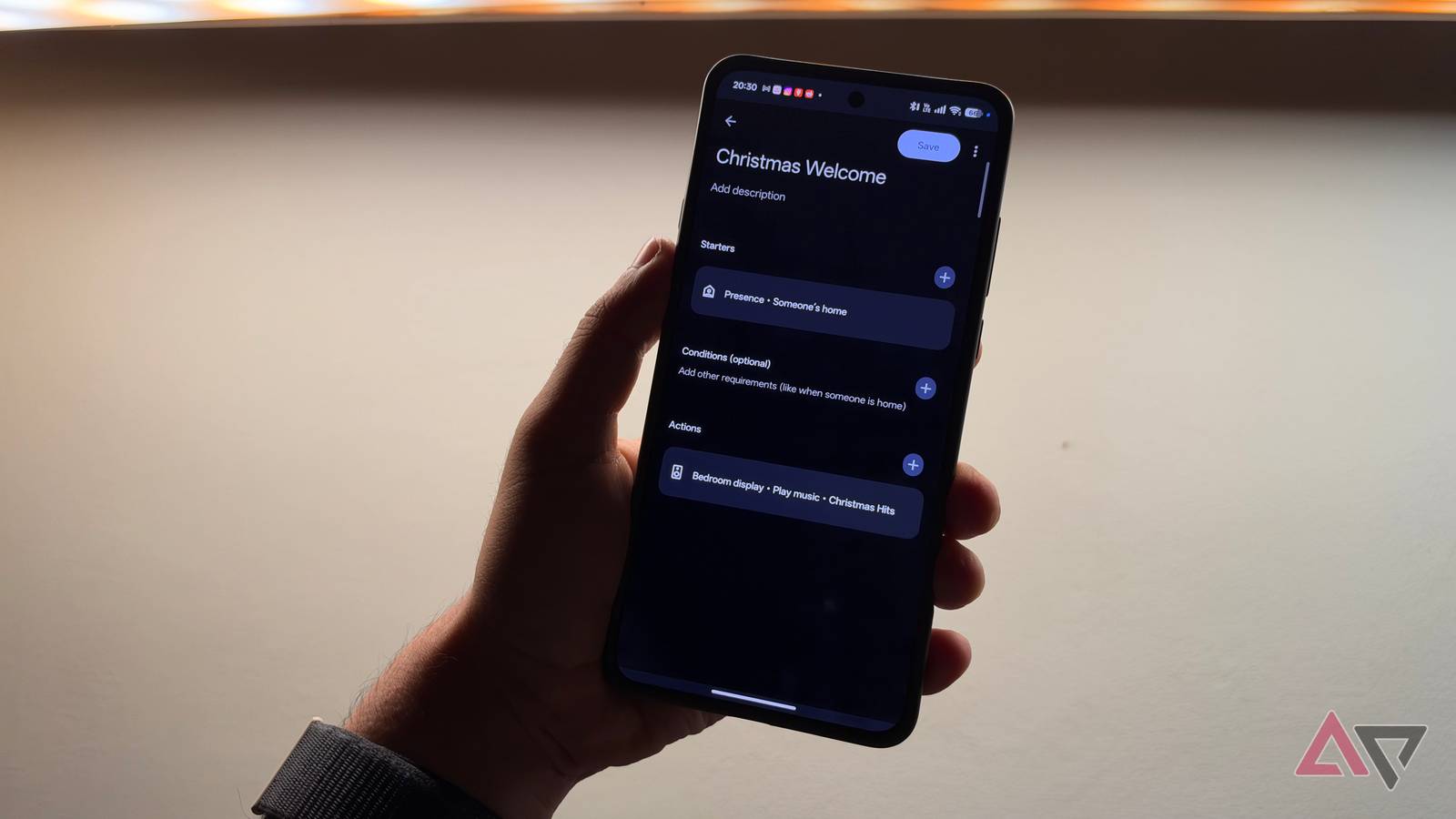
Published Nov 22, 2026, 7:00 AM EST Dhruv Bhutani has covered the Android ecosystem since 2010, with a focus on smartphones, connected devices, and home networking. His reporting is informed by hands-on experience reviewing hundreds of smartphones and testing a wide range of smart home and audio products over more than a decade. He has attended Mobile World Congress eight times since 2011 and IFA Berlin five times, alongside regular coverage of launch events and industry briefings from companies including Google, Xiaomi, Oppo, and Qualcomm. This on-ground access and long-term exposure to product cycles inform how he evaluates hardware, software direction, and ecosystem shifts. First-Hand Experience Reviewed and tested hundreds of smartphones since 2009 Tested smart home, audio, and connected devices across multiple categories Attended Mobile World Congress (8 times, first in 2011) Attended IFA Berlin (5 times) Covered industry events including Qualcomm Summit and launch events from Google, Xiaomi, Oppo, and Vivo Career History CNET — Freelance Editor May 2024 – Present Android Police — Freelance Editor July 2023 – Present Android Authority — Contributor November 2022 – Present Android Authority — Editor January 2019 – October 2022 FoneArena — Editor February 2010 – January 2018 PhoneReport.info — International Correspondent February 2010 – May 2011 Nokia Mobile Talk — Writer June 2009 – October 2009 I have a fully kitted-out smart home, with smart lights, connected speakers, and all the other usual tidbits that I use for setting predefined scenes or playing my favorite playlists. All that is great, but come the festive season and holidays, I usually want something more special. Instead of manually turning on the lights around the Christmas tree, I expect them to switch on when cued. Similarly, between turning on a more holiday-appropriate scene and starting a holiday playlist when I get home, the smart home possibilities are endless. So, I set about automating it in Google Home. The result? A seasonal automation setup that gives me a gloriously festive welcome every time I enter my home, and gets out of the way anytime I switch on the television. It's the perfect project out of my Hallmark Channel dreams, and it took me hardly more than 10 minutes to achieve. Set up a festive welcome home routine with Google Home Sync your Christmas tree lights, smart lighting and holiday playlist When kicking off this project, I had a fair idea of what I wanted. A properly cheesy Christmas-themed playlist the moment I entered my home, lights around the Christmas tree switched on, and my study decked in a suitably themed dazzle of colors. So, I dived into the Google Home app's automation editor to start building this. The starting point was Google's presence-sensing node. Rather than relying on a fixed schedule, Google Home can determine whether you're home using your phone's location, connected devices, and the Wi-Fi network you're connected to. So, when you connect to your Wi-Fi network, Google Home knows that you're back home. This works the other way around. When you disconnect and your location changes, it knows you're no longer nearby. I use this presence detection to trigger my Christmas welcome-home routine. When I walk through the door, Google Home switches the living room lights to a predefined festive scene. Instead of the usual warm white lighting, I've set it to a combination of reds, green, and warmer accent lighting to give my living room a properly festive scene. My smart home is built around Philips Hue, so I built the scene in the Hue app and used Google Home's presence detection as a trigger to activate it. It wouldn't be Christmas without a properly lit Christmas tree. Now, I'm not doing anything too fancy. I have a regular LED strip plugged into a smart plug. I added that smart plug to Google Home. When the arrival routine runs, the plug switches on and the tree lights up right alongside the rest of the room. The other part of my welcome routine is music. It wouldn't be the holiday season without Wham on the stereo. I have a Christmas playlist ready to go, and Google Home starts playback on a dedicated smart speaker using that same presence trigger. One automation handles changing scenes, switching on lights, and playing a playlist. I've also created a reverse automation that switches all these lights off the moment I leave home. Make your Christmas playlist pause when you turn on the TV Using Google Home's device-state sensing to automate playback As fun as running a 24-hour Christmas playlist is, I don't need Mariah Carey blaring on my smart speaker while I'm trying to catch a movie. But that's what a smart home is for. I shouldn't have to manually stop playback anytime I switch to the television. That's where Google's device-state sensing comes in handy. The automation editor supports media playback states, including the full gamut of playing, paused and not playing, and more depending on your device. This means I can use my Google TV's current playback activity as a trigger for another automation. When the TV starts playing something, Google Home knows it, and it sends a stop command to the speaker playing music. This is a targeted command. If someone else is listening to music in the kitchen, I don't need to switch that off. And because I like being annoying, I've set it to start the Christmas playlist as soon as the television stops playing. Google Home makes building festive automations surprisingly easy Creating a festive-themed automation for your home setup is surprisingly simple and more straightforward than you'd imagine. What I like about this setup is that I don't have to touch the existing setup. Google Home handles the automation layer. You just set up the right triggers, and it'll handle the rest. Is it going to replace something super granular like Home Assistant? No. But it more than suffices my rather simplistic needs. All I need is for it to switch some lights and a speaker on a schedule, pause it when the TV is on, and switch it off when I step out the door. That's a 10-minute job Google Home handles comfortably.
I built a Google Home holiday mode that follows my presence and TV use instead of simple schedules
Full Article
Original Source
Read the full article at Androidpolice →KhanList aggregates and links to publicly available news content. We do not host full articles from third-party sources. Always verify important information with original sources.