
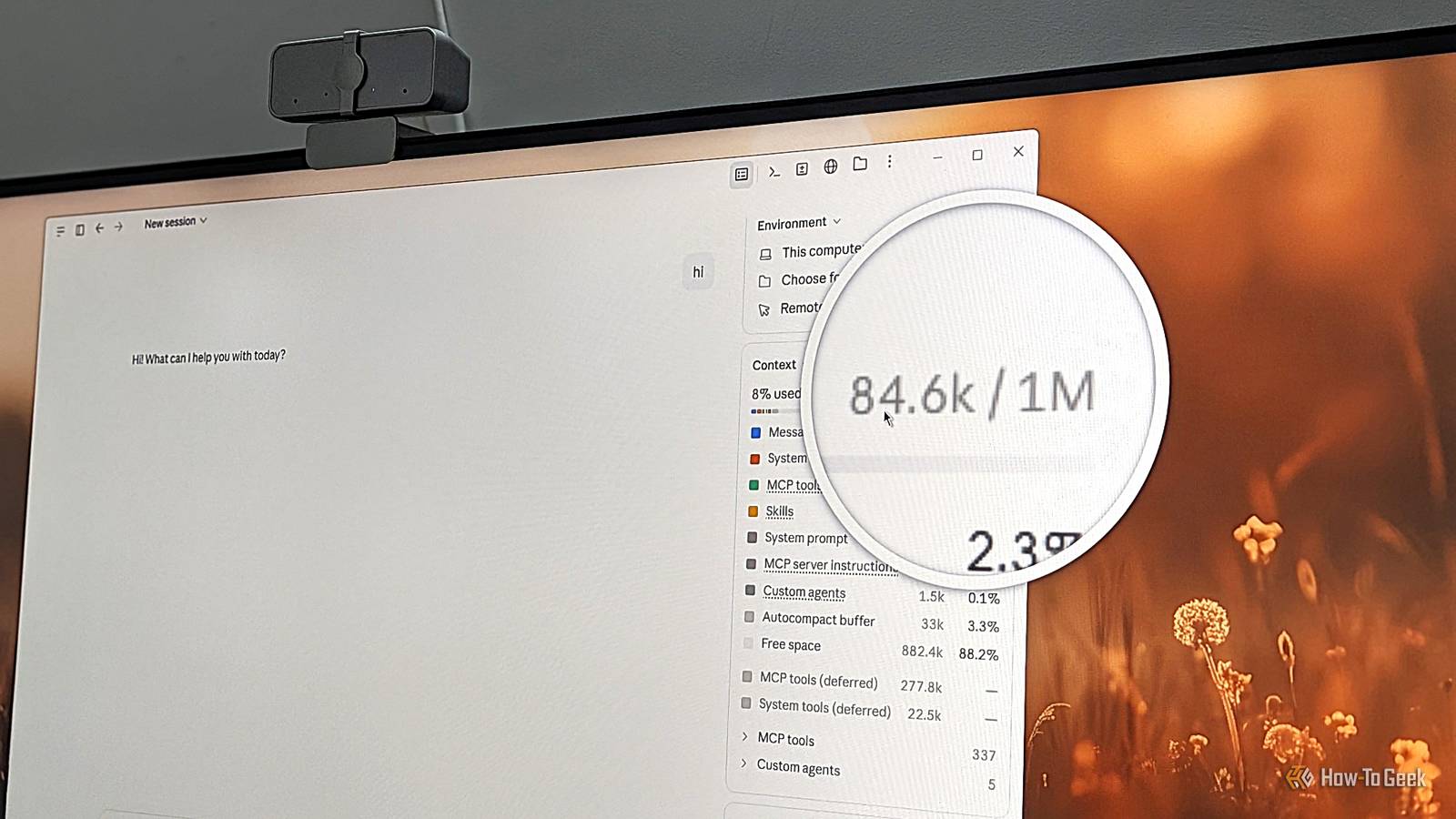
Published Oct 25, 2026, 4:30 PM EDT Dibakar Ghosh is a tech journalist at How-To Geek with over a decade of experience using and writing about open-source software, Linux, Android, AI, and personal productivity. He writes about software, operating systems, and tools that help people get more from the technology they already use. Do you, like me, obsess over your Claude sessions, trying to optimize everything down to a single token? If so, you’re in good company — I’ve been trying everything to stretch my $20 Claude Pro subscription as far as I can. However, all your tweaks and adjustments only work if you’re building them on a solid foundation. As it turns out, the way I was using Claude was actually working against me and inflating my token usage from the very first message. I sent “Hi,” and the token usage was already at 85K Claude’s handling a lot of context under the hood Claude Cowork used to have a /context command that showed how many tokens a chat had consumed up to that point. I used it often to check whether I’d reached 200K tokens, at which point I’d summarize everything and move to a new chat to avoid context rot. However, I’d always used this feature midway through a chat to see if I was nearing my limit for switching chats. I never had the bright idea of testing it at the start of a chat, and I only stumbled upon this recently by accident. You see, the /context command seems to have been recently removed from Cowork. As far as I can tell, it’s now only available in Claude Code — both in the CLI and in the desktop app’s Code mode. In fact, if you’re using Code mode in the Claude desktop app, you can access it directly from the right-hand panel, so you can always keep an eye on your token usage. I found that to be a really neat improvement, so I decided to switch from Cowork to Code mode to monitor my token usage more closely. So I started a new session and sent “Hi.” Claude replied with another simple greeting, but to my absolute horror, the panel showed that I was already using 84.6K tokens. I wasn’t expecting that at all. Sure, I knew Claude had a fairly large system prompt, so I figured there’d be some baseline overhead — maybe 5K tokens, or 10K at the very most. But the actual number was more than eight times what I would’ve guessed. Unfortunately, you can’t bring it down to zero I was only able to reduce it by 16K tokens Seeing 85K/1M tokens consumed after a single “Hi” is startling, but once I looked at the breakdown, the numbers started to make some sense — even if I didn’t like it. The Claude system prompt and built-in system tools were eating up about 30K tokens. Those are baked into the app, and there’s nothing you can do about them. Then there were Messages, which took up another 23K tokens. Since the only messages in the chat were my “Hi” and Claude’s reply of fewer than 10 words, that couldn’t account for all of it. My guess is that this includes memories and context from past conversations that Claude loads at the start of every chat. To test this, I deleted some of my really old conversations, and that reduced Messages to around 14K tokens. I probably could’ve brought that number down further by disabling the memory feature, but it’s very useful, so I decided to leave it enabled. The remaining 30K or so tokens came from Skills and MCP tools. Now, I’ll admit I’ve installed a lot of Skills and Plugins over the months, but surely they couldn’t be eating up that many tokens? The idea behind Skills and MCP servers is that only a brief description of each tool (and not the tool itself) is loaded at the start of a chat, so Claude knows what to trigger when necessary. Surely the descriptions alone couldn’t account for this much token usage? So I went into Settings and disabled almost every Connector, Plugin, and Skill. However, that only reduced token usage by around 8K. I then went back and deleted everything to see if that made a difference, but it turns out disabling them was enough to remove them from the context. Going scorched-earth didn’t really help my cause. Overall, after all that fiddling around, I was able to bring down the baseline token usage from 84.6K to 68.7K — a reduction of roughly 16K tokens. Sure, it’s better than nothing and would probably help extend a session by one or two extra messages, but I certainly would’ve liked to get that number down to just 30K, accounting only for the system prompts and tools. Ultimately, I had to switch apps to solve the problem This is why power users love Claude Code CLI Both Claude Code and Cowork mode in the desktop app technically run the Claude Code CLI under the hood — after all, it was Anthropic’s first harness of this kind. As such, I wanted to go back to the source and test whether the same issue persisted. So I opened a Claude Code session in the terminal, logged in with the same Claude account, sent “Hi,” and ran the same /context command. This time, I saw a relatively reasonable token usage of 46.7K, even before making any tweaks or adjustments. The token distribution was also quite different. The system tools cost roughly the same in both apps, but the CLI’s system prompt accounted for just 3K tokens, compared to almost 10K in the desktop app. The MCP tools barely contributed to context usage. For comparison, the desktop app showed 13.9K tokens attributed to MCP tools. Part of that came from the two connectors I kept enabled — Claude in Chrome and Filesystem — while the rest came from whatever additional tooling the desktop app includes. However, the fact that MCP tools accounted for less than 1K tokens in the Claude Code CLI suggests that it doesn’t need much additional tooling to do its job. This means the desktop app isn’t just heavier on system resources because of its graphical layer. It’s also heavier in terms of token usage because it ships with additional tooling and a larger system prompt. That said, the really cool thing about the CLI is that it lets you configure your setup on a per-folder basis. It stores settings locally in each folder, including a specific collection of Skills and MCP servers. To test this, I stripped a second folder of everything and launched Claude Code there. The same “Hi” brought the token count down to just 36.9K, while my other folder retained its full setup. This means you can potentially have one folder optimized for programming with Claude Code and another for marketing work. You don’t have to enable (or disable) every tool across the board and end up with a generic, suboptimal workflow. Anthropic needs to improve their desktop app I used Claude Code through the CLI for months before Anthropic released Cowork mode in the desktop app. It allowed you to work with your system files just as you could with Claude Code, but through a graphical interface. At that point, I switched because I found the graphical app more aesthetically pleasing — the CLI makes everything feel very claustrophobic. However, my recent testing revealed that the CLI still has some major advantages over the graphical app, especially when it comes to modularity and user control. As such, I’d like to ask Anthropic to bring the same level of flexibility we have with the CLI app to the desktop app. And if that’s too much trouble, at least make the CLI more pleasant to use, with better spacing and margins.
Claude was eating 84.6K tokens at the start of every chat until I made this one change
Full Article
Original Source
Read the full article at Howtogeek →KhanList aggregates and links to publicly available news content. We do not host full articles from third-party sources. Always verify important information with original sources.