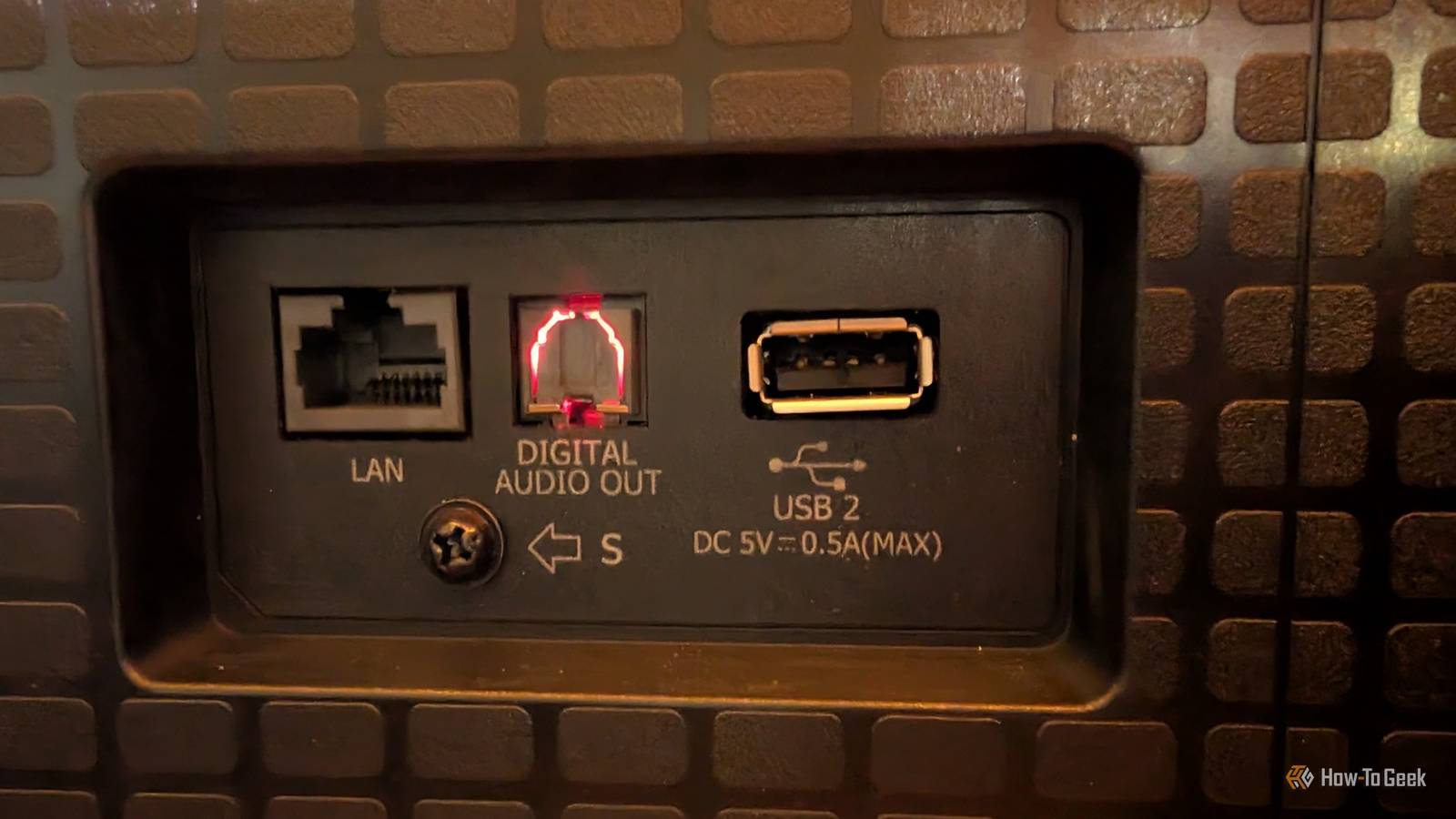
Published Jul 25, 2026, 2:18 PM EDT Adam has a degree in Engineering and has a life-long interest in technology. He has been writing for over a decade for various print and online publications, with a focus on consumer tech. He joined How-To Geek in 2024 while working at Pocket-lint. As well as being a long-term fan of Apple products, he also has a strong interest in smart home tech, running a Home Assistant server at home to automate all his smart home devices. He believes that the ideal smart home should work with minimal interaction from the user, with automations running as if by magic rather than requiring you to push buttons on a control panel. You can find more of his work on Muck Rack. If you've ever wondered why one of the ports on the back of your TV appears to glow, that's the optical digital audio output via a TOSLINK port. It uses light to transmit data through a fiber-optic cable, which is why the port can appear to glow. While HDMI ARC and eARC have become the standard way to connect a TV to speakers, there are still a surprising number of things you can use your optical audio port for. Soundbars or surround receivers to revive older gear Old audio gear is the best budget solution for home theater audio Credit: Adam Davidson/How-To Geek If you have older soundbars or surround sound receivers, they may not support HDMI audio. If this is the case, they may have optical audio ports instead. For example, I'm still using a surround sound system that I bought more than a decade ago. It doesn't support audio input over HDMI. It does have an optical audio port, however. This means I can connect the optical port of my smart TV to the surround sound receiver and enjoy immersive audio when watching shows and movies. It may also be the case that you want to keep the limited HDMI ports on your TV for other purposes, such as connecting a game console. This might mean that the single HDMI ARC/eARC port is already in use. In this case, you can use the optical audio port to connect to a soundbar or surround sound system, as long as it includes an optical input. Headphone amplifiers Better than Bluetooth Credit: Kris Wouk / How-To Geek If you want to watch shows and movies using headphones, the optical audio port on your TV may help get the best experience. The TV headphone jack can sometimes be of limited power and variable quality, and Bluetooth headphones can come with latency issues that make the audio feel out of sync with the video. Wired headphones from a dedicated headphone amplifier can provide a high-quality listening experience without any noticeable latency. The trouble is that most headphone amps don't support HDMI. They usually stick to inputs such as USB, coaxial, and optical. That's where your optical audio port can help. You can connect your TV to a headphone amplifier via a digital-to-analog converter (DAC), or directly if it has its own built-in DAC. You can then connect your headphones to the amplifier and enjoy high-quality audio piped directly to your ears. MiniDisc recorders for a retro recording experience Make a playlist the old-fashioned way If you're a fan of retro audio tech, then the optical audio port can be very useful. MiniDisc recorders often include optical audio ports, making it possible to hook them up to your TV and record the audio from your TV directly to a MiniDisc. You can then play the audio on the MiniDisc to your heart's content. At first, this may seem fairly pointless. Why would you want to be able to record audio from your TV without the video? However, for some people, this feature can be very useful. Some users hook up a MiniDisc recorder to a TV that's connected to an Apple TV. They can then play music through the Apple Music app and record the audio directly to a MiniDisc. If you've created a perfectly curated playlist, for example, you can use this trick to record it to a MiniDisc for offline listening, although the legality of doing so is something of a gray area. Hearing aid TV streamers for assistive listening A great workaround for older TVs Sony If you use hearing aids, you can buy devices that send the audio directly from your TV to compatible models. This makes it easier to hear the TV audio more clearly and reduces the ambient noise. While some models of hearing aid streamers support HDMI, many popular older models do not. If this is the case, you can use optical audio instead. The streamer then sends the audio directly to your hearing aids using its own low-latency wireless link, which can be more reliable than standard Bluetooth. Hi-Fi speakers for TV audio Skip the newfangled soundbar Credit: Andrew Heinzman / How-To Geek If you have a Hi-Fi system in your living room, you may want to use the same system to play the audio from your TV. There's no need to invest in a soundbar or other TV audio system if you have a perfectly good Hi-Fi already available. However, most Hi-Fi systems don't have HDMI inputs, so you can't connect them to your TV using HDMI. Some Hi-Fi systems include optical audio ports, however, with a built-in DAC that can convert the digital output from the TV. Even if your Hi-Fi system doesn't include a built-in DAC, you can use a dedicated DAC between your TV and your Hi-Fi to convert the signal for you. Don't neglect that optical port! Some smart TVs no longer have optical audio ports as HDMI becomes the standard for audio. However, if your TV still has one, you should take advantage of it while you still can. While optical can’t carry the newest lossless surround formats, such as Dolby TrueHD, it's still great for stereo and many common surround standards.
5 things you can plug into the mystery glowing port on the back of your TV
Full Article
Original Source
Read the full article at Howtogeek →KhanList aggregates and links to publicly available news content. We do not host full articles from third-party sources. Always verify important information with original sources.