
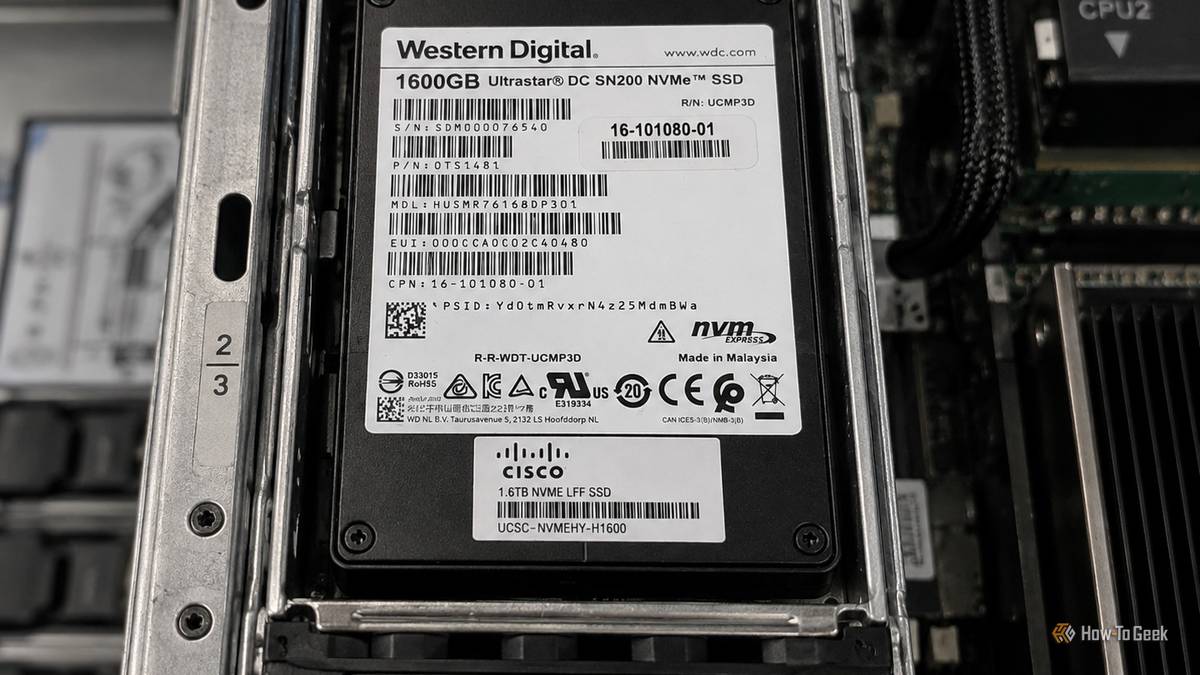
Published Nov 28, 2026, 7:30 AM EST Ever since he got his first smartphone, the legendary Nokia 6600, back in 2005, Goran became obsessed with technology. This obsession had only gotten worse after he received his first gaming PC a couple of months later. He fell in love with video games in the early '90s, shortly after embarking on his gaming journey with the Sega Master System II and SNES. Since then, he has built dozens of PCs, played thousands of games, and authored hundreds of articles about PC hardware, gaming hardware, and video games. He knows everything there is to know about the PC gaming and PC hardware space, and while his console gaming knowledge isn't as comprehensive, he considers himself a console veteran. Goran has almost a decade of experience writing about tech and video games for numerous web publications including TechSpot, TechPowerUp, and EsportsHeadlines. He has been writing for How-To Geek since December 2022. When he isn't gaming or deciding which component of his PC to upgrade next, you can find him strolling around Novi Sad while listening to music and contemplating what to play next. When it comes to equipping your PC or homelab with used components, pre-owned flash storage is usually a no-go. Consumer SSDs have fairly limited write endurance and aren't built for punishing workloads, such as running a busy homelab 24/7. On the other hand, you've got enterprise SSDs, designed for demanding use cases, with endurance so high that they can still beat new consumer drives even with multiple years of server duty under their belt. They're also built to last, but the fact of the matter is that many server-grade drives, including SSDs, are replaced after just a few years in service. All this makes them a pretty solid buy for homelabbers, even when pitted against brand-new consumer offerings. Even a used enterprise SSD can outlast a new consumer drive I'm talking about petabytes of writes left in the tank Credit: Patrick Campanale / How-To Geek In the server world, demanding workloads are the norm, which led enterprise SSD vendors to adopt another endurance metric on top of the TBW (Terabytes Written) we see on consumer SSDs. Server-grade drive endurance is usually listed in DWPD (Drive Writes Per Day), which ranges from less than one to 100, depending on the use case. 100DWPD ratings are reserved for fast drives designed to absorb writes in two-tier server setups (the second tier made of slower SSDs or hard drives), while the "regular" drives are rated for a single or a few writes each day. Now, even one drive write per day is impressive compared to a consumer-grade SSD. For example, a high-end PCIe 4.0 consumer drive, the Samsung 990 Pro, has an endurance rating of 1,200TBW for the 2TB model along with a five-year warranty. Five years equals 1,825 days, which means that one of the best consumer SSDs out there would end up with an endurance of only about 0.33DWPD over its warranty period. Credit: Patrick Campanale / How-To Geek Compare that to the endurance of the 1.92TB version of the Micron 7500 PRO, a read-intensive server-grade SSD that's not even designed for write-heavy use. It's rated for 1DWPD over five years, which comes down to 3,504 terabytes written, almost triple the endurance of the Samsung 990 Pro. In other words, even if a company burned through half of that SSD's endurance before retiring it, it would still have more TBW left (1,752TB) than a brand-new Samsung 990 Pro. However, it rarely comes to that, since a typical enterprise SSD only stays in service for a few years before it gets swapped for a newer model. Better still, many enterprise drives are used for read-intensive workloads, meaning they can end their service with substantial endurance remaining. Higher endurance isn't their only strength Enterprise SSDs offer robust controllers, power-loss protection and other advantages For starters, their controllers offer better error correction and support more channels, allowing them to deliver consistent, reliable performance even under extreme loads. The controller firmware is also tuned for 24/7 operation, which includes better wear leveling and garbage collection, and it makes use of greater overprovisioning than consumer options, which improves their longevity. Then you've also got power-loss protection, achieved by capacitors built into these drives. They allow the drive to stay on long enough for the controller to flush buffered writes to NAND, preventing data loss in case of a power outage. Another advantage is a heavy-duty design resulting in superior build quality and higher thermal endurance. This translates well to typical homelab use, which can see many services sharing the bandwidth of a single SSD, especially if you often use your homelab for multiple tasks at once. For example, if you use your homelab for self-hosting, as a media server and a NAS, and you also edit recordings stored on it, an enterprise-grade SSD will be a better choice than a regular one. Power-loss protection is another important feature for homelabbers, since many hobbyist setups don't have a UPS or some other way to keep everything running after the power goes out. eBay has loads of used enterprise SSD listings Just don't forget to test the drive after it arrives Considering just how overpriced SSDs are right now, the good news is that you can find a used enterprise SSD quite easily on eBay, at prices that aren't much higher (and sometimes even lower) than new consumer SSDs sell for. I found more than 500 U.2 PCIe 3.0 and PCIe 4.0 SSD listings on eBay sporting prices of $350 or less. For that price, you usually get either 1TB or 1.92TB models, with a fair number of listings offering drives with at least 90% life remaining. These are very good prices in this day and age, especially considering that even budget consumer-grade SATA SSDs can cost almost $250 for 2TB of storage. Drives from established brands, such as Samsung, can sell for much more. For example, the 2TB Samsung 870 EVO SATA drive costs close to $500 on Amazon as of this writing. Aside from eBay, you can also look for used enterprise SSDs over at ServerSupply and ServerPartDeals, both popular sources of used server hardware. ServerPartDeals even offers multi-year warranties on its refurbished drives, so I recommend checking the store before wandering off to eBay. While many listings claim the drives are tested and ready for use, I still recommend testing them as soon as they arrive. You can always end up with a dud when buying used, even from a reliable seller with tons of positive feedback. So if you plan to get a used enterprise drive, it's smart to invest some time into testing it within the return window, so you can get your money back if something's wrong. You'll likely need an adapter to plug them into your motherboard You might also need active airflow Credit: 10Gtek / Amazon You probably saw that I mentioned U.2 SSDs, which use a special interface found on enterprise SSDs. It looks similar to a SATA connector, but it can actually support ultra-high speeds, with even PCIe 5.0 NVMe server drives using U.2 ports. Luckily, you can find U.2 to M.2 adapters, as well as PCIe U.2 adapter cards, for cheap (usually a few dozen bucks), allowing you to install server-grade drives on regular desktop motherboards. Other ports used by enterprise drives include U.3, and SAS, which is mostly used by older and slower SSDs and hard drives. SAS drives can't work with a simple adapter, though. They need a dedicated HBA (Host Bus Adapter) card to run in a regular PC. You've also got enterprise SSDs that use the regular SATA connector, but they're naturally limited to SATA speeds. Credit: Sabrent The port you should focus on is U.2 (also known as SFF-8639), since that's what you'll find on most used NVMe server SSDs. Size-wise, they sport the good old 2.5-inch form factor, but are usually thicker than consumer 2.5-inch drives, with most being 15mm thick. That said, some models feature the regular 7mm thickness that consumer drives have. Aside from needing an adapter and extra space for their increased height, you might also need an active fan to cool them down. While they're rated for higher temperatures, server-grade SSDs are used in server racks that have plenty of active airflow, so keep that in mind as well if you decide to pull the trigger on one. Last but not least, enterprise SSDs draw much more power at idle, usually between 3.5W and 5W, while most consumer drives sit below 1W. 10Gtek PCIe 3.0 x4 to U.2 NVMe SSD Adapter Card The 10Gtek PCIe 3.0 x4 to U.2 NVMe SSD Adapter Card is a cheap and cheerful way to plug a server-grade U.2 NVMe SSD into a regular desktop motherboard. All you need is a free PCIe x4 (or larger) slot. While they come with a few quirks, second-hand enterprise SSDs can still be a great purchase for your homelab Used enterprise SSDs are a surprisingly good choice for your homelab. Even a used server drive will usually have much higher endurance than a brand-new consumer SSD. It also comes with a controller optimized to deliver reliable performance under high load and power-loss protection, it's designed to be used 24/7, and it's generally a better choice for a busy homelab than even the best consumer-grade SSDs out there. Sure, server drives come with a few quirks: most need an adapter to work with a regular motherboard, some will also need active cooling, they draw more power at idle, and warranties are often short or nonexistent. But considering their reliability and price on the used market, they're more than worth it if you can take advantage of their full potential.
Used enterprise SSDs beat new consumer ones for homelabs, and not just on endurance
Full Article
Original Source
Read the full article at Howtogeek →KhanList aggregates and links to publicly available news content. We do not host full articles from third-party sources. Always verify important information with original sources.