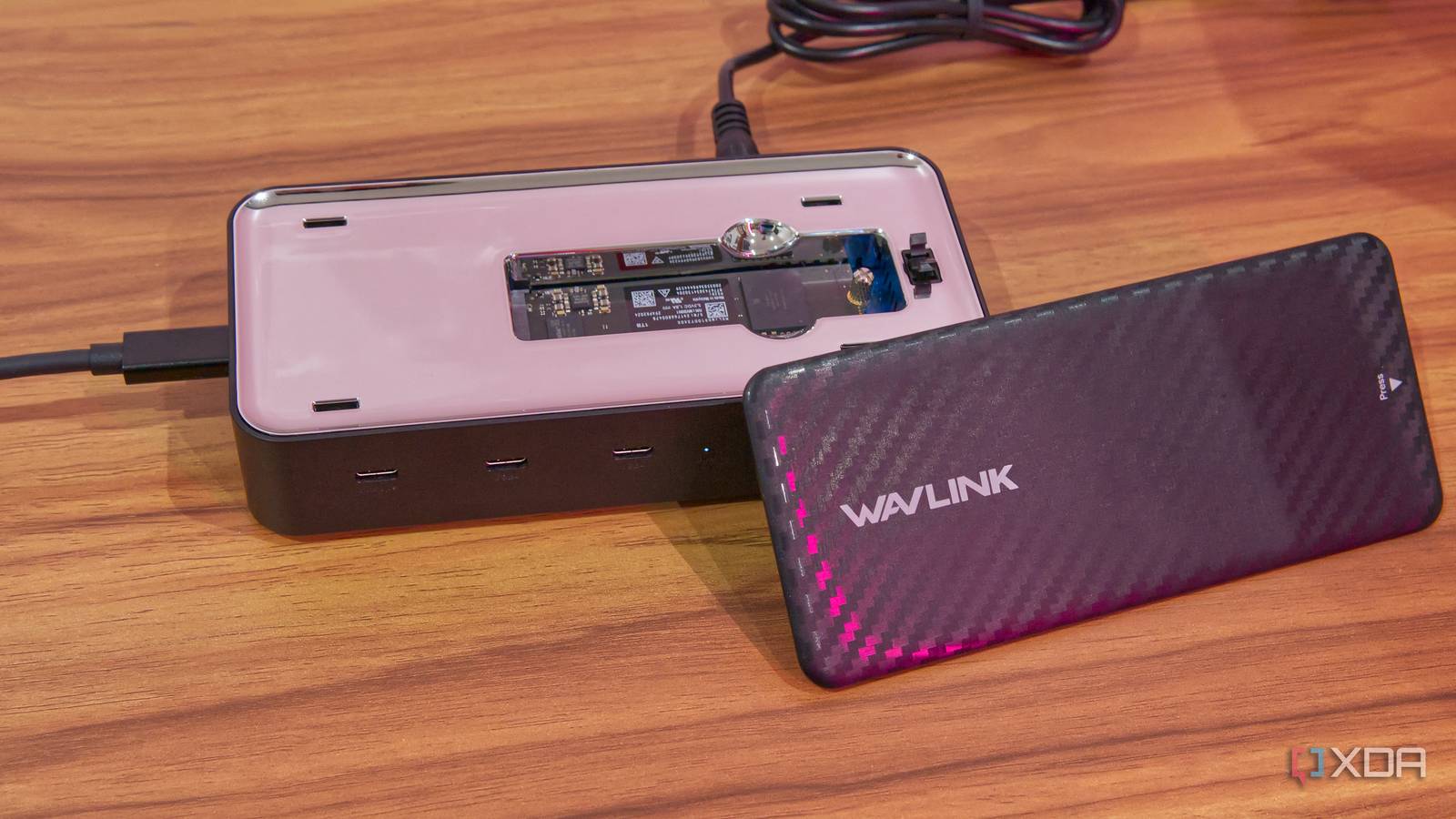
Published Aug 16, 2026, 7:00 AM EDT João has been covering the tech world for over 7 years, with a heavy focus on laptops and the Windows ecosystem. I also love all things tech and videogames, especially Nintendo, which he's always happy to talk about. Prior to joining XDA in 2021, he worked at Neowin: https://www.neowin.net/news/poster/jo%C3%A3o-carrasqueira/ I've tested a pretty wide range of docking stations in my day, but the Wavlink 6-in-1 USB4 Dock (WL-UMD4406) is a pretty unique one, for better or for worse. It comes with just five extra ports for your device, but it gives you an SSD enclosure as well, and that's an important part of the setup. On paper, this sounds like a solid option if you're more interested in external storage expansion than more ports, but at the end of the day, it doesn't do an exceptional job at either aspect, and it ends up being something of a mess. About this review: Wavlink sent me the 6-in-1 USB4 Dock for the purposes of this review. The company had no input nor an early preview of its contents. Wavlink 6-in-1 USB4 Dock 5/10 Ports 2x USB4 40Gbps, 1x USB 3.2 Gen 2x2 (Type-C), 2x DisplayPort 2.1, 1x USB4 40Gbps (to host) USB Power Delivery Up to 100W Power supply included Yes Max display res. 7680x4320 (up to three displays) The Wavlink 7-in-1 USB4 dock offers five ports to expand your PC's connectivity and a built-in SSD enclosure for additional storage. However, a few quirks make it harder to recommend. Pros & Cons Easy access to the SSD slot It has a power button SSD speeds aren't as advertised on macOS Strangely limited sleection of ports Loud Wavlink WL-UMD4406: Price and specifications Wavlink launched the 6-in-1 USB4 Dock in June 2026, and it costs around $200, though it seems to be out of stock at Amazon currently. For that price, you get a dock that offers two USB4 downstream ports, one USB 3.2 2x2 Type-C port, and two DisplayPort 2.1 ports supporting up to 8K resolution at 60Hz. Interestingly, Wavlink's own website calls it a 7-in-1 dock instead. Pricing-wise, this seems to be a solid proposition on the surface. Dedicated SSD enclosure can sometimes cost over $100, and USB4 docks cost no less than that either, though they usually include more ports. Specifications Ports 2x USB4 40Gbps, 1x USB 3.2 Gen 2x2 (Type-C), 2x DisplayPort 2.1, 1x USB4 40Gbps (to host) USB Power Delivery Up to 100W Power supply included Yes Max display res. 7680x4320 (up to three displays) Price $199 Supported SSD sizes Up to 8TB HDMI No Ethernet No Color Black Brand Wavlink What I like Accessing the SSD is easy The first thing that comes to mind in terms of positives here is that installing and swapping the SSD is fairly easy on this dock. Unlike the Satechi Stand & Hub I typically use with my Mac Mini, there's very little required in terms of tools or even force. Just push down the top of the dock and it automatically unlocks so I can remove it and see the SSD slot. The SSD itself is held in place with a screw that can be easily fastened or loosened with just my hands, so there's very little reason to use any tools for this process. It also supports drives of various physical sizes up to the M.2 2280 format, so you have more options to choose from. It has a power button One small detail I also like with docking stations that require their own power source is a power button, so I can easily turn it off when I'm done for the day. Thankfully, Wavlink delivers on that. Otherwise, the dock and its ports have worked fine, powering my display at its full resolution (5120x1440) and refresh rate (144Hz), along with my webcam and other peripherals like my camera (for moving files over) or a wireless USB microphone receiver. Unfortunately, that's about it in terms of positives. What I don't like A strange port selection There are many potential uses you might have for a docking station, and I won't deny that, for a laptop, access to more USB-C ports can be one of them. After all, most devices come with no more than four of them, and many peripherals have made the transition to the newer connector. That being said, I find it highly unlikely that the majority of people looking for a dock only need USB-C ports and DisplayPort for their device. With this dock, you don't get HDMI so you can connect to a TV, and you don't get an Ethernet port that most laptops are sorely missing. USB Type-A, a headphone jack, or even an SD card reader — all of it is missing from this Wavlink dock, and I have to wonder who needs this selection of ports in a $200 docking station. I'm used to moving my photos into my laptop by removing the SD card from my camera, but while using this dock, I had to do it by plugging in the camera directly over USB. I have devices that I charge or connect with a USB Type-A port, like my capture card or my wireless microphone. I can't use them with the included cables anymore. This dock adds very little value to most of the devices that need more ports. The SSD speeds are misleading SSD expansion was one of the more exciting parts of this dock going into it. I was using the Satechi Stand & Hub, which also has SSD expansion, but it only connects over USB 3.2 Gen 1, offering 10Gbps of bandwidth, which in turn resulted in around 1,000MB/s transfer speeds for my SSD, which by itself would usually support up to 5,000MB/s or so. Using USB4, I figured I'd get a massive performance uplift, and Wavlink promises up to 2,040MB/s reads with this hub. But the speeds I got didn't change at all; I was still looking at slightly below 1,000MB/s. Then I looked more closely at the product description, and Wavlink claims the SSD has 20Gbps of bandwidth. This set off some alarm bells, and after looking into it, it seems like Wavlink is connecting the SSD via a USB 3.2 Gen 2x2 bus, which has the aforementioned 20Gbps of bandwidth. Typically, a USB4 enclosure for an SSD will leverage the full PCIe bandwidth available on the USB4 connection, which is at least 32Gbps, offering much higher speeds overall. By mounting it over a USB 3.2 Gen 2x2 connection Wavlink is crippling its maximum speed. And on my Mac Mini, that's compounded by the fact that the device doesn't support USB data at 20Gbps, so I'm actually limited to 10Gbps, the same as my old USB 3.2 Gen 2 hub. This does seem to be a Mac-specific issue, as I was able to get the full advertised speeds on Linux and Windows, but this limitation isn't mentioned anywhere. This odd connection has other undesired effects: every time my Mac Mini goes to sleep, when I wake it back up, the operating system says I removed the SSD without ejecting it. I never had this issue with my previous dock, and according to my colleague Adam Conway, it's likely because the NVMe-to-USB bridge that's being used for the SSD does a poor job of handling the transition to sleep mode, which causes the device to disconnect. I've also had issues with the SSD not being recognized on my devices, requiring me to unplug and plug the dock back in. Frankly, all of this has me worried for the health of my SSD if it happens every time the computer goes to sleep. It's loud I've tested more than a few docks in my day, some with over a dozen ports, running multiple displays. I've also tested external SSD enclosures, including my main USB hub and some other options. But none I've ever tested were this loud. The Wavlink 6-in-1 USB4 Dock was a constant source of noise in my office, often being louder than my Mac Mini. Mind you, the Mac Mini even has a built-in power supply, which this dock doesn't. Yet it was loud enough for my wireless microphone to pick it up with its built-in noise reduction enabled. And what's worse is this doesn't happen during particularly intensive usage. I'm only using one external display, my webcam, and I have an SSD in the enclosure mostly sitting idle, yet the fan kept ramping up for no apparent reason. Even when my Mac went to sleep, the dock would still ramp up the fan. Should you buy the Wavlink 6-in-1 USB4 dock? I can't really recommend this product for its asking price. It's not broken, but the fact that SSD speeds don't match what's advertised on macOS (and should really be better in general), the strange assortment of ports, and how loud it can get, I just have to question why someone might get this instead of a competing product. The combination of an external SSD enclosure with some extra ports is fairly uncommon, but there are other options like the Satechi Stand & Hub I've already mentioned or the Beelink Mate Mini if you want Thunderbolt speeds. These products have designs to match the Mac Mini specifically, but functionally, they'll work just fine on anything else (though they don't have HDMI or DisplayPort, either). Otherwise, buying a separate dock and USB hub may still be a better experience. You should buy the Wavlink 6-in-1 USB4 Dock if: You want this very specific combination of SSD expansion and extra ports You shouldn't buy the Wavlink 6-in-1 USB4 Dock if: You actually need a bigger variety of ports for your PC You're looking for Thunderbolt or USB4-level SSD speeds Wavlink 6-in-1 USB4 Dock 5/10 Ports 2x USB4 40Gbps, 1x USB 3.2 Gen 2x2 (Type-C), 2x DisplayPort 2.1, 1x USB4 40Gbps (to host) USB Power Delivery Up to 100W Power supply included Yes Max display res. 7680x4320 (up to three displays) The Wavlink 6-in-1 USB4 Dock offers a few ports, but it lacks the variety you'd usually expect from a docking station, and the provided SSD enclosure has an unnecessary abndwidth limitation that makes it especially bad for Mac users.
This Wavlink USB4 dock has an identity crisis; it's neither a good hub nor a great SSD enclosure
Full Article
Original Source
Read the full article at Xda-developers →KhanList aggregates and links to publicly available news content. We do not host full articles from third-party sources. Always verify important information with original sources.