
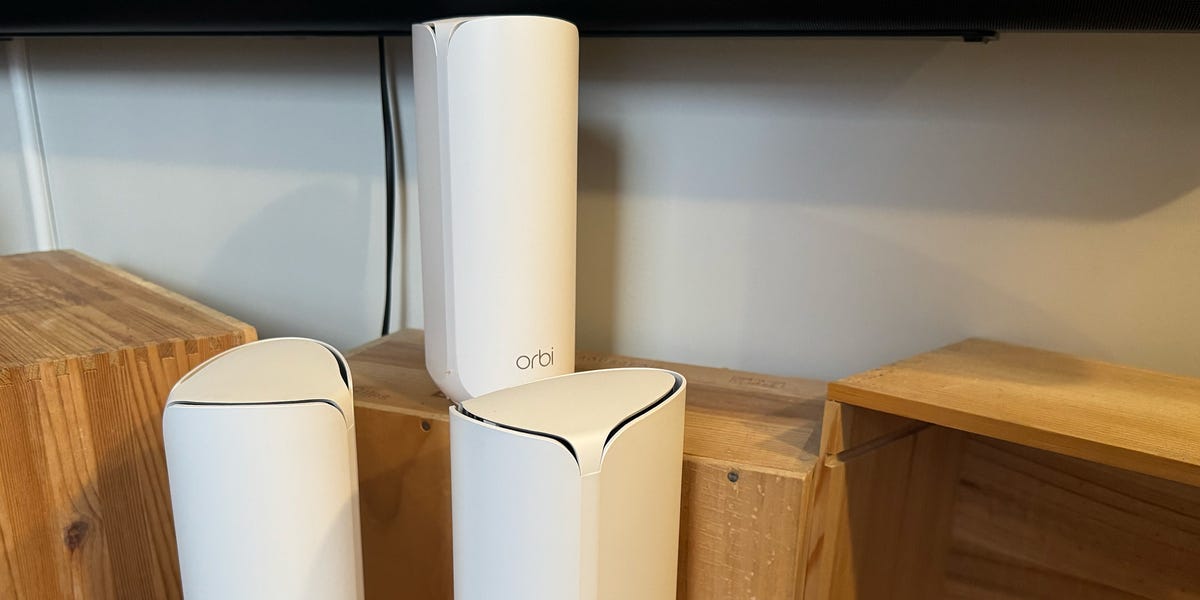
5 min readNetgear’s New Budget OrbiWhen Netgear released the Orbi 370 Series last summer, it marked the first budget WiFi 7 Orbi Series mesh network. Netgear had sold affordable mesh networks before, but this was an attempt to marry the performance of the Netgear Orbi 770 Series with a more obtainable package at half the price.Not as fast as the Orbi 770 Series, and a dual-band mesh network rather than a tri-band one, the Orbi 330 Series nevertheless came up as a winner in our testing. Given its spot as Netgear’s entry-level mesh network, we were pleasantly surprised by its consistently fast speeds.Granted, the pricier Netgear mesh networks have 6-GHz bands and even faster speeds, albeit at a much greater cost, but the Orbi 370 Series is more than enough mesh network for the vast majority of people who need to blanket a space with WiFi larger than a standalone router can handle, but who don’t need to provide simultaneous connections for dozens of people.ProsSIlent5 GHz band is fast, even at a distanceStable signalConsJust one LAN port per nodeSetup could be quickerParental controls require monthly subscription feeKey SpecsHighest Recorded Data Transfer Speed (Wireless)up to 5 GbpsHighest Recorded Data Transfer Speed (Wired)up to 2.5 GbpsWiFi StandardWiFi 7 (802.11be)Bands2 (2.4 GHz, 5 GHz)Streams4 (2 x 2.4 GHz, 2 x 5 GHz)WAN/LAN Ports1x 2.5 GB WAN, 1x 2.5 GB LANDimensions4.72 × 2.95 × 8.02 in.The SetupCompared to TP-Link’s or Eero’s setup process, the Netgear took longer and wasn’t as smooth an experience. It wasn’t a particularly hard setup to execute, but neither was it overly easy for somebody who doesn’t consider themselves very tech savvy.The app-based setup was less intuitive to follow along with than that of its two competitors, and it took longer to set up the mesh network. Hooking up the Eero 7 took me all of 10 minutes. The Netgear Orbi 370 Series took twice as long; three times as long if you count the time spent waiting for a firmware update to install as soon as I got the system connected.Mesh networks are made up of at least two nodes that are spaced far apart and connected to one another wirelessly, forming a single network. You can buy a two-pack of the Orbi 370 Series for $250, a three-pack for $350, or a four-pack for $380. Each node provides 2,000 square feet of coverage, and so the three-pack Orbi 370 Series I tested was capable of throwing out up to 6,000 square feet of WiFi.SpeedThe Orbi 370 Series is a WiFi 7 router. That’s the latest WiFi standard widely available in the U.S. right now. WiFi 8 is only just beginning to reach the international market, and the U.S. market rollout is happening slowly. We don’t expect there will be many WiFi 8 routers or mesh networks in the U.S. until later in 2027. Should that put you off buying a WiFi 7 mesh network? Not at all.The WiFi 7 standard was released in mid-2024 and only became common a year later. Much of the market consists of WiFi 6 routers and mesh networks, even today, and so a WiFi 7 mesh network such as the Orbi 370 Series is in no danger of being considered slow or outdated within the next five years. WiFi 8 isn’t faster than WiFi 7, anyway. It mainly includes some signal strength reliability tweaks.The Orbi 370 Series dual-band mesh network includes the expected 2.4-GHz and 5-GHz frequency bands. Practically every router and mesh network these days includes, at least, these two bands. The 2.4-GHz band prioritizes range and an ability to maintain strong WiFi signal through obstructions (such as walls) rather than speed, and the 5-GHz band prioritizes speed at the expense of shorter range and greater susceptibility to interference from walls and other solid objects between nodes and connected devices.The 2.4-GHz band gave me so-so speeds, and its ability to hold a strong signal was average, at best, as I walked further into the bowels of my hundred-year-old, five-story brick apartment building and away from any node. It was the 5-GHz band that shined on the Orbi 370 Series.Given the 2.4-GHz band’s mediocre speed, I held my breath as I moved a bit closer to a node (to compensate for 5-GHz bands’ reduced range) and connected a MacBook Pro to the Netgear’s 5-GHz band. It had no problem maintaining a steady 1–1.2 Gbps connection speed when I was near a node. Again, this is 5 GHz. I’m not using 5 GHz when I’m roving around far away from a node. I’m using it on a device that I’ll be consistently using near a node, such as a computer or video gaming console. Still, that’s an impressive speed for a budget mesh network, and frequently I’d see it poke past 1.3 Gbps.Then I added to that same band a MacBook Air, Alienware Area-51 laptop, iPhone, Android smartphone, iPad, and all my smart home gadgets, which include a home security system, smart lighting setup, Google Nest Hub, and smart TV. Again, the Orbi 370 Series handled it all with ease. While I’d choose a tri-band mesh network like the Netgear Orbi 770 Series for, say, a small business whereby dozens of people would all be connected at once, the Orbi 370 Series would be more than sufficient for a large home or small office.We pay a lot of attention to the WiFi connection when we talk about mesh networks, but the wired ports on the back of each node get comparatively little attention. That’s a shame, because although most people favor WiFi, a wired connection has its advantages for situations in which you absolutely cannot risk a dropped or weakened connection. Competitive gaming, for one, benefits from a wired connection that won’t suddenly drop or weaken due to signal interference, as can happen with WiFi. The Orbi 370 Series suffers from only having a single wired port on each node. Most people won’t even use the one, but it’d be nice to have the choice of plugging in two or even three devices.Who Should Buy It?Given the Netgear Orbi 370 Series’ strong 5-GHz performance and middling 2.4-GHz performance, it’s best for those who need WiFi coverage for a space over 3,000 square feet and who tend to work in static areas, rather than roaming around with their computers. You can set up the Orbi 370 Series mesh network with however many nodes you need to cover your place, and you’ll make sure to place the nodes near desks or workspaces where the majority of the work (at least, the work requiring high speeds) will be done.If you’re not roaming around with your computer, you can afford to use it day after day close enough to a node in order to connect it to the blazing-fast 5-GHz frequency band. You’ll have slightly sluggish 2.4-GHz band coverage farther from these workspaces, sure, which is fine if you’re not using devices for purposes that require the fastest speeds at the edges of your mesh network’s range. As long as you don’t mind giving up a stronger 2.4-GHz network, you can eke out some very impressive 5-GHz band speeds for not much money.Other Mesh WiFi Systems We RecommendMatt Jancer has been in the industry for 15 years and lives in his favorite urban death maze, New York City. He’s traded words for money on behalf of more than 15 magazines. Some of his longest-running bylines were spent covering cars, motorcycles, outdoors gear, health and fitness for Car and Driver, Outside, Esquire, Smithsonian, Playboy and Wired. When he’s not writing about motorcycles and our place in the wilderness for a living, he’s writing for enjoyment, riding his motorcycle, and mountain climbing out West. He believes everyone needs at least one hobby they have none of their ego invested into, and so guitar noises and cooking smells have been known to emanate from his apartment. Oh yeah, and he thinks pigeons are way underrated.
The Netgear Orbi 370 Series Is an Impressively Cheap and Impressively Fast Mesh Network
Full Article
Original Source
Read the full article at Popularmechanics →KhanList aggregates and links to publicly available news content. We do not host full articles from third-party sources. Always verify important information with original sources.