
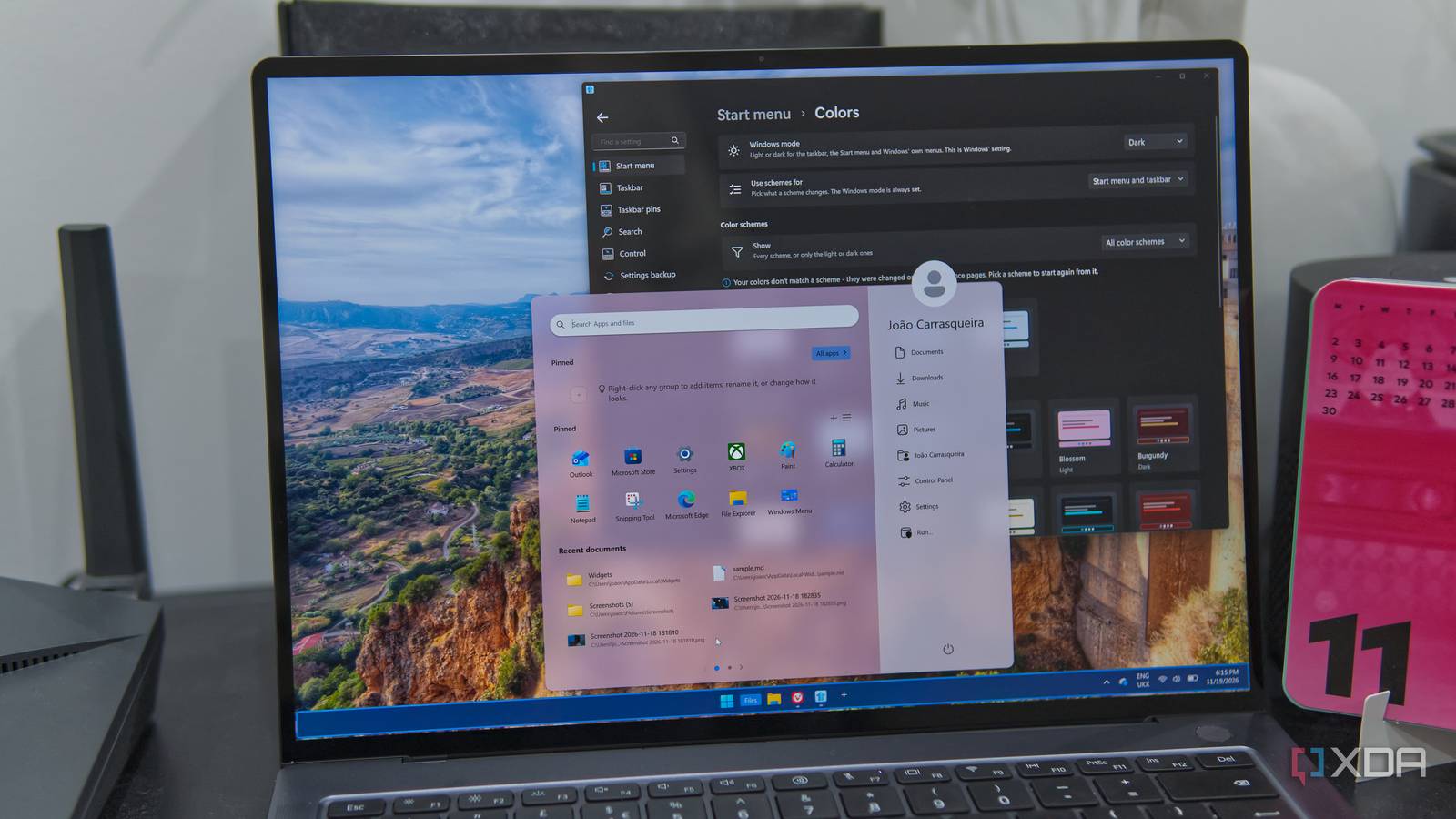
Published Nov 22, 2026, 9:00 AM EST João has been covering the tech world for over 7 years, with a heavy focus on laptops and the Windows ecosystem. I also love all things tech and videogames, especially Nintendo, which he's always happy to talk about. Prior to joining XDA in 2021, he worked at Neowin: https://www.neowin.net/news/poster/jo%C3%A3o-carrasqueira/ A few years ago, I reviewed Start11 v2, and it turned out to be one my favorite Windows customization tools out there, even though the price felt hard to justify. But Stardock, — the maker of Start11 — seems determined to prove the worth of its software with the recent launch of Start11 v3. So of course I had to spend some time with it. And after checking it out, I have to say it's looking better than ever. There are a lot of new features here that not only enhance customization, but add new productivity and usability tools as well. Customization is still top-notch Now it's even better Start11 v2 already went above and beyond in terms of customization options, and all of that is still here in version 3. Once the app is installed, you can use it to select from one of seven major Start menu styles, including styles based on Windows 7, Windows 10, and Windows 11. Each of these styles has its own range of customizations, so you have a ton of options to really make the menu your own. Most of this isn't really new, so I recommend checking out my Start11 v2 review if you'd like more detailed info on those aspects. What is new in terms of customization comes in some of the finer details. For example, Start11 v3 adds the option to use Microsoft's Mica material for the Start menu background, as well as an option to see the desktop background through the Start menu with no blur effect. This may work for some scenarios, though many backgrounds will make the menu too busy and hard to read since there's no shading or blur on the background. That could be a quirk with this beta release, though. Also new — at least, I don't remember this from my original review — are a wide range of preset color themes that can be applied to both the Start menu and taskbar. This gives you a cohesive look with colors that are meant to go together and still look nice, though of course, you still have the option to set all these colors manually if you're confident in your theming abilities. Speaking of the taskbar, another small addition is the ability to add a border to it, which uses a different highlight color for an extra bit of personality. Back on the Start menu, another small new addition is the ability to add line separators or plain text, which you can use to help you organize the menu or point people in the right direction if you're customizing it for someone else. One neat addition isn't so much a feature, but guidance; Start11's settings window now includes some tips for customizing your menu, which can be helpful since the amount of options available is sometimes overwhelming. Now you have more tools built-in The Start menu provided by Start11, especially when using its Windows App Style or Pro Style, was already incredible in version 2. Pages, groups, and folders gave you so many options for organizing your apps, on top of bringing folders from your PC directly into the Start menu so you didn't have to go into File Explorer as often. With version 3, that goes even further with widgets. You can now add widgets to your Start menu that can present information more directly, and in a lighter package than Microsoft's own widgets platform. This can include information about disk capacity and resource usage, or it can be something like a calendar, a daily countdown, or a clock. Some of the more interesting ones include a feed, which uses RSS or Atom to sync news to your start menu, a Recent widget for recently-opened files, or a plain-text notes widget for whatever you need to remember. You can write directly in the Start menu, so it's great for quick notes. There's also a Markdown Viewer widget, which renders a Markdown file of our choosing, though you can't edit it directly. While this is an odd limitation, I could see it being useful if, for example, you point it to a Markdown file stored in OneDrive that can be edited on other PCs. This allows you to view that updated information every time you open the menu, and it could be helpful as a centralized information system or a way to show important messages to employees in a company. The taskbar got better, too App grouping and more The taskbar also got a few upgrades in Start11 v3, to help with organization and general usability. While it's not labeled as new, one thing I noticed is that you can now choose between the Start11 taskbar, the plain Windows taskbar, or a Windows taskbar with some tweaks applied. Naturally, the full Start11 taskbar has the most customization options, which includes the big headlining new feature. That's app grouping, which is exactly what you're thinking of. You can drag different apps on the taskbar together to create groups, which are very reminiscent of tab groups in something like Chrome. Not only can you rename them to help keep related apps together, but you can also collapse groups if there's a set of apps you don't need in that specific moment. It's cool if you spend a lot of time multitasking heavily. Another notable addition is the ability to reopen recently-closed windows, another feature that feels very inspired by web browsers. The taskbar now shows a + (plus) button at the end of your open apps, and in there, you can add a line separator or choose from a list of recently-closed apps to reopen. There's also a smaller change related to folder menus, one of my favorite features in Start11 v2. These let you open and browse folders from your PC without opening File Explorer, and now, each folder menu has a dedicated customization menu so you can change specific settings such as the maximum height of the pop-up menu (so you can scroll the items instead). This can make big folders more presentable, which I also appreciate. And there's more tweaks, too Improvements to search and new sharing options Rounding out the new additions, there are some options big and small. One major piece of news is the ability to share page layouts if you use the Start menu styles based on Windows 11. These are the most customizable layouts, and now, once you've created a layout you love, you can share it with the Start11 community to potentially help others create the menu of their dreams. Likewise, you can find these shared layouts in the Start11 settings under Pages > Add a page. The page library will show you layouts you've saved on your PC as well as options from the internet, so you can get started with something that works well for your needs. While search isn't a primary focus for this update, there are also some nice tweaks on that front with v3. You can now choose the sorting options when using Everything as the search engine in Start11, and you can also enable or disable fuzzy matching for your search queries. All these little things round out an update that adds a lot of value to an app I already loved. It's not for everyone, but I love it Whenever I use Start11, I love everything it can do, and I want to say it's absolutely worth getting. Start11 v3 certainly takes that to the next level. Don't get me wrong, Start11 is an app that's very optional — you can certainly make do with the standard Start menu, or replace it with a free keyboard launcher like Raycast to improve your productivity. But there's no denying that Start11 does more than enough to justify its price tag if this kind of customization is something you're interested in. Stardock Start11 Start11 v3 adds a wealth of new features that make the Windows 11 Start menu and taskbar even better, with additional customization and productivity tweaks.
Start11 v3 gives the Windows 11 Start menu the widgets and customization it should have had all along
Full Article
Original Source
Read the full article at Xda-developers →KhanList aggregates and links to publicly available news content. We do not host full articles from third-party sources. Always verify important information with original sources.