
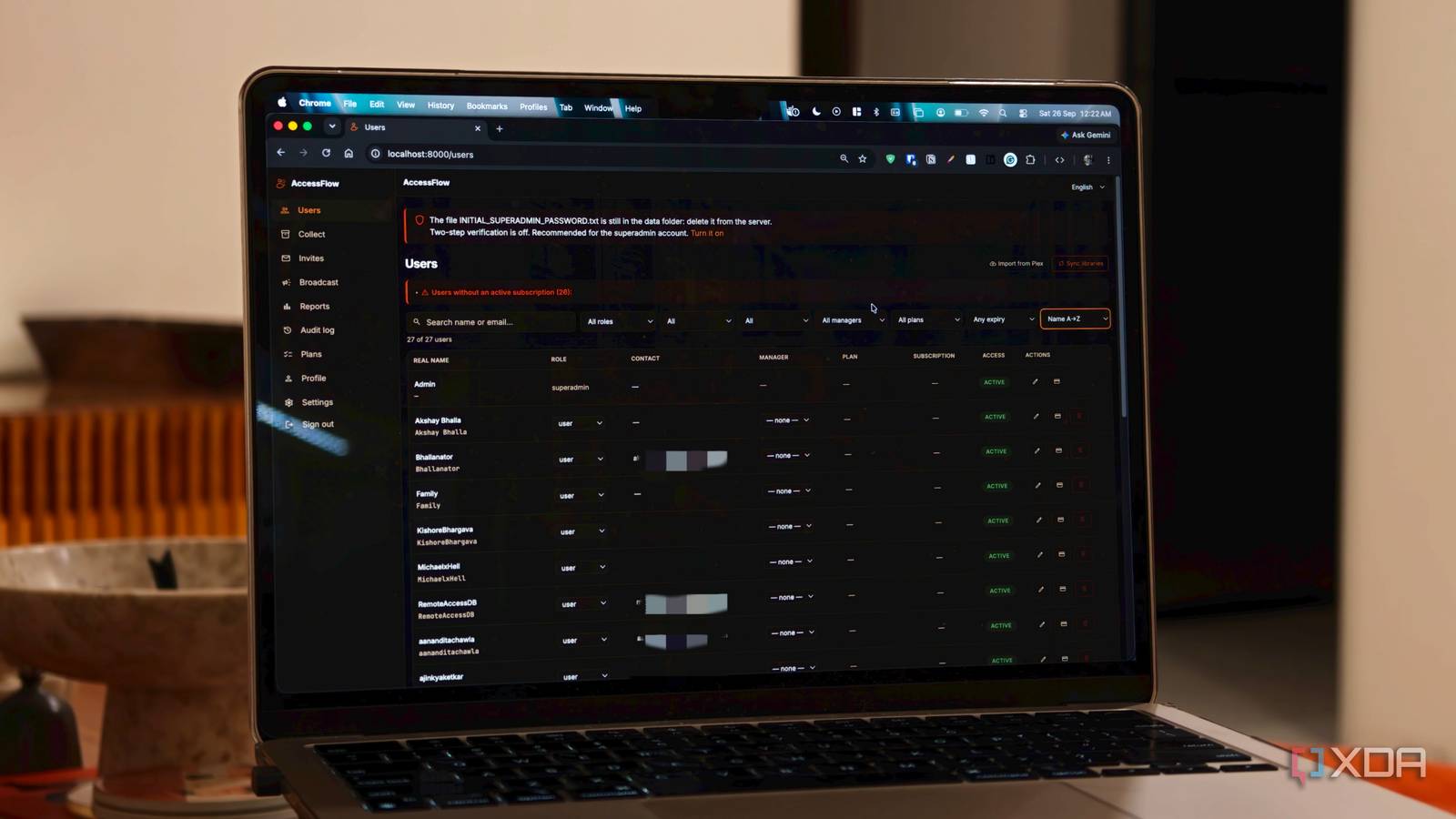
Published Sep 26, 2026, 8:30 AM EDT Dhruv Bhutani has been writing about consumer technology since 2008, offering deep insights into the personal technology landscape through features and opinion pieces. He writes for XDA-Developers, where he focuses on topics like productivity, networking, self-hosting, and more. Over the years, his work has also appeared in leading publications such as Android Police, Android Authority, CNET, PCMag, and more. Outside of his professional work, Dhruv is an avid fan of horror media spanning films and literature, enjoys fitness activities, collects vinyl records, and plays the guitar. Running Plex is one of the easiest ways to clean up and organize your media library. But if you're sharing it with friends, that same server can quickly become a painful thing to manage. I have dozens of friends tapped into my Plex server, and over time, keeping track of who needs access to what has become astonishingly hard. As good as Plex is at media sharing, it's not really designed as an admin panel for managing many users. Right now, adding someone to Plex means going into Plex, navigating a bunch of pages, and sending an invite. You can't contact these users either. Clearly, there had to be a better way. That's how I stumbled across AccessFlow. This self-hosted app is designed as a dashboard for managing Plex users and invitations, giving you a proper administrative dashboard for your server. Adding friends and family to your Plex server is finally effortless AccessFlow puts invites and user management in one place Credit: The biggest problem that AccessFlow solves is right there in the name. Anytime someone asks me for access to my Plex server, I no longer need to dive into the Plex interface. Instead, I can look into it right from the AccessFlow dashboard. This dashboard connects to my Plex account and lets me create an invite for a new user. From here, I can select the libraries they should have access to and even send the invitation right from here. No need to switch over to the Plex interface at all. That alone is much faster than anything Plex offers. AccessFlow goes a step further. It can even track invitations I've sent out. Sometimes friends ask for Plex server invites but then forget to accept them. AccessFlow keeps many of these expired invitations, making it easy for me to see the current status. The user management screen is helpful in a similar fashion. It lets me see every single person connected to my server and manage their access from one place. Every few months, I check in to see if any users aren't actively logging in to Plex and remove their access to keep things lean and clean. Additionally, you can manage administrative roles directly from the page. In my setup, everyone except me has user access, but for larger servers, being able to set up admin and moderator roles could be useful. AccessFlow lets you send broadcast messages to your entire user base Server-wide announcements made easy through a single dashboard While user management is great, what got me hooked on AccessFlow is the ability to communicate with everyone through the app. Running a home Plex server with a number of users connected means I occasionally need to inform them about something. Every few months I might take the server offline for maintenance, or I might add a hotly anticipated movie everyone has been asking for. Not just that, I might be clearing out my server to make some space and removing a few movies from the server. Normally, I'd send out these sorts of messages through WhatsApp and individual conversations. That's fine for a small pool of users. But beyond a certain number of users, it doesn't really scale. AccessFlow, however, integrates deeply with Telegram, which lets users connect their accounts to the portal. AccessFlow then allows administrators to send broadcasts to those users. It's given me a much easier way to communicate server-wide announcements. If I know the server will be offline for a few hours, I can send a message to let everyone know without sending individual texts or responding to people asking why Plex is down. The same goes for server additions or removals. Beyond that, it's given me a bit more structure in how I manage all these users. This isn't a tool that I use every day, but every time I do, I'm reminded just how much of an upgrade it is over Plex's built-in user management. AccessFlow is the administrative layer on top of Plex I know how good Jellyfin is, but Plex works for my needs and is my go-to for watching and sharing media. AccessFlow adds a meaningful layer on top of that by letting me manage the people who can access my server. Inviting users, tracking access, and even broadcasting changes to the server becomes much easier with a dedicated tool. AccessFlow does it well enough to justify adding it to my self-hosted stack alongside Plex. More than that, though, it takes out the boring administrative work of managing a shared server and lets me focus on what matters more to me. That's maintaining a high-quality movie library and watching it. AccessFlow AccessFlow is a self-hosting dashboard for managing Plex users, invites and sending out server-wide communication broadcasts.
Running a Plex server for dozens of users is painful until you add this one tool
Full Article
Original Source
Read the full article at Xda-developers →KhanList aggregates and links to publicly available news content. We do not host full articles from third-party sources. Always verify important information with original sources.