
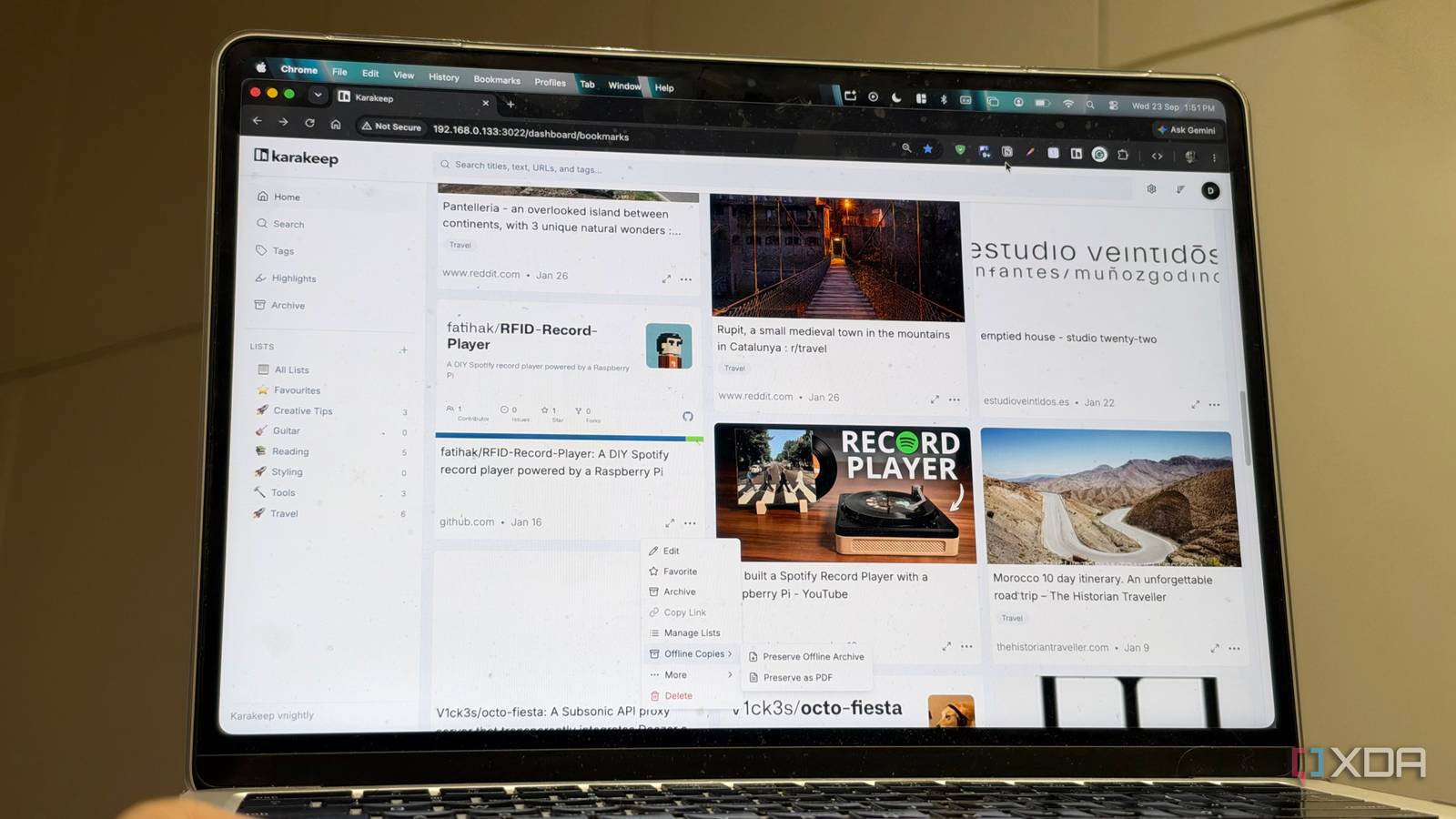
Published Sep 24, 2026, 8:00 AM EDT Dhruv Bhutani has been writing about consumer technology since 2008, offering deep insights into the personal technology landscape through features and opinion pieces. He writes for XDA-Developers, where he focuses on topics like productivity, networking, self-hosting, and more. Over the years, his work has also appeared in leading publications such as Android Police, Android Authority, CNET, PCMag, and more. Outside of his professional work, Dhruv is an avid fan of horror media spanning films and literature, enjoys fitness activities, collects vinyl records, and plays the guitar. Saving tabs, articles, and web pages is a big part of my daily research cycle. Be it articles, tutorials, or GitHub projects for interesting software pieces that I want to highlight. This is a daily hassle for me because I don't want to keep tabs open all day, and bookmarks, as good as they are, don't ensure these important bits of information are still available when I reach for them a couple of days or months later. Sites get updated, or go offline all the time, and I installed Karakeep to solve this problem of data being ephemeral. It's a self-hosted bookmarking and read-it-later app that stores the actual content of a web page alongside the original link. All you have to do is install it on your own server, add the browser extension, and you're done. Once configured, it can keep a local archive of all your bookmarks and pages of interest and help you create a personal research library fully in your control. Karakeep fits perfectly in my research workflow Full-page archives are essential for long-term research The biggest difference in using a tool like this becomes obvious when I make Karakeep a part of my daily workflow. When I talk about interesting open-source tools and self-hosted services over here at XDA-Developers, I usually start planningmy research weeks or months in advance. A lot of these tools are things that need long-term use. A normal bookmark certainly solves the problem of keeping track of where I found them. But Karakeep solves the longer-term problem of making sure I can find and access that website earlier on. When I save a webpage, Karakeep automatically fetches its title, description, images, and readable content. That's a good start in itself. But what sells it to me is that with full-page archival enabled, it can also keep a fully local copy of the page. That means I'm no longer relying on the publisher to keep hosting the page. I have a fully local and offline copy of the page as it was when I first read it. That's understandably very useful for long-term research. Over time, I've used it to save everything from documentation to manuals and technical guides, not just because I might write about it later, but also for easy reference. Often enough, I'm just saving explainers that become reference guides for me to understand a topic better later on. It's a very different approach to bookmarking. If I find a useful article while researching a story, I can save it immediately instead of going through an entire organization layer, though I do usually end up tagging the saves. But mostly, it lets me be a bit more liberal with my bookmarking approach. Karakeep takes the work out of organizing bookmarks Automatic tagging and rules keep your research organized Now, I'm aware that Karakeep is far from the only web archival tool around. But the reason why Karakeep stuck for me is that it's not another system that requires constant organization. The more things I save, the harder it gets to manage bookmarks. Karakeep simplifies this dramatically with automatic tagging. You can pair it with an API key for your preferred LLM, be it cloud-based or local, and Karakeep takes over from there. It can analyze saved content, apply tags, and even generate summaries. That's obviously a tremendous upgrade over standard bookmarks, which require you to open individual pages to see what it was that you saved. I find this entire process very useful because my saved content covers a rather wide net of subjects. It goes from Android and Android Auto to self-hosting, and even my hobbies like new vinyl drops or upcoming books. Before switching to Karakeep, I had a tree-like bookmark structure running three folders deep. Predictably, it wasn't very useful. Similarly, Karakeep incorporates rules that can make organization even more, well, organized. I can create rules around incoming bookmarks, and Karakeep can automatically route them into separate lists. Think things like an automatically updating to-read list. Tying it all together are the browser extensions, without which this system simply wouldn't work for me. Karakeep has extensions for Chrome and Firefox as well as mobile apps, making it easy not just to save content, but also to recover and read on the go. In my workflow, I save articles on my desktop and get around to reading them on my smartphone on the go. Self-hosting this entire stack gives me granular control over my bookmarks and saves, but more importantly, unlike similar services like Raindrop.io, it means that my archives aren't held hostage behind a monthly subscription. I can back up, save, and archive for as long or as little a time as I want. Much more than a bookmarks manager The longer I use Karakeep, the more it becomes less of a bookmark manager and more of a research tool. It's my personal archive of research that I do not want to lose, definitely not in the short term anyway. The kind of research I do has a long tail, and it's not rare for me to reference something I saved years ago. I've faced multiple incidents of bookmarks going dark on me. With Karakeep, that's a solved problem, making it essential to my self-hosted stack. Karakeep Karakeep is an open-source, self-hosted bookmarks manager that allows you to add bookmarks from any platform and categorizes them based on tags.
My bookmark manager now keeps offline copies of everything I save, and broken links are no longer my problem
Full Article
Original Source
Read the full article at Xda-developers →KhanList aggregates and links to publicly available news content. We do not host full articles from third-party sources. Always verify important information with original sources.