
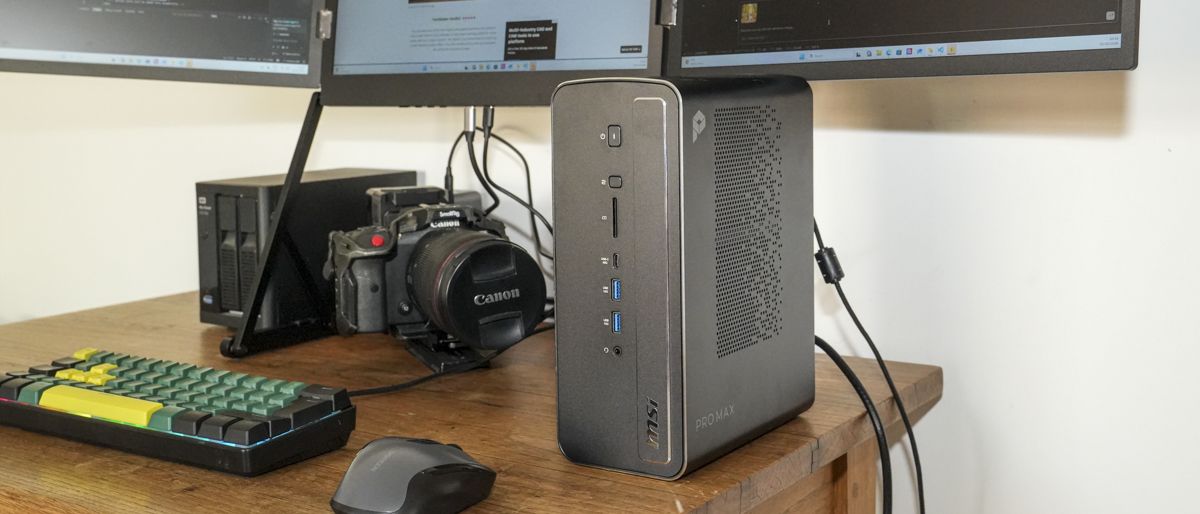
TechRadar Verdict The processor may already be over a year old, yet combined with a powerful GPU, NPU and a stack of RAM, it has the raw power to comfortably run local AI. Standard mini PC performance is workstation-level, perfect for high-end creative and business use. As with the competition, the Pro Max Edge AI+ enables you to run LLMs fully offline and at speed, all made possible by the 128GB of unified memory, Strix Halo CPU and powerful integrated Radeon 8060S graphics. However, some other aspects feel dated, such as the slow 2.5GbE network; still, that local AI potential is impressive. Reasons to buy +Excellent local AI +Huge unified memory +Compact workstation design Reasons to avoid -Older CPU -RAM can’t be upgraded further -Large power draw for a mini PC Why you can trust TechRadar We spend hours testing every product or service we review, so you can be sure you're buying the best. Find out more about how we test. Jump To: 30-second review Price and availability Specs Design Features Performance Final verdict Should you buy it? MSI PRO MAX Edge AI+: 30-second reviewThe MSI Pro Max Edge AI+ is one of the most powerful mini workstations that I’ve tested, and proved to be a perfect tool for Creative application and running AI offline. Inside is the AMD’s Ryzen AI Max+ 395, however, unlike previous machines of this size that I've looked at it's backed by Radeon 8060S graphics and, crucially for running local language models it comes with 128GB of unified memory.This combination of high powered processers means that it was able to run surprisingly large local AI models all downloaded and managed within Lemonade. The most impressive task centered around sorting more than 2,600 images, generate images using the Flux and Qwen3 Coder models through Visual Studio Code and several other supporting apps. It was also able to generate a ten page website, although quite a bit of prompting was needed.Performance for normal creative work, using Photoshop, Lightroom and Premiere Pro was equally impressive with the machine handling batches of Sony RAW files without issue. Pushing the abilities I checked out the performance editing 4K Canon EOS R5 C footage in Premiere Pro and once again that power of the Strix Halo took the edit in its stride.There are of course some drawbacks such as the staggeringly high price at £5,999, then there the 2.5Gb Ethernet that just feels slow for a workstation of this level, and getting the most from local AI requires plenty of setup and experimentation, but then that's just how things are with AI at the moment.But once configured, that’s where the Pro Max Edge AI+ starts to make sense. If you need private, completely offline AI for coding, image organisation or other long-running workloads, there’s an enormous amount of processing power packed into this relatively compact machine.MSI PRO MAX Edge AI+: Price and availabilityHow much does it cost? From $5,499When is it out? Available nowWhere can you get it? Directly from MSIThe MSI Pro Max Edge AI+ is available from the MSI website for $5,499 (US); €5,299; £5,999. It’s also widely available from most online retailers.Value: 4 / 5 (Image credit: Alastair Jennings)CPU: AMD Ryzen AI Max+ 395, 16-core / 32-thread Zen 5GPU: AMD Radeon 8060S integrated graphicsNPU: AMD XDNA NPU, up to 50 TOPSRAM: 128GB LPDDR5X-8000 unified memoryMaximum GPU memory allocation: Up to 96GBStorage: 2TB M.2 2280 NVMe PCIe Gen 4 x4 SSDRear ports: 2x USB 2.0 Type-A, 1x USB 10Gbps Type-A, 1x USB 40Gbps Type-C with DisplayPort 2.0 Alt Mode and 15W PD output, 1x HDMI 2.1, 1x DisplayPort 1.4a, 1x RJ45 Ethernet, 1x 3.5mm audio combo jackNetworking: 2.5Gb EthernetWi-Fi: Wi-Fi 7Operating system: Windows 11 ProAre you a pro? Subscribe to our newsletterSign up to the TechRadar Pro newsletter to get all the top news, opinion, features and guidance your business needs to succeed!MSI PRO MAX Edge AI+: DesignThe first impressions of this mini PC are impressive. It arrives with a slightly larger form factor than I’m used to for a mini PC, but then again, this has one of the Strix Halo CPUs inside, and that’s matched with an equally impressive integrated GPU and NPU.What marks this new machine out, despite its rather ageing CPU, is the fact that it’s been fully optimised to run LLMs with 128GB of unified RAM soldered to the motherboard and AMD Radeon 8060S integrated graphics.The machine is by no means large at 197.5 x 188.4 x 94.5mm, and while heavier than most mini PCs, it comes in at just 2.9kg, so if you need it, it’s still perfectly portable. On the portability, I was pleased to see that the power supply is integrated into the form factor, so there’s no power brick to lug around with the machine itself.This means it’s equally at home on your desktop or, if you’re a creative and you do need to take your machine with you, then it’s still relatively portable.Around the body, there are plenty of ports and connectivity options, which are given space due to that larger form factor. Size-wise, it sits somewhere in the middle of a mini PC and mini tower.On the front, you have two USB Type-A ports offering 10Gbps and one USB4 port with 40Gbps. This also supports DisplayPort 2.0 and 15W USB power output.Alongside this USB port is a full-sized SD 4.0 UHS-II card reader that will appeal to creatives, along with a 3.5mm audio jack. The other addition on the front is a performance mode switch that you can use to quickly adapt between Performance and Eco modes. (Image credit: Alastair Jennings)At the rear, you have a further two USB 2.0 Type-A ports and a USB 3.2 10Gbps Type-A port, a USB Type-C port that offers 40Gbps, and again this supports DisplayPort 2.0 and 15W USB Type-C power output. The USB ports are joined by HDMI 2.1 with HDR and up to 4K 60Hz, DisplayPort 1.4, a 2.5GbE RJ45 Ethernet port and a further 3.5mm audio combo jack.On the exterior, that pretty much rounds everything up, but inside you have two M.2 NVMe slots, one filled with a 2TB M.2 NVMe PCIe Gen 4 x4 SSD. The onboard RAM is soldered on and can’t be upgraded, but that is enough to run LLMs and many of the major creative applications with AI features.On the design and build, it’s a shame that there is no OCuLink port for connecting out to an eGPU; even with the USB4 port, the fact that the RJ45 port is limited to just 2.5GbE is a disappointment. I would have expected that a machine of this price would have at least 5GbE, if not 10GbE. When it comes to the overall quality and design, it’s both aesthetically pleasing and exceptionally well made, as you’d expect at this price point.Design: 4.5 / 5 (Image credit: Alastair Jennings)MSI PRO MAX Edge AI+: FeaturesAs of 1 October 2026, this machine has just hit the shelves. Yet one of the headline features, the Strix Halo Ryzen AI Max+ 395, is already over a year old. This CPU features an integrated Radeon 8060S GPU and an NPU, alongside 128GB of unified LPDDR5X-8000 RAM, which enables the ultrafast processing required by many of the AI features to really push through.That CPU, while a little older than some of the latest AI mini PCs that we’re seeing, enables the machine to be well balanced when it comes to performance, although this is still an expensive option. That CPU offers 16 cores and 32 threads with AMD’s Strix Halo Zen 5 architecture.This is joined by the equally impressive AMD Radeon 8060S integrated graphics and integrated AMD XDNA NPU, which offers up to 50 TOPS of AI processing. This means that with all of those processors combined, there’s 126 TOPS of potential within this one small machine.Storage capacity is catered for with two M.2 slots, each NVMe PCIe Gen 4 x4, and my review sample arrived with a 2TB module. Across the machine, there’s a decent array of ports both front and back, and it’s great to see that it features a USB4 port on both the front and back. If you do need to connect ultra-fast storage, this is perfectly possible. These ports also support DisplayPort 2.0 and 15W power output, which again is extremely handy.On starting up the machine, it’s pre-installed with Windows 11 Pro, and MSI has included its management software, which enables you to activate certain AI features, as well as security and settings options to adjust the machine’s performance.One of the features that I mentioned in the design section is the fact that the power supply is integrated, and this offers 300W of power, which is needed by these AI-enhanced processors to handle all of that processing.Wi-Fi 7 supplies the wireless connectivity, which is now becoming the standard, although Wi-Fi 8 has just started to emerge on some devices. It also features a UHS-II SD card reader, again great to see, and a single LAN port at the back, which is 2.5GbE. This is a little disappointing on a machine of this price and performance. I would have expected a minimum of 5GbE and preferably 10GbE.Features: 4 / 5MSI PRO MAX Edge AI+: Performance (Image credit: Alastair Jennings)Benchmark scoresCrystal Disk Mark Read: 6122.48Crystal Disk Mark Write: 5827.92Geekbench 7 CPU Multi: 21905Geekbench 7 CPU Single: 2672Geekbench 7 GPU: 96251PC Mark Overall: 9990Cinebench 2026 CPU Multi (Threads): 6932Cinebench 2026 CPU Single (Threads): 457Fire Strike Overall: 25009Fire Strike Graphics: 28653Fire Strike Physics: 29422Fire Strike Combined: 11480Time Spy Overall: 10777Time Spy Graphics: 10972Time Spy CPU: 9792Wild Life Overall: 65611Steel Nomad Overall: 2158Windows Experience Overall: 8.8Procyon: 1125Getting into the performance of the machine, the initial setup is as straightforward as ever. Windows 11 Pro is relatively straightforward, and once you plug the machine in and connect up all the peripherals, it’s just a case of running through the final steps, connecting it online, and within about 10 to 20 minutes, the machine will be up and running, ready for you to install whichever software you want.In this test, I’ve run a wide variety of different applications, starting off with the basics of Microsoft Office to test productivity. I’ve also installed the Adobe Creative Suite, with a focus on Adobe Photoshop, Lightroom and Premiere Pro, and alongside that, to start some of the AI testing, I’ve also installed DaVinci Resolve.As this machine is very much focused on AI, especially with that Strix Halo processor, I’ve also installed Lemonade to manage the local LLMs and downloaded and installed a good variety of different options, including Flux, Qwen 3 and Qwen 2.5 releases, to enable a variety of different tasks that I’d later test the machine with.Starting out with general computer use, Microsoft Office and Windows run smoothly, as you would imagine on a machine of this price and power. Microsoft Word, PowerPoint and Excel can all easily be opened at the same time, with images, data and content being transferred from one to the other without any noticeable slowdown or hesitation.Copying and pasting images is straightforward, and as I opened multiple windows over the week of testing in the Edge browser, there was no issue or slowdown. It also proved that the Wi-Fi 7 connection to my Wi-Fi 6 hub was exceptionally solid.Progressing on from Microsoft Office, I loaded up a few apps from the Adobe Creative Suite and, using Adobe Bridge, checked through a couple of thousand images, both JPEG and RAW, that were shot on the Sony A7 IV. Again, here you really see that processor and the Radeon 8060S GPU handle the rendering of thumbnails exceptionally quickly.Unlike on many smaller mini PCs, there is really very little time needed for each new thumbnail to render, enabling me to quickly scroll from top to bottom through the images without having to wait to see what each file contains. Selecting a batch of images and then opening them in Adobe Camera Raw once again just showed how powerful this machine was.While I was dealing with large Sony RAW files, and a decent quantity at a time, there was absolutely no slowdown on either individual or batch adjustments. Then, opening those up into Adobe Photoshop was equally fluid, with only a few seconds needed between ACR and the Photoshop workspace for each of the 50 images to fully load.Even with my desktop workstation, which is a relatively powerful machine and also features 128GB of RAM and a decent GPU, what up to this point I’ve always felt was pretty fluid now seemed relatively slow in comparison. As I then switched over to Lightroom to quickly check and enhance another batch of files, it was again apparent that image editing on this machine was well below what it was capable of doing.Even with generative expand and image generation, render times were a few seconds rather than up to a minute, which is what I have experienced with other small mini PCs. The real show of power came when I loaded up Adobe Premiere Pro and went to work on a 4K video edit using C-Log footage from the Canon EOS R5 C.Again, it was as if I was just editing 1080p video shot on a mobile phone, and the machine could handle cuts and edits of the five-minute video without too much issue from over an hour’s worth of footage.The only consideration here was that the footage was being imported from an external Thunderbolt 4 drive, and here I was a little disappointed that I couldn’t connect my NAS to the system so that I could network edit due to the limited speed of the 2.5GbE network port on the back. Instead, I had to rely on a traditional external SSD for storage, although there is thankfully an additional internal M.2 slot which would take additional internal storage if required.Still, the video editing potential is there, and it’s impressively fast, but this led me directly to checking out the machine’s AI potential, and this is where things really started to develop.To test AI performance, more specifically local AI performance, I first installed Lemonade and then, through that, downloaded a variety of different LLMs and models for different tasks.These included Qwen 2.5-VL-7B-Instruct-GGUF, which is a vision model and was used to inspect and recognise images. I used this in combination with ExifTool to organise and label a variety of files for website creation.I fell back on Qwen3-Coder-30B-A3B-Instruct-GGUF, and this was absolutely superb for coding HTML and CSS Grid for the test. While this took quite a bit of additional configuration, especially training it to use Grid formats rather than straight HTML, and connecting it through Visual Studio Code, I was again impressed by just how simply it all tied together.The biggest task that I put the machine through was file organisation, and this is a task that I’ve always put off. Even after a few months of using various different techniques to sort the images, it’s always good when one of these machines comes in so that I can start to pick up from where I last left off.While they automate the process, it’s still relatively slow. Here I fed in over 2,634 images and used GPT-OSS-20B-NPU to really put the machine through its paces. Not only was it able to recognise the images, but it started to sort them at a relative speed, although I did fall back onto Qwen 2.5-VL-7B-Instruct-GGUF in order to complete the task, and not all images were recognised. Checking the content of those images, they were mostly nondescript or under or overexposed, so the subject wasn’t recognisable in any way.Taking time to set up the machine is something that I found all the way along when using AI machines: they’re not ready to use out of the box, and there is a certain learning curve needed in order to configure the LLMs in a way that works for you. While they do run offline, as all tests were carried out in this review, I did utilise online AI at points to select the different models for the different tasks that I had in mind.One of the next tests that I ran was to create a quick static website that I could then update on a regular basis. For this, I first loaded Qwen3-Coder-30B-A3B-Instruct-GGUF through Lemonade. I also opened Visual Studio Code and installed the Continue extension. I created a folder with all the assets that I wanted for my project, including Word documents that I converted into plain text and images that were reformatted into JPEGs.In Visual Studio Code, I was then able to use the Continue AI chat window, connect the model that I wanted and put in the prompt to create a 3D printer review website with a variety of different sections. I also uploaded some general design ideas so that it had a good plan of what it was going to create. I’d already pre-designed the look and layout using CSS Grid, as I like the speed of pure static HTML rather than a more standard CMS site. I then hit Enter and let the local model do its thing.One of the first things that I noticed was that, within Visual Studio Code, I would have to accept file creation for each file that it generated. In this review, I haven’t yet found a workaround for this so that it can just create the files without prompting.But checking out the HTML, it was exceptionally clean, if a little textbook, and the final result was pretty good, although there were a few minor rendering issues with the JavaScript that I hadn’t wanted it to create. For some reason, none of the images that I had given it had been included in the design, so essentially it was just CSS layout and review text.Again, going back in and re-editing, it started to slowly develop the website into what I wanted, and this really starts to show you the power of localised AI and what’s possible. By the time the whole process was finished, the server session recorded 152,937 input tokens for what was essentially a 10-page website and processed 24,639 output tokens, which were generated across 51 requests.To actually complete the site, I would consider around 200 requests realistic. The final response generated 406 tokens at 47.85 tokens per second, equivalent to approximately 8.5 seconds of generation, with a time to first token of 1.99 seconds, which is pretty much on par with some of the online models that I use. The entire process, which involved a little to and fro from prompts and letting the machine work through the task, was an hour.As I went through further models and further experiments with the localised AI, I was increasingly impressed by what it was capable of doing, with the most useful application being the file sorting. I have run file sorting with some of the other AI models and been impressed, but here things seemed to take a bit of a step up, with the power of the GPU and CPU taking on most of the processing.Quickly checking which processors were in use showed that there was no NPU involvement in the sorting process, as I was using the Qwen 2.5-VL-7B-Instruct-GGUF model. However, it did appear that there were spikes of NPU use during the processing.When selecting the models, if you do want to make full use of that NPU, then you select an NPU-compatible model, but this varies per task, and new models are being released all the time that you can download and experiment with. This is where most of the time with AI comes in, as you do need to experiment a great deal to make the most of these machines and their AI potential.For most users, however, if you’re just using Copilot or the built-in AI behind Photoshop or Premiere Pro, then the potential is also there, and that does fall back onto the processor and NPU, with more improvements arriving over time. The final AI test was to incorporate AI into DaVinci Resolve for some video editing.While I’ve only just started to experiment on this front, the way that DaVinci and the AI model interact on this machine is slightly eerie and impressive, with some pretty decent rough cuts of three-channel video straight off the bat. I’m hoping that, with a bit more experimentation, I’ll get usable edits, but even in these early stages of experimentation, the potential of this machine is apparent.While other lesser machines are able to do many of these tasks, what makes it different here is the absolute speed at which the hardware is able to cope. Because of the 128GB of onboard memory, it doesn’t stall or run out of steam partway through a task. In the final task, really just for a bit of fun, I loaded in Flux-2-Klein-9B-GGUF for some generative image creation.Here, I asked it to create a picture of a Labrador in the New Forest in spring, summer, autumn and winter. I was able to create each of those images in less than a minute. The Flux model is a little limited in what you can actually do with it, but I was able to load a portrait of myself into the system, then use that to generate a picture of myself and a Labrador in the New Forest. This was again entertaining and surprisingly good for something that runs offline.However, there were some of the issues that you always get with even the online models, such as extra arms and fingers where you weren’t expecting them. Still, this is fully offline AI running without any cloud server intervention.Performance: 4.5 / 5MSI PRO MAX Edge AI+: Final verdict (Image credit: Alastair Jennings)The MSI Pro Max Edge AI+ is an impressive mini PC, although slightly larger than the small box-like machines that I usually look at, but even with a processor that is over a year old, when it is combined with the integrated Radeon 8060S GPU and NPU, it already offers impressive power.But then, when you add in 128GB of unified RAM, a fast SSD and plenty of connectivity options, you have a machine that is finally capable of running LLMs locally. The one point about any machine like this is that they’re not simple plug-and-play systems when it comes to the AI potential.Setting up the local language models in the way that you want to use them does take time, and for anyone just getting into local AI, expect to put aside at least a week to fully experiment with each of the models and what they can do, as well as the different model types that utilise the CPU and GPU and those that really make use of the NPU.Once you’ve done that and you know exactly what you want to do, then it takes another day to fully set up the machine to do exactly what you want from scratch. After testing several of these machines, I now jot down the models that I need to install in order to run these tests, and even then I’m looking at a good half-day to download all of that content.But then, once it’s set up, the potential is massive. Unlike lesser machines with less RAM and without these AI-enhanced CPUs, you can actually run proper localised language models, and the output they produce is also exceptionally good.When you spend time not only making sure that all the downloads are there and available for them, but also training them so that they produce the style of content that you want, they become even more powerful. Personally, I found the best way to use this is to run a combination of cloud AI to help prompt the local AI into getting exactly what you want, use the paid tokens for the knowledge and the local AI for the heavy local work.It all takes time, but compared with just a few months ago, the leap forward is massive and, really, while this machine is expensive, it does offer true offline AI if you want it.Should I buy the MSI Pro Max Edge AI+? (Image credit: Alastair Jennings) Swipe to scroll horizontally Value Strix Halo power with the usual pricing 4 Design Stylish design that gives space for cooling 4.5 Features 128GB unified-memory enable the power to run local LLMs 4 Performance Powerful GPU just gives this machine the edge over some close compitition 4.5 Overall Incredibly powerful workstation in a compact form 4 Buy it if...You want offline AIRunning some of the commands that I utilised in this test would cost a substantial amount if using a cloud-based option. However, here, while that process is time-consuming, there’s no additional cost.You have long-running tasks.The file sorting for the 2,500 images was lengthy, and that’s just the start of it, so having a machine that I can leave running in the background sorting out images is extremely appealing.Don't buy it if...You just need a powerful machine.There are plenty of machines as powerful as this for general work, but without that massive AI potential, that you can buy for a far lower price.You don’t really need local AI.The idea of local AI is good, but for the majority of people, the free or minimum-tier options available from the major players will offer you far more than you get from this machine.It’s only when you start to customise things that this becomes viable.For more professional-grade desktops, we've tested the best business computers and the best mini PCs. Alastair is a photographer, filmmaker and tech writer who has been working in the publishing industry since the late 1990s. For more than 25 years he has covered photography, video and technology across Future's photography, technology and gaming brands. He runs a photography and video production company and lectures in TV and film. He can usually be found testing mini PCs or prototyping and prop building with the aid of 3D printing. You must confirm your public display name before commenting Please logout and then login again, you will then be prompted to enter your display name.
MSI Pro Max Edge AI+ mini PC review
Full Article
Original Source
Read the full article at Techradar →KhanList aggregates and links to publicly available news content. We do not host full articles from third-party sources. Always verify important information with original sources.