
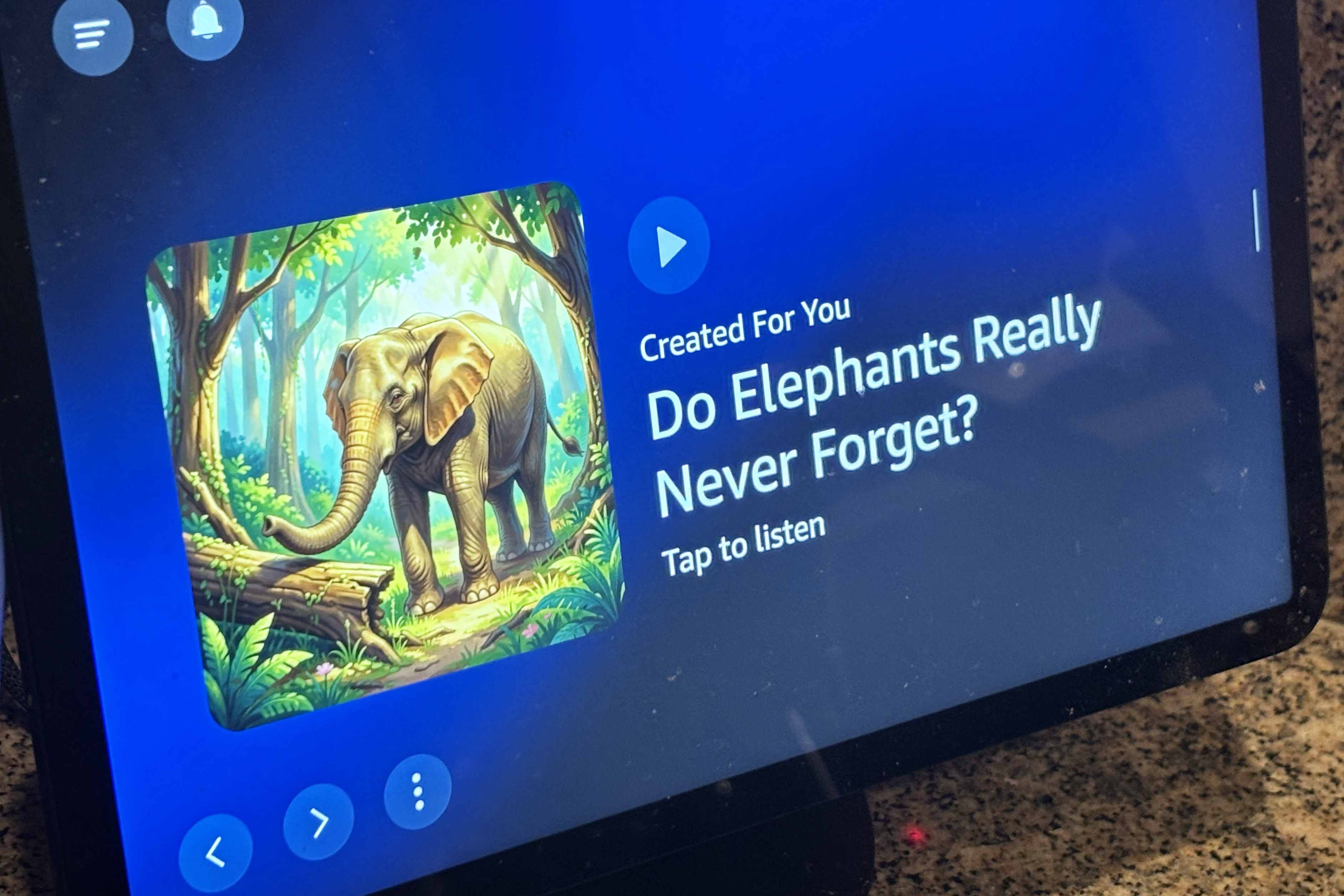
With Amazon announcing a new Echo Show 16 to square off with Apple’s upcoming HomeView, the smart displays are having a moment, but I’ve noticed something seems off. In the past week or two, my Echo Show has started showing me a lot of lazy, annoying AI-generated ads under a playback feature called Created For You. So I figured out how to improve my experience with a few settings changes. Not only is this AI slop vague and accompanied by poorly generated images, but it also doesn’t seem to have anything to do with my recorded interests or personalization, either. The slides range from questions about squirrels finding nuts and how to make cornfield mazes to facts about daylight saving time. Basically, it’s very general content I don’t really care about and don’t want showing on a central display at home. These ads for Amazon’s podcasts and similar services are neither fun nor well-targeted.Tyler Lacoma/CNET I suspect Amazon is pushing its AI podcasts and similar chatty content with this latest round of generated ads, but if you’re not interested in viewing any of these canned clips, they can come across as irksome. So I reviewed my settings options and found out how to push my Show display away from these creations and toward more interesting content. How do I turn off these AI-generated slides? To change what your Show displays, I recommend using its touchscreen to access settings.Tyler Lacoma/CNET The good news is you can control what your Echo Show, well, shows you — but you have to know what settings to change. This isn’t very easy through the Alexa app, but I found a better way using the Show’s own touchscreen controls. Here’s what to do when you have a minute. First, when an AI slide like this appears, tap the three-dot menu button and tap the thumbs-down option to indicate your dislike. It’s not a perfect solution, but it should help start weeding out these types of ads. Next, swipe down on your Echo Show device to access the main menu, and choose Settings. Then choose Display & Appearance, and head to Content Categories. Here you have two options. You can manually turn off all the categories you don’t want to see, especially those connected to the AI slop that you’ve been seeing. Keep focus on topics that you’re interested in if you still want to see other related content. You can also toggle the Rotate Once setting on, which will show you Amazon’s slides only once, my preferred option for handling this kind of unwanted content. Toggle your topics and how often they show up for more control.Tyler Lacoma/CNET As an alternative, you can switch your Echo Show to show only a photo album of your choosing. I like getting some Alexa recommendations like recipes and updates, so this option isn’t for me, but if you have a good photo album to share with Alexa, you can limit your slides to only your own content. With these settings adjusted, you should see far fewer AI-generated images and more slides tailored to your own interests. I’ll keep an eye on my Echo Shows and let you know if anything changes, but this has worked well for me so far. Tyler has worked on, lived with and tested all types of smart home and security technology for over a dozen years, explaining the latest features, privacy tricks and top recommendations. With degrees in business management, literature and technical writing, Tyler takes every opportunity to play with the latest AI technology, push smart devices to their limits and occasionally throw cameras off his roof, all to find the best devices to trust in your life. He always checks with the renters (and pets) in his life to see what smart products can work for everyone, in every living situation. Living in beautiful Bend, Oregon, gives Tyler plenty of opportunities to test the latest tech in every kind of weather and temperature. But when not at work, he can be found hiking the trails, trying out a new food recipe for his loved ones, keeping up on his favorite reading or gaming with good friends. See full bio The Latest from Tyler Is Your Echo Show Display Filling With AI Slop? I Found How to Turn It Off Anker Eufy’s Security Kit Offers First-Time Free Face Recognition. Here’s What Else I Liked The Wild World of Third-Party AI Apps for Ring Security, and Whether You Need Them
Is Your Echo Show Display Filling With AI Slop? I Found How to Turn It Off
Full Article
Original Source
Read the full article at Cnet →KhanList aggregates and links to publicly available news content. We do not host full articles from third-party sources. Always verify important information with original sources.