
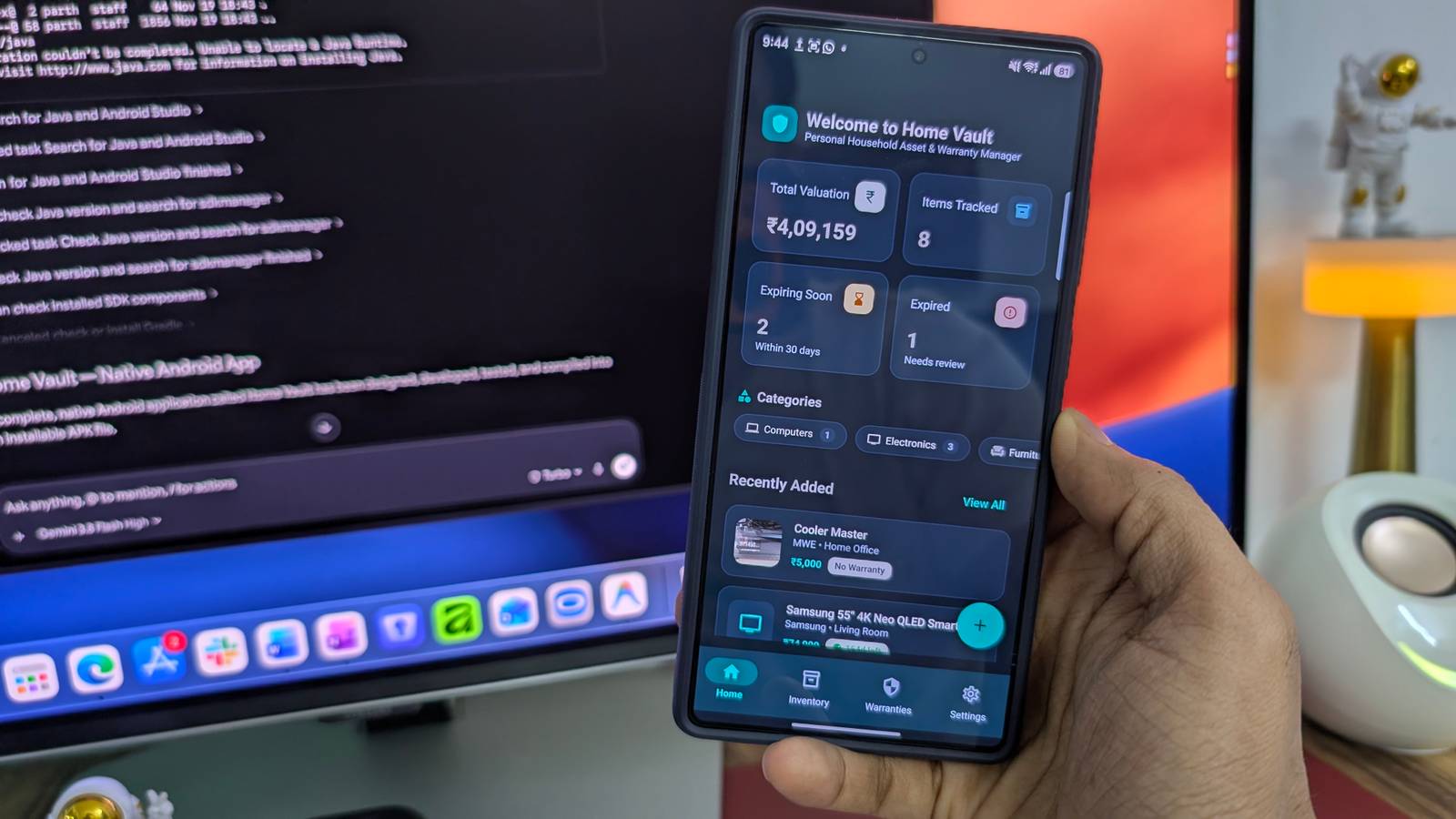
Published Nov 22, 2026, 5:00 PM EST Parth is a technology analyst and writer specializing in the comprehensive review and feature exploration of the Android ecosystem. His work focus on productivity apps and flagship devices, particularly Google Pixel and Samsung mobile hardware and software. He provides expert guidance on productivity software, system optimization, and the advanced functionalities that allow users to maximize their device's potential. His analyses are crucial resources for readers seeking to master complex operating system features and streamline their digital workflows. When he is not busy with technical analysis and software evaluation, Parth dedicates his time to watching K-dramas, studying mobile technology trends and the role of artificial intelligence. I have experimented with plenty of AI coding tools, but most of my projects have been websites, sample dashboards, or apps that I eventually forgot about. This time, I wanted to build something that would be useful beyond my own desk. I turned to Gemini in Google Antigravity with a simple idea: create a household inventory where I can organize everything in one place. I called it Home Vault. I wanted to solve a real household problem A word on the prompt Keeping track of expensive purchases, invoices, warranty details, and service history isn't always easy. I wanted a dedicated app where my family could find all this information without digging through emails, photo galleries, or physical documents. With that in mind, I prepared a detailed prompt for Gemini in Google Antigravity. I named the app Home Vault and asked Gemini to build a native Android application using Kotlin, Jetpack Compose, and Material 3. I wanted a modern dashboard showing the total inventory value, registered products, and upcoming warranty expirations. I also require separate categories for electronics, kitchen appliances, furniture, and other household essentials. My prompt included the ability to attach product photos and PDF invoices, add purchase prices, record maintenance history, and receive warranty expiration reminders. I even requested powerful search and filtering options, dark mode, and a backup-and-restore feature so my family could transfer inventory data between devices. Most importantly, I instructed Gemini to generate a working APK rather than a web app or a fancy prototype. I wanted something we could install on our Android phones without going through the Play Store. Home Vault started looking like a proper Android app The useful features mattered most After I submitted my detailed prompt, Gemini 3.8 got straight to work. The entire process took about 30 minutes, which was impressive given the number of features I requested. I opened the APK file on my Samsung Galaxy S25 Ultra, and immediately Home Vault looked and felt like a proper native Android app rather than a generic AI prototype. Gemini adopted a beautiful Material You design with rounded cards, attractive icons, subtle colors, and neatly organized menus. The dashboard displayed the total value of my household inventory, registered products, and warranty information in a clean layout. However, a beautiful interface means little if the underlying features don't work. Thankfully, Home Vault had plenty to offer. I could add household appliances, electronics, and furniture, along with purchase dates, prices, model numbers, and warranty details. I could also attach product photos and invoices, which made the app much more practical than a basic spreadsheet. The dedicated warranty section was another highlight. It organized products by warranty status and made it easier to spot upcoming expirations. Home Vault didn't feel like a collection of disconnected screens. It felt like an app designed around a genuine household need. I finally had a real APK My family became the real testers After Gemini finished the development process, I had an installable Android app that I could transfer directly to my phone. I didn't need to rely on Android Studio to test it. Installing Home Vault was straightforward, and seeing it running on my phone felt rewarding. I also shared the APK with my family members and asked them to try Home Vault on their phones. They could add household appliances, attach invoices, and organize important purchase details without my assistance. Their feedback mattered more than any technical benchmark. After all, I wanted to build something useful, not just showcase Gemini's coding skills. This experiment was never about publishing Don't search for the same in the Play Store I should clarify one thing: Home Vault isn't available on the Google Play Store, and I don't have any immediate plans to publish it. This was never meant to be a commercial app or an alternative to established household inventory services. I built it as a personal experiment to understand how far Gemini and Antigravity have come. Generating a working APK and testing it with a handful of family members is one thing, but releasing an app publicly is an entirely different responsibility. I would need to spend more time on security, accessibility, expensive testing, and ongoing maintenance before considering a wider release. For now, I am perfectly happy keeping Home Vault as a private project. An AI experiment with real benefits Home Vault won't replace a professional inventory management service anytime soon, but that was never the point of this experiment. I wanted to see whether Gemini 3.8 could take a detailed prompt and turn it into a functional Android app without requiring me to write everything from scratch. And the results speak for themselves. Sometimes, all it takes is a practical problem, a detailed prompt, and a little patience (and a good amount of tokens). Now, I can't wait to see how Gemini 4 models fair with such complex tasks.
I used Gemini to create an Android app that my family uses; they love it
Full Article
Original Source
Read the full article at Androidpolice →KhanList aggregates and links to publicly available news content. We do not host full articles from third-party sources. Always verify important information with original sources.