
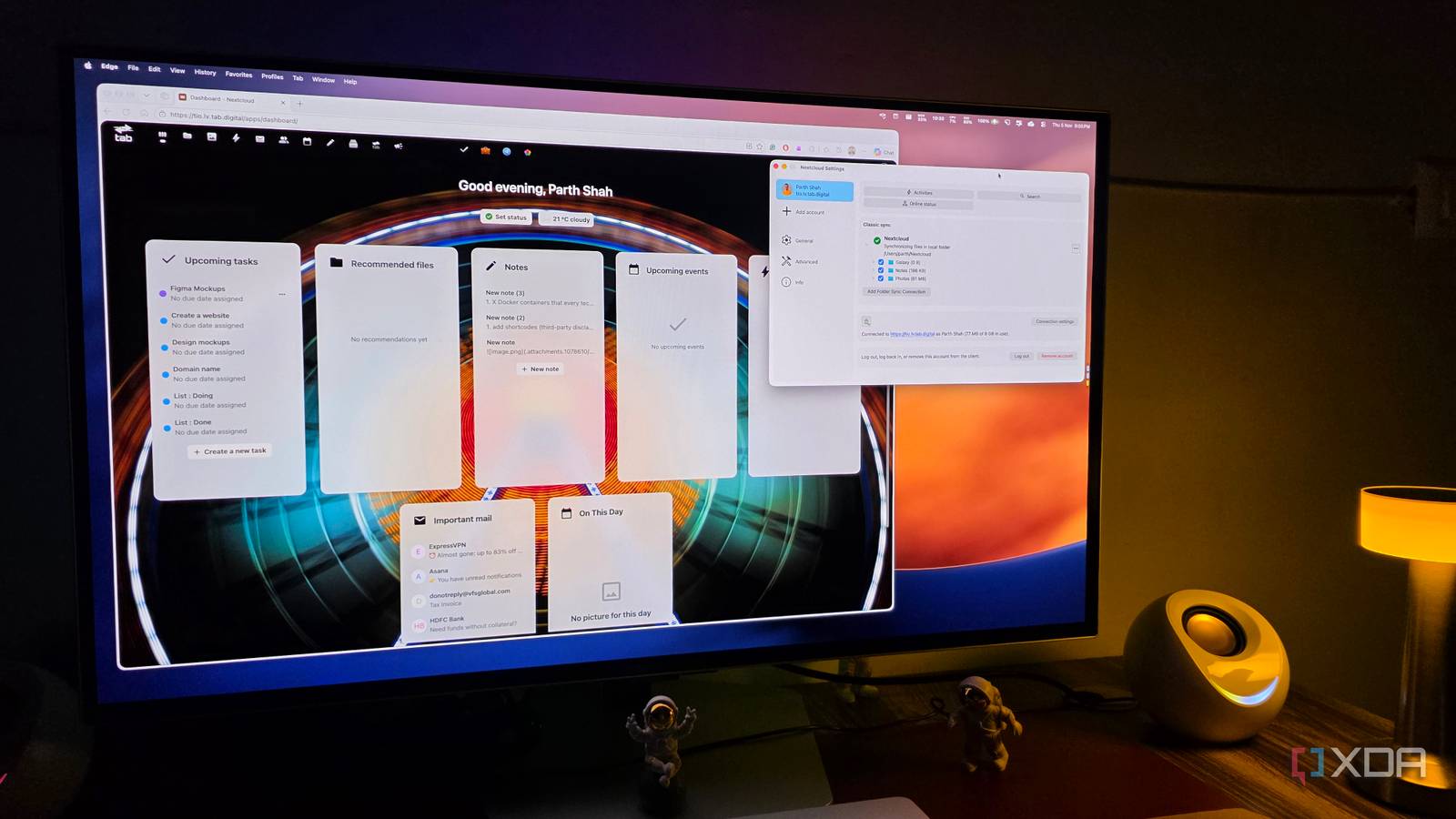
Published Nov 6, 2026, 10:01 AM EST Parth, a seasoned tech writer, wields the keyboard (or pen) with finesse to unravel the intricacies of both Windows and Mac operating systems. He has covered evergreen content on mobile devices and computers for multiple publications over the last six years. You can find his work on AndroidPolice, GuidingTech and TechWiser. Whether it’s demystifying system updates, deciphering error codes, or exploring hidden features, Parth’s prose guides readers through the binary maze. When not immersed in tech jargon, you’ll find him sipping chai, pondering the next software review, and occasionally indulging in a friendly debate about mechanical keyboards. The idea of having a single app for all my productivity needs sounds interesting. I have experimented with Notion, Microsoft 365, Capacities, Anytype, and other tools, but none of them checked every box. So, I decided to take a different approach. Instead of searching for another productivity app, I started building my own workspace using an open-source platform. With a few tweaks and the right extensions, I turned Nextcloud into a productivity hub that handles my files, notes, tasks, projects, calendars, and much more. Why I decided to build my own productivity hub And why I picked Nextcloud for the job I wanted to build a productivity system that could grow with my needs instead of forcing me to work around someone else’s limitations. The idea wasn’t simply to replace a few subscriptions. I wanted a central command center where different tools could work together without creating unnecessary complexity. That’s where Nextcloud caught my attention. Unlike traditional productivity platforms, Nextcloud offers a modular approach. I could start with file storage and gradually add project management, notes, calendars, office tools, and more through its app ecosystem. Its open-source nature and self-hosting capabilities were equally appealing. I could run everything on my own hardware, choose exactly which features to enable, and retain control over my data. Nextcloud Files became the foundation of my workspace Much more than another Google Drive alternative The first thing I did was organize my entire digital workspace using Nextcloud Files. After all, there is no point in building a productivity hub if my important documents and project assets are scattered everywhere. I created dedicated folders for Work, Personal, Clients, Projects, and Archives, with further subfolders to keep everything neatly arranged. For instance, my Work folder contains article drafts, research material, screenshots, and other editorial resources, while my Clients folder houses website assets, proposals, and related documents. Next, I installed Nextcloud native apps on my Windows PC, MacBook, and Android phone. I was surprised to see an Android app offering a Material You interface that looks modern. It even supports auto camera upload. I like how seamlessly Files connects to the rest of Nextcloud. I could open documents in the office suite, attach relevant files to project boards, and access everything from a single interface. I turned Nextcloud Deck into my project manager Notes, Calendar, and Tasks replaced three separate apps Nextcloud Deck was one of the biggest surprises during this experiment. I wasn’t expecting much from a project management tool bundled with a self-hosted platform, but it proved more capable than I expected. I started by creating separate boards for my editorial workflow, client projects, and personal tasks. Each board has columns such as Ideas, In Progress, Under Review, and Completed. For example, when I am working on a client’s website, I create individual cards for UI design, development, testing, and final revisions. I can assign due dates, add labels, attach relevant files, and move cards between columns. Once I had my files and projects sorted, I turned my attention to everyday planning. I enabled Nextcloud Notes, Calendar, and Tasks to see whether they could replace the separate apps I was using for these activities. I use Notes as a quick capture tool for article ideas, meeting takeaways, research snippets, and random thoughts. It supports Markdown, which is a welcome addition. Calendar handles my editorial deadlines, meetings, and personal appointments, while Tasks keeps track of everything I need to accomplish throughout the week. The individual apps aren’t necessarily more feature-rich than dedicated alternatives, and that’s perfectly fine. Their biggest advantage is convenience. I can check my upcoming schedule, review pending tasks, and access my notes from the same platform. Nextcloud Office handles my documents and spreadsheets I customized the dashboard around my workflow Nextcloud Office was another welcome addition to my setup. Instead of relying on Google Docs or Microsoft 365, I can create and edit documents, spreadsheets, and presentations directly inside Nextcloud. I use it to prepare article drafts, maintain project budgets, and work on client proposals. I also gave the default dashboard a personal makeover. I rearranged widgets to prioritize upcoming calendar events, pending tasks, recent files, and activity updates. Now, whenever I launch Nextcloud, I get a quick overview of my day. It’s a small customization, but it makes the entire workspace feel more organized and purposeful. Files, tasks, calendars, all working together Nextcloud has changed how I approach my daily productivity. Instead of relying on a handful of disconnected services, I now have a centralized workspace that handles everything I need. Of course, it’s not plug-and-play. There is an initial learning curve, especially when it comes to self-hosting, configuring different apps, and maintaining the server. However, if you have the right hardware and don’t mind getting your hands dirty, the rewards are massive. You get a powerful, flexible, and private productivity ecosystem that you can expand as your needs grow. For me, that freedom alone makes the initial effort worthwhile. Nextcloud OS Windows, macOS, Linux Key highlights Self-hosted, open source Nextcloud is a self-hosted alternative to Google Drive and OneDrive. iOS compatible Yes Android compatible Yes Desktop compatible Yes
I turned this open-source app into my ultimate productivity hub, and it's completely free, private, and powerful
Full Article
Original Source
Read the full article at Xda-developers →KhanList aggregates and links to publicly available news content. We do not host full articles from third-party sources. Always verify important information with original sources.