
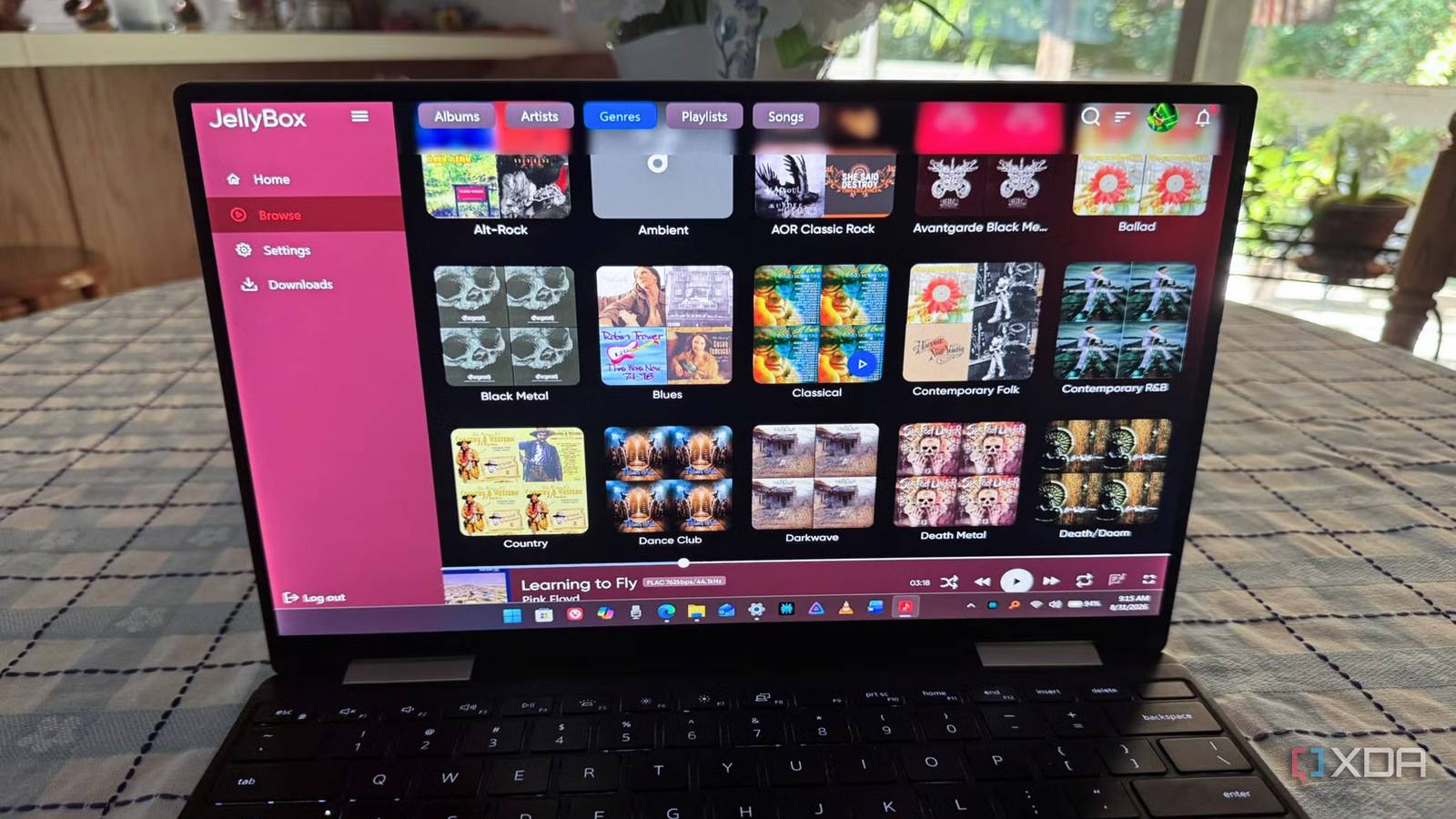
Published Sep 5, 2026, 8:30 AM EDT Based in rural Minnesota, Brian Burgess worked in IT for 10 years before finding his passion for writing about consumer technology. Brian earned his degree in computer and network technology in 2000. He held various IT positions, including help desk support, router installations for IBM, database administration, and other associate network administration roles. He's been a personal technology journalist for 18 years and has written thousands of articles about Microsoft products and services, Android, iOS, streaming, and more. He has written for notable tech sites including XDA, InformationWeek, How-To Geek, Byte, groovyPost, and others. When he is away from the keyboard, you will hear him playing guitar, working outdoors, and watching Star Trek. Music streaming services like Spotify have made listening to music easier with features such as recommendations that create playlists based on your listening history. However, I already know what I want to listen to, since I've begun ripping my CD collection to MP3, FLAC, or other lossless audio files and adding them to my Jellyfin server to play whenever I want. A new cross-platform client app called Jellybox Player aims to provide a Spotify-like experience for listening to your self-hosted music. It's available for Windows, Mac, Linux, Android, and iOS. It does one thing well — play my music files from my Jellyfin server in a modern music player interface across multiple devices. Create a self-hosted Spotify Jellybox is a music client What's nice about many alternative Jellyfin clients is that they give me access to all my media files, as Moonfin does. Other clients handle specific files, like Findroid for my movie collection on my Google Pixel. Jellybox Player focuses only on the music files on my Jellyfin server, so it can act as my self-hosted streaming music player. While the Jellyfin clients give me access to all the media, I have to dig through it to get to the music I want to hear. The Jellybox music client makes things easier by providing a music player interface and options for my self-hosted music experience. It's a lot like music streaming apps such as Spotify or Tidal, but based on a collection of music I actually own. I can browse my music collection on Jellyfin like other players. I can sort by albums, artists, genres, or search for something I want to listen to. I like that it plays my FLAC collection at full bitrate and shows all the info on screen, including the codec and sample rate. I can also download songs, playlists, and albums for when I'm on the go. I need to go through my music collection and make sure the metadata is correct and that folders and albums are separated properly. Jellybox can also display artists' bios and complete discographies. It can also display lyrics in real time if my server has them. It's something I need to take time to work on so I can get the full benefits from the client. Jellybox also works with Emby, so if you are running an Emby server, you can point the client at its server address to access your music. It also gained some features for working with CarPlay, and the developers promise Android Auto support is on the horizon. Jellybox Jellybox is a music-only client for Jellyfin that looks and works like other streaming players. Except this is for the self-hosted music that you own. Run Jellybox across multiple devices Cross-platform availability In addition to the features, Jellybox is cross-platform and works on all desktop and mobile platforms. However, it's still awaiting acceptance into the Play Store, but you can download a universal APK on your Android device from GitHub. Jellybox also doesn't have a native TV device client yet. I tried the APK on my Nvidia Shield, but it's a touch-centric interface. I was able to install it and connect to my server by attaching a keyboard and using it, or using the remote to navigate, but it isn't practical. The iPhone has AirPlay capability to send music to other speakers and devices. I find this useful since there isn't a native Apple TV version available yet. Additionally, I was pleased to learn that it works with my included assistants (Android and iOS), so I can skip between songs and manage playback controls with my voice. Several installers are available on the Jellybox GitHub page, and I found the right one for my platforms. Windows has an installer and a portable version, which is helpful since I can run it from a USB flash drive when I move between PCs. The universal Android APK is there, so I can try different Android devices by sideloading it on a Google TV box and other phones I want it on. A music player I don't subscribe to I own the music I hear Music streaming apps like Spotify, Apple Music, Tidal, and others require paying a subscription to listen to music that you don't own. There are workarounds to get your own music collections on those apps, but the steps can be tedious and don't always work. With Jellybox, I already own the music on my server, and it provides a modern player I would expect for streaming. The best part is that it doesn't require purchasing an app license or paying a monthly subscription fee. I simply point it at my server, Jellybox finds my music, and I can enjoy my tunes. I learned I need to better organize my music files and folders, get the metadata right, and include artist bios and lyrics. But managing your own media server is part of being a self-hoster, and it's something I'm glad to do for optimal listening. Building a self-hosted music streaming service with Jellybox Like other Jellyfin projects, Jellybox is still a work in progress, and it is getting new features with each update. I would like to see a few features added, and a TV-specific client would be welcome. Still, it does most of what you would want from a self-hosted music player, including playback, downloads, AirPlay, and more. It's nice to have a music player that doesn't require a subscription.
I turned Jellyfin into the Spotify alternative I've always wanted with this app
Full Article
Original Source
Read the full article at Xda-developers →KhanList aggregates and links to publicly available news content. We do not host full articles from third-party sources. Always verify important information with original sources.