
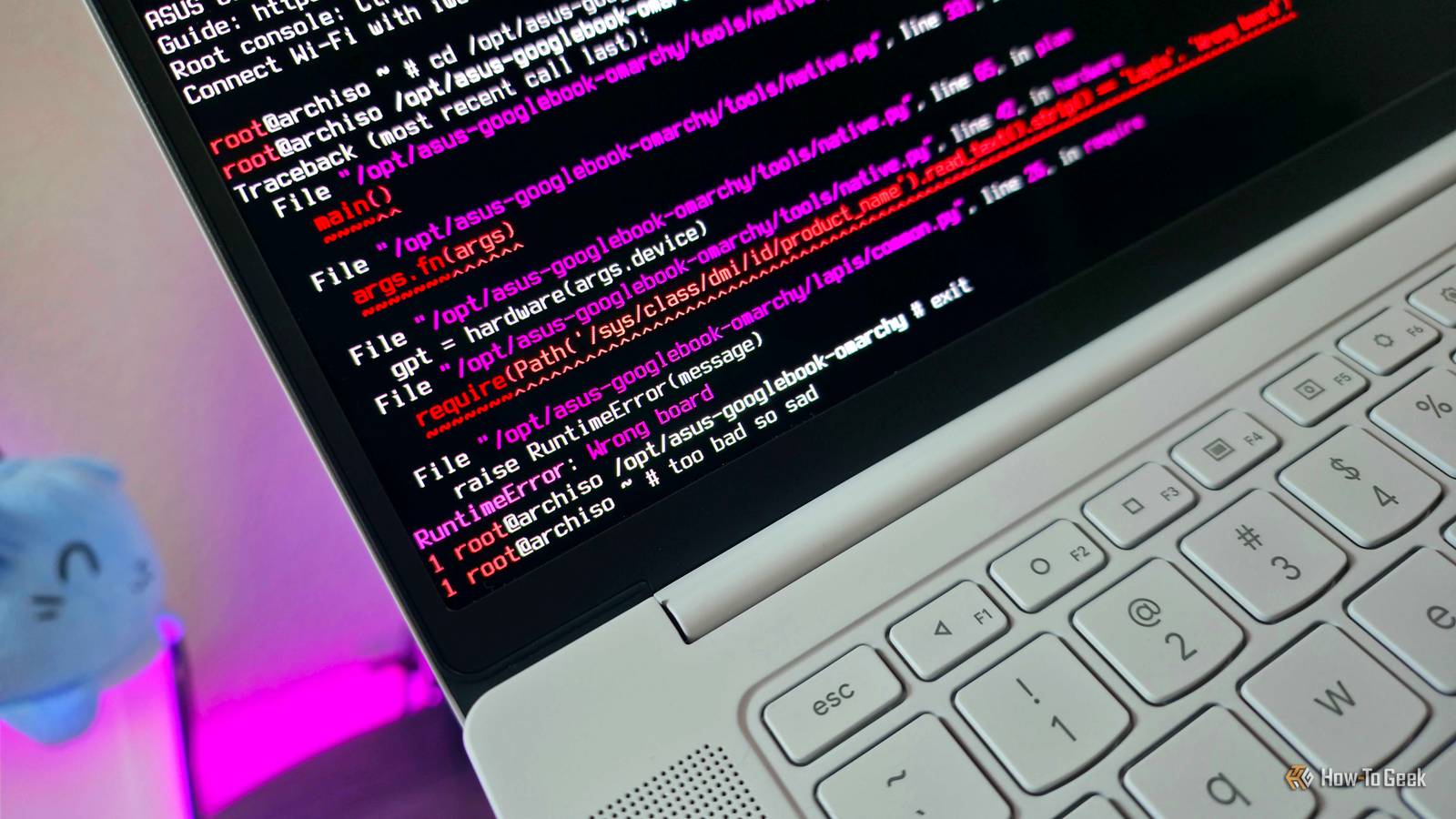
Published Nov 8, 2026, 12:30 PM EST Zachary Boddy is a seasoned journalist with over six years of experience covering technology and video games, and is now contributing to How-To Geek. Zachary's career began at Windows Central, where their long-running, deep-rooted passion as a tech and gaming nerd fueled thousands of published articles, including reviews, guides, interviews, editorials, and so much more. When Zachary isn't writing, they're playing video games, reading books, listening to music, and spending time with their family, a very food-motivated cat and an exceptionally creative daughter. Against my better judgment, I have spent a lot of time with Google's "ambitious" new computing platform, even outside my Lenovo Googlebook 15 review. Before I stepped away completely, a conversation with my colleague revealed that you can already find returned Googlebooks for hundreds of dollars off, and the poor critical and consumer reception indicates further discounts are inevitable. Each first-generation Googlebook actually boasts excellent hardware, making these laptops potentially unbeatable deals—if only they didn't run the buggy and incomplete Googlebook OS. So, I set out to install a better operating system (in this case, basically any Linux distro) on my Lenovo Googlebook 15 to see if it's worth buying these laptops. Unfortunately, my greatest fears were realized in that Googlebooks, much like Chromebooks before them, don't function like traditional laptops—but Googlebooks are even closer to your phone, and community support is in its earliest days. Unless you're an experienced Linux nerd who relishes bending technology to your will (and can accept all the risk that entails), I do not recommend buying a Googlebook with the intention of replacing Googlebook OS. The simple path to my Linuxbook, shot down It takes a little more finesse to mess with Googlebook OS I had a creeping suspicion that Google wouldn't make it easy for me to install Linux on my Googlebook, considering the platform is built on Android 17 and various parts of ChromeOS. Still, I had to attempt the easy way: creating an installation media using a USB drive and a Linux or Windows 11 ISO file, and booting from that drive. Surprise, surprise, it takes a lot more than simply unlocking the bootloader to scrape out Googlebook OS, as these laptops don't use standard BIOS or UEFI firmware like most computers. Instead, Googlebooks appear to rely on a combination of Android's A/B Fastboot and Chromebooks' Depthcharge bootloaders, which makes these laptops fundamentally incompatible with standard ISO installation media, including running a live, lightweight Linux distro directly from a USB drive. The intention with the unlockable bootloader seems to be for developers to be able to flash custom versions of Googlebook OS, similar to what Android enthusiasts have been doing for years with projects like GrapheneOS, though it may take a while for support to ramp up. Even tools for rooting that allow you to modify core system files, like Magisk, may support Googlebooks in the future, but don't right now. The tried-and-true path to a new OS for Chromebooks has been to replace the default firmware with an open-source BIOS or UEFI, allowing you to use standard ISO images, but those tools also don't work on Googlebooks right now. I have zero doubt that there will eventually be a way to easily, safely, and natively install Linux or Windows 11 on your Googlebook, but it's certainly not that simple at the moment. Still, where there's a will, there's a way, and people have found a way—just not a way for me. A desperate attempt to make Googlebooks okay Hyper-specific and a lot of work, but the potential is there I wasn't about to give up after the obvious methods failed, and looked for other ways to get Linux running on my Googlebook (no, the Googlebook OS Linux Terminal is not good enough). Sure enough, talented people have found a few ways to accomplish this without converting the bootloader, including a way to dual-boot Googlebook OS and Linux by taking advantage of Android's two-slot bootloader (although this approach does mean restoring Linux every time a Googlebook OS update rewrites the second slot). You can find that method on GitHub. The method I attempted, however, blessed me with extremely detailed documentation on its GitHub page, and felt like the more thorough, straightforward path to replacing Googlebook OS by far. It involves formatting the "userdata" partition and making a variety of necessary changes to the primary bootloader slot, but most of the work you do is in building the live USB for installing Omarchy, the Linux distro of choice for this method (although another person used this same path to install CachyOS, which you can also find on GitHub). I am unequivocally a Linux amateur, so it was interesting to learn as I went, encountering various obstacles, researching endlessly, and ultimately (and very expectedly) failing due to an obvious reason I anticipated from the beginning. This isn't a guide, though, so follow the GitHub documentation, backup your files, and be sure you know how to reinstall and recover Googlebook OS if you wish to attempt this yourself, as a lot can go wrong with these experimental, home-brewed projects. As for how my attempt went, the first step to this method is to build the live USB that essentially wraps the Omarchy ISO in device-specific Depthcharge firmware using the GitHub repository. This makes Omarchy initially capable of running on your Googlebook's RAM without a UEFI conversion, and is your direct path to a native installation. You may have already realized the two issues with this, though, with one being why this didn't work. Firstly, this method is designed with Omarchy in mind, and while I already mentioned an alternative that uses CachyOS, it's not so simple to plug in your preferred Linux distro, like Ubuntu or Linux Mint. More importantly, though, is that this method caters to one device: the ASUS Googlebook 14 my colleague reviewed. That's because every Googlebook has unique motherboard firmware built into the Depthcharge bootloader that configures your device's hardware, with each having a codename. The ASUS Googlebook 14 is "Lapis," while my own Lenovo Googlebook 15 is "Ruby." Unfortunately, I lack the skills or knowledge to know how to swap out the Linux distro, let alone the multi-step Depthcharge payload (even if I did find my Googlebook in the Depthcharge repository). I also had no idea where to begin to research how to potentially do this, and I wasn't prepared to spend any more time on the Googlebook I had already packed away once. I still wanted to push as far as I could, beginning with setting up Ubuntu inside the Windows Subsystem for Linux, spending a fair amount of time troubleshooting all the packages and tools I needed to install and update, and learning how to use PowerShell to mount a USB drive to WSL. From there, it was a fairly long (but straightforward) process of downloading the ISO, following the scripts, and eventually having a complete live Omarchy USB drive. All that was left was to attempt to boot my Googlebook from this USB drive, which obviously failed—oh! Initialization succeeded, and I was met with the stripped-down Omarchy root console, a huge step forward. The display and keyboard were fully functional, I successfully connected to my Wi-Fi, and I was able to verify the internal drive partitions and live USB integrity, all through consecutive reboots. I was feeling hopeful and tentatively moved toward a native installation... which failed on the first step due to incorrect device firmware, with no apparent way to move forward. I learned a lot and ultimately had fun, but I had to end my Linux experiments here. As is the way of the world, I discovered someone recently published a fork to install CachyOS on the Lenovo Googlebook 15, but only after this article was already finished and I had no more time to test. You can find the new path to Linux on GitHub if you wish to try, but its existence doesn't change my overall experience or conclusion that it's currently not worth buying a Googlebook with the intention of installing Linux unless you know and welcome the many risks and substantial effort involved. Googlebooks could eventually be a great deal for Linux users, but not yet Multiple people have absolutely succeeded in replacing Googlebook OS with Linux, but any method to do so is still experimental, risky, and restrictive, and comes with a host of security concerns. It's not certain when the path to a Google-free Googlebook will clear and be accessible to more people, devices, and Linux distros, but in the meantime, Googlebooks aren't the awesome deal for fantastic Linux-ready hardware that they could be in the future once community support expands. Unless you crave a lot more challenge than I do, I'd wait before pursuing your dream of a Linuxbook... or just get a Chromebook Plus and save yourself some trouble.
I tried to un-Google my Googlebook with Linux, here’s why it failed
Full Article
Original Source
Read the full article at Howtogeek →KhanList aggregates and links to publicly available news content. We do not host full articles from third-party sources. Always verify important information with original sources.