
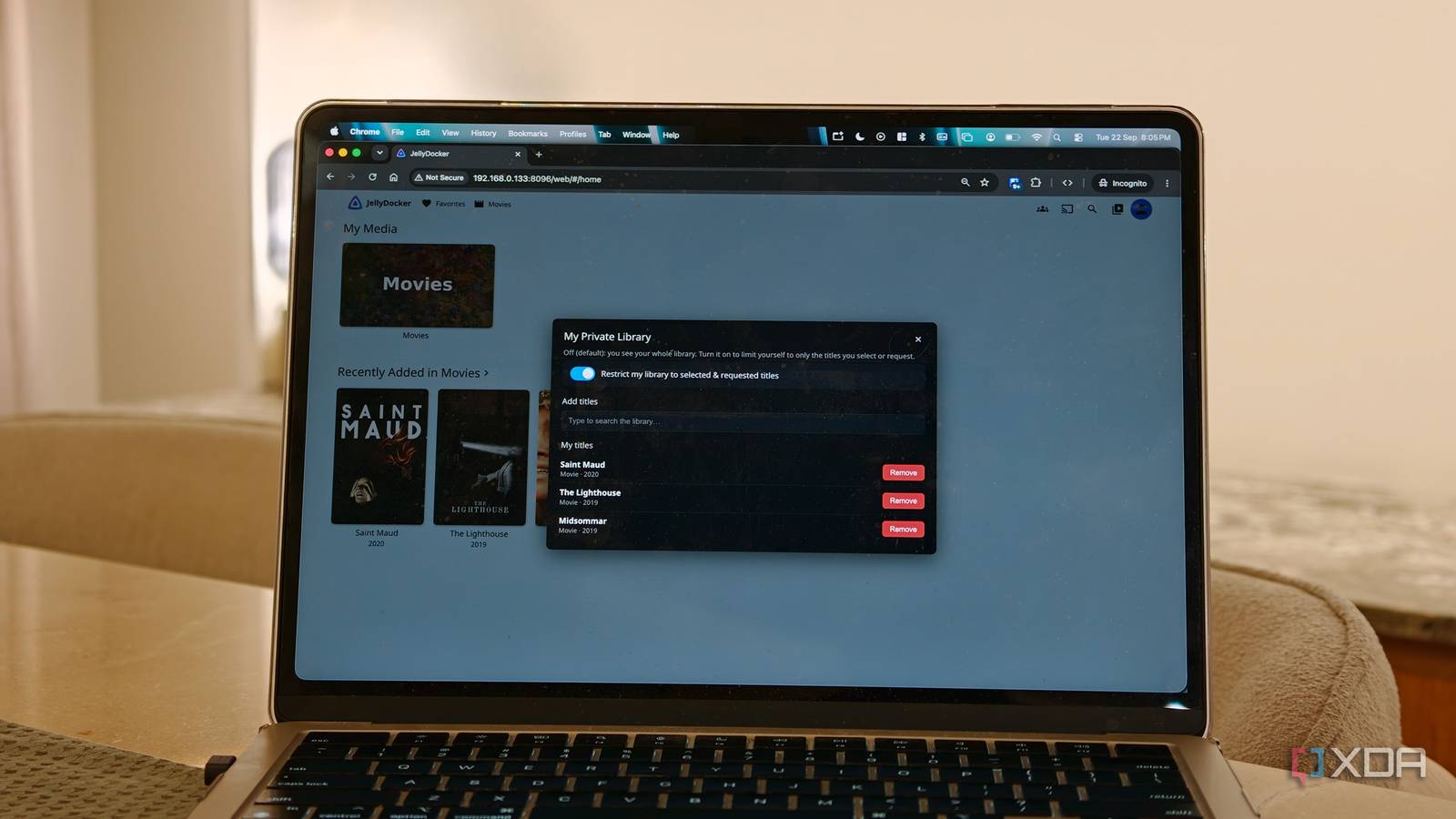
Published Sep 22, 2026, 6:00 PM EDT Dhruv Bhutani has been writing about consumer technology since 2008, offering deep insights into the personal technology landscape through features and opinion pieces. He writes for XDA-Developers, where he focuses on topics like productivity, networking, self-hosting, and more. Over the years, his work has also appeared in leading publications such as Android Police, Android Authority, CNET, PCMag, and more. Outside of his professional work, Dhruv is an avid fan of horror media spanning films and literature, enjoys fitness activities, collects vinyl records, and plays the guitar. My media library is a highly curated experience set up to meet my precise needs. I download, organize, and add movies and TV shows to the library, and Jellyfin handles playback across devices. Over time, I've given close friends and family members access to this library, which has, unfortunately, created its own set of problems. For one, I don't want everyone who has access to my Jellyfin library to see everything I have. I'm a big fan of horror cinema, but some of the gore-rich content can be a bit much for some of my friends. Meanwhile, creating individual libraries is certainly possible, but it's way too cumbersome for me to be bothered with it. Clearly, there had to be a better way to handle this. That's where JellyPrivateLibraries steps in. The app gives each Jellyfin user a private selection of media from my existing library without needing to create separate libraries. It's an astonishingly clean solution to a very common problem. Set up JellyPrivateLibraries in minutes Give every user their own view of Jellyfin Credit: Installing JellyPrivateLibraries is straightforward using Jellyfin's built-in plugin system. Just add the repository from the GitHub link, tap add, and you're done. From there, if you want, you can connect your JellySeerr instance for more granular control, but we'll get to that in a minute. Let's take a step back and discuss the why of it. Giving access to my media library has traditionally meant giving access to everything. That doesn't make sense all the time. If someone just wants an easy way to watch a few classic comedies, having them sift through a hundred thrillers is pointless. Credit: With JellyPrivateLibraries, I can create a restricted experience for individual users. Instead of creating a segregated physical library, the plugin uses Jellyfin's existing per-user tag permissions, so each restricted user gets a personal tag. The plugin then assigns that tag to individual movies, allowing Jellyfin to filter movies by user. That might sound complex on paper, but the setup is surprisingly simple. Once I enable the private library for a user, JellyPrivateLibraries adds a widget to Jellyfin that lets users manage their own content selection. There's no need to create a new library or move files around. This widget can handle all the filtering in place. Predictably, this works both ways. While a user can certainly filter out the content they don't want to see, I can also hide content from non-admin users using Jellyfin's blocked tag functionality, making it a much more sensible way of sharing a large media library. Seerr makes building private libraries almost effortless Turn requests into automatic access Manual controls are certainly handy, but the system really comes into its own when you combine it with Seerr. While Seerr isn't required for the plugin to work, it elevates the experience by combining requests, media libraries, and individual preferences into a single setup. Moreover, since I've already automated my friends' incessant movie requests, adding Seerr to the mix makes a lot of sense for me, and I suspect it does for most other users. If you're unfamiliar with Seerr, the service gives users a dedicated interface for browsing movies and TV shows and requesting that content in Jellyfin. The service connects to the likes of Radarr and Sonarr for the actual processing, but that's out of the scope of this article. What's more relevant is JellyPrivateLibraries' integration with Seerr. Once you've set up the relevant API tokens, a friend can open Seerr and request a movie. Once it is downloaded, JellyPrivateLibraries then automatically assigns that movie to the user who requested it. The plugin supports Seerr webhooks for this purpose and can even sync back previous requests. Credit: This is where the setup starts making a lot of sense. I don't have to keep tabs on who requested what and if I want it crowding up the main library. Nor do I have to wait for a movie to download and then manually find it in Jellyfin. The entire process, including the request, gets automated and saves me time and effort. Let's assume a friend has a taste for unique art house cinema. In a normal scenario, those same movies would fill up the homepage for all users once added to my library. Now, using a combination of JellyPrivateLibraries and Seerr, they can build an entire collection on my server that's visible only to them. It's great for taming a large library. Building the perfect shared media server My Jellyfin setup is central to my self-hosted stack, and for a long time, I thought I was done tinkering with it. The media downloads and playback were fully automated, and my content was fully organized. But the problem of clutter and lack of curated libraries was something that bothered me. Credit: JellyPrivateLibraries solves that without needing me to change anything else in my setup. It seamlessly integrates into my existing library and organization. I can keep one large media library, give individual users their own selection, and let Jellyfin handle the rest. I can configure it to share my entire library, none of it, or somewhere in between, and it takes me no more than a few minutes to do it. Can't beat that.
I stopped hiding movies from friends and started giving them their own Jellyfin view instead
Full Article
Original Source
Read the full article at Xda-developers →KhanList aggregates and links to publicly available news content. We do not host full articles from third-party sources. Always verify important information with original sources.