
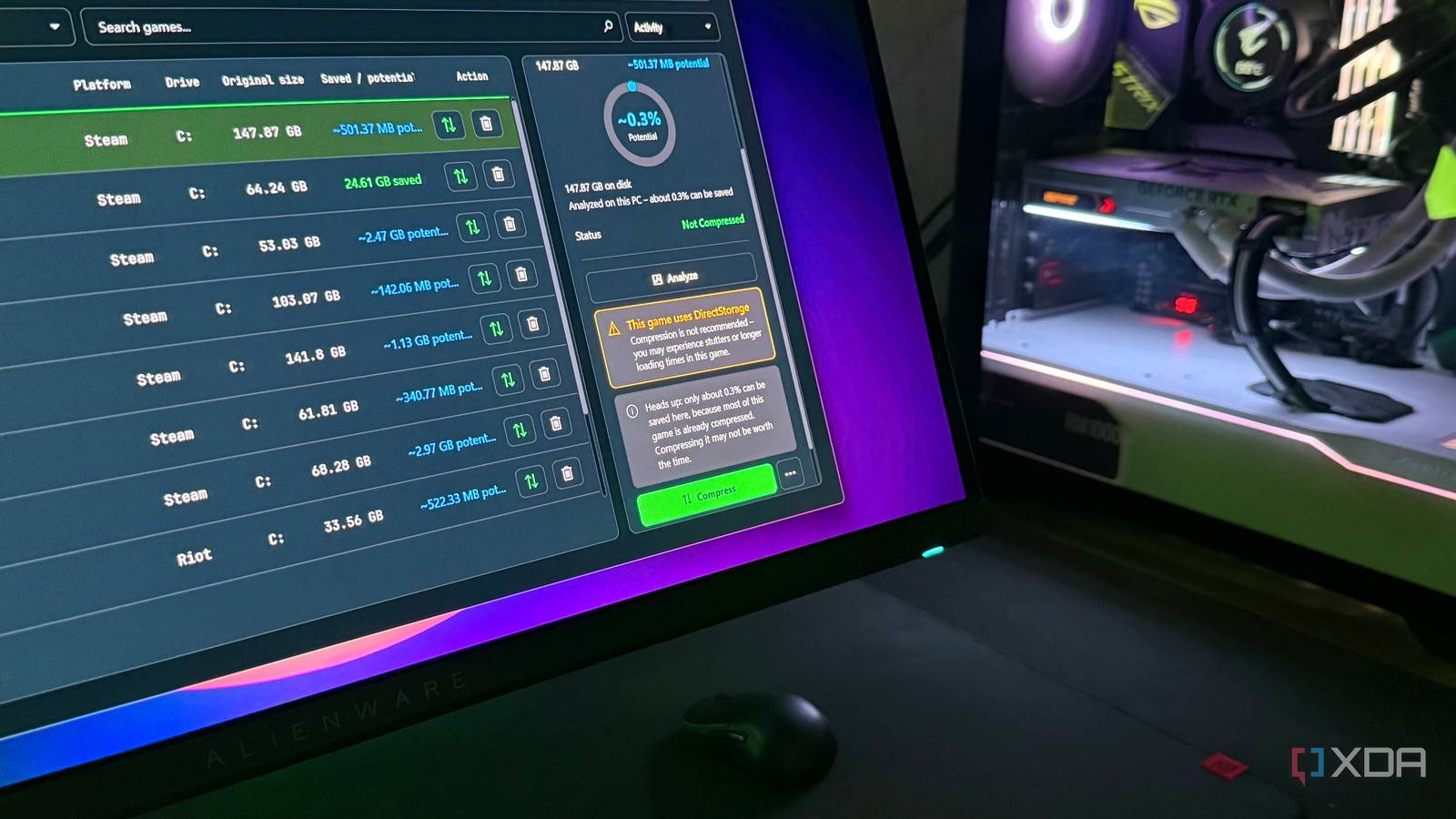
Published Oct 3, 2026, 11:30 AM EDT Hamlin has been in the tech field for over nine years. Since 2017, his work has appeared on MakeUseOf, Android Police, OSXDaily, Beebom, and more. He served as the Senior Editor at Valnet's MakeUseOf for over two years before joining XDA. He uses a high-end gaming rig for desktop use and a MacBook for traveling, but dislikes some of the quirks of macOS. You're more likely to catch him at the gym or on a flight than anywhere else. I've been using Game Compressor recently to free up some storage space on my only 2TB NVMe drive. With many AAA titles taking over 100GB these days, a 2TB SSD can feel limiting quickly. Of course, I could uninstall the games I don't need every day and download them again when I want to play, but I'd rather avoid a 100GB download if I can. That's what convinced me to pay $6 instead of splurging on overpriced SSDs these days. God of War alone gave me around 25GB back with LZX compression, and some other games came close, but the best part? I didn't see any difference in performance or loading times afterward. That said, I was careful with what games I chose to compress because not every game is worth compressing. In fact, even Game Compressor warns you against compressing games that use DirectStorage. And then there are games that don't even free up 1GB of space, making them hardly worth the time it takes to compress them. DirectStorage games are where I draw the line Because the potential performance hit is just not worth it I like LZX compression so much because it not only frees up a lot of space, but the performance overhead has also been practically invisible in the games I've compressed, like God of War and Baldur's Gate 3. Windows decompresses those files on the fly using your CPU as the game accesses them, so you can play the game as if you never compressed it. But with games that use DirectStorage, this file-system-level compression can work against it by preventing affected reads from using its optimized I/O path. Remember, DirectStorage has its own decompression pipeline, so LZX adds another layer of compression that doesn't help. This is exactly why Game Compressor warns you when you select a game that uses DirectStorage for compression. I compressed Battlefield 6 as an experiment to see what would happen, and while the game launched normally, I noticed stutters and asset-streaming delays that weren't there before. That alone was enough to convince me not to bother with DirectStorage titles again. And most DirectStorage games on my PC showed less than 1GB of potential savings, so it's not like I'm missing out on anything. Some games barely give you anything back If you're not even freeing up 5GB on a 100GB game, what's the point? I could just click Compress All, and Game Compressor will smartly skip the titles that use DirectStorage and compress everything else. But I'd still rather go through my games individually because many of them barely free up any space. Why wait hours for the compression to finish only to be disappointed with the results? A lot of games these days already ship with compressed archives, audio, video, and other assets, so there's very little left for LZX to squeeze out. I've settled on a pretty simple cutoff because of that. If Game Compressor shows potential savings of less than 5%, I just leave it alone. Sure, you could argue a few GB here and there can eventually add up, but several games installed on my PC actually show less than 1% potential savings. Battlefield 2042, for instance, can only free up 150MB, even though the game itself is a little over 100GBs. The same goes for popular releases like Assassin's Creed: Shadows and Call of Duty: Warzone, where the potential savings are in MBs instead of GBs. Considering a game this big usually takes about 15-20 minutes to compress, it's just not worth it. The games I compressed run exactly the same, though But I'd still be careful if you have an older CPU Even though I wouldn't bother compressing many games in my library, the ones I did compress have given me nothing to complain about. My frame rates and loading times are pretty much the same as before despite the extra CPU overhead from decompression. This is not me pushing you to pay for Game Compressor. You can use CompactGUI for free, or even the compact.exe command in CMD to compress games using LZX. Game Compressor just makes the process easier for me, especially since it shows which games use DirectStorage and how much space I can save before I compress them. That said, just because performance has been mostly identical for me doesn't mean you'll have the same experience. I'm using a 5800X3D, which is still no slouch for gaming, and a little extra decompression work won't make much difference when there's enough CPU headroom to spare. But if you're using a much older processor that's already struggling in CPU-bound titles, I'd think twice before compressing your games. The last thing you want is stutters just because you wanted some space. If I were you, I'd start by compressing a CPU-bound game and see how it fares before touching the rest of your library. The space you free up is only worth it if there's no catch No matter what tool you use for LZX compression, you should be a little selective about the games you choose to compress. This is especially true if you use compact.exe or CompactGUI, because you won't know which games use DirectStorage or how much space you could save beforehand. If compressing a game comes with any noticeable downside, I'd rather leave those files alone and find the space somewhere else. Remember, you always have other options, like enabling Storage Sense and cleaning up temporary files, so you don't need to touch your game files just to free up 20-30GB of space. Game Compressor Game Compressor is software that scans and compresses your game library to save storage space without impacting performance.
I saved 300GB compressing my games, but going all-in was a mistake
Full Article
Original Source
Read the full article at Xda-developers →KhanList aggregates and links to publicly available news content. We do not host full articles from third-party sources. Always verify important information with original sources.