
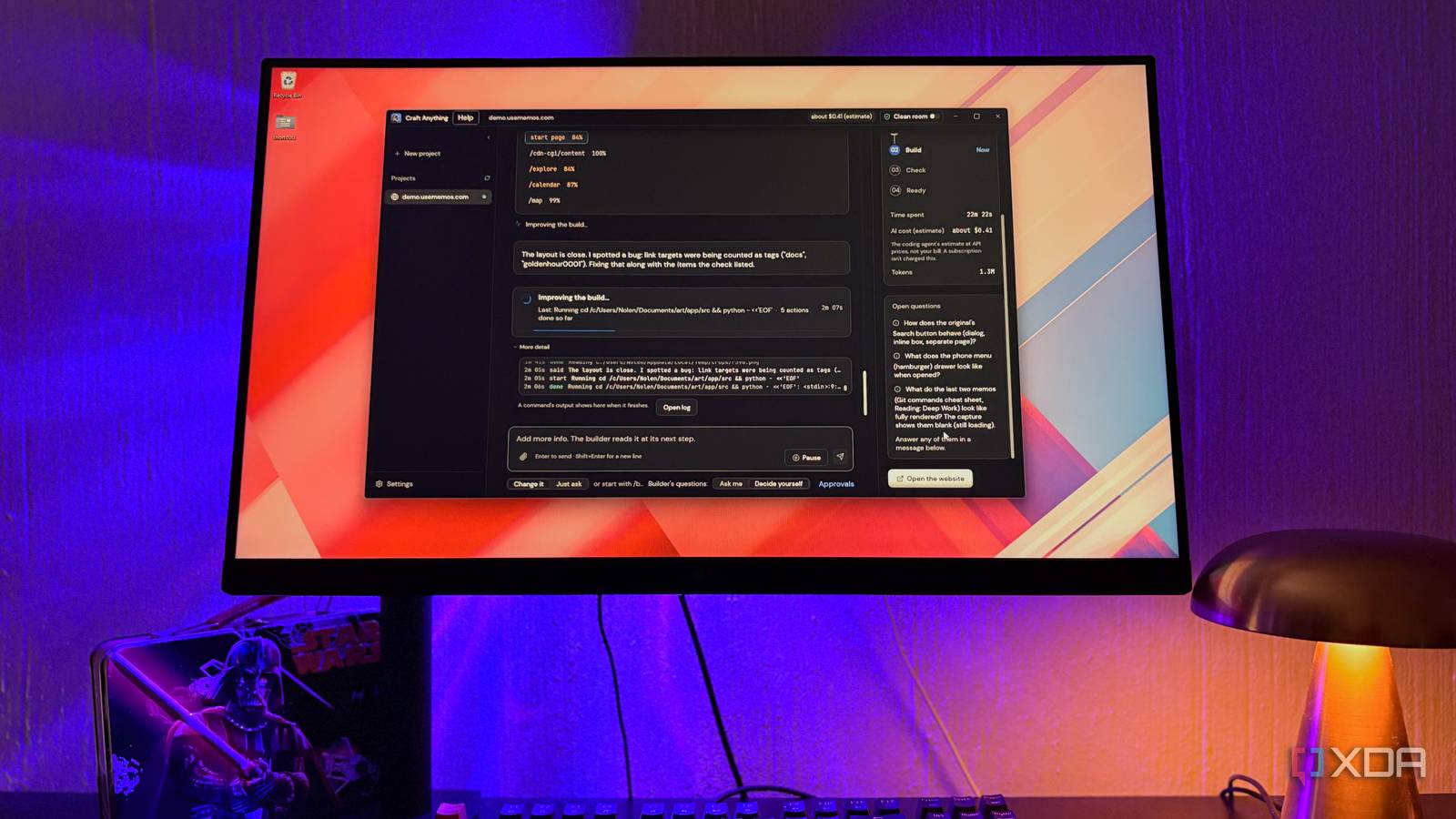
Published Nov 21, 2026, 7:00 PM EST Nolen began their writing career in 2019, with three years dedicated to editing the Creative section at MakeUseOf. Their expertise lies at the crossroads of technology and creativity, covering areas like photography, video editing, and graphic design. Outside of work, you'll often find Nolen diving into a good book, writing their own stories, or playing video games. Vibe-coding has made building a website or app feel ridiculously easy, which is the entire point. It gets quite a bit of criticism, which I think is very fair, because you're trusting AI with security holes you can't spot if you don't write code yourself, and also a product that might just be bad. But I think small utilities you build for yourself are fair game - not only do you get to make the tools you've always wanted, but it's an opportunity to learn more about the UX and development process. You've probably tried it yourself, or at least thought about it. This is exactly what tools like Replit, Lovable, and Claude Design are for. You simply type your idea, let the AI do its thing, and you have a working prototype. There's a free, open-source app builder that takes a pretty different route to the same result, though: it studies any existing website or app, and lets you build your own version of it. How the big app builders get you paying Every idea comes with a price tag All three of the big names work on roughly the same idea, where you type a prompt into a box in your browser and an AI model on their side builds the thing for you. Lovable's free plan gives you five build credits a day, capped at 30 a month, and Pro starts at $25 a month for 100 credits on top of those daily ones. Replit is harder to budget for, because its Agent uses what it calls effort-based pricing, meaning a complicated request costs more than a simple one and you don't actually know what the final cost is until it's finished working. Then there's Claude Design. It used to be the case that you needed a subscription to use it, but it's now available to free users and is subject to usage limits. The thing that all of them have in common is that you give a prompt, perhaps some reference materials, and then it builds your tool. Craft Anything goes about it differently. It comes from ArtCraft, the team behind a suite of free, open-source alternatives to Adobe apps. Instead of running AI models in its own cloud, it's a desktop app that hands the actual building to a coding agent you already have on your computer, like Claude Code, or you can plug in your local LLM if you want to keep the whole workflow private. But instead of just a prompt, you give it an entire app or website, and it does a clean-room build. How Craft Anything actually works It studies first, then builds second A clean-room build is recreating a product's functionality from scratch by observing its behavior and specifications, without ever viewing or copying its original source code. It's not exactly a new concept as reverse engineering tools have been around for a while. But Craft Anything is one of the only user-friendly ones with a GUI available that anyone can use regardless of coding experience. The first screen during setup literally asks if you want "plain words and big buttons or the full developer workbench". Craft Anything doesn't ship with any AI of its own, so it scans your PC for coding agents instead. It found Claude Code on mine, along with OpenAI's Codex and OpenCode. I stuck with Claude for my first couple of runs, but you've also got the option for a local API endpoint. From there, you choose what you want to make. You can point it at a website, app, or game that already exists, or start fresh from just a prompt, which is the option that puts it in the same category as tools like Lovable and Replit. If you're recreating something, you can pick how closely it should have the same look. Clean room, the default, only works from what a normal visitor would see on screen, while Deep mode reads the actual code and files and is meant for private use on software you're allowed to examine. Every build then runs through four stages called Study, Build, Check, and Ready. During Study, over 300 built-in inspection tools take screenshots of every page along with its menus and pop-ups, then measure the layout at desktop, tablet, and phone widths, without using AI. The coding agent then steps in to start writing the project, and the Check stage compares the result against the original page by page and scores how alike they are. If there's something that's off, the agent will go back in to fix it. And every time it wants to run a command it hasn't used in that project yet, it asks for approval. What a build actually looks like with Craft Anything You can just watch, or you have the option to steer The app I copied here is Memos, an open-source note-taking app. Once you give it your link and an optional prompt, it will post plain-language updates while it works, for example telling me it spotted links being counted as tags and was fixing that, and there's a detailed log underneath if you want to follow every step. A full build took me about 25 minutes, and most of that went to the agent writing files and then refining them after each check. But you're not completely locked out while it runs. You can still prompt it while it's running, so you can change your mind, give additional information, or reject anything you're not happy with so far, and send it. And Craft Anything will adjust accordingly without restarting the whole thing. I actually stopped mine a couple of times and redirected it; for example, I paused it to tell it to skip a check it wanted to run using a browser on my PC, and it just picked back up from where it was. The app itself costs nothing, but the building runs on your coding agent's subscription (if it's subscription-based). With Claude Code, that comes out of the same usage limits as your regular Claude chats, and my build went about 4.6 million tokens with Opus 5.5. Craft Anything estimated that at $1.39 in API prices, which isn't what I was actually charged, but it did almost max out my 5-hour usage window. My rebuild landed at 91% likeness to the original, with all 26 of its checklist items met, and it runs locally in my browser. Any website or app you like can be your starting point now We all have a catalog of sites and apps that we just absolutely love the design of, or perhaps something with a user flow you think is genius. Craft Anything lets you rebuild that for yourself, working only from what anyone visiting the site can already see, without ever touching the original's code. And you end up with your own version you can use on your own machine, which is where I think it pulls far ahead of Lovable, Replit, and Claude Design. Craft Anything
I replaced Lovable, Replit, and Claude Design with a free open-source app builder, and it's better in every way
Full Article
Original Source
Read the full article at Xda-developers →KhanList aggregates and links to publicly available news content. We do not host full articles from third-party sources. Always verify important information with original sources.