
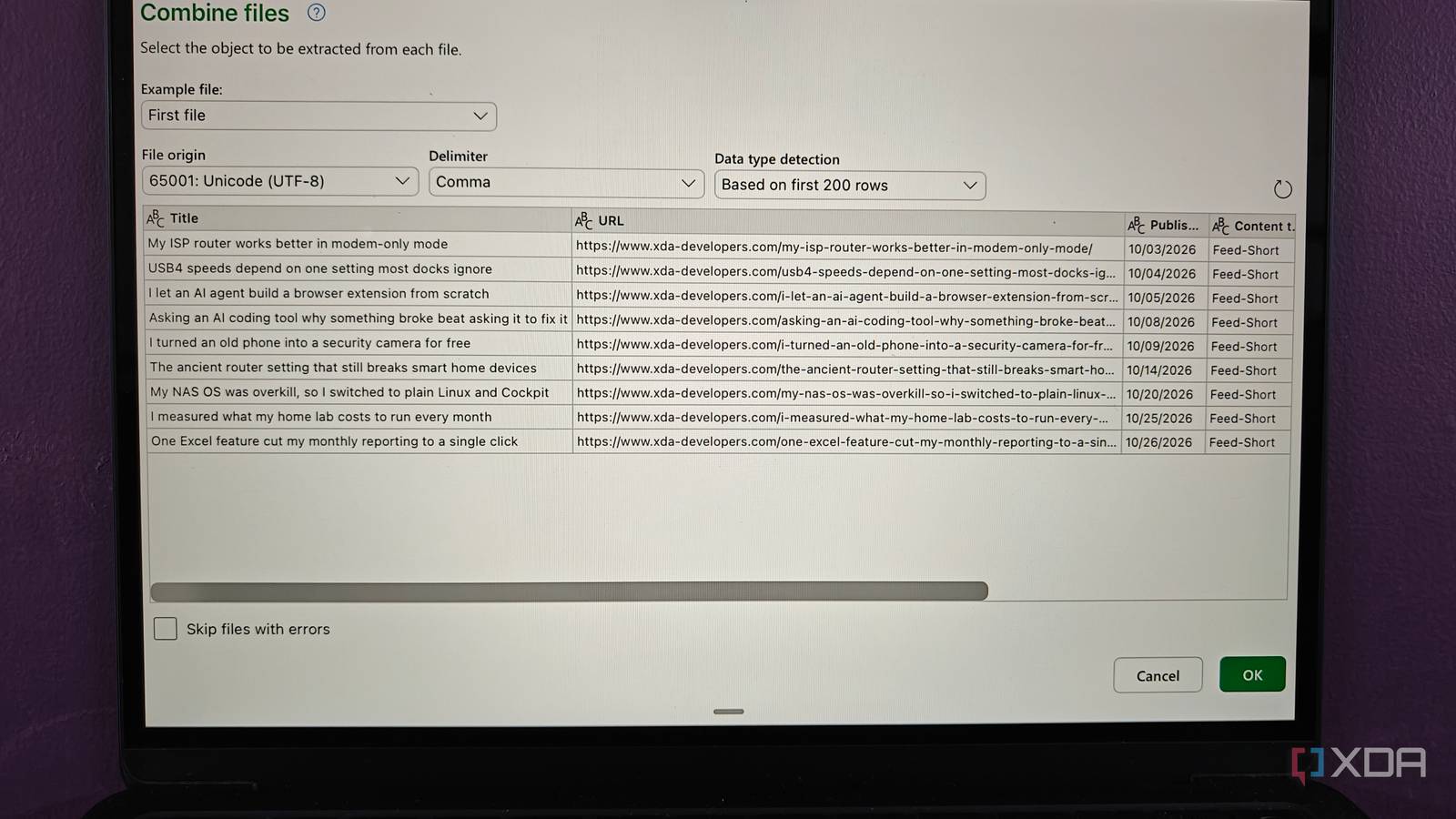
Published Nov 28, 2026, 2:30 PM EST Shivansh began his tech journey as an avid reader of tech publications, which inspired him to launch his career in video media at Sillycorns. He has led content across multiple tech YouTube channels and Instagram accounts, crafted go-to-market (GTM) strategies for Vivo, and consulted on digital growth. Coming full circle to his roots in written media, he now delivers deep-dive tech journalism. Outside of his professional work, Shivansh loves watching movies, riding bikes, and playing cricket. For years, my monthly report ran on pure patience. Each month, I downloaded every performance export. Then I stacked them by hand, and rebuilt their lookup formulas that tied the published articles to Asana cards. This was a significant amount of work that I used to do inside a makeshift database, held together with copy and paste. Now, since this was pure manual labor, there had to be some feature capable of doing all of this with just a few clicks. Power Query, sitting on Excel's Data tab the whole time, was that feature. Once I got aware of this, the six months of exports started landing on one table in under a second. For reference, it used to take 24 hours before. Now let me save your hours too. How to combine a folder of CSV files in Excel with Power Query Even when the Folder button is missing Under the hood, Power Query records each cleanup you make as a step written in a language called M, and Refresh replays every step on whatever the source holds today. A formula sheet is a mix CD you burn again every month, while a query is a playlist that picks up new songs on its own. Microsoft first shipped it as a free add-in for Excel 2010 and built it into Excel 2016 for Windows, but the full editor only reached Excel for Mac in early 2023. That's the only excuse I have for trying this super underrated feature so late. The Mac version still has a gap at the very start. The Get Data (Power Query) window offers sources such as Excel workbook, Text/CSV, XML, JSON, OData, SharePoint lists, and a Blank query, with no Folder option. Microsoft's own source table even lists local folders as refresh-only on the Mac. A Blank query gets around it. I typed one line of M, Folder.Files("/Users/…/XDA exports"), clicked Next, and approved Excel's Grant File Access prompt for that folder. From there, the Combine files button on the Content column read every CSV, stacked them, and added a Source.Name column with each file's name. Five monthly files became one 47-row table. Then I dropped November's export into the same folder, clicked Refresh All, and the table grew to 54 rows without a single paste. On Windows 11, the folder option is built in: Data > Get Data > From File > From Folder, then Combine & Transform Data. Why Power Query Combine Files shows null values The first combine looked fine until I scrolled. June through September showed null under US sessions, and only October had numbers: 47 rows, four months of blanks, and as the cliché reels say, "the math wasn't mathing." Combine files as a tool, builds its cleanup from one example file, by default the first file in the list. On my laptop, Folder.Files returned the files in the order the disk stored them rather than by name, so October came first, and October's export spelled the header US Sessions with a capital S. M is case-sensitive, so the other months had nothing to put in October's column. My first fix made things worse. I told Power Query to rename US Sessions to US sessions in every file. But a later step, Changed column type, still looked for the old name with the capital S. It couldn't find it, so the whole query stopped with this error: Expression.Error: The column 'US Sessions' of the table wasn't found. The real fix took two small changes. First, I added MissingField.Ignore to the rename. That tells Power Query to skip files that already use the lowercase name, instead of failing on them. Then I pointed the Changed column type step at the new name, US sessions. Where new columns quietly disappear Why does one capital letter break the whole query? Combine files quietly adds four helper queries, and every file runs through one of them. Its code had Columns = 8 because October's file had eight columns. Microsoft's CSV document reference says any column past that number gets ignored. If a future export adds a ninth column, Power Query will drop it without any error. I deleted Columns = 8, and now each file keeps all its columns. Column types work the same way. Power Query looks at the first 200 rows of the example file and guesses whether each column holds text, numbers, or dates. It saves those guesses in a Changed Type step, using each column's exact name. Rename a column, and that step can't find it anymore. One more Mac quirk: my first Close & Load put the helper queries on worksheets of their own, and I deleted them by hand. Merge replaces my lookup formulas, with one catch I expected it to forgive typos My second monthly chore was matching each Asana card to its published article. Merge queries does this in one step, a bit like a VLOOKUP. I chose the Task name column from the Asana export, the Title column from the performance table, and a Left outer join. The dialog said 54 of 60 rows matched. The six that didn't were cards still marked Drafted, In progress, or Submitted, so those empty results were correct. Then a Group By on the Month column gave me a six-row summary that updates itself on every refresh. The catch is that the match has to be exact. On Windows, Merge has a fuzzy matching option. It scores how alike two titles are, using Jaccard similarity. By default, it accepts any pair that scores 0.80 or higher, which would catch a working title that lost a word before it went live. But Microsoft's fuzzy-merge page doesn't list Excel for Mac, and my Merge dialog doesn't have the option. So when a title changes, that row won't match until I paste the final title into the Asana card. Is Power Query worth learning for a monthly report? Building all three queries took me about three hours. Reminding you of the reference again, my monthly routine for the same work used to take four hours. Now, after these three hours of work (which includes an hour that a capital S ate), it will take almost no time at all. Definitely a feature you need to learn and use.
I replaced a sheet full of VLOOKUPs with one built-in Excel feature, and now my reports rebuild themselves
Full Article
Original Source
Read the full article at Xda-developers →KhanList aggregates and links to publicly available news content. We do not host full articles from third-party sources. Always verify important information with original sources.