
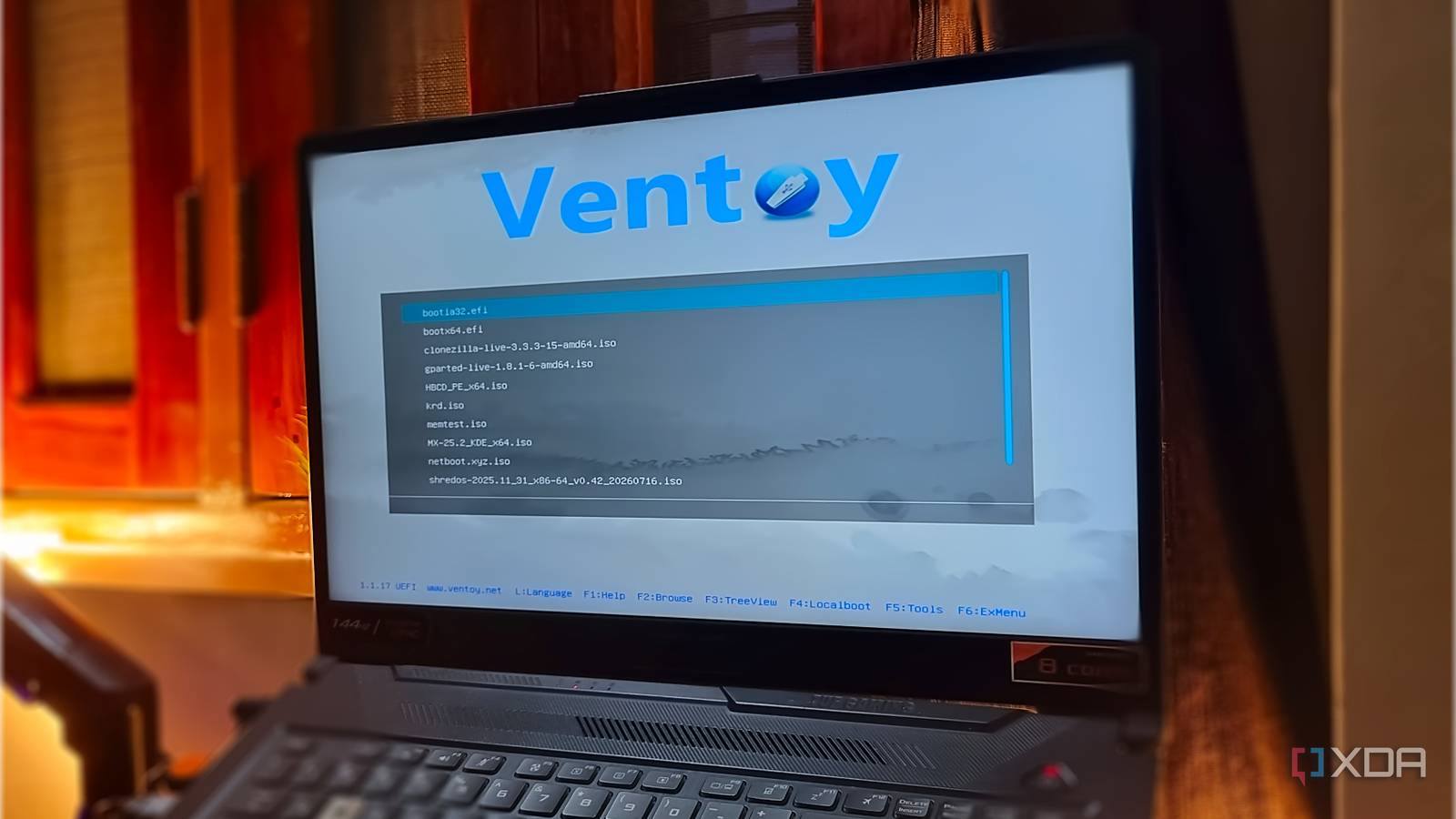
Published Sep 6, 2026, 12:30 PM EDT Abhishek is an author at XDA who covers computing. He has loved computers since he got the Lenovo G570 in 2012. Abhishek holds a master's degree in computer applications and began his writing career in 2018. He loves writing how-to articles, listicles, and informational posts on popular operating systems and web services. He closely follows the Windows Insider program and tests new Insider builds to discover upcoming experimental features and upgrades. His past work includes long-term collaborations with reputed publications like Tom's Hardware, and Windows Latest. When not writing anything, he is busy watching new episodes of One Piece or searching for something binge-worthy. Keeping a bootable USB of the current operating system is just a basic tier of protection. It brings a false sense of confidence that one day, when your computer cannot load the OS, you can use the bootable USB to wipe the existing installation and create a new one. I've practiced this approach for a decade, going from Windows 7 to Windows 10, because formatting the system drive (the one that stores the OS files) usually resolves OS-related problems. But Windows and Linux have multiple third-party tools to fix most of these issues. I keep a bootable USB drive, a one-stop solution for the most common system problems. These tools can analyze hardware, access and relocate data, check OS install issues, and solve other problems that can pop up out of the blue. Keeping this bootable drive has saved me many times, and if you don't have one, it's time to build one now. Ventoy makes the bootable USB drive concept easy Dumping ISO files of the operating systems and tools I can't ignore Ventoy because it creates a bootable USB drive and lets you run live tools from it. Ventoy is a very lightweight, visually unimpressive piece of software that can convert your USB into a multi-boot device that works with Windows and Linux. Instead of recreating the USB drive with an ISO for a single operating system or tool, you can copy the tool ISOs once and be done. Ventoy can also build a persistent USB, so you can use an OS without installation and still keep all your system changes, apps, and data after a reboot. It's a fascinating thing to use, although I keep it on a separate USB drive and not this one. As for the ISOs on the USB drive, I have two operating systems: Windows 11 and MX Linux. Troubleshooting tools are good, but I prefer having a copy of these two to spin up new virtual machines quickly or do a clean installation. The third utility is Netboot.xyz, and it's a lifesaver when you want the ISO file of an OS or distro that I haven’t copied to the Ventoy drive. A relatable example of this is when I want to set up NixOS or Fedora on a new virtual machine and don’t want to go through the whole download process. I revived one of my friend's laptops with Ubuntu, and I installed it via Netboot.xyz. The biggest selling point is that you don’t need to bulk-download and store ISO files on the limited USB drive storage. As long as you have a working internet connection via Ethernet, the tool can fetch the ISO of the items listed in its library. Hiren's Boot CD PE and System Rescue, fix troubled OS installs Packed with tools that official ISOs lack Hiren's BootCD has been around for a very long time. The original creator isn't actively involved in the project anymore, and a few enthusiasts help maintain the PE version. Sowhy not use the WinRE utilities in the ISO instead of a third-party tool? The honest answer is that the official ISO falls short of troubleshooting tools and merely acts as an installer with a basic set of recovery tools. You can format the drive, create partitions, and do a few more actions in the Windows 11 installer USB. But Hiren's BootCD PE loads an environment that's like a mini version of the OS with a GUI interface, which feels familiar even if your OS won’t boot (happened to me too many times). So you don't have to stay in the terminal and have working access to tools that could help identify the problem. For example, HWInfo can check your hardware; you can test your storage drive's health with HDDScan or CrystalDiskInfo; fix BCD issues with EasyBCD; and more. Similarly, System Rescue is a tool to fix problems with your Linux install with a set of the most useful Linux tools, like Testdisk, Timeshift, etc. System Rescue gives you the liberty to control it via the terminal mode or GUI mode (with the help of startx). Clonezilla, ShredOS, GParted Live, and MemTest for memory and storage woes Kaspersky Rescue Disk for the unpredictable malware Clonezilla is a gem I’ve been using to clone hard drives to external storage. The best part is that it works on both Linux and Windows systems. A few months back, the 500GB drive on my laptop showed signs of an imminent failure. CrystalDiskInfo scans were bad, and Clonezilla helped me copy everything to a new drive and avoid the pain of reinstalling. Many cloning tools exist, but few work when your system cannot boot. Clonezilla can work with unmounted/inactive filesystems, so it helps if that happens. GParted Live solves disk partitioning and formatting problems, with a lightweight GUI design. Installing an OS on some disks can be a pain if the disk and firmware use incompatible partition and boot modes. One of my SSDs was formatted to GPT and would refuse to install the OS, but GParted Live helped me format and partition the drive correctly. MemTest86 is good for diagnosing RAM problems, especially when you face abrupt shutdowns, application crashes, and OS diagnostic tools fail to find anything. ShredOS is based on nwipe, which itself is forked from DBAN. It’s one of the tools you rarely need until you want to fix something like a dynamic partition problem on Windows. I once ended up with a dynamic disk after partitioning my drive. The OS worked fine until I tried to dual-boot Ubuntu, but it couldn't install, citing the disk's incompatibility. DABN wiped it clean, and ShredOS does the same job but with a better interface. One time, I removed traces of all my personal data from the HDD while giving my old Lenovo laptop to a cousin for a couple of years. It's different from a traditional wipe because it actually rewrites the drive's addressable sectors with zeros rather than just deleting the file system data. If you pick a more granular method, a complete wipe can take hours or even a day. Kaspersky Rescue Disk works as an offline antivirus, and while it has a very niche use case, I prefer to keep it on my USB drive. Always prepared Countless system failures have taught me to stay prepared, and these ten tools are indispensable on my USB. I’ve got everything I need to recover files, clone drives, wipe the disk, check for memory problems, along with dedicated troubleshooting environments for Windows and Linux. Netboot.xyz removes the need to copy a new ISO file before I want to install an OS. Ventoy Ventoy is an open source tool to create bootable USB drive for ISO/WIM/IMG/VHD(x)/EFI files.
I keep a bootable USB with 10 free tools on it, and it has fixed every PC problem I have had this year
Full Article
Original Source
Read the full article at Xda-developers →KhanList aggregates and links to publicly available news content. We do not host full articles from third-party sources. Always verify important information with original sources.