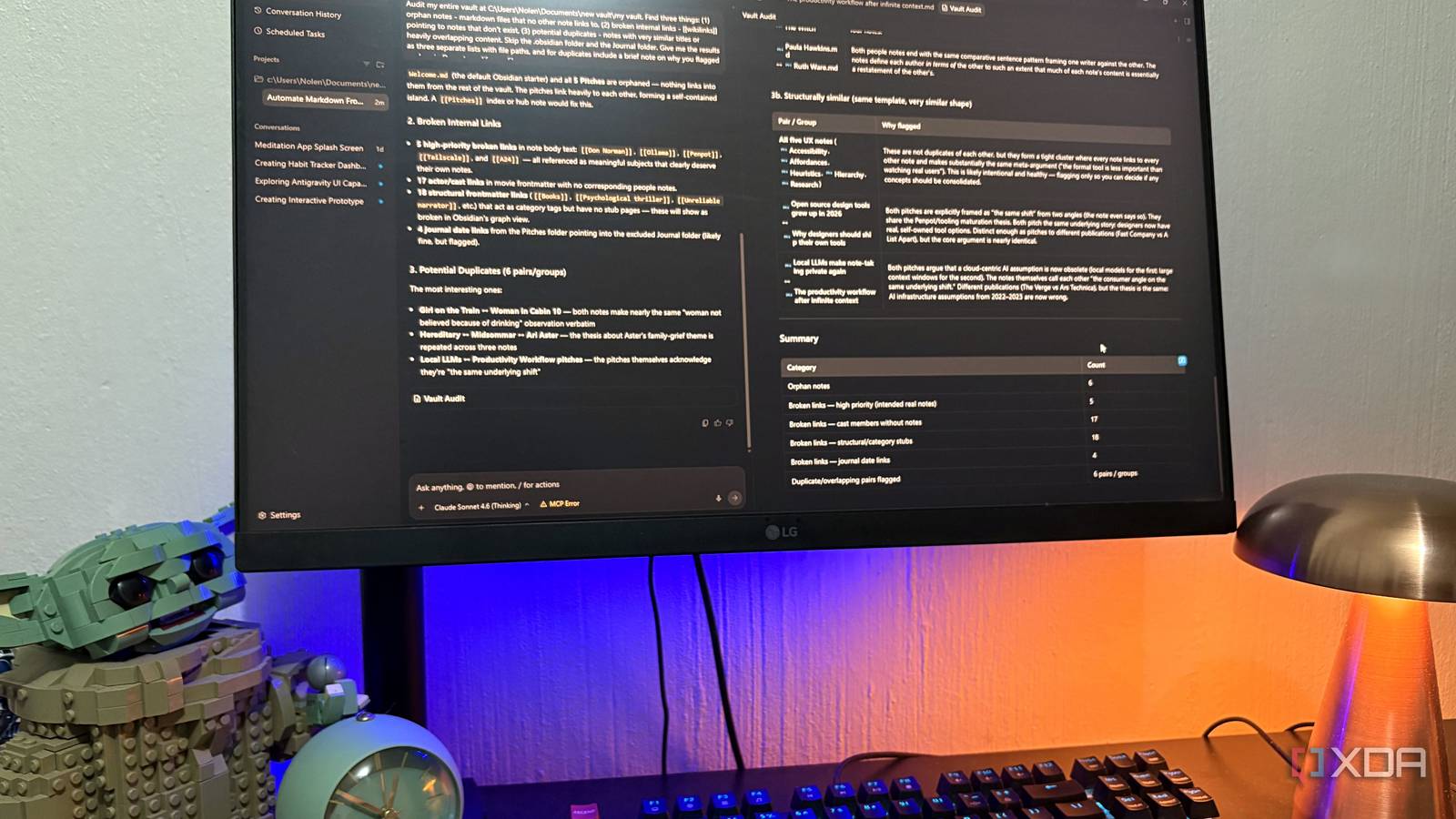
Published Jul 27, 2026, 6:00 PM EDT Nolen began their writing career in 2019, with three years dedicated to editing the Creative section at MakeUseOf. Their expertise lies at the crossroads of technology and creativity, covering areas like photography, video editing, and graphic design. Outside of work, you'll often find Nolen diving into a good book, writing their own stories, or playing video games. Antigravity got most of its early attention as a coding tool. It's Google's answer to Cursor and Windsurf, built on VS Code, aimed at developers who want agents doing the heavy lifting across their editor and terminal instead of typing every line themselves. This is a pretty easy sell if you're a developer. But there's a whole other read on what this tool actually is once you strip that framing away, because file access and terminal access aren't developer-only features. They're just the mechanism, which is useful in a lot of contexts that have nothing to do with shipping code. I already had one sort-of non-dev use running with the Figma MCP setup, which bridges design work into a coding pipeline pretty neatly. That got me curious about what else I can use Antigravity for. Turns out, it's a productivity wizard in disguise, so naturally, I set it loose on one of the things I need most help with: my Obsidian vault… Want to stay in the loop with the latest in AI? The XDA AI Insider newsletter drops weekly with deep dives, tool recommendations, and hands-on coverage you won't find anywhere else on the site. Subscribe by modifying your newsletter preferences! Giving Antigravity the whole vault to audit The first step was mapping the mess I used the standard Antigravity manager, which is the main GUI you get after installing. Not the CLI or SDK. Antigravity itself is Google's agent-first IDE, forked from VS Code, and the point is that agents can plan and execute tasks across the editor, terminal, and browser instead of just answering questions in a sidebar. You spawn an agent, describe a job, and it works through the steps on its own with a plan you can watch and interrupt. For the vault, I set it up as an Antigravity project pointed at my Obsidian folder, which is how it scopes what the agents can see and touch. Then I locked down the permissions: read access to the whole vault, write access denied on my Journal folder and the .obsidian config folder, because those are personal or system-level and shouldn't be touched. The audit itself was a single prompt asking it to find orphan notes, broken wikilinks, potential duplicates, and things of that nature. So the setup couldn't have been easier: it took ten seconds to make the project and set the permissions, and about a minute to craft my prompt. What the agent actually did was more interesting than what I asked for. It started reading files one by one, then partway through decided that manual reading wasn't going to be enough to verify its own findings. So it wrote a Python script to check its work, ran it in the terminal, and used the results to double-check the audit before presenting anything. That's the terminal integration doing something a chat AI can't. It caught its own limitation and built a tool to fix it, mid-task. The findings themselves were more thorough than I would've done manually. It flagged a set of orphaned notes, a batch of broken wikilinks, and some genuine content duplication I'd forgotten about. All packaged into an artifact document I could open, review, and act on. So it basically gave me a big report of findings that I was now able to act on, and while getting it was easy, actually putting these findings to use was a different story. Building a reusable cleanup routine right into the vault Skills are what allowed me to take action on the findings Skills in Antigravity are basically reusable instruction packages the agent loads on demand. A skill is just a folder with a SKILL.md file in it, containing YAML frontmatter and Markdown instructions, and it lives in a specific .agents/skills/ directory either at the project level or globally. The agent sees the skill's description at the start of a conversation, and if a task matches, it reads the full instructions and follows them. So instead of retyping "here's how to clean up my vault" every time, I could hand it a skill once and just say "run the vault cleanup skill" whenever. Pretty much just like in Claude Code. The move was to feed the audit artifact back to the agent and ask it to write me a vault-cleanup skill based on what it found, because the audit had already surfaced the exact problems the skill would need to solve. So there were stub notes for the broken wikilinks, an index file for the orphaned Pitches folder, and a duplicates report I could review manually. I didn't want anything auto-deleted or auto-merged, so those went in as hard rules in the skill. The agent wrote the file, saved it to the right directory, and flagged its own design choices before I even asked. One of them was building in a "show the plan and wait for approval" gate that the skill can't skip on future runs, which I thought was a good instinct because 17 actor stubs is probably something I'd want to eyeball before it happens, now that I look back. Running it was instant. The agent read the skill, planned the exact files it would create, asked one clarifying question about the actor stubs, and then produced the fixes. This all took just a few minutes and permissions. Not only is my vault notably tidier now, but the bigger win is that the skill is now sitting in the vault as reusable infrastructure. I can invoke it any time the vault drifts, and it'll behave the same way it did the first time. This goes beyond just organization though. I now have a pitch-prep skill that scans my Pitches folder against the Sent-Pitches archive to flag anything I might have already covered. A weekly frontmatter check so I don't have to think about status fields going stale. And one that watches for notes I've written but never linked into anything, which is basically how orphans get created in the first place. Google built this for developers, but the mechanism works on more than code And what it means for the productivity apps you're paying for The obvious comparison here is Claude Code, which I've used on this same vault before. Claude Code is faster for one-off tasks. But Antigravity's skills setup is where it pulls ahead for this kind of work, because the fix travels with the vault instead of living in my shell history. I don't have to remember what I ran last time. And the wider point is that a lot of what people pay Notion or similar tools for is really just structure and consistency across a pile of documents. If you already have the documents somewhere local, an agentic setup like this can enforce the structure for you without the subscription or proprietary lock-in. Google Antigravity
I gave Google Antigravity access to my Obsidian vault, and it fixed years of chaos in a weekend
Full Article
Original Source
Read the full article at Xda-developers →KhanList aggregates and links to publicly available news content. We do not host full articles from third-party sources. Always verify important information with original sources.