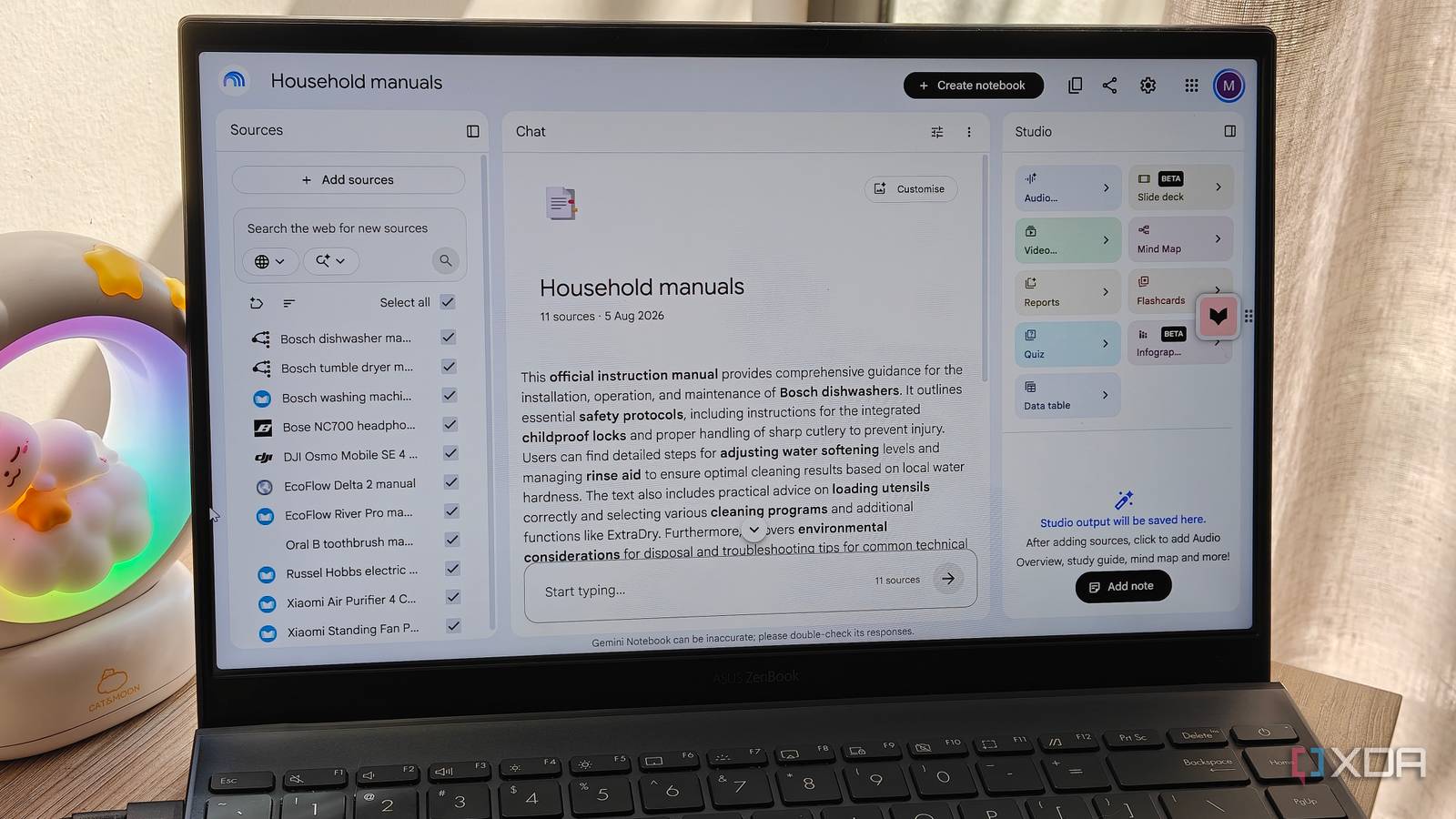
Published Aug 9, 2026, 7:00 PM EDT Megan is a Software Writer at XDA Developers who has been writing about consumer technology since 2016. With a postgraduate degree in New Media journalism, she has always been passionate about diving deep into topics and writing about them in a way that makes them easier to understand for everyday consumers. She runs her own blog called Tech Valkyrie and has contributed to Tom's Guide and Android Authority. She also worked at MakeUseOf as a Lead Editor. In her spare time she plays video games and geeks out about the latest tech. While NotebookLM (now rebranded to Gemini Notebook) is often touted as a research or productivity tool, its ability to answer questions about supplied sources makes it useful for searching through and summarizing key points in documents. This makes it well-suited to interesting use cases that leverage this source-based interactivity. Recently, I had to fish a manual out of one of my drawers to figure out a problem with my dishwasher. It took me a while to find the information I was actually looking for. Someone suggested that I try uploading the manuals to Gemini Notebook, which seemed like a nifty idea. While it started out as a bit of an experiment, it actually ended up being a whole lot more useful than I had imagined. It doesn't have to take forever to upload your manuals Just use digital copies instead When I first started planning my household manual notebook, I needed to figure out how to get my manuals into Gemini Notebook. I could digitize them using my phone's built-in document scanning feature, but it would be time-consuming. This is when I remembered that most major devices have online manuals available. I used a variety of sources to obtain PDF copies of my device manuals online. Some of these came directly from the manufacturer website, but most came from Manualslib.com. I then used the URL of the PDFs to add them to Gemini Notebook as sources. One thing to note, though, is that when you import sources this way, Gemini Notebook simply uses the URL as the source title. This can get messy and confusing, especially for links that don't contain keywords. As a result, I renamed the sources I added immediately after uploading them to tell them apart. The most time-consuming part of the process was finding the manuals for all the products I own. Notably though, a few of the older products I had, like my handheld clothing steamer, did not have an online manual. In this case, I would need to find the original manual, digitize it, and add it to my notebook. I uploaded manuals for my smart home devices, like my TV, TV box, air purifier, and smart fan. I also uploaded manuals for my portable power stations, dishwasher, washing machine, tumble dryer, electric blanket, wireless earphones, and smartphone gimbal. I even added the manual for my electric toothbrush. Once I had all my manuals uploaded, that's where the magic happened. Gemini Notebook now makes troubleshooting devices seamless I can also quickly reference specs After uploading my manuals to Gemini Notebook, I decided to test out its ability to provide troubleshooting answers and find information about device features. Despite the many disparate sources in my notebook, I was surprised by how quickly the AI found the information I was looking for. To see whether it could provide accurate troubleshooting suggestions, I asked it about a scenario I recently faced with my dishwasher. I asked it why some of my dishes were still dirty after a wash cycle, and it provided the answers I had found in the manual. Except this time, it took only a few seconds to identify the problem, compared to the 30 minutes I spent thumbing through the manual trying to identify it beforehand. I then decided to experiment with some questions about my device features. This included my headphones' battery life and how long my toothbrush was meant to last on a single charge. I also asked it about the loud fans on my portable power stations and whether I should be concerned when they turn on. Finally, I used the AI to actually get advice on how to save electricity when using my tumble dryer. I haven't looked at its manual in years, so it was actually helpful in providing information I'd long forgotten. I have a habit of ignoring certain device features because remembering everything they can do — and what all the buttons on my appliances mean — is difficult for me. But now I feel like I have a way to make that information less overwhelming and more easily accessible. It's not a perfect solution, however The source view could be better As much as I'm impressed by Gemini Notebook's ability to make my sources more digestible, actually viewing these sources on the website is difficult. Sometimes it renders the source legibly, but other times the formatting makes it mostly illegible. So you need to visit the original site again to see the PDF properly. This can be annoying when you're trying to find a specific citation, since opening the PDF in a new window won't show the highlighted text. A better source view is one of the things I'm hoping Gemini Notebook will improve, since right now it feels suboptimal. There are also times that the diagrams in manuals will prove more useful than an explanation. For example, when I asked the AI where the power button on my headphones was, it could only identify which side it was on, but not which of the two buttons on the right ear cup it was. The AI also gave me a written description of where the heat exchanger is on my tumble dryer, but I needed to check the original manual to make sure I was looking at the correct component. Overall though, using Gemini Notebook with my device and appliance manuals makes me feel like I have my own support desk. And because the responses are grounded in my sources, I feel much more certain about the advice given than I would with a general internet search. Turn Gemini Notebook into your own support hub If you're looking for more ways to use Gemini Notebook, I'd suggest using it as a support hub for your household gadgets and appliances. I've wasted so much time looking for advice on old devices when I could've just uploaded the manuals to an AI tool and used it to answer my questions. It also doubles as a useful repository for digital manuals for your devices, so you can access them when you need to reference them. NotebookLM is Google’s AI-powered research assistant that turns your uploaded documents, notes, and sources into an intelligent, conversational workspace that helps you connect ideas, summarize insights, and generate new ones.
I fed NotebookLM every manual for every device I own, and my house got a support desk
Full Article
Original Source
Read the full article at Xda-developers →KhanList aggregates and links to publicly available news content. We do not host full articles from third-party sources. Always verify important information with original sources.