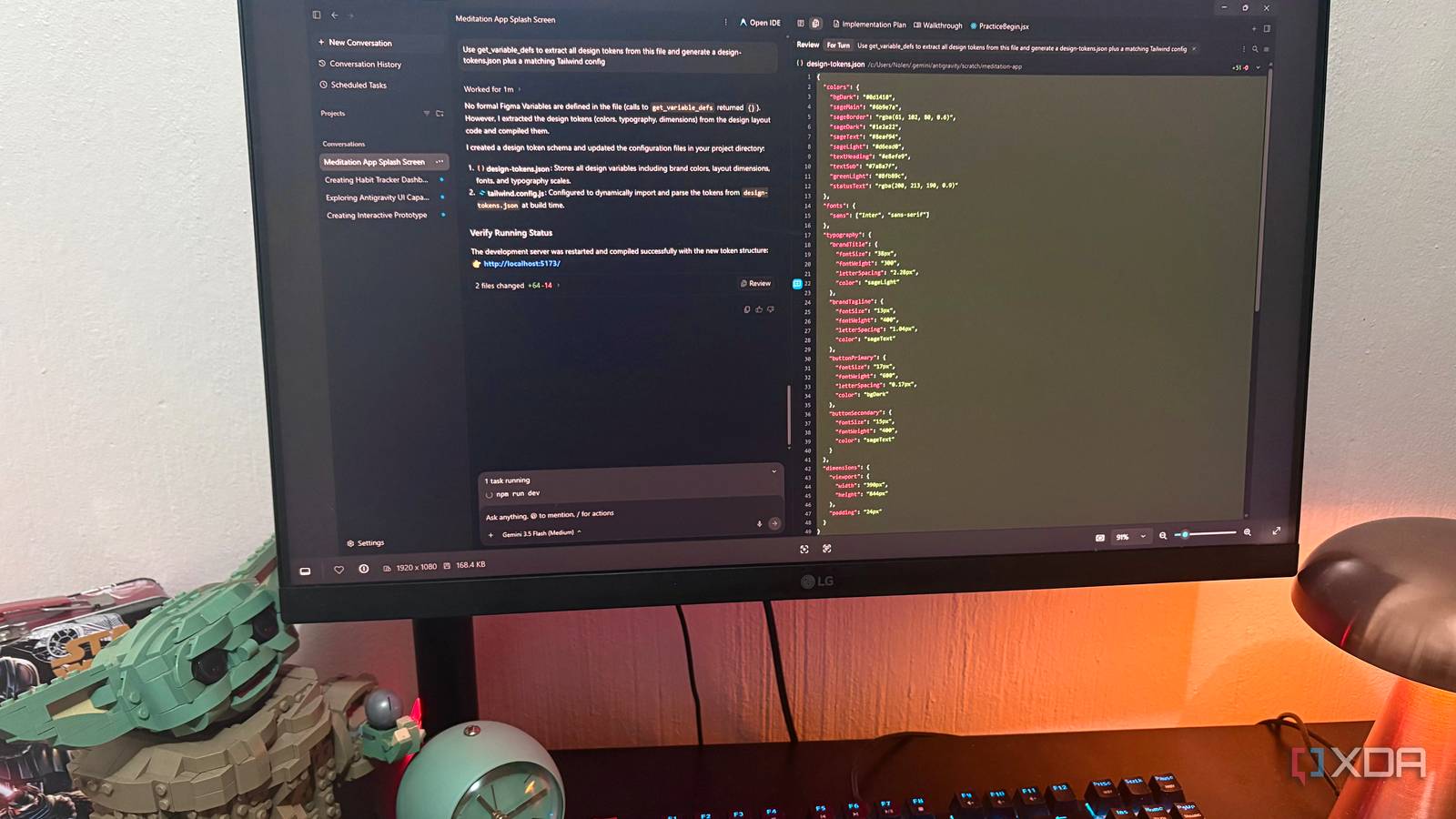
Published Jul 26, 2026, 10:30 AM EDT Nolen began their writing career in 2019, with three years dedicated to editing the Creative section at MakeUseOf. Their expertise lies at the crossroads of technology and creativity, covering areas like photography, video editing, and graphic design. Outside of work, you'll often find Nolen diving into a good book, writing their own stories, or playing video games. Antigravity's been getting a lot of attention in the coding space since Google dropped it, but it barely comes up in design circles, which is kind of strange because it might actually be one of the better things to happen to a design workflow this year. It's agentic, GUI-first, and the whole appeal for someone who doesn't live in a terminal is that you don't really have to think about it as a coding tool at all. The piece you actually need to make this useful in a design workflow is a Figma MCP connector. Once that was in place, Antigravity could read my designs as structured data and the workflow it opened up ended up being more useful than I'd figured going in. I've been putting it through its paces over the last week or so and here's what I found… Want to stay in the loop with the latest in AI? The XDA AI Insider newsletter drops weekly with deep dives, tool recommendations, and hands-on coverage you won't find anywhere else on the site. Subscribe by modifying your newsletter preferences! Setting it up is as easy as a few clicks But the plan you're on decides how much you can actually do with it Setup was almost a non-event. Antigravity has a built-in MCP Store, and you just go to Settings > Customizations, search for Figma, and hit Add. While that's installing, you will need to open the Figma desktop app, then bring up the Quick Actions menu (Ctrl + K), search MCP, and tick "enable desktop MCP server". You might have to refresh the connector in Antigravity or even restart the whole thing. But from there, they should be connected. The one thing worth knowing upfront is that Figma actually has two MCP servers. The remote one runs in the cloud, and the local desktop one runs inside the Figma desktop app itself. I was on the desktop server for everything you see here, and tools like get_variable_defs for design tokens are desktop-only. Plan-wise, the remote server works on all seats, but the desktop server needs a Dev or Full seat on a paid Figma plan. I gave Antigravity a Figma design and got a real app back Why this is different from a Figma prototype, even though it looks the same at first The workflow itself is embarrassingly simple. I had a small onboarding flow for an app in Figma - a splash screen and three destinations off it (a practice screen, a log in screen, and a guest mode screen) - and I selected all four frames and told Antigravity to build an interactive mobile web version of them, matching the design tokens exactly. It reasoned through the whole stack on its own and spun up a Vite React project, installed Tailwind, wired up state-based navigation between the four screens with working back buttons, and locked the viewport to 390 by 844 so I could preview it as a mobile frame in the browser. Three minutes of thinking time and it was live on localhost. So why not just use Figma's own prototyping mode? A Figma prototype is a demo, but this is a product. A prototype lives inside Figma - you can share a link, people click through it, and that's the end of the road. What Antigravity gave me is a real web app on real infrastructure. I could push it to Vercel this afternoon and it'd work on any phone in the world. The fidelity is also higher than the prototype; Figma prototypes don't scroll like real apps, don't respond to real touch, and animations feel slightly off. What I'm looking at in the browser is the actual rendering engine. The bigger thing, though, is that designers can ship now, not just spec. Going from a Figma file to a running web app without writing a line of code was science fiction two years ago. And because it's real code in a real project, I can now hook that Log In screen up to actual auth, wire the meditation timer to real state, and iterate on it as a product instead of a picture of one. The workflow nobody's talking about I asked Antigravity for criticism Once the app was running, I asked it to compare the running code to the Figma file and tell me where they'd drifted apart. Three seconds of thinking time and it came back with a proper design QA report. And I want to make it clear that this wasn't nitpicking - it caught real, meaningful visual bugs. For example, the gradient positioning was off, which changed the whole mood of the background. Layer offsets that were intentionally asymmetric in Figma had been centered perfectly in code, which is exactly the subtle designer-intent thing that gets flattened in handoff. Typography was close but wrong on both size and letter-spacing, and where Figma had used gradient SVGs, the code had faked it with CSS shapes. All of it was stuff that would've taken me an hour with the Figma inspector. So the story isn't that AI writes perfect code from designs because it doesn't. It's more that it writes about 90% correct code and then audits its own work against the source of truth. I asked for design tokens and got a whole system Another use case I wanted to play with was pointing Antigravity at the same Figma file and asking it to extract every design token and generate a JSON plus a matching Tailwind config. The Figma MCP has a handful of tools for this kind of thing; it actually ships with six tools, but get_variable_defs is the one that handles variable extraction specifically. Here's the catch though: that tool only returns tokens if the design actually uses Figma Variables, and most designers (me included) hardcode hex values and mean to systematize later, which doesn't always end up happening. So it came back empty. But instead of throwing its hands up, Antigravity reverse-engineered the token system from the code it had already generated. It grouped everything semantically, gave things proper names, and produced a real design-tokens.json with a matching Tailwind config wired to import from it at build time. So I got a design system as a byproduct of building the app, and I've got the JSON now ready to reuse across future projects. For anyone with an existing codebase who wants a design system without hand-copying hex codes into a config file, this alone might be worth setting the MCP up for. The gap between designing and shipping is closing I didn't expect much from this connector going in, but ended up with a build, a review, and a design system. All these workflows are basically the same thing wearing different hats, and for designers, this is the combo that closes the gap between design and code. Figma Google Antigravity
I connected Google Antigravity to Figma with MCP, and it turns my designs into working code in minutes
Full Article
Original Source
Read the full article at Xda-developers →KhanList aggregates and links to publicly available news content. We do not host full articles from third-party sources. Always verify important information with original sources.