
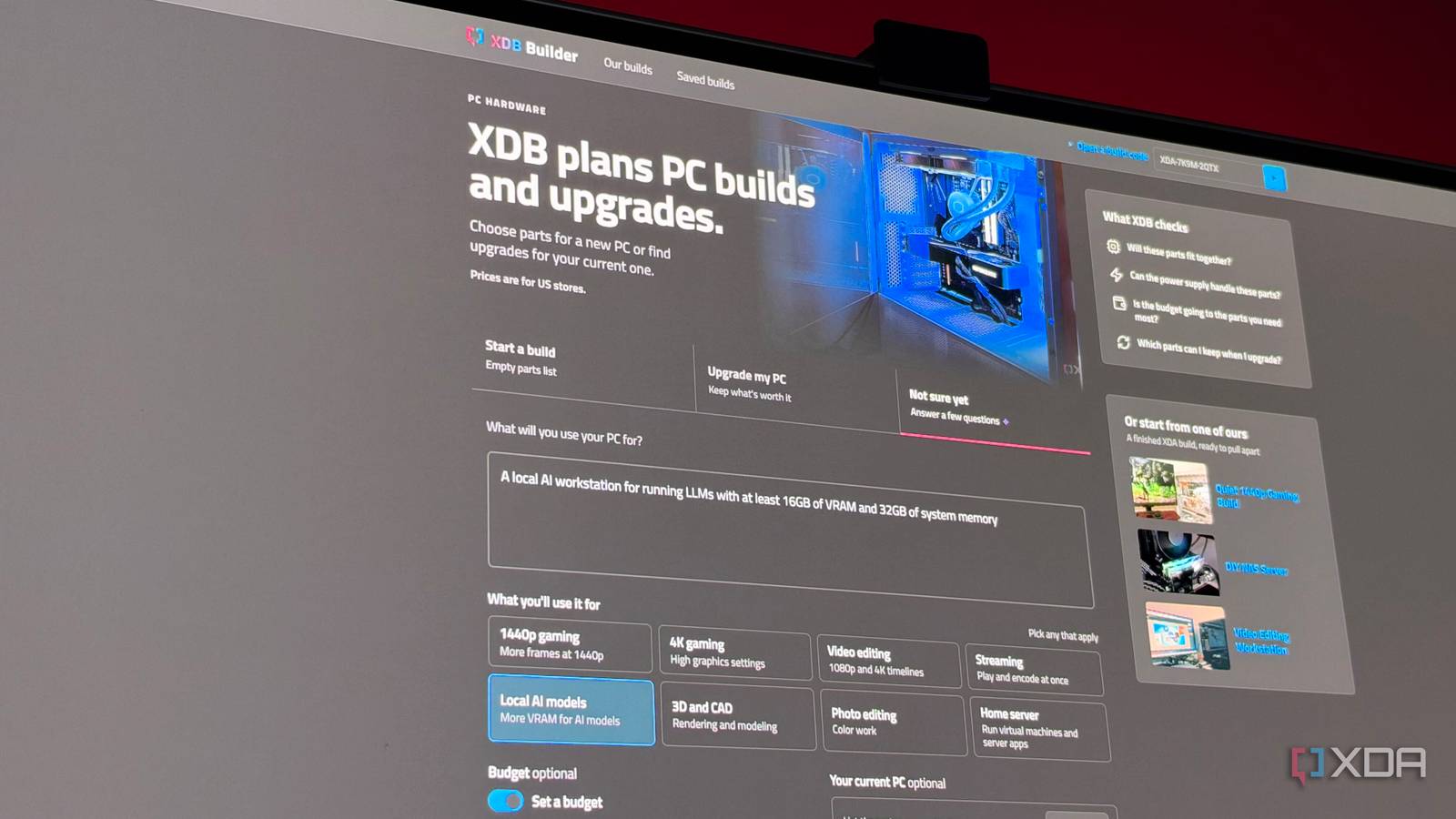
Published Nov 5, 2026, 12:01 PM EST His love of PCs and their components was born out of trying to squeeze every ounce of performance out of the family computer. Tinkering with his own build at age 10 turned into building PCs for friends and family, fostering a passion that would ultimately take shape as a career path. Besides being the first call for tech support for those close to him, Ty is a computer science student, with his focus being cloud computing and networking. He also competed in semi-pro Counter-Strike for 8 years, making him intimately familiar with everything to do with peripherals. Building a local AI workstation out of consumer parts is only getting more expensive, and doing it entirely on your own can whip up enough browser tabs to make your head spin. Between trying to build something capable while also staying within a budget, it's easy to miss something, and all it takes is one missed spec you didn't account for to completely derail your build's compatibility. XDB is XDA's PC building planner, and not only does it take on all the T-crossing and I-dotting that needs to go on in a PC build, but it also can help you plan a build from the ground up. Gaming builds are the obvious application, but it's great for putting together builds for specific workflows, and can be done in a few minutes with a good prompt. Parting out a local AI workstation with XDB How to tell XDB what you're aiming for XDB works great when you know exactly what you want, and there are options for the big-picture build types: a normal PC, gaming PC, PC for creative work, and a NAS build. But if you want something purpose-built that targets something very specific, it can help with that, too. If I want to put together a build to use as an AI workstation, it's as simple as prompting XDB for the kind of workloads I wish to run along with what kind of performance I expect to get, and it can decide based on those parameters what kind of horsepower I'll need. I don't quite have the budget to get an RTX 5090, but if I want to run the kinds of models that are particularly capable in a home, I'll need a 16GB card at the minimum to handle said models at decent quantization and context window length. Before I let XDB work its magic, though, I need to set a budget. With the budget toggle off, XDB will only select parts based on what you ask for, so a VRAM-heavy request with no budget could land you back in 5090 territory. I set mine to just over $2,500, which should give me enough memory to do what I need while still being reasonable for a workstation. What it suggested was well configured The best you could do given current prices Once I gave XDB the go-ahead to put my system together, it landed on a pretty solid collection of parts for an AI workstation. The graphics card is the biggest line item, as it should be: an XFX Swift Radeon RX 9070 XT 16GB at $900. It’s a smart pick for a system like this. Its 640GB/s of memory bandwidth is well ahead of the 448GB/s on an RTX 5060 Ti 16GB and the 320GB/s on an RX 9060 XT, and it's one of the best ways to get a 16GB capacity without breaking the bank. Attached to the GPU is a helpful card that reads: "The XFX Swift runs local AI tools through ROCm. Ollama, llama.cpp, LM Studio, vLLM and ComfyUI list it as supported; some workflows are tuned for NVIDIA first." This is a very useful tidbit to know if you're putting together a system like this for the first time and don't know what kind of software gaps exist in the ecosystem. It's true that a lot of local AI workflows are developed with CUDA as the primary platform, but AMD's ROCm is very usable for an at-home setup, and tools like llama.cpp also support Vulkan, which on RDNA 4 cards like this one often generates tokens faster than ROCm can. The rest of the build: an Intel Core Ultra 7 270K Plus ($325) on an ASRock B860M-H2 board ($90), cooled by a Cooler Master MasterLiquid 360 Core II ($50). Then 32GB of Patriot Viper Elite 5 memory ($480), a SanDisk Optimus 5100 SSD ($299), a be quiet! Pure Power 12 power supply ($90), and an NZXT H5 Flow case ($70). That’s $2,304 total, leaving $196 of the budget unused. The two sticks of 16GB memory costing more than the Core Ultra 7 certainly hurts, but it's a reasonably priced build that came in under budget for what I was shopping for. How to make the build your own XDB is quite flexible The two changes people will most likely want are switching to Nvidia and dropping in a used card, and both are possible with XDB. XDB offers the Nvidia switch as a one-click option: an Asus TUF Gaming RTX 4080, which currently goes for $794 more. It’s worth knowing what that money buys. The 4080 also has 16GB, so it won’t run bigger models than the 9070 XT. What you get is about 12% more memory bandwidth (716.8GB/s versus 640GB/s) and CUDA, which is still the cloth from which most AI tools are cut. It also pushes the total to $3,098, which is well past the budget. That switch button is just XDB finding and filling in the cheapest Nvidia equivalent, which happens to be a 4080 at the moment. If you want to select a component yourself instead, you can click "Change" or "Manage" on any of them, and that will bring up a menu for you to do to. You can even prompt XDB from this menu to give you components that fit specific parameters. For example, if I want to make sure a motherboard has Wi-Fi, I can prompt XDB to only suggest motherboards with Wi-Fi. A used card is a very reasonable option for a build like this, and you can work it in. You can simply take out the current card by clicking "Manage" and then "-". From here, you'll have to manually do the price calculus for which card you want to use. If I fill in an RTX 3090, which is an excellent candidate for a build like this, there are no current price listings from retailers for XDB to pull from, so it shows the price as unavailable. Most used cards you'll be targeting will probably have the same unavailable price, but you can always just omit a card altogether in the planner if you know what you're going for. XDB can help you put together a system, no matter the use case XDB’s job is to take an idea, like “I want to run local AI”, and turn it into a list of parts that fit together, get enough power, and stay within budget. With a clear request and a set budget, it delivered a complete local AI machine for about a quarter of the 5090’s current price, and makes it easy to adjust further.
I asked XDB to build a local AI workstation without spending RTX 5090 money
Full Article
Original Source
Read the full article at Xda-developers →KhanList aggregates and links to publicly available news content. We do not host full articles from third-party sources. Always verify important information with original sources.