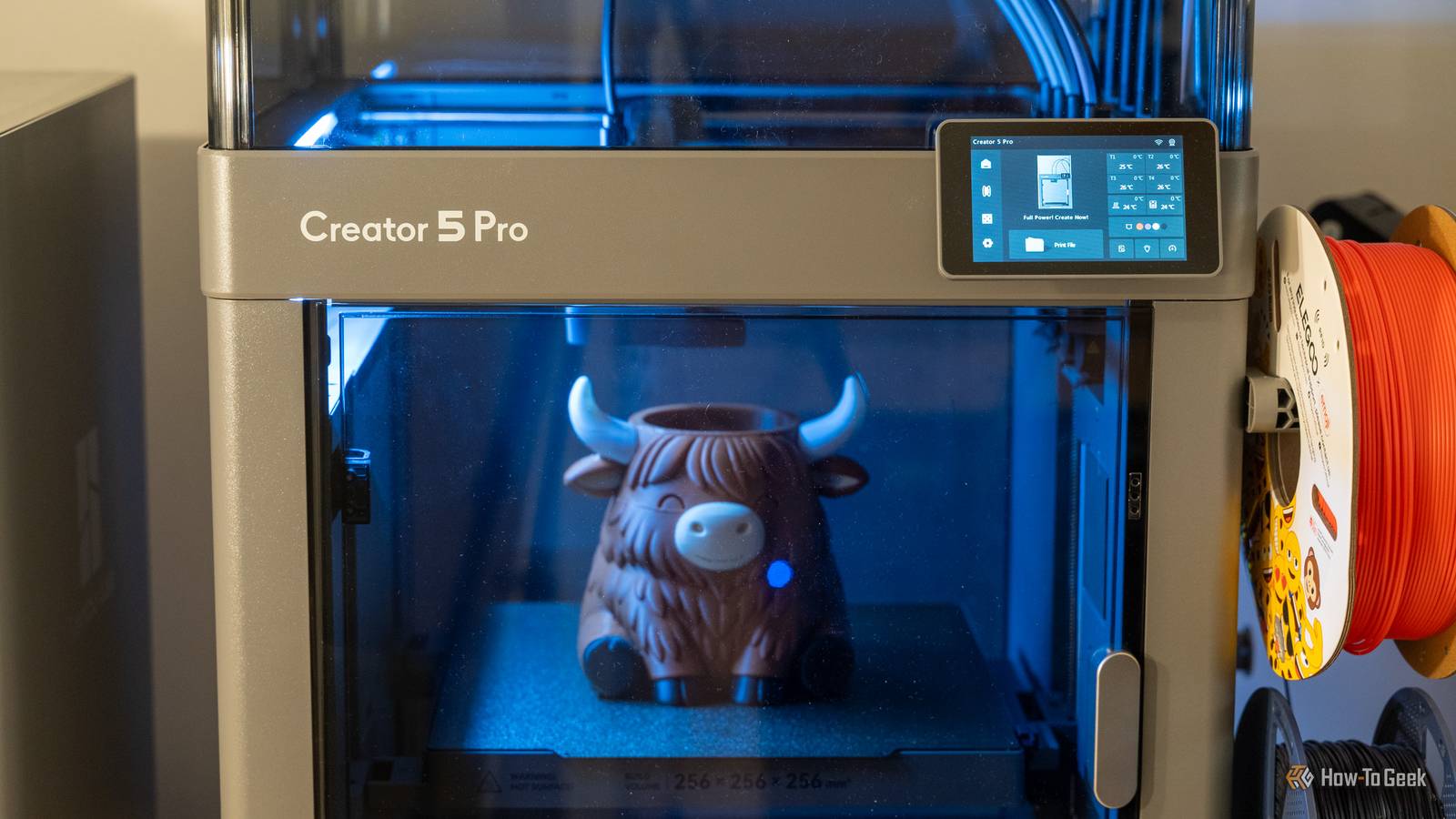
Flashforge has been a stalwart in the 3D printer industry for many years now, but the Creator 5 Pro is the 3D printer to put them back on the map. With a heated (and HEPA13 filtered) chamber and four independent direct-drive print heads, the Flashforge Creator 5 Pro will be what ushers in a new era of 3D printing, and I'm here for it. FlashForge Creator 5 Pro 8/10 Brand Flashforge Build Volume 256 × 256 × 256mm Connectivity USB, 2.4GHz/5GHz Wi-Fi Heated Build Plate Yes As FlashForge's first toolchanger 3D printer, the Creator 5 Pro boasts a lot of unique and powerful features. It can travel at up to 600mm/s with its CoreXY design, and features full auto calibration from start to finish. It also has four independent toolheads that allow it to run four separate colors or materials without the purge waste of traditional multicolor printers. With an enclosed build chamber and active chamber heating up to 65C (with HEPA13 filtration), the Creator 5 Pro can also handle engineering-grade filaments with ease. Pros & Cons 4 toolheads offer multi-material and multi-color with less waste Sub-10 second filament changes Great printing quality Heated and purified chamber Software and UI/UX could use some updates Changing the physical filament is a bit cumbersome Price and Availability The Flashforge Creator 5 Pro is available directly from Flashforge and Amazon from $949. The Creator 5 can be purchased from either Flashforge or Amazon from $799. Specifications Brand Flashforge Build Volume 256 × 256 × 256mm Connectivity USB, 2.4GHz/5GHz Wi-Fi Heated Build Plate Yes Feed Type Direct drive Dimensions 520 × 443 × 710mm Weight 18kg Top Print Speed 600mm/s Max Extrusion Flow 32mm³/s Max Plate Temperature 120°C Max Print Temperature 320°C MULTICOLOR PRINTING Yes, up to four colors This multi-head printer makes multicolor prints no longer wasteful 50% less filament waste and more than 30% faster than my other printer Credit: Patrick Campanale / How-To Geek While I've had a multicolor capable printer for several months now, I have typically avoided larger multicolor prints because of the waste they generate—especially for smaller models. One time, I sliced a small multicolor model and would have spent three times the filament in purge waste as I would have for the full model. Now, doing larger production runs of models does cut the waste-per-model down. But, in a home environment like I often use my printers in, I'm just printing one model at a time. So, I have always avoided complex multicolor prints. The Flashforge Creator 5 Pro changed all that for me. The Creator 5 and Creator 5 Pro feature four independent nozzles that are always loaded with filament. While traditional 3D printers with multi-material units (MMUs) have to pull the old filament out, push the new filament in, and then purge the old filament out of the nozzle to change the colors, the Creator 5 series does not. Instead, it just parks nozzle one, grabs nozzle two, and starts printing again. No purging, no reloading filament, no waiting. Each nozzle change takes under 10 seconds (typically around 7 seconds) to complete. Credit: Patrick Campanale / How-To Geek There's a lot of benefit to having multiple nozzles, but it really shines in multicolor and multi-material prints. For example, my brother-in-law loves highland cows, and he also loves plants. So, when I found a highland cow planter model, I knew I had to print it for him. I started by slicing the print on my P1S with an AMS to see how long it would take to print, and how much filament it would take. 19 hours and 18 minutes for time, and a total of 128g of filament purged (including the prime tower). I then sliced the same model with the same settings on the Creator 5 Pro, and it shows 12 hours 42 minutes, and 62g for the purge tower. Now, had I been more comfortable with the printer, I could have purged into infill or even purged into supports instead of printing a prime tower. There's also ways to reduce the filament usage for a purge tower. Had I chosen to use another method of purging (or, even just did no prime tower at all because it's not really required on the Creator 5 Pro, just recommended), then my waste material would have been 2g for the entire print. Every print on the Creator 5 Pro purges around 0.5g of filament per color, and that's the equivalent of the "poop" that Bambu printers do before starting a print. Sadly, there's no way around that, but I can live with 0.5g of filament purged at the start of a print if nothing else is purged during the print. However, the multi-head design doesn't always save time or filament. Another example of a model I printed with the Creator 5 Pro, which came out fantastic, is these USA 250th anniversary coasters. The coasters use three colors and print in roughly the same amount of time on both my P1S and Creator 5 Pro. There are only 10 filament changes total, which means it only purges around 2g of filament, while the Creator 5 Pro goes through around 1g of filament for the prime tower. So, on a smaller model with only a few filament changes, the time and filament use is quite comparable between a single-head and multi-head printer like the Creator 5 Pro. However, when you start to push into larger models that have hundreds of filament changes, both the time and filament savings really start to add up. Both models are perfect for multi-material and multicolor printing The Creator 5 Pro adds an enclosure and chamber heater though Credit: Patrick Campanale / How-To Geek There are two 3D printer models in Flashforge's latest series: the Creator 5 and Creator 5 Pro. Both models share the same core features, including the CoreXY design, the four independent print heads, and a 256 x 256 x 256 build volume. This makes both models perfect for multi-material and multicolor printing. Both models also share the same direct-drive extruder, meaning you could feed four TPU spools into the printer without an issue. However, the Creator 5 Pro that I'm reviewing here does take things up a notch from the base Creator 5. It features a fully enclosed build chamber, active chamber heating, and a HEPA13 filter. Which model is better for you depends on what you plan to print. Both will have the same print quality for basic filaments like PLA and PETG, though, so do keep that in mind. You'll need a lot of vertical room for this printer And it's not optional Credit: Patrick Campanale / How-To Geek I keep my 3D printers on a custom-built desk next to my main work desk. I have quite a bit of vertical room above it because I didn't have space to build a second shelf, so the Creator 5 Pro fits there perfectly. The problem is, not everyone will be so lucky. The way Flashforge designed the Creator 5 Pro requires a lot of vertical height. In fact, it sticks up nearly a foot taller than most similarly-sized printers. It's only a little taller than a P2S with an AMS on it, but the thing is, the extra vertical height isn't optional. Overall, it's around 28 inches tall from top to bottom. Thankfully, you don't really need to access the top much once it's assembled, but it does make it a bit more complicated when trying to fit multiple of these printers on a shelving system. It's still difficult to find replacement parts, even after launch You can't even buy replacement nozzles, let alone different-sized nozzles While the Creator 5 lineup hasn't fully rolled out at the time of this review, more and more users are starting to get their hands on the printers and there are still no spare parts to be found. In fact, I've seen users who had broken nozzles for one reason or another struggle to get replacement nozzles from support. I'm not sure what's going on with the replacement parts side of things, but Flashforge definitely needs to improve that. If a 3D printer is available for purchase on Amazon, you should offer some type of replacement parts if using proprietary components, as Flashforge is doing here. As it stands, not only are replacement parts like extruder motors, fans, or heaters not available, but simple things like replacement nozzles aren't available, either. You also can't find larger or smaller nozzles for the system, though they "should" be coming at some point soon, from what I've seen. So, if you rely on 0.25mm, 0.6mm, or even 0.8mm nozzles to print your parts, I wouldn't go for the Creator 5 Pro yet, even though I love the printer. Only 0.4mm stock nozzles are available. No RFID filament system is a bit of a let-down And the loading/unloading system leaves a lot to be desired Credit: Patrick Campanale / How-To Geek While RFID systems are not necessary to print, they do make it so much simpler to load filaments and configure settings. With printers from Bambu and Elegoo, you can either tap the RFID tag or just insert the spool into the AMS, and the printer automatically knows what the filament is. The printer doesn't just detect the type of filament, like PETG or PLA, but also the color. This information allows both the printer and slicer to automatically configure the settings like nozzle temperature, airflow, and more for that filament without you having to lift a finger, really. On the Creator 5 lineup of printers, the lack of an RFID reader is the least of my worries, though. Loading and unloading filament is a royal pain, to put it lightly. I love that each print head has its own direct drive motor. This means that there's no motor at the inlet where the filament is inserted, so you have to manually push the filament up to the print head, or pull it back from there. I'm fine with that. What I'm not fine with is the loading and unloading procedure. To load filament, you have to push it all the way to the print head, then reach into the printer and depress the filament cutter to open the filament head for the filament to be pushed another few millimeters before it is caught and ready to load. Unloading the filament is just as annoying. To unload, you have to reach inside the printer, awkwardly grab the print head off its magnetic mount, push the filament cutter yourself, and then place the print head back on its mount. I can't tell you how frustrating this entire system has been to use since day one. It actually took me quite a while to figure out how to load filament, since I'm used to every other printer where you just push the filament until it stops moving and then it loads it automatically from there. The problem is, I don't see how Flashforge could fix this, as there's no system internally where it could pick up a print head and then run it into the filament cutter as other printers do. While I love most of what the Creator 5 Pro has to offer, filament swaps are by far my least favorite part of using this printer. The prints are gorgeous, but the user experience leaves a lot to be desired. The touch interface could use a lot of improvement Thankfully, that can be fixed in a future update Credit: Patrick Campanale / How-To Geek The last Flashforge 3D printer I used was the Adventurer 4 Pro back in 2023, and I was not very impressed with it at all. The overall experience with the printer I had back then was fairly poor, and the interface (and slicer) turned me off of Flashforge basically until the Creator 5 Pro. The Creator 5 Pro's interface has come a long way since the Adventurer 4 Pro I used three years ago. It's much more modern, and reminds me a lot of the Elegoo Centauri 2 and Bambu Lab P2S interfaces, though I feel like Flashforge is a lot less mature than the other two brands are as far as UI/UX design goes. The biggest gripe I have with the interface is that there is a pop-up that comes up when a print is finished, and the pop-up has to be dismissed before another print can be started. I have had multiple times where a print has finished and I've grabbed it off the plate, cleaned the build plate, and then set the build plate back in. Then, I left the office for a few days as it was the weekend or I was just working outside the office, and I wanted to start a print. Thankfully, remote printing is a feature of the Creator 5 Pro through the Flashforge app and through Flash Studio. However, if that little "Ok" button isn't tapped on the screen, you can't start a print. Period. There doesn't seem to be any way around this annoyance, but it's something that Flashforge could fix in a future update. If you can build a habit to click the "Ok" button whenever you're done with a print, then this won't affect you at all. But, since I have so many printers from so many other brands, and no other brand requires this, it's just not a habit I've formed. Flashforge, please fix this. Should you buy the Flashforge Creator 5 Pro? Credit: Patrick Campanale / How-To Geek The last few sections might sound like a lot of complaining, but I really do love the Flashforge Creator 5 Pro. The biggest gripe I have that can't be fixed is filament swaps, and that's really not a big deal—it's just annoying. For $949, the Creator 5 Pro is only $50 more than Bambu Lab's X2D Combo, while offering way more capabilities. It has a heated chamber, four independent nozzles, and a built-in multi-material system instead of requiring an AMS. The print quality I've gotten out of the Creator 5 Pro is superb, and I have zero complaints there. If you're looking for a 3D printer to do multicolor or multi-material prints with that will produce as little waste as possible, then the Flashforge Creator 5 Pro is one of the best on the market, I'd say. It's way more affordable than Bambu's H2C Combo, and is more full-featured than the Snapmaker U1. So, yes, I definitely do think you should buy the Flashforge Creator 5 Pro if you're in the market for a multi-head 3D printer. Just know that there are a few small gripes to deal with along the way. FlashForge Creator 5 Pro 8/10 Brand Flashforge Build Volume 256 × 256 × 256mm Connectivity USB, 2.4GHz/5GHz Wi-Fi Heated Build Plate Yes As FlashForge's first toolchanger 3D printer, the Creator 5 Pro boasts a lot of unique and powerful features. It can travel at up to 600mm/s with its CoreXY design, and features full auto calibration from start to finish. It also has four independent toolheads that allow it to run four separate colors or materials without the purge waste of traditional multicolor printers. With an enclosed build chamber and active chamber heating up to 65C (with HEPA13 filtration), the Creator 5 Pro can also handle engineering-grade filaments with ease.
Flashforge Creator 5 Pro review: Four print heads are better than one
Full Article
Original Source
Read the full article at Howtogeek →KhanList aggregates and links to publicly available news content. We do not host full articles from third-party sources. Always verify important information with original sources.