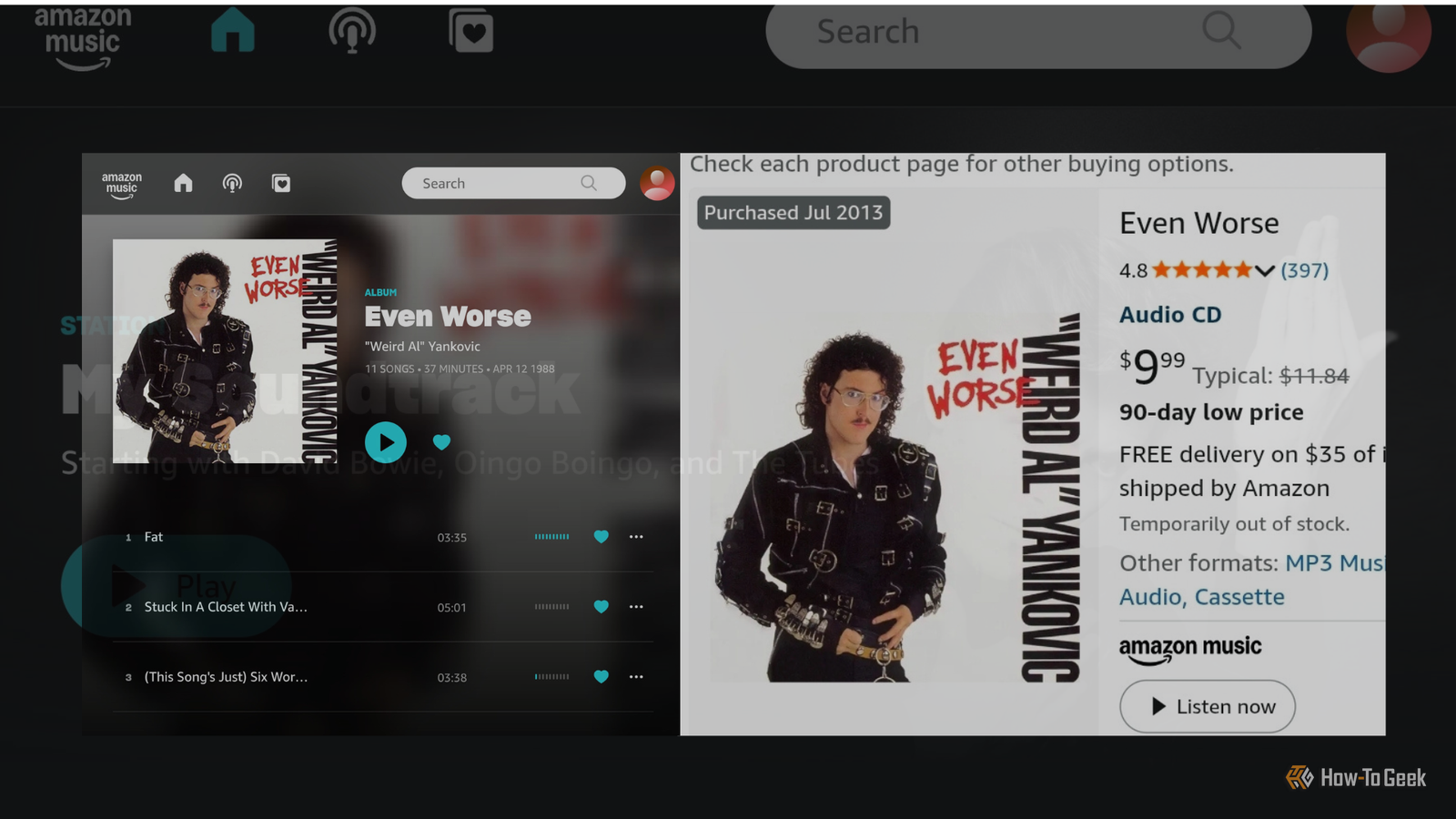
Published Jul 26, 2026, 8:30 AM EDT Former radio and TV guy (I Heart Radio and PBS). Now a writer, researcher, and musician who writes about the absurdity of our modern world and other offbeat topics. Specializes in weird music, the old web, retro video games and tech, and researching strange, yet interesting things. His work has appeared in Vice, Tedium, Star Trek.com, Today I Found Out, Typebar, SyFy Wire, and How To Geek. Currently working on a variety of music, web, and writing projects. Visit him on the web at https://djbuckfreelance.neocities.org/. I'm frustrated with various companies because we live in a time when everything is licensed to us; we don't own it after making the purchase. Amazon has never been one of my favorite corporations. But, like many of you, I've bought things from them numerous times over the years. That includes quite a bit of my current music collection. While I was going through some of my accounts over the past 2 years, I learned something interesting: I still had access to the digital versions of many CDs I bought over the years in an unlikely place: Amazon Music. Meeting the Residents again Discovering something unexpected in old Amazon orders Credit: David J. Buck / How-To Geek It all began during a re-read of a book called Never Known Questions: Five Decades of The Residents. In the past, I'd picked up the "pREServed" editions of their first 8 or so albums/art projects. At some point, I gave them all to a friend of mine, Weird Paul Petroskey. After reading the book, I wanted—against my wife's better judgment; she can't stand those guys—to listen to a few of those albums again. I remembered buying the sets originally from Amazon, and I figured, as one does, that I'd be able to find them in my order history and repurchase them. Quiz 8 Questions · Test Your KnowledgeCutting-edge Jellyfin featuresTrivia challengeThink you've kept up with Jellyfin's evolution? Put your media server knowledge to the test.StreamingFeaturesInterfaceClientsMediaBegin Which SyncPlay feature, added to Jellyfin, allows multiple users to watch content simultaneously in sync?AGroupWatchBSyncPlayCPartyStreamDCoViewCorrect! SyncPlay is Jellyfin's built-in synchronized playback feature that lets multiple users watch the same content together in real time. It was introduced to bring a watch-party experience natively into the platform without needing third-party tools.Not quite — the feature is called SyncPlay. It's Jellyfin's native synchronized playback system that keeps multiple viewers in lockstep, complete with play, pause, and seek synchronization across all participants.Continue What major overhaul did Jellyfin introduce to modernize its web interface in recent years?AA complete rewrite using React and a new design systemBA switch to a native desktop Electron appCIntegration of the Kodi interface as the default frontendDAdoption of Google's Material You design languageCorrect! Jellyfin's web client underwent significant modernization efforts including a shift toward a cleaner component-based architecture using modern JavaScript frameworks. The goal was to improve performance, accessibility, and maintainability across all browsers.Not quite. Jellyfin has been progressively modernizing its web client through architectural improvements and a refreshed design system built around modern JavaScript tooling. It remains browser-based rather than moving to a native desktop wrapper like Electron.Continue Which official Jellyfin mobile client was released to provide a native experience on Android and iOS?AJellyfin TheaterBJellyfin SwiftfinCJellyfin MobileDJellyfin RemoteCorrect! Jellyfin Mobile is the official app available for both Android and iOS, providing a native mobile experience for browsing and streaming your media library. It has received numerous updates improving playback compatibility and UI responsiveness.Not quite. The official mobile app is simply called Jellyfin Mobile and is available on both Android and iOS. Swiftfin is actually a separate community-developed native iOS client, while Jellyfin Theater is a different desktop-focused client.Continue What is Swiftfin, the community-developed Jellyfin client?AA Windows desktop client built with WinUIBA native iOS and tvOS client written in SwiftCA Linux terminal-based client using ncursesDA Roku channel for Jellyfin streamingCorrect! Swiftfin is a natively built iOS and tvOS client for Jellyfin, written in Apple's Swift programming language. It was created to deliver a smoother, more native Apple experience compared to the web-wrapped mobile app, with support for features like direct play and native video controls.Not quite. Swiftfin is a native iOS and tvOS application written in Swift, Apple's programming language. It offers a polished, platform-native experience for Apple device users connecting to their Jellyfin server, with better performance than a browser-wrapped approach.Continue Which subtitle format support was notably improved in Jellyfin to better handle complex typography and styling?ASRTBWebVTTCASS/SSADTTMLCorrect! ASS (Advanced SubStation Alpha) and SSA subtitle formats support was a major focus for improvement in Jellyfin, particularly important for anime fans who rely on complex styled subtitles with custom fonts, positioning, and animations. Better ASS rendering meant far fewer burned-in subtitle workarounds.Not quite — the answer is ASS/SSA (Advanced SubStation Alpha). These subtitle formats are heavily used in anime fandom for their rich styling capabilities. Jellyfin improved support so these subtitles render correctly in the browser player without needing to transcode them into the video stream.Continue What hardware acceleration method did Jellyfin add support for to improve transcoding on Intel GPUs?ANVENCBAMFCQuick Sync Video (QSV)DOpenCLCorrect! Intel's Quick Sync Video (QSV) is a hardware-accelerated video encoding and decoding technology built into Intel processors and integrated graphics. Jellyfin expanded and refined its QSV support to allow users with Intel hardware to transcode media far more efficiently, reducing CPU load significantly.Not quite. While NVENC is NVIDIA's encoder and AMF is AMD's equivalent, Jellyfin specifically improved support for Intel's Quick Sync Video (QSV). QSV leverages Intel's integrated GPU capabilities to handle transcoding tasks, making it a popular choice for home server builders using low-power Intel hardware.Continue What feature did Jellyfin introduce to allow users to manage and track their media progress across multiple devices?ACross-device bookmarking via external cloud syncBResume playback with synchronized watch state across devicesCA dedicated playlist export tool for Plex migrationDAutomatic media file renaming based on watch historyCorrect! Jellyfin stores playback progress server-side, meaning your watch state — including where you left off — syncs automatically across all your devices and clients. This lets you start a movie on your TV and seamlessly resume it on your phone without losing your place.Not quite. Jellyfin handles this through server-side playback state syncing, which means your resume points and watch history are stored on the server itself. Any client — whether mobile, TV, or browser — can pick up exactly where you left off without needing a third-party cloud service.Continue Which major plugin capability was formalized in Jellyfin to allow community developers to extend server functionality?AA Lua scripting engine for custom automationBA standardized plugin API and official plugin catalogCDirect integration with Docker container orchestrationDA WebAssembly sandbox for third-party extensionsCorrect! Jellyfin formalized its plugin ecosystem by providing a standardized plugin API alongside an official plugin catalog that users can browse and install directly from the server dashboard. This made it much easier for community developers to build and distribute extensions for metadata providers, authentication systems, and more.Not quite. Jellyfin established a proper plugin framework complete with a standardized API and an official in-app catalog for discovering and installing plugins. This opened the door for community contributions like custom metadata scrapers, last.fm scrobbling, and alternative authentication providers.See My Score Challenge CompleteYour Score/ 8Thanks for playing!Try Again I did buy a few of them again, along with a few other records. For my purchase, I received a free month of Amazon Music as an extra. I'm not a big fan of streaming services, but the price fits my budget, so I checked it out. As I navigated a bit, I noticed there was an option to view my purchased music. I took a quick look, and that's when I saw it: an option to download my music. Not only had I forgotten about half of those albums, but I had no idea they were available as MP3 downloads. I had to login to Amazon Music to find my files But no subscription was required I had to go to Amazon Music itself to download my files. This can be done on either desktop or mobile, but fair warning: finding your MP3s isn't exactly intuitive. I tried it on my phone first, since I listen to music locally using Symfonium when I travel. I performed the mobile retrieval method on a Samsung Galaxy Z Fold 5 using the Mozilla Firefox browser in Desktop Mode. I could not get it to work otherwise. I opened Amazon Music's website, not the app. In the upper right-hand corner of the page, there are three buttons, with one that looks like a heart (inside a square). That's the playlists button. From there, select Music. Then navigate to Purchases at the top of the page. When I first loaded mine, it was blank, so I selected the filter (in the left-hand corner) and sorted it by Recently Added. So it goes: Playlists > Music > Library > Purchases > Recently Added. That's a lot of steps, Amazon. Almost excessive. To download an album, I clicked on the three dots next to one of the song titles and selected View album. This brings you to the album page. Next to the Play button, there's another three-dot menu. Click on that and select Download Album. And now you've downloaded your music in 8 easy steps. I've done this on Desktop as well. It uses the same steps and can be done via the desktop app or through the website as I did here. As of this writing, this UI flow worked for me. But companies can sometimes change things without notice, so keep that in mind if you want to give it a try. You can also download individual tracks A faster option when you don't want the full album Credit: David J. Buck / How-To Geek If you want to download individual tracks, you can do that from your library. To do so, you either download it through the three-dot menu on the track itself or hit the icon that looks like a downward arrow. It's as simple as that. I had one album that Amazon wouldn't let me download at all as the full album, but it let me download it track-by-track. It took forever on account of it being a 3-disc set. It's not the most efficient way to download music, but to each their own. I added the files to my Jellyfin library on Desktop It made perfect sense for my setup While I'm a fan of Symfonium on my phone, I still use Jellyfin for my home server (for music, anyway; I actually use Plex for movies/shows). I used Syncthing to sync the files I downloaded on my phone to my desktop. From there, I just transferred them into my Jellyfin library. The metadata transferred over fine, and the files play as expected. Since I use my Jellyfin server often for music streaming at home, it only made sense to throw those weird MP3s on there at the first available opportunity. Almost all of my digital files were originally included with CD or Vinyl purchases I still have all of them, too Credit: David J. Buck / How-To Geek After logging in, I scrolled through a few pages before I found The Complete Mole Trilogy and The Commercial Album, along with quite a bit of Frank Zappa, Join Us by They Might Be Giants, "Weird Al" Yankovic albums, and Tom Petty's Mojo album from 2010. I forgot I owned Q: Are We Not Men? A: We Are Devo! Deluxe Edition. There were some Sparks records I hadn't heard in years. I purchased some of those Weird Al albums on CD in the early 2010s, when I started collecting seriously. Credit: David J. Buck / How-To Geek Several of my CD purchases (all the Weird Al, Devo, and The Residents albums) included some of these downloads. I think there might have been one or two of them that I purchased as digital only (Sparks' Two Hands, One Mouth Live and A Cappella by Todd Rundgren). Yet those were few and far between. A very select few were digital downloads included with my past vinyl purchases (Zappa's Joe's Garage Acts I, II, & III). While I still own the physical copies, having the MP3s makes it so much easier to revisit some albums I haven't heard in some time by syncing them with Symfonium and putting them in my Jellyfin library. Since they're now living in Jellyfin, I don't have to grab my phone or pull a disc every time I want to hear an obscure album. A digital backup hiding in plain sight Credit: David J. Buck / How-To Geek Rediscovering my music was pretty cool. There were a few snags along the way. After downloading several of my CDs, it kept pestering me to sign up for the streaming service. So, if you bought any albums within the last 13 years or so, check out Amazon Music and see if you can download them. For me, I can re-listen to some rather hard-to-find, slightly obscure records. In the end, I was happy to have the Zappa and Rundgren MP3s back, but revisiting those Residents albums was certainly a very interesting experience. Amazon Music Unlimited
Amazon hid years of my digital music purchases—here's how I added them to my Jellyfin library
Full Article
Original Source
Read the full article at Howtogeek →KhanList aggregates and links to publicly available news content. We do not host full articles from third-party sources. Always verify important information with original sources.