
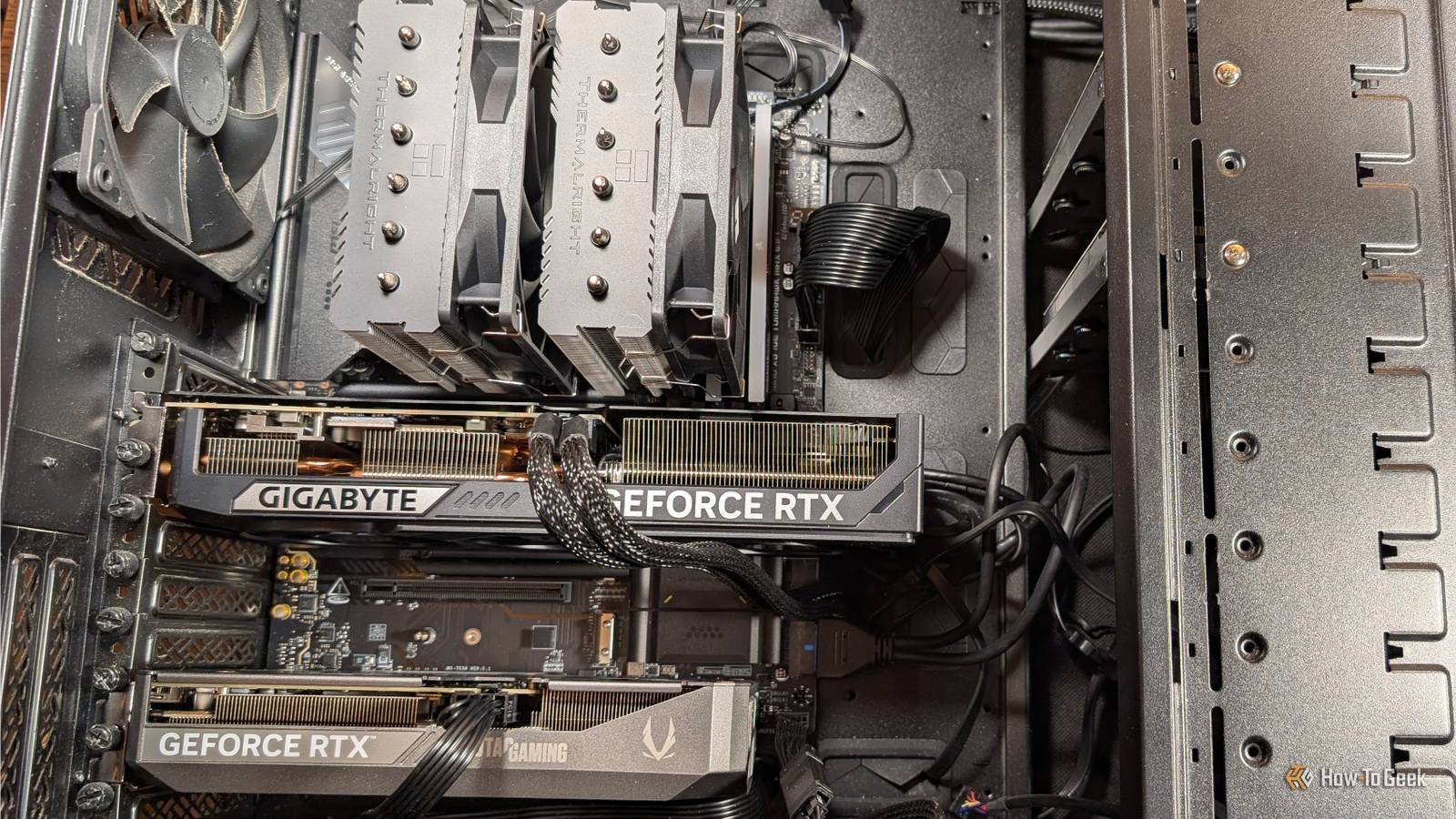
Published Nov 9, 2026, 2:30 PM EST Sydney Butler is a technology writer with over 20 years of experience as a freelance PC technician and system builder and over a decade as a professional writer. He's worked for more than a decade in user education. On How-To Geek, he writes commerce content, guides, opinions, and specializes in editing hardware and cutting edge technology articles. Sydney started working as a freelance computer technician around the age of 13, before which he was in charge of running the computer center for his school. (He also ran LAN gaming tournaments when the teachers weren't looking!) His interests include VR, PC, Mac, gaming, 3D printing, consumer electronics, the web, and privacy. He holds a Master of Arts degree in Research Psychology with a minor in media and technology studies. His masters dissertation examined the potential for social media to spread misinformation. Outside of How-To Geek, he hosted the Online Tech Tips YouTube Channel, and wrote for Online Tech Tips, Switching to Mac, and Helpdesk Geek. Sydney also wrote for Expert Reviews UK. He also has bylines at 9to5Mac, 9to5Google, 9to5Toys, Tom's Hardware, MakeTechEasier, and Laptop Mag. So you've won the lottery, and the first thing you do is buy a shiny new graphics card, but what do you do with the old one? Common sense says you should sell it and defray the cost of the new card. However, what if I told you that your old GPU could keep providing value to you, worth more than any money you could get for it? If your PC's motherboard has a second slot that can accommodate your old card (e.g., a 16x or open-ended 8x slot) and your PSU can handle the draw from both cards, here are some useful, interesting, or just plain cool things the second card can do for you. Turn your old GPU into a dedicated frame-generation and scaling card It sounds like a stretch, but it works! Frame-generation and modern upscaling technology have done a lot to help modern GPUs strike a good balance of frame rate and image quality, but there's still some overhead when the same card that's rendering the game is also performing both of those tasks. Using Lossless Scaling and its dual-GPU feature, you can offload frame generation and scaling to the second GPU. This means the primary GPU can focus on rendering the "real" frames, while the software uses the second GPU to apply scaling and frame generation to that card's output. To be clear, we're talking about Lossless Scaling's in-house algorithms for these two tasks, but the results can still be pretty great, Our friends over at XDA tested this feature by pairing a GTX 1080 with an RTX 3080 Ti. Neither of these cards supports Nvidia 's frame-generation technology officially, so this was of some practical value as well. You can also use this feature with an iGPU, which is great for laptops, but iGPUs can be so limited in performance that frame generation or scaling can become a bottleneck rather than improve performance. Flat-out streaming performance These days, I use a dedicated mini PC as my media server, running both Plex and Jellyfin, but like a lot of people, I started off running my Plex server as a background process on my gaming desktop. If you're still doing that, you can tell your media server software to use your secondary GPU for transcoding, which should have minimal impact on anything else you're doing. Assuming you have a CPU with enough cores to handle your foreground app (like a video game) while still letting the server do its thing, someone in your home requesting a big video that needs to be transcoded shouldn't suddenly tank your performance. Run local AI without filling your gaming GPU’s VRAM Time to have a chat? Running AI models locally is where it's at, if you ask me, but it takes significant GPU power to run your own chatbot or image generation model. That said, you might be surprised at what your old card can do, depending on what it is. Some outlier cards, like the 12GB RTX 3060, have moderate horsepower, but more VRAM than other cards in its price bracket. This opens up plenty of options for useful models. Stable Diffusion only needs a 4GB Nvidia card, though an 8–12 GB model is the sweet spot. Give a virtual machine a real graphics card It's almost like a real computer If you have virtual machines or Docker containers that can use GPU features or acceleration, you can give them direct access to your secondary GPU and improve performance without impacting the rest of your system too much. Turn it into a dedicated DLSS 5 or PhysX card The return of multi-GPU gaming? Credit: Rocksteady Studios We're asking our GPUs to do more and more stuff, which is why the Lossless Scaling dual-GPU setup is so interesting, but what if you want some of that proprietary Nvidia secret sauce? If you have a 40-series or 50-series card, you can set the more powerful card to render the game as usual, and the second card to dedicate all its resources just to DLSS 5 neural rendering. DLSS 5 is coming to 40-series cards officially, but it hasn't happened yet, and Nvidia is still working on performance optimization. In the meantime, modders have created Neural-coprocessor, which can claw back most, or even all, of the performance loss from running Nvidia's AI-powered image enhancements. This is still very experimental, and you need a somewhat janky setup to make it work, but it could make holding on to your 40-series card when you upgrade to a 50-series model worth it. A less experimental, but rather more niche use is a PhysX card. The latest 50-series cards have some issues with older games that use PhysX, but a second (rather modest) card can handle that job and enable the full experience of the PC catalog that relies on this technology, like several of the Rocksteady Batman games. The fun's barely started These are just a handful of examples, but as we give GPUs more and more specific jobs, having an extra one around to offload the work to might even become the norm for desktop users. So think of it as getting ahead of the curve.
5 reasons to keep your old GPU right next to your new one
Full Article
Original Source
Read the full article at Howtogeek →KhanList aggregates and links to publicly available news content. We do not host full articles from third-party sources. Always verify important information with original sources.