
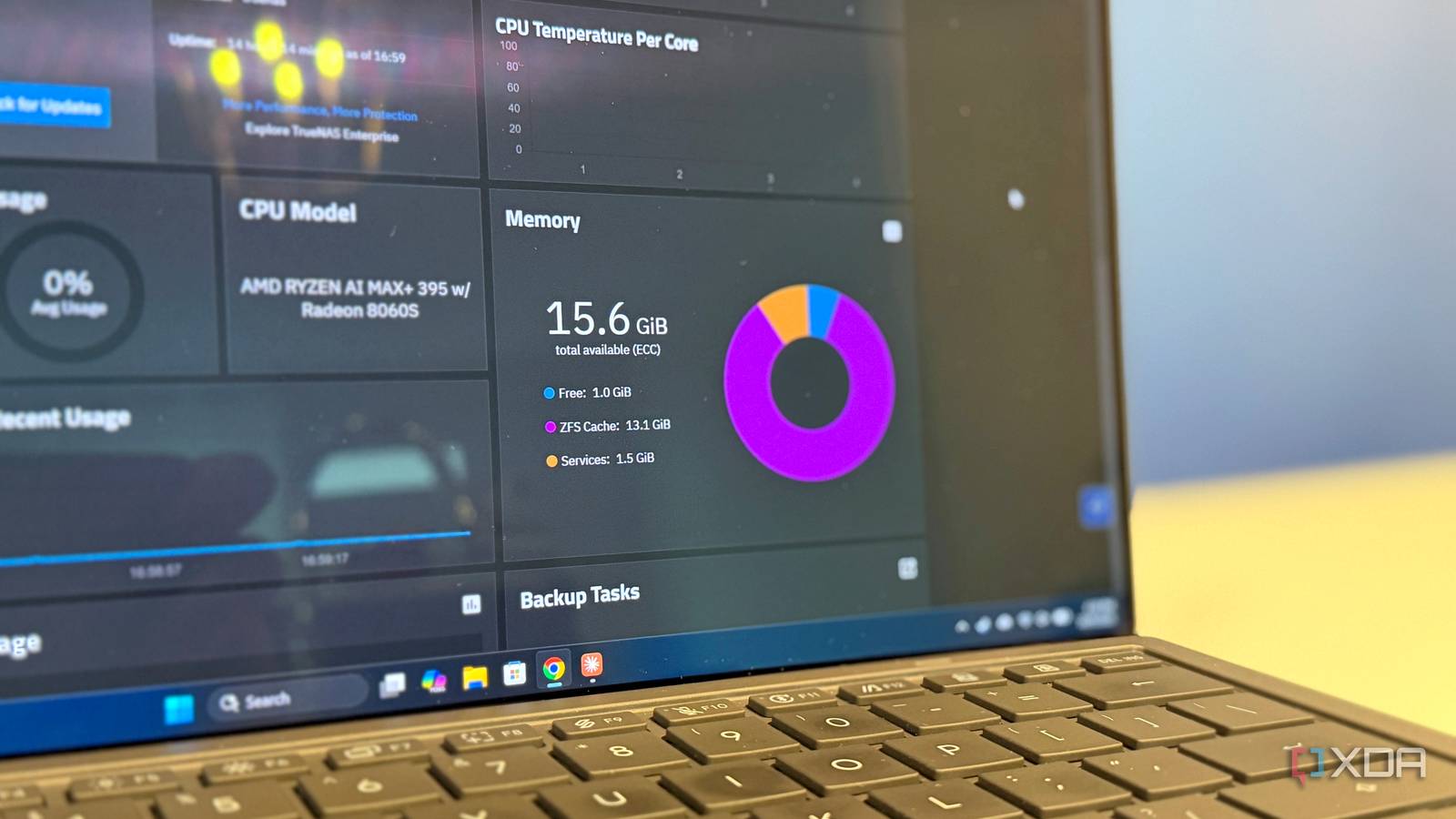
Published Oct 11, 2026, 8:00 AM EDT Maker, meme-r, and unabashed geek, Joe has been writing about technology since starting his career in 2018 at KnowTechie. He's covered everything from Apple to apps and crowdfunding and loves getting to the bottom of complicated topics. In that time, he's also written for SlashGear and numerous corporate clients before finding his home at XDA in the spring of 2023. He was the kid who took apart every toy to see how it worked, even if it didn't exactly go back together afterward. That's given him a solid background for explaining how complex systems work together, and he promises he's gotten better at the putting things back together stage since then. Ask anyone about running ZFS, and you'll hear the same warning: it eats half your RAM. That used to be true on Linux, which is why so many people who build their own NAS with TrueNAS Scale open the dashboard, see a wall of memory marked as used, and assume something's leaking. Except it isn't half anymore. On current TrueNAS, ZFS will happily fill almost all your RAM, and that's exactly what you want. The "half" was never a performance rule. It was a safety margin for a Linux memory quirk, and once you know why it existed, the full-looking memory graph stops being scary. ZFS wants that memory for the same reason: your NAS needs more RAM than you think. Still, a couple of cases can cause real trouble, and they're worth understanding before you tweak anything. What the ZFS ARC is and why it wants your RAM Don't worry, ARC gives memory back when something else needs it ZFS keeps a read cache in RAM called the Adaptive Replacement Cache, or ARC. It holds data and metadata you've read recently, plus the stuff you read often, and it balances those two lists on the fly. RAM answers in nanoseconds, while even fast SSDs take microseconds and hard drives take milliseconds, so every read served from the ARC is one your disks never have to handle. It's also why more RAM can do more for a NAS than an SSD cache. From ZFS's point of view, empty RAM is wasted RAM. If nothing else needs the memory, the ARC grows into it, because a bigger cache means more cache hits. It's the same idea as the Linux page cache that linuxatemyram.com has explained for years, just with a smarter way to decide what to keep. To see it for myself, I spun up a TrueNAS 25.10.7 VM with 16GB of RAM, wrote a 12GB file to a small mirror pool, and read it back twice. Both passes finished in under a second at roughly 13.5GB/s, and the pool's disks didn't serve a single byte of either read. That's RAM speed, not disk speed. Afterward, arc_summary showed the ARC holding 13.1GB of the VM's 15.6GB of usable memory, with ZFS reporting just 21MB available. By any free-memory metric, that VM looked like it was about to fall over. Yet it had logged zero memory throttles and zero reclaims, because nothing else wanted that RAM. The key thing to understand is that the ARC isn't hoarding. When the kernel signals that it's running low on memory, ZFS shrinks the ARC and hands that RAM to whatever asked for it. That's why a NAS with a "full" memory graph can still start a container or a VM without falling over. The catch is that shrinking takes time, and that latency is where the real problems live (more on that later). Why ZFS used to stop at half your RAM The cap was a safety margin, not a speed setting ZFS started life on Solaris and grew up on FreeBSD, where the ARC could use nearly all of a system's memory. When it was ported to Linux, that changed, and the reason is buried in a 2012 ZFS on Linux pull request. It's a fairly dry read, but the short version is that Linux allocates memory differently, and ZFS needed a buffer to stay safe. The problem was fragmentation in the Linux kernel's slab allocator. ZFS's limits assumed every byte of cache cost exactly one byte of RAM, but the developers found that fragmentation could push real usage to roughly double the ARC's reported size. Left unchecked, that could theoretically let the cache outgrow the machine's physical memory. So ZFS on Linux defaulted to half of your RAM. If the worst-case fragmentation doubled it, you'd still fit. TrueNAS CORE, running on FreeBSD, never had that limit, which is why people moving from CORE to SCALE used to complain that their cache suddenly looked tiny. TrueNAS and OpenZFS dropped the cap iXsystems changed that with TrueNAS SCALE 24.04 Dragonfish, which made ARC memory allocations identical to TrueNAS CORE. The same change went upstream too. An iXsystems engineer authored the OpenZFS commit arguing that half of the physical memory had become too strict for modern systems with lots of RAM, and it shipped in OpenZFS 2.3.0. The new default is the larger of your total RAM, minus 1GB, or five-eighths of it. Platform ZFS Version Default ARC limit TrueNAS 24.04 OpenZFS 2.2 with the iX change RAM minus 1GB, or 5/8 of RAM TrueNAS 24.10 and 25.04 OpenZFS 2.3 RAM minus 1GB, or 5/8 of RAM TrueNAS 25.10 OpenZFS 2.3.9 RAM minus 1GB, or 5/8 of RAM Ubuntu 26.04 LTS OpenZFS 2.4.1 RAM minus 1GB, or 5/8 of RAM Ubuntu 24.04 LTS OpenZFS 2.2.2 50% of RAM Proxmox VE 8.1+ Varies 10% of RAM, max 16GB That's roughly 94% of a 16GB system and 97% of a 32GB one, and my test VM landed right on the formula with a 14.6GB ARC ceiling. So on a modern NAS, "half" is a relic. Why your NAS looks like it's out of memory Linux counts the ARC as used memory Here's the part that trips people up. ZFS isn't doing anything wrong when it fills your RAM, but Linux reports it in a way that looks alarming. Open a terminal, run free, and you'll see almost nothing available, even when the system is perfectly healthy. The normal Linux page cache shows up under buff/cache, which everyone knows is memory the system will give back when needed. The ARC doesn't live in the page cache, though, so Linux reports it as plain used memory instead. As Netdata's guide to the ARC points out, it also isn't counted in the kernel's available memory figure, which can fool tools like earlyoom and systemd-oomd into thinking the box is out of RAM. That's a reporting problem, not a memory problem. The cache is still there to be reclaimed; Linux just doesn't label it that way. What TrueNAS's dashboard actually shows TrueNAS does a better job here, because its dashboard splits memory into Free, ZFS Cache, and Services. You can see at a glance that most of your RAM is cache rather than apps. That doesn't stop the questions, mind you. One user on the TrueNAS forums asked why 101.7GiB of their 125GiB was ZFS Cache after upgrading to 25.10, and the answer was simply that ZFS is doing its job. When ZFS's appetite actually causes problems VMs need memory now, not eventually None of this means ZFS's memory use is always harmless. The cache gives memory back, but not instantly, and how it interacts with the rest of Linux's memory management has caused real headaches. If you run more than just file sharing on your NAS, keep these cases in mind. Starting a virtual machine requires a large block of RAM all at once. If the ARC is full, ZFS has to shrink it to free memory, and the VM is left waiting. On a box that mostly serves files, that rarely matters. On one that spins VMs up and down, it can mean slow starts or failed allocations, which is why hypervisors treat the ARC very differently. Why Proxmox caps it at 10% Proxmox VE runs on ZFS too, but it does the opposite. New installs since 8.1 cap the ARC at 10% of RAM (up to 16GB), and Proxmox's rule of thumb is 2GB plus 1GB per TB of storage. A hypervisor's RAM belongs to its guests, and having the cache in the way when a VM starts is exactly the problem above. Same filesystem, different job, different default. Should you limit the ARC? For most people with a dedicated NAS, you shouldn't. The cache fills because the RAM is free, and it gives that RAM back when something needs it. Capping it just means more reads hit your disks. There are a few cases where a limit makes sense, though: Your TrueNAS box runs a lot of VMs, especially ones that start and stop often. You're running ZFS on a hypervisor like Proxmox, where guests need memory on demand. You've put ZFS on a desktop or laptop, where apps and games compete for RAM. The limit is a single tunable called zfs_arc_max, and it works on TrueNAS and on Ubuntu Server alike. It takes a minute to set, but check your ARC hit ratio first so you know what you're giving up. Full RAM is the point, not the problem The old warning wasn't wrong; it's just out of date. ZFS on Linux stopped at half your RAM for over a decade to guard against an allocator quirk, and TrueNAS and OpenZFS have since decided modern systems don't need that buffer. A memory graph full of ZFS Cache means your NAS serves reads from RAM instead of disks, which is exactly why the ARC exists. If you're curious whether it's earning its keep, check the ARC hit ratio under Reporting -> ZFS in TrueNAS before you change anything. A high hit ratio means the cache is doing its job, and that's a better reason to leave it alone than any number on a dashboard.
ZFS uses half my RAM on purpose, but that's not the problem people think it is
Full Article
Original Source
Read the full article at Xda-developers →KhanList aggregates and links to publicly available news content. We do not host full articles from third-party sources. Always verify important information with original sources.