
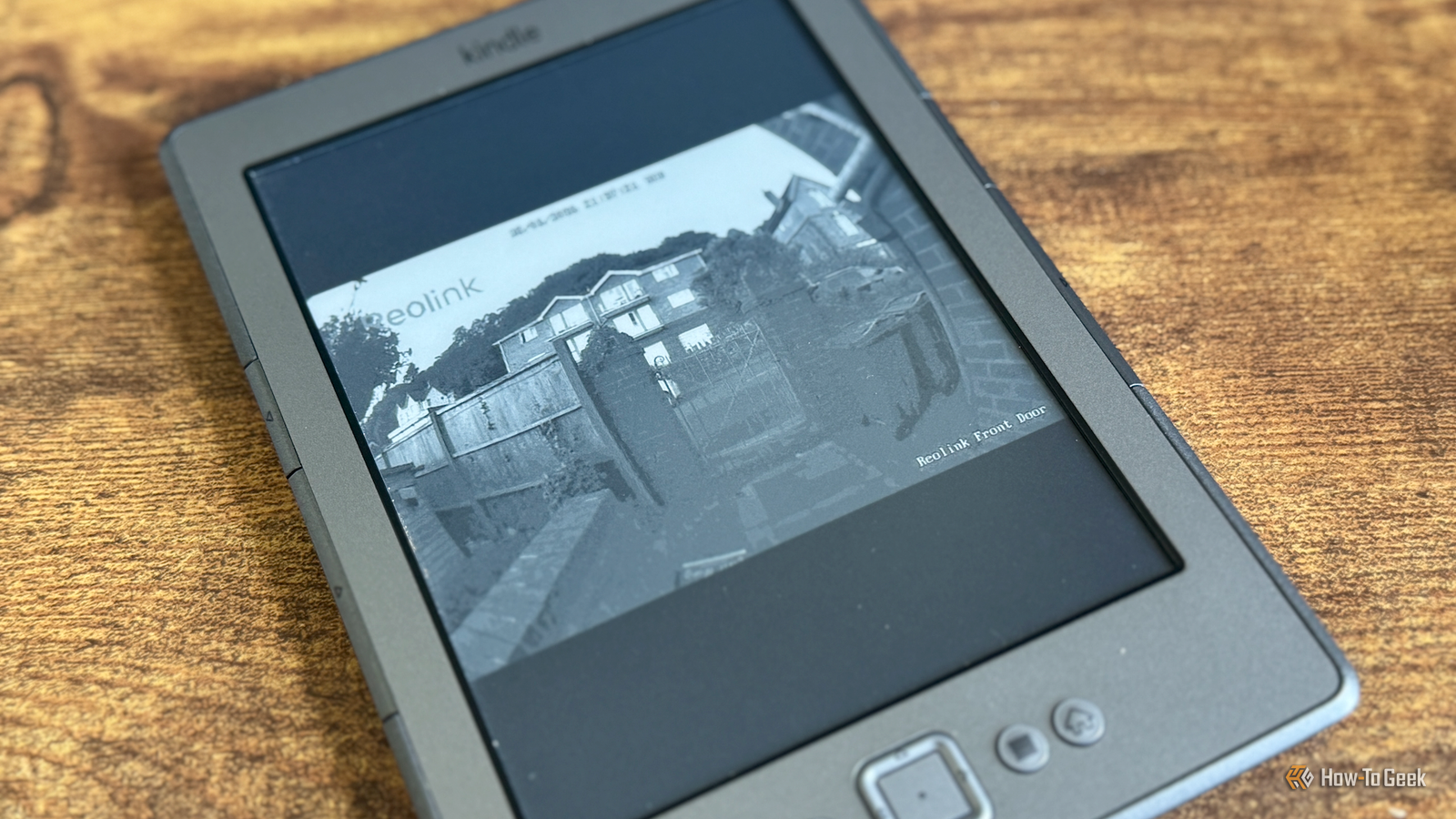
Credit: Adam Davidson / How-To Geek Published Aug 23, 2026, 7:00 AM EDT Adam has a degree in Engineering and has a life-long interest in technology. He has been writing for over a decade for various print and online publications, with a focus on consumer tech. He joined How-To Geek in 2024 while working at Pocket-lint. As well as being a long-term fan of Apple products, he also has a strong interest in smart home tech, running a Home Assistant server at home to automate all his smart home devices. He believes that the ideal smart home should work with minimal interaction from the user, with automations running as if by magic rather than requiring you to push buttons on a control panel. You can find more of his work on Muck Rack. Sign in to your How-To Geek account A Kindle is primarily intended for reading eBooks. While you can use one to browse the internet, it's nowhere near the experience of using a smartphone. You may be surprised to learn that it's possible to stream video on a Kindle. Streaming video on a Kindle shouldn't be possible It's about as far from its intended purpose as you can get Credit: Faisal Rasool / How-To Geek A Kindle is designed to mimic the experience of reading a real, physical book as closely as possible. The first models were monochrome, and all true Kindle eReaders have used E-Ink displays that far more closely match the look of a page than a bright tablet screen can. Another major benefit of using E-Ink is that it uses very little power. The E-Ink display uses most of its power when changing the content of a page, but once the page is rendered, it requires very little power to maintain the image. You can potentially leave your Kindle on its screensaver for weeks before the battery runs out. The trade-off is that the refresh rate of an E-Ink screen is fairly slow. Even on modern Kindles, page turns aren't instantaneous, and they're even slower on older models. This is hardly the ideal hardware for streaming video. Jailbreaking a Kindle lets you do things Amazon never intended You can do far more than just install your own eReader software The first thing that you should be aware of is that there isn't some hidden setting on your standard Kindle that will let you play Netflix. Standard Kindle eReaders don't provide a way to play streaming video. If you want to stream video on a Kindle, you're going to have to jailbreak it. Jailbreaking a Kindle may breach Amazon's terms of service, and damage caused by modifying the device may not be covered by the warranty. There's also a risk that you might brick your device, so you might not want to try it with your brand-new Kindle Scribe Colorsoft. I was happy to risk it with my decade-old Kindle 4 because Amazon ended support for the device in 2026. Once you've jailbroken a Kindle, you can install software such as the popular KOReader document reader app, but it also allows you to do much more. That includes being able to view a video feed on your Kindle. Don't expect to watch Netflix on a Kindle E-Ink isn't intended for 24 fps Credit: Lucas Gouveia / How-To Geek | PerfectBrand/Studio R3/Shutterstock If you're hoping to use a Kindle to watch Netflix in perfect 4K quality, then you're out of luck. The hardware simply isn't up to the job. The E-Ink display can't refresh anywhere near fast enough to display a movie at 24 fps. However, my very old Kindle 4 can refresh the screen at a rate of about one frame per second. While this gives you a very poor-quality video stream, it is a video stream, nonetheless. I managed to do this using Home Assistant. An automation takes a snapshot from my video doorbell once per second. The image is converted to a grayscale JPEG that's the right dimensions for my Kindle screen. A script on the Kindle then uses wget to download each image and draws it on the Kindle screen. The result is that the image updates every second, showing a slightly delayed live view of the video feed from my video doorbell. I've only tried this on a Kindle 4, so on a newer Kindle, it may be possible to play the video slightly faster than one frame per second. Even a slow refresh feed can be surprisingly useful One frame per second can sometimes be enough Credit: Adam Davidson / How-To Geek You may be wondering why I tried to stream video on my Kindle in the first place. The reason was that I wanted a way to see who was at the door if the doorbell rang while I was reading. I try to keep my phone out of reach when I'm reading so I'm not tempted to start doomscrolling, so I wanted a way to check the doorbell without having to get up and go to the door. The one frame per second feed is more than good enough for seeing who is at the door. I don't need a perfect 24fps video stream to see if it's a genuine caller or just a delivery driver who's rung the bell just to annoy me. It's genuinely useful to be able to see the feed, even if it crawls. I don't see myself ever streaming video on my Kindle for any other reason, since the quality is so low. For this single purpose, however, it does exactly what I need. I'm pretty sure this is not how Amazon's hardware team envisaged people using the Kindle 4 when they designed it. A jailbroken Kindle can do more than you think I've had a lot of fun seeing what I could do with my jailbroken Kindle. I've even managed to make my Kindle turn the page when I tap my fingers together, using my Apple Watch. It's impressive what you can do with such limited hardware.
Your Kindle can stream video, but Amazon doesn't want you to know about it
Full Article
Original Source
Read the full article at Howtogeek →KhanList aggregates and links to publicly available news content. We do not host full articles from third-party sources. Always verify important information with original sources.