
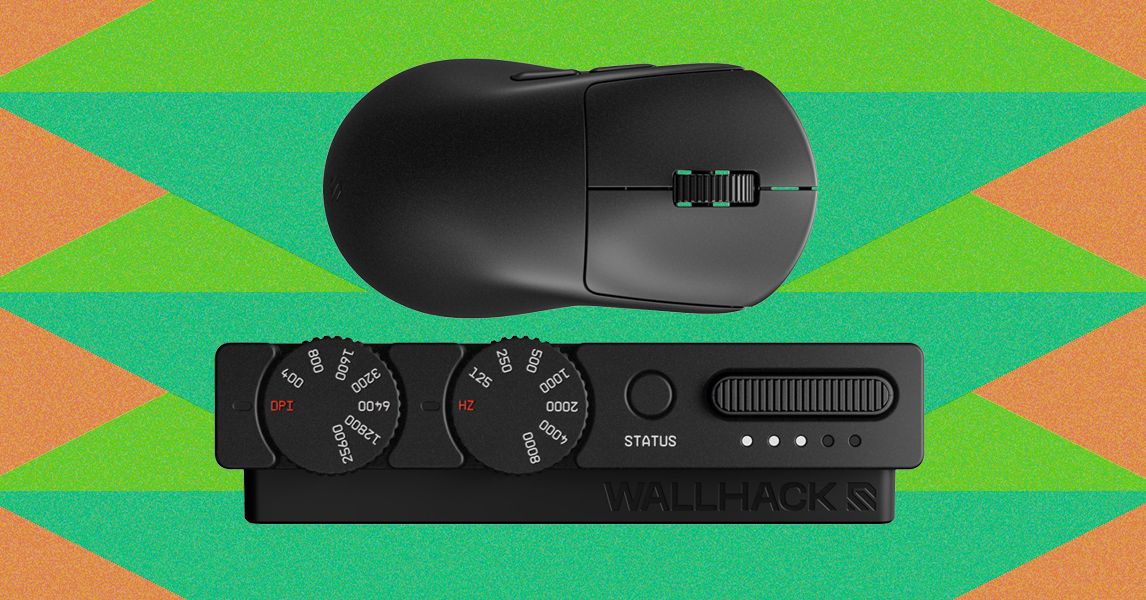
Review: Wallhack M-001With a tactile dongle for on-the-fly customization and a metal chassis, the Wallhack M-001 is the most fun I've had reviewing a gaming mouse in a long time.Courtesy of WallhackMagnesium shell. Hot-swappable, rechargeable batteries. 52-gram weight. Functional and innovative dongle. Satisfying tactile experience. Great styling and design language.High price point. Slightly outdated sensor. Only 2.4G wireless connectivity with dongle; no Bluetooth or USB-C connectivity on mouse.Batteries. They're not typically thought of as a significant source of innovation. Most companies have spent the last few years removing mice in favor of more lightweight designs.That's what's made the return of the replaceable and rechargeable battery surprising—something I once thought to be a lost technology from a bygone era. A few companies have recently realized that the ability to pop out and replace your battery in seconds is a great way to extend mouse life without needing to increase battery size or efficiency.From the handful of mice I’ve tested with hot-swappable batteries so far, Wallhack does it best. The mouse is designed around the function’s ease-of-use, and everything else comes together to make a mouse that feels not only competitive for gaming, but also well thought-out and satisfying to use in everyday life.Effective ShapeThe M-001’s shape is a standard right-handed, symmetrical design. This means the mouse’s left and right sides are shaped identically, but only the left side has thumb buttons. There are two main buttons, two side buttons, a standard ratcheting scroll wheel, and a power switch on the underside.Photograph: Henri RobbinsPhotograph: Henri RobbinsWith a length of 120 mm, the M-001 is slightly shorter than contemporaries like the Razer Viper V4 Pro (125 mm) and Logitech Pro Superstrike X2 (127 mm). The overall width and height are comparable, at 63.5-mm tall and a 39-mm wide. The largest difference is the profile of the mouse: The front end sits significantly lower than other mice, and the rear has a more significant hump, which creates a more angled shape overall. When using a palm grip, this puts your hand at a slightly more aggressive forwards angle, with your palm sitting higher and your fingers pointing more downwards. It’s a slight difference, but I found this angle to be better for quick movements compared to a more “flat” design. However, like most shape-related choices, this is ultimately down to individual preference. (To compare mouse sizes, I typically use a website like eloshapes)The two main buttons are lightly sculpted, with subtle concavity for fingers to comfortably rest in. Similarly, there is a subtle taper at the bottom center of the mouse which makes lifting and moving easier. The side buttons use a simple, rounded shape placed just above the taper, making it easy to rock your thumb upwards to press them without getting in the way. They’re just elevated enough that the buttons don’t recess into the shell when pressed. The only shape-related issue I had was the scroll wheel, which is a good bit more elevated than other mice. This isn’t a huge issue, and I adapted to it after a few hours of use, but it’s something I could see being off-putting for users accustomed to a lower-profile scroll wheel.(Not) Heavy MetalThe most important part of this mouse’s construction is the magnesium shell, which provides significantly more rigidity than the plastic shells used on most mice. Because of this, the mouse feels incredibly sturdy and solid. The metal shell also gives the mouse a cool, slick feeling underneath your fingertips, which I prefer to the matte plastic feeling that most mice have.Despite using metal, it only weighs 53.6 grams, making the M-001 quite light by most standards, It still falls slightly behind the Viper V4 Pro’s 50.3 grams and lags way behind Corsair’s superlight, 36-gram Sabre V2 Pro Ultralight. But the M-001 is incredibly solid, with none of the flexibility or flimsiness that most plastic mice have. When compared to other magnesium mice like the AngryMiao Infinity .97 or Corsair’s magnesium-shelled Sabre, the M-001 has an entirely solid upper shell without any cutouts or holes, which feels much better for regular use with a multitude of grip styles (plus, it’s much less likely to have dust, dead skin, or anything else build up inside of it). While the full magnesium shell increases weight, it’s a worthwhile trade-off for a smooth and rigid shape.It’s also worth noting that some of Wallhack’s promotional material depicts the mouse as being a solid black color, but this isn’t quite the case. The unit I received is much closer to a gunmetal color, with a significant amount of metallic flake across the finish. The color looks fantastic in person, but it's difficult to properly capture in images.Flipping over this mouse reveals one of the more atypical design decisions being made: the lack of a bottom shell. Instead of an entire underside, there is a thin frame around the circumference of the mouse that holds six feet in place. Between them is a chasm that reveals the entire PCB and battery.Photograph: Henri RobbinsOf particular note is the PCB’s function inside the mouse: Instead of simply sitting inside of the shell, the PCB works as a primary structural component. Similar techniques have been used in designing supercars and sport bikes, with the Ferrari F50 using the engine block as a stressed member that provides rigidity to the entire car, a technology borrowed from Ferrari’s F1 team. This provides some obvious benefits to rigidity and weight-savings, but it’s also just undeniably cool to be able to flip over your mouse and see the entire circuit board.Right behind the PCB is the star of the show, a hot-swappable battery. While I’ve tested quite a few mice with this technology, none of them have managed to make the battery-swapping so satisfying. Instead of being attached with magnets or a rotating locking mechanism, the batteries use a custom-made -spring-loaded ejector similar to an SD card or a Nintendo Switch cartridge. To insert the battery, simply press until you feel a click, and it will lock into place. To remove it, do the same: press until you feel a click, and it will pop out slightly. Of all the mice I’ve tested with removable batteries, this is by far my favorite mechanism to use: It’s intuitive, fun, and feels sturdy.This battery system does come with a trade-off. Because hot-swappable batteries means an effectively-infinite battery life (as long as you remember to plug the old one into the dongle when you swap), Wallhack has decided to entirely remove the USB-C port on the mouse. This means it only functions as a 2.4G wireless mouse and cannot be plugged or charged in directly. This isn’t a huge issue (it never inconvenienced me, since there was always a fully charged battery ready to swap in), and it theoretically means the connection quality will be better, since there’s fewer components between the antenna and the receiver. But it is worth noting that, if a battery dies or your dongle craps out, there’s no other way to use this mouse.The Perfect DongleIn every high-polling mouse I’ve reviewed, the dongle has been a bit of a pain point. A high polling rate necessitates proximity, which in turn requires in a small thing sitting on your desk. In most cases, these things have only one or two functions: They connect to the mouse, and they maybe have a small number of LED indicators (between 1 and 3) that can display battery life, connection quality, or some other setting. Almost every time, they’re small and light enough to slide around on your desk and will inevitably end up falling behind it once or twice due to the weight of the cable pulling it back.With the M-001, nearly all of these issues are resolved: The dongle is given purpose, function, and I’d even argue dignity. Instead of the small, existing-by-necessity designs that most manufacturers ship with their mice, Wallhack has managed to make a beautiful piece of industrial design. The dongle is a medium-sized metal wedge sporting a gunmetal gray finish identical to the mouse. It has two camera-like dials up front, a button, and a slot for a rechargeable battery. The DPI dial features numbering from 400 to 25,600, and the polling dial goes from 125 Hz to 8,000 Hz.Photograph: Henri RobbinsThe dials both have LED indicators next to them, which illuminate alongside the mouse to indicate a setting being changed. When rotated, they both have a satisfying ratcheting mechanism that’s stiff enough to avoid accidental inputs, without being difficult to turn using a single finger.While I loved these dials from the moment I saw them, I really didn’t expect to use them much. I’ve always been more of a set-and-forget type of person. But after testing this mouse for a while, I regularly found myself using both of the dials: On-the-fly DPI adjustments were great for games like Marvel Rivals. I tended to prefer, for example, a higher DPI for Thing and a lower for Thor. Polling adjustments, too, were useful in situations where older games (like Destiny 2) got grumpy when I was using a mouse above 1,000 Hz.Performance and SoftwareLike many mice today, the M-001 uses an in-browser customization client. Wallhack’s web client, Wallhack Terminal, takes a unique stylistic approach, relying on a black-and-white, text-based system that resembles Command Prompt more than a typical gaming software. This is both a breath of fresh air stylistically, and much more straightforward than some of the software I’ve used in the past.The configurator has an extensive feature set, including adjustments for mouse rotation, acceleration, and lift-off distance, which is adjustable by millimeters instead of the vague Low/Medium/High that some softwares use. The sensor can also be pushed to scan faster than the mouse’s 8,000 Hz polling rate, which can potentially improve the accuracy of the sensor, but limits battery life.Along with adjusting DPI and polling with the dials on the dongle, switching them to the red “DPI” And “Hz” text allows for more granular adjustments within the configurator.Photograph: Henri RobbinsThe sensor inside the mouse is a Pixart PAW3950. For anyone who doesn’t have an exhaustive list of mouse sensors floating around their head, this is the same type of sensor used in the 2022 Razer Viper V2 Pro (branded as the Razer Focus Pro 30k). That's four years old at this point. It’s not quite a cutting-edge sensor anymore. But unless you're in the top-tier of competitive play, the sensor will feel consistent and reliable enough, being able to easily track and manage direction changes during fast-paced shootouts. My personal daily driver is a Viper V2 Pro with the exact same sensor (I prefer the shape to the V3 and V4), and it’s still perfectly serviceable after four years of use.The main buttons inside this mouse use Omron Optical switches, while the side buttons opt for low-profile Omron blue-dot mechanical switches. The scroll wheel’s encoder is a mechanical unit as well, which means it doesn’t have quite the same longevity as the optical units some mice are beginning to use. However, they are easier to replace or fix if something does go wrong.The internal design of this mouse is impressively simple: There are six feet on the underside, and the outer four all have screws underneath. When you remove these four screws, the bottom half of the shell comes off cleanly (no flimsy plastic clips!), and a few more screws separate the internals from the top shell.Mice Should Be FunI’ve said many times that, when it comes to peripherals, technical specs are only one part of the story. More than that, it’s important to have a device you enjoy using. Of all the mice I’ve tested, the M-001 is by far one of the most enjoyable. The shape is comfortable and natural for multiple grip styles, and the material ensures that the mouse feels rigid and stable despite its light weight. The dongle is a brilliant design that elevates itself from a sad desk tchotchke to a practical and functional device. And the battery mechanism is one of the most clever and fun designs I’ve seen in ages.Everything about this mouse is deeply satisfying, and I found myself excited to use it every time I sat down. Of course, this mouse isn’t at the cutting edge of sensors or switches, and because of this, I can’t exactly recommend this mouse to someone looking for an ultra-cost-effective option with min-maxed specs. But in using the mouse on the daily, I didn't find that it mattered as much as you might think. 8,000 Hz polling and a 25,600 DPI sensor are enough for all but the pros. Instead, it uses tried-and-true internals that function perfectly well and, more importantly, have crisp and precise tactile responses.Henri Robbins is a WIRED contributor specializing in mechanical keyboards and PC peripherals. He also reviewed hardware for Input and Inverse. He graduated from Miami University, where he studied journalism, media and communications, and photography. He resides in Cincinnati. ... Read More
Wallhack M-001 Review: When Fun Overrides Specs
Full Article
Original Source
Read the full article at Wired →KhanList aggregates and links to publicly available news content. We do not host full articles from third-party sources. Always verify important information with original sources.