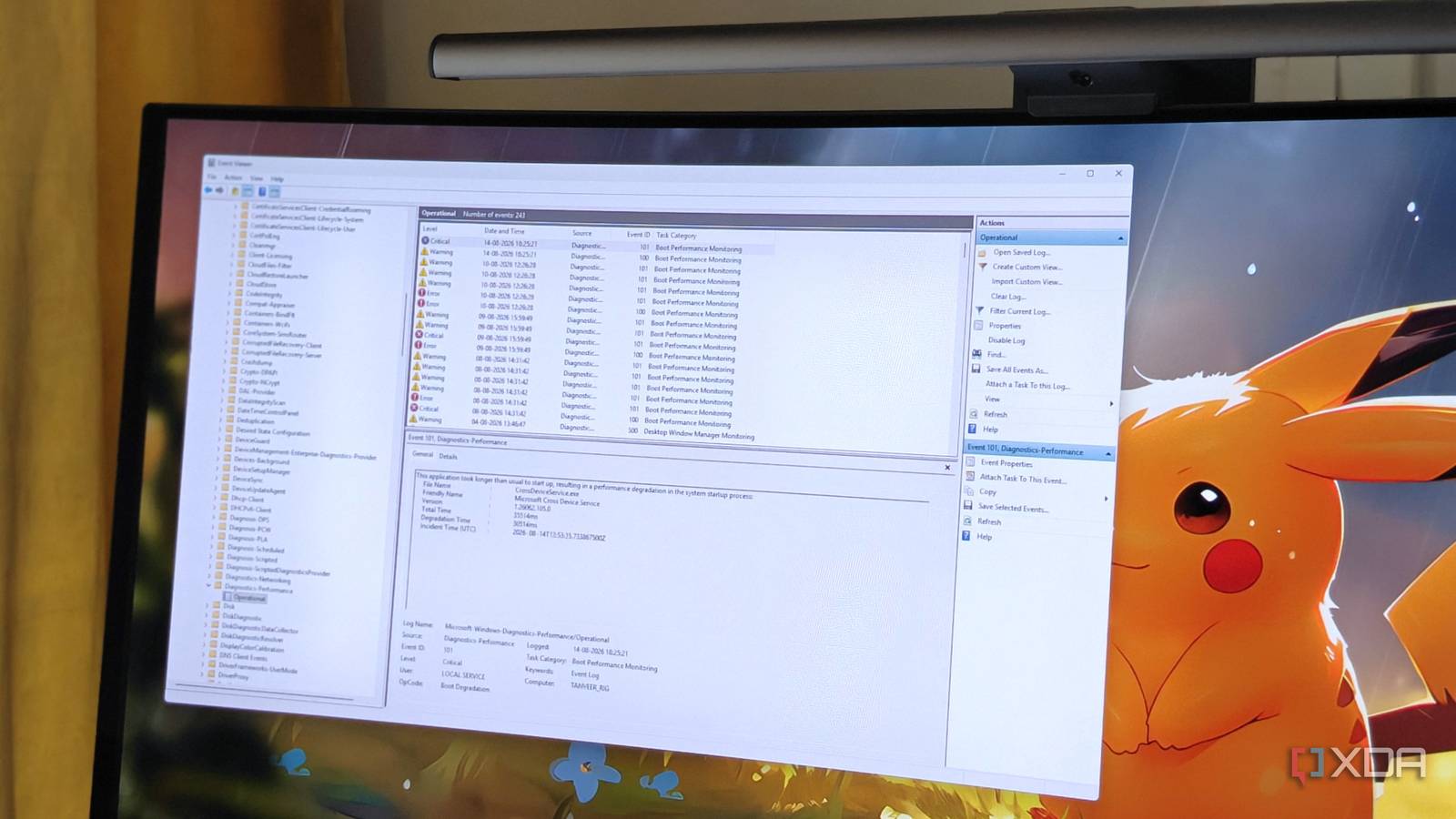
Published Aug 18, 2026, 8:00 PM EDT After a 7-year corporate stint, Tanveer found his love for writing and tech too much to resist. An MBA in Marketing and the owner of a PC building business, he writes on PC hardware, technology, and Windows. When not scouring the web for ideas, he can be found building PCs, watching anime, or playing Smash Karts on his RTX 3080 (sigh). Sign in to your XDA account Nobody likes long boot times, but long shutdown times aren't welcome either. While you can just click "Shut Down" and be on your way, it probably keeps nagging at you if your PC takes unusually long to power down. If you've checked everything from stubborn apps to Windows Update issues, and are still no closer to an answer, I suggest checking Event Viewer for definitive evidence. It has a dedicated event log tracking shutdown delays and critical errors, which you can view with an easy filter. You'll be able to reveal which app or process delayed your last few shutdowns, including the amount of delay it was responsible for. The typical checklist of fixes is probably not helping The real culprits might be hiding in plain sight The first thing any Windows user suspects when facing long shutdown times is Windows Update. Windows 11 is notorious for pushing countless updates, many of which complete installation only when your PC shuts down, contributing to longer shutdowns. If the Windows Update history doesn't reveal anything suspicious, you would probably move to Task Manager to spot unnecessary apps being stuck, delaying a shutdown. If you're unable to reveal anything, disabling Fast Startup is usually the next step. Fast Startup helps speed up boot times by saving the kernel session and retaining parts of the OS in a hybrid state, preventing a proper shutdown. While this can help avoid long boot times, Fast Startup sometimes creates problems during shutdowns, contributing to unusual delays. I recommend turning off Fast Startup anyway to prevent a myriad of Windows issues. Even DISM and SFC scans can help fix long shutdowns by fixing corrupted Windows files. If your shutdown times haven't improved even after all these fixes, it's time to look at Windows' detailed logs, which clearly reveal which apps or services are causing long shutdowns on your PC. I found that Event Viewer had the answer all along A simple filter lays it bare While researching long shutdown times, I found that there's a specific log in Event Viewer that tracks shutdown-related delays and errors. If you navigate to Applications and Services Logs > Microsoft > Windows > Diagnostics-Performance > Operational, you'll see a list of several errors and warnings. If you create a filter using the Filter Current Log button on the right panel and enter "203" in the field with Event IDs>, you'll find a small subset of events that point to the exact source behind your shutdown delays. You can see the file name and the total time that the app or service added to the shutdown. In my case, it was the GameInput Host Service that was at fault. Although the amount of delay was small, this particular service is known to cause high memory usage and system errors, with many Windows users disabling it for better results. Your PC might reveal other sources, such as a VPN service, a cloud sync client, or another built-in Windows service. Whether you should disable the service in question or toggle it to "Manual" comes down to its usefulness and impact. Search Reddit and other forums for the potential impact of turning it off and decide for yourself. Event Viewer is way more useful than people think Most Windows users don't realize the importance of Event Viewer. It hides a surprising amount of useful information about your PC's behavior, helping you troubleshoot a variety of errors. If you're facing delayed shutdowns even after addressing other culprits, Event Viewer should be on your list. It will tell you which services aren't letting your PC power down instantly.
This single Windows diagnostic will tell you why your PC takes forever to shut down
Full Article
Original Source
Read the full article at Xda-developers →KhanList aggregates and links to publicly available news content. We do not host full articles from third-party sources. Always verify important information with original sources.