
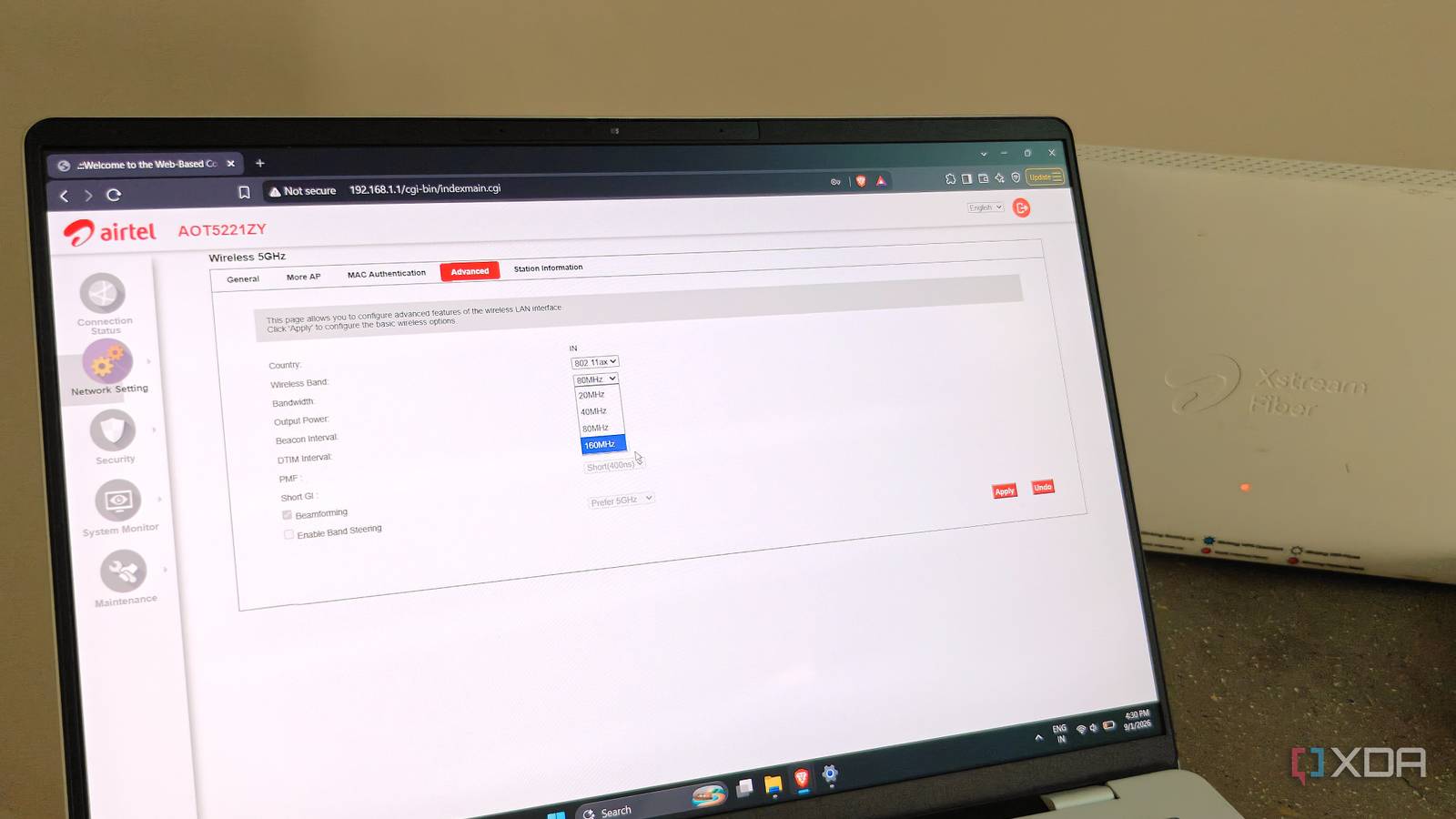
Published Sep 1, 2026, 10:01 AM EDT After a 7-year corporate stint, Tanveer found his love for writing and tech too much to resist. An MBA in Marketing and the owner of a PC building business, he writes on PC hardware, technology, and Windows. When not scouring the web for ideas, he can be found building PCs, watching anime, or playing Smash Karts on his RTX 3080 (sigh). We instinctively chase the biggest numbers when it comes to performance, whether it's PC hardware or networking. That's probably why your router's default channel width is greater than what it should be, so that performance looks good in a speed test. While a higher channel width directly translates to more bandwidth and speed, the overall result might not be what you want. I experienced this myself when I experimented with different channel width values in my router's settings. Dropping to a lower value reduced my maximum Wi-Fi speed in some areas of the house, but the connection improved in every way that mattered. Apps and websites became snappier, buffering was minimal, and the Wi-Fi range improved tangibly. Your router's default channel width is probably suboptimal Bigger isn't always better Users on Wi-Fi 6E and Wi-Fi 7 are more familiar with 160 MHz channels, and even 320 MHz channels on the latter. That said, even those on Wi-Fi 6 can make use of wider channels on the faster 5 GHz band by tweaking their router settings. Your 5 GHz band is probably set to use wider, 80 MHz channels to offer the maximum bandwidth possible in your plan. This results in a bigger number when you run a speed test, since the bigger slice of the spectrum allows the router to push more throughput. This should improve performance, but in real-world conditions, it rarely helps. This is because most of us live in densely populated urban environments, where your neighbors' Wi-Fi competes with your own on the same spectrum. The greater the channel width, the greater the interference with nearby Wi-Fi networks. Once your router combines multiple channels into a single wider channel, it increases the signal-to-noise ratio. At longer distances, your router faces greater packet loss, making the problem worse. Using 80 MHz on your 5 GHz band probably shows a better speed test, but it tanks your actual Wi-Fi performance. Lowering the channel width can tangibly improve Wi-Fi performance I experienced it myself Recently, I was checking out my router's admin page to see if I could enable DFS channels. While that wasn't an option on my router, I spotted that the 5 GHz band was set to 80 MHz channel width. I probably picked it a while ago, hoping to boost the speed in the furthest rooms of the house. I changed it to 40 MHz, just to see if it would make a significant difference. And I'm glad I did that, since my 5 GHz performance became genuinely smoother. The overall bandwidth dropped slightly, but the connection was way snappier and more reliable. The random slowdowns when watching YouTube on my TV or browsing Instagram on my phone were gone. Even the range improved when I moved to the rooms away from the router. This is because a lower channel width reduces co-channel interference with neighboring networks. Your router is less likely to occupy the same slice of spectrum as other routers. It also allows your router to avoid DFS channels, which can force a lengthy re-scan if the router detects a weather or airport radar signal. Hence, the chances of a connection drop are reduced, too. Use a free utility to find the best wireless channel Don't ignore channel selection Credit: NetSpot While you're tweaking router settings, it's recommended to revisit the channel you're using. Your router's automatic channel selection picks a less-crowded channel on every reboot. However, if you rarely reboot your router, your channel selection is most likely outdated. The channel scan your router performs is a static snapshot, not a dynamic scan that updates the "best" channel periodically. Hence, it's recommended to manually choose a clean wireless channel by using a utility like WiFi Analyzer. It will show you the number of networks on every band and channel, along with the signal strength of each network. You can choose the channel with the least number of strong networks. Optimizing channel selection alongside channel width will have a greater impact on your Wi-Fi performance. You'll minimize interference and actually enjoy a stable connection instead of chasing vanity metrics. Wi-Fi speed isn't everything, especially in crowded environments Most people treat their Wi-Fi bandwidth as the north star for their Wi-Fi performance. In reality, a lot more goes into making a stable, reliable, and snappy connection. You need to minimize interference and latency, and maximize range before you can conclude that your connection is optimized. Reducing the channel width reduces co-channel interference and improves the range of your Wi-Fi.
This router setting reduced my Wi-Fi speed, but it's the best change I've made to my network
Full Article
Original Source
Read the full article at Xda-developers →KhanList aggregates and links to publicly available news content. We do not host full articles from third-party sources. Always verify important information with original sources.