
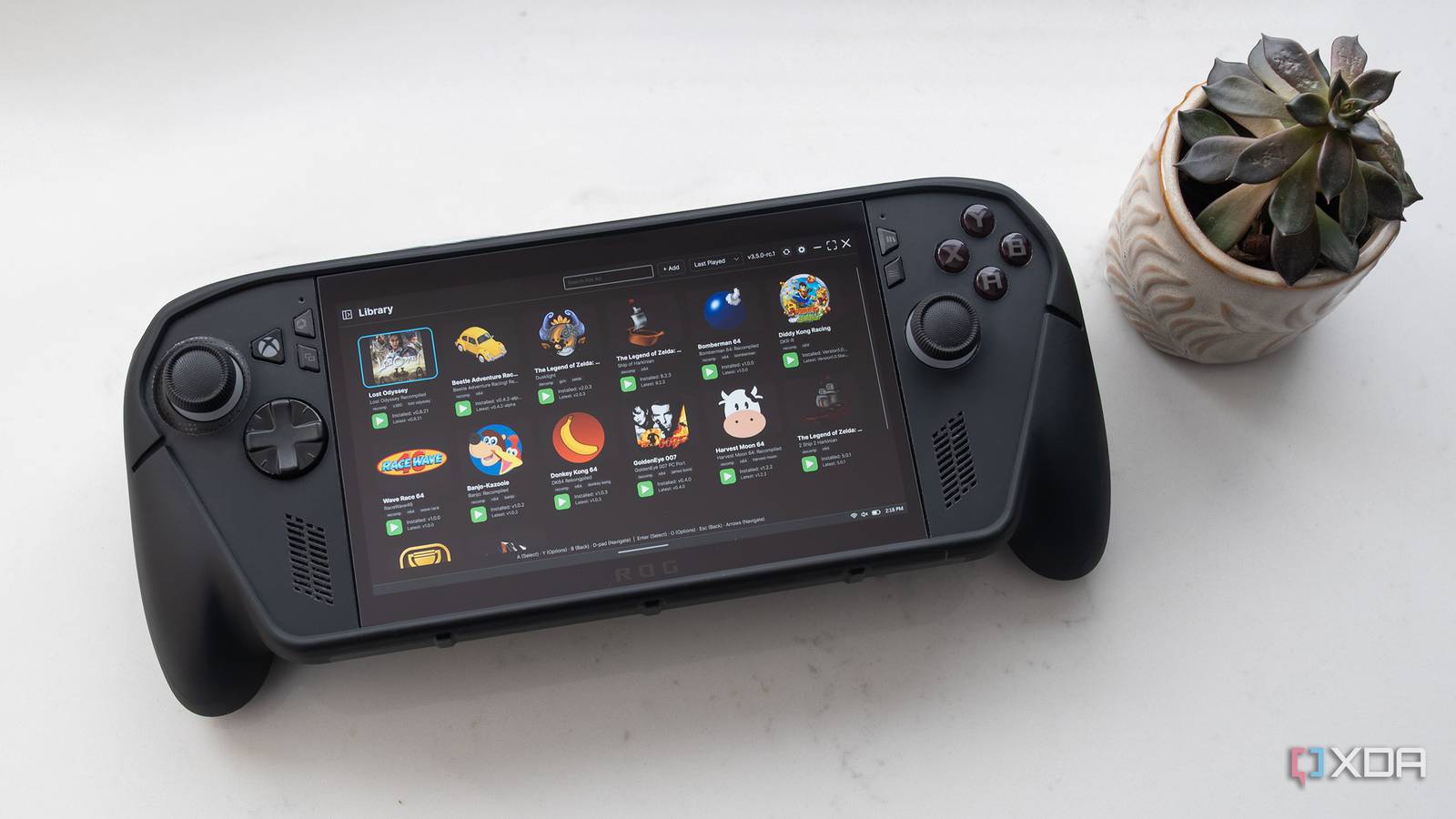
Published Oct 6, 2026, 11:30 AM EDT Patrick O'Rourke is XDA's News Editor and Entertainment Segment Lead. Previously, he was Pocket-lint's Editor-in-Chief, the Editor-in-Chief of Canadian tech publication MobileSyrup, and earlier in his career, he worked as the technology editor at the Financial Post and Postmedia. He's based in Toronto. Over the past 15 years, he's written thousands of articles. Patrick has also interviewed dozens of tech industry executives and covered GDC, E3, Gamescom, WWDC, Apple keynotes, Samsung Unpacked events and more. Patrick has a BA in journalism from Toronto Metropolitan University. The retro video game decompilation and recompilation PC port scene has exploded over the past few months, at least in part because AI and LLMs have sped up the tedious reverse-engineering work typically required to get old-school titles running on other platforms. In fact, there are so many out there now that it can be hard to keep track of them all, especially when it comes to projects that drop updates nearly daily. Thankfully, I've discovered Quiver, a Windows 11, Linux, Android, and macOS app that makes downloading, installing, and running GitHub decomp/recomp game releases way easier. Unlike emulation, which runs the original ROM through software that tries to copy the original console, decompilations and recompilations transform an old-school game into a native PC application. This creates a gaming experience that's closer to playing on original hardware and makes it easier to add enhancements like higher frame rates and resolutions, more modern controls, lower input latency, and more. The world of old-school game recompilations is rapidly growing Quiver is great for keeping your games updated and for discovering new ports There are tons of decompilation/recompilation ports out there, including Nintendo 64 classics like The Legend of Zelda: Ocarina of Time's Ship of Harkinian, Majora's Mask's 2ship2harkinian, Twilight Princess' Dusklight, and Banjo: Recompiled, a PC port of Banjo-Kazooie, just to name a few that have been around for a couple of years. More recent AI-assisted ports include Zelda: The Wind Waker, Super Smash Bros. Melee, Pokémon Red and Blue, and GoldenEye 007. Quiver is especially useful for keeping your games up to date. Take Lost Odyssey Recompiled, a recently released PC recompilation of the classic Xbox 360 JRPG that's getting new features almost daily. Seriously, since I started playing Lost Odyssey a few weeks ago, at least four updates for Lost Odyssey Recompiled have appeared through Quiver, including one that added HDR support and another that fixed a weird visual flickering issue. With Quiver, the Update appears automatically under the title, and all I need to do is click Update. You can also set the launcher to install updates automatically, but I prefer to know when they arrive so I can see what they change. Quiver is also a useful tool for discovering decompilation and recompilation. If you navigate to the left menu and click App Catalog, you'll find apps divided into Nintendo, PlayStation, Xbox, and Other Platforms lists. While I feel pretty plugged into the fast-moving world of retro game ports, I discovered several I didn't realize existed with this feature. For example, while I haven't tried them yet, I definitely plan to check out Snowboard Kids 2, Road Rash 64, Dinosaur Planet (which never actually released), and maybe even Vandal Hearts. I've already booted up Beetle Adventure Racing, a very underrated N64 game I fondly remember renting at Blockbuster as a kid. To add one of these titles to my library, all I need to do is tap Add and then rip the ROM or Disc image from a copy of the game I, of course, already own. If you're familiar with the emulation world, finding these game files in various locations across the Internet won't be a problem. Next, make sure the unzipped ROM is in the corresponding game folder in Quiver's directory, and you're ready to go. Moving my existing games and mods to Quiver was a simple process In just a few steps, my Ship of Harkinian setup was ready to go One of my key concerns with switching over to Quiver was losing my settings, mods, and saved progress in the games I've been playing. Thankfully, Quiver's folder structure seems to match all the recompilations I already had installed, so I just copied them over from my ROG Xbox Ally X to an unnamed Windows 11 handheld I'm reviewing with the help of LocalSend (if you're wondering why I'm being cryptic, it's because the handheld is still under embargo). I then dropped them in the corresponding folders for each title in the Quiver directory, and I was good to go after updating each title (finding my Dusklight Twilight Princess save file took a bit more work). The entire process was far more seamless than I expected. As is always the case with all decomps and recomps, make sure you drop the unzipped Quiver installation folder somewhere that's easy to access. I always throw everything in my Documents folder. Since I do most of my retro gaming on my ROG Xbox Ally X, I also created a shortcut in the Xbox app so I can launch Quiver in Xbox Mode without being forced to switch to Windows 11 every time. There are other fun Quiver features I haven't spent much time with, including changing the launcher's colors, adding a background image, and even setting background music to play when Quiver is open. As far as retro game recompilation and decompilation launchers go, Quiver seems to be the best around right now. It makes it an absolute breeze to keep track of new PC ports and keep them updated. Quiver
This launcher finally made my messy retro PC game port library effortless to manage
Full Article
Original Source
Read the full article at Xda-developers →KhanList aggregates and links to publicly available news content. We do not host full articles from third-party sources. Always verify important information with original sources.