
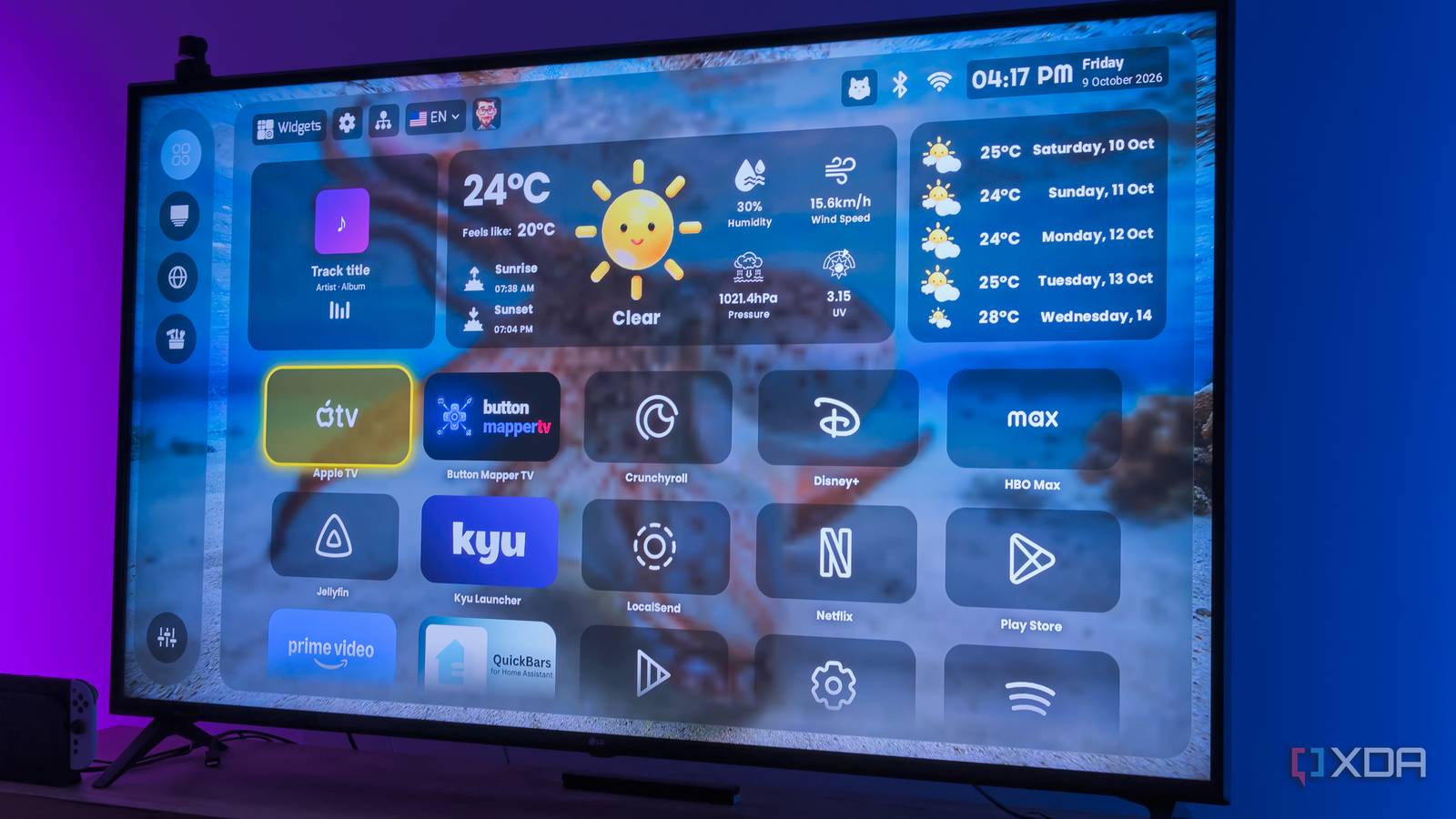
Published Oct 10, 2026, 6:00 PM EDT João has been covering the tech world for over 7 years, with a heavy focus on laptops and the Windows ecosystem. I also love all things tech and videogames, especially Nintendo, which he's always happy to talk about. Prior to joining XDA in 2021, he worked at Neowin: https://www.neowin.net/news/poster/jo%C3%A3o-carrasqueira/ I've written about Android TV launchers a few times, and most often the angle is that you can trim some of the fat from Google's default launcher for a much smoother experience. It's especially helpful on an older device like my Chromecast with Google TV, which feels noticeably slower these days. This article is about something else. PLUI, short for Premium Launcher TV UI, is a launcher that advertises itself as a feature-packed alternative that's fully free to use, with no premium payments required. With a pitch and name like that, I had to give it a shot, and, perhaps unsurprisingly, I came away with mixed opinions. It's a lot all at once There are a lot of UI elements Right off the bat, PLUI presents itself as a very capable and, in tandem, very busy Android TV launcher. The initial setup is actually very short, but once you get to the proper UI, you get an app list, colorful widgets, a sidebar menu, and a top menu with a few more shortcuts. In concept, it's not much different from a lot of other launchers, but it's presented in a way that feels cluttered out of the box, even if it does offer useful features. Still, it does drive home the point that this is a very capable launcher. Apps can be displayed all on the same page, but you can also sort them into categories, and you can see most of the important controls at a glance. However, this also comes with the downside of generally feeling slower. On a device like the Chromecast with Google TV I'm using, scrolling through the app list and opening menus feels a good bit more sluggish than other lightweight options. Then again, this launcher was pitched to me as the antithesis of the lightweight launchers we've previously covered on XDA, so it's all about the features it offers. The customization options are solid No premium paywalls here Looking at what's on offer, one of PLUI's biggest advantages seems to be its widgets. It's not the first launcher to offer them, but many times, these launchers have some of the coolest widgets locked behind a paywall, and that's not the case here. The launcher recently started offering its full suite of features for free. The widget options include a handful of great ones, but the best part is the variety of options for the same concept. For example, there are over 80 weather-related widgets, many of which simply display the same information in different ways. You can add widgets that show a photo slideshow, what's currently playing on your TV (useful for music), security camera feeds, and a couple others. More are in the works, too, including podcasts and a section called "fun & extras." When it comes to widget concepts, though, nothing here is really mind-blowing. It's mostly a lot of variations of similar concepts. The same goes for visual customization as a whole. PLUI lets you choose from a wide range of background sources, including Reddit, NASA, or Bing's wallpaper of the day (plus a built-in collection of images). Plus, you can enable a blur effect on the launcher surfaces, adjust the transparency level, or choose whether the launcher pulls an accent color from the wallpaper. One fairly unique feature is its custom icon pack, which you can apply to most apps to give your home screen a more cohesive look. Not every app is supported, so it can fall a little flat. Aside from that, it doesn't feel like there's much unique to PLUI visually. It works for everyone in the house Everyone gets their own screen The big element that makes PLUI different from most other launchers is that it supports multiple user profiles. You can create up to ten user accounts on PLUI, set up a PIN, and make sure everyone in the house has their own customized TV screen. If you have a big family with very different interests, there's definitely something to this. Not only can you change things like the wallpaper for each user, but you can control what apps are visible and how they're organized. It's a pretty useful concept, and one that Google already offers with its built-in launcher, but it's expanded upon here. Of course, beyond the launcher, all the apps and settings are under a single user, so it's not like using a different profile makes it so you see significantly different content. You're still logged in to the same services under the same account, which is why I don't really subscribe to this idea of a launcher having multiple users. Even Google's built-in launcher barely makes a difference between users, and it's no different here. It doesn't make much sense at its core. A TV isn't a super personal device with sensitive data, and it's usually meant for a communal space. You can switch to your account and see a different wallpaper for five seconds, but does it really matter? Switching accounts isn't as fast or as meaningful as it is on something like a computer, considering all the underlying app and user data is shared anyway. It ends up being a waste of time. The only notable benefit I can see is parental controls with screen time limits, which Google's launcher offers, but you can't replicate with other third-party launchers. If this is something you're concerned about, then PLUI may be worth it. Monet is still my choice It does it all in a much lighter way PLUI isn't a bad launcher, but I came into it expecting a feature-rich experience unlike anything else, and that's just not the case. It feels more cluttered, and its performance is pretty subpar compared to an option like Monet Launcher. Almost all the capabilities I mentioned — such as widgets or different wallpaper sources — are also found in Monet, even if they;'re not exactly the same. PLUI may have NASA wallpapers, but Monet has Wallhaven as a possible source. PLUI dominates in widget count (mostly because of its weather section), but it loses on visual customization, which Monet handles better when it comes to choosing accent colors and tweaking smaller details. In fact, despite feeling much lighter, Monet puts PLUI to shame feature-wise. It makes it easier to change the default launcher without requiring a separate app (PLUI needs a dedicated button remapper), it has a quick app switching overlay, and I can remap other buttons to quick actions, too, so I can make things like the YouTube and Netflix buttons actually useful for once. I also prefer other options, such as Kyu Launcher or AT4K. PLUI will only cater to a very specific subset of users. PLUI has a long journey ahead I can see potential for PLUI to be one of the best launchers out there, and if you care about widget options and features like parental controls, it's worth considering. But the lackluster performance and lack of unique features I care about make this one a bit harder to recommend. Parental controls are really the only factor that would make me say this is the launcher for you, no questions asked. If that is you, you can check it out below. Premium TV Launcher UI
This Android TV launcher gave me screen time controls, but I'm still not switching from Monet
Full Article
Original Source
Read the full article at Xda-developers →KhanList aggregates and links to publicly available news content. We do not host full articles from third-party sources. Always verify important information with original sources.