
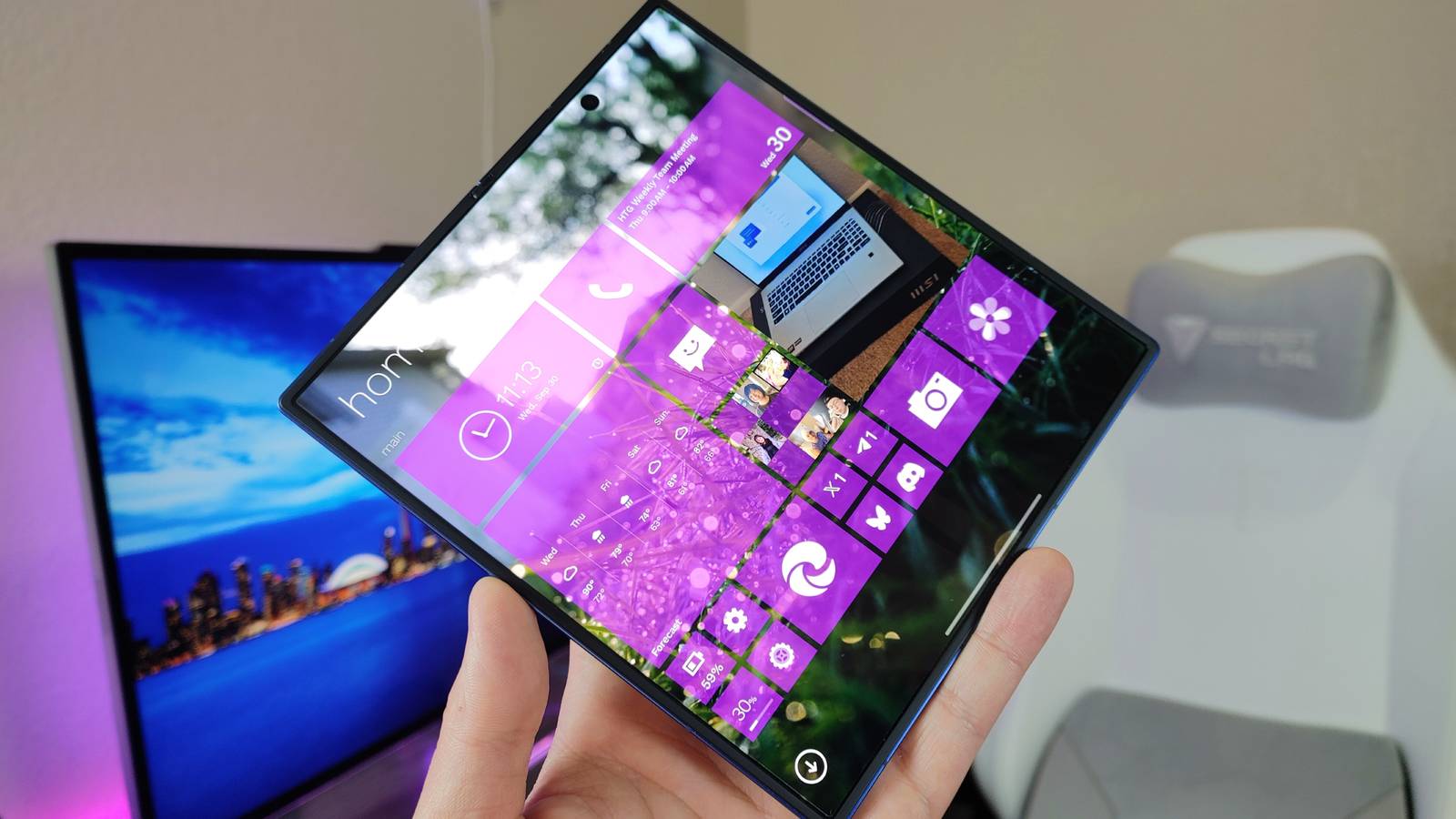
Published Oct 1, 2026, 9:00 AM EDT Zachary Boddy is a seasoned journalist with over six years of experience covering technology and video games, and is now contributing to How-To Geek. Zachary's career began at Windows Central, where their long-running, deep-rooted passion as a tech and gaming nerd fueled thousands of published articles, including reviews, guides, interviews, editorials, and so much more. When Zachary isn't writing, they're playing video games, reading books, listening to music, and spending time with their family, a very food-motivated cat and an exceptionally creative daughter. Sign in to your How-To Geek account Pick up any Android device or iPhone, and the home screens all essentially look the same: a grid of static icons and some widgets. Most devices in general work like this, but it wasn't always like that. Microsoft experimented with dynamic Live Tiles that combined icons and widgets into one, which hit their peak during the Windows 8 era — and you can still enjoy some of that magic on your phone today. I've been playing with METROV Launcher, a relatively recent addition to the Google Play Store that faithfully turns your phone into a Windows Phone 8 nostalgia machine. Even better, METROV boasts full foldable support, and unfolding my Samsung Galaxy Z Fold 7 emulates the experience of a Windows 8 desktop. Like many others, I've been surprised by just how great METROV is overall, enough that I'm genuinely considering sticking with it long-term (even if it does have some unavoidable flaws). Bringing Metro and beyond to your foldable Windows Live Tiles, brought to Android your way METROV is hardly the first attempt to breathe a little Windows Phone into Android, but I love this launcher's approach for one major reason: with a foldable smartphone, you get a Windows Phone when closed, and a Windows PC tablet when opened. That's because METROV has a "desktop mode" that changes the inner screen to a traditional Windows 8 Start Screen-like layout, rather than simply rescaling your cover screen layout to fit a bigger display. Being a launcher, you sadly won't get the full multitasking experience of a Windows 8 PC when using the inner screen (you'll still be limited to whatever multitasking features your foldable supports), but it is a lovely home screen experience unlike any default Android skin. It looks and feels amazing, faithfully recapturing Microsoft's classic Metro design language — even down to the transitions and animations. METROV takes full advantage of the brief period of time Microsoft was properly investing in both mobile and desktop experiences, and the end result feels like a glimpse at what that vision could've looked like had Microsoft succeeded. It's a match made in heaven for my Galaxy Z Fold. Metro is the name of the game, but don't believe you're overly restricted by what Microsoft did over a decade ago. METROV includes a ton of customization options and even optional themes that take from Windows Phone 7 or 8.1, Windows 8, Windows 10 Mobile, and beyond, to ensure that no two setups will ever look the same. Established launchers like Square Home do provide more modern features, like additional tile sizes, stackable tiles and widgets, home screen categories, and more, but METROV strikes a great balance between being faithful to the old and bringing something new. Once you take the time to customize your inner and outer screen layouts with your apps and widgets, the sky's the limit for how everything comes together. I can't overstate how much fun I had when first beginning to explore METROV. This launcher really does bring that Metro magic to Android, Live Tiles and all, in a way other launchers I've tried don't quite manage. That said, there are still plenty of flaws and compromises that can't be avoided, even with all these features. Customization and features to mask the flaws Android and Windows 8 are just too different, but METROV spans the gap well The idea behind Live Tiles was to combine the familiarity and accessibility of icons with the dynamic information provided by widgets, which was awesome in theory but limited by the platform and app support, as well as significantly less interactability compared to widgets. With Android launchers like METROV, those weaknesses are even more noticeable, as Android simply isn't designed with this interface in mind. With limited access as a launcher, METROV does its best to make the Metro experience feel natural. There's a built-in Windows Phone Action Center that can effectively replace your notification center, widgets can be placed on your home screen as tiles, you can add a news feed, and there's a suite of built-in apps (Gallery, Calculator, Agenda, Forecast, Music Player, and a few others) that follow the Metro design language, feature Live Tiles, and seamlessly integrate into the launcher and your phone. METROV can even cleverly use notifications to give other apps pseudo-Live Tiles; for example, the Google Messages tile can flip to show recent messages and a prompt to respond to them, which is more useful than a simple notification counter. You also get plenty of settings to fine-tune your experience with METROV, including in-depth per-app customization for Live Tile labels, icons, colors, backgrounds, and animations. Home screen scaling and padding, various ways to display your background, additional controls and widgets for the Action Center, and more — METROV gives you a lot of control, and the attention to detail helps the launcher shine. Regular updates continue to add new features and fix existing problems, too, and you can submit feedback yourself through METROV's GitHub page. You may have a lot of feedback, too, because METROV certainly isn't perfect (and it's not entirely the launcher's fault). I already mentioned Square Home's strengths, and they mirror METROV's weaknesses, like not letting you freely place tiles anywhere on the grid or making it just as frustrating to move or resize tiles and create folders as the original Windows phones and PCs. There are deeper issues, though, like many widgets not working properly or at all, which hurts more when your Live Tiles are already less lively. Some widgets I tried failed to display properly at all, like Samsung's Clock widget. Other widgets, like TIDAL, work completely fine with the right tile size but never update their information, so you're stuck with the same cover art and static control icons. Widgets that let you swipe or scroll may not work properly either, because they're not designed with a Metro interface in mind. I already mentioned the (frankly awesome) built-in Metro apps that try to make up for at least basic apps, but the apps themselves lack the features, integration, and familiarity of the phone, clock, calendar, weather, and other apps that most people use. METROV also can't avoid the fact that it's a launcher. The solo developer has done impressive work with the aforementioned default apps and optional Action Center, but leaving METROV to switch apps, multitask, alter system settings, and more can be jarring. I can absolutely see METROV making strides to improve the fluidity of customization and the reliability of widgets, but everything underneath the launcher will always be Android, not Windows 8, and METROV can't change that. Some awkwardness aside, I really love how METROV transformed my Fold Some might argue that Windows phones were never ahead of their time, and I'd disagree on a few fronts. The time when Windows phones (or Windows 8 in general) did anything particularly special, though, has long since passed. Android and iOS have evolved by leaps and bounds, and the only thing keeping Windows phones in the memory of a select few is the Metro interface at its core. METROV is now my absolute favorite launcher for experiencing the charm of Windows phones that so many modern devices lack, no matter how capable they have become. It's good enough that, despite the fundamental flaws, I'll be sticking with METROV Launcher on my Galaxy Z Fold 7 for at least a while. This launcher, made by a solo developer and completely free and ad-free (with an optional one-time paywall to access all present and future features), makes me dream of an alternate reality where Microsoft actually succeeded in making Windows the third major player in the smartphone world, and its foldables blend the lines between your phone and computer like nothing else. METROV Launcher If you're looking to relive the days of Windows 8 phones or PCs, METROV Launcher fills your Android phone with Metro nostalgia, giving you a fluid and customizable interface with Live Tiles, built-in apps, and more.
This Android launcher turned my phone into the Windows 8 foldable Microsoft never made
Full Article
Original Source
Read the full article at Howtogeek →KhanList aggregates and links to publicly available news content. We do not host full articles from third-party sources. Always verify important information with original sources.