
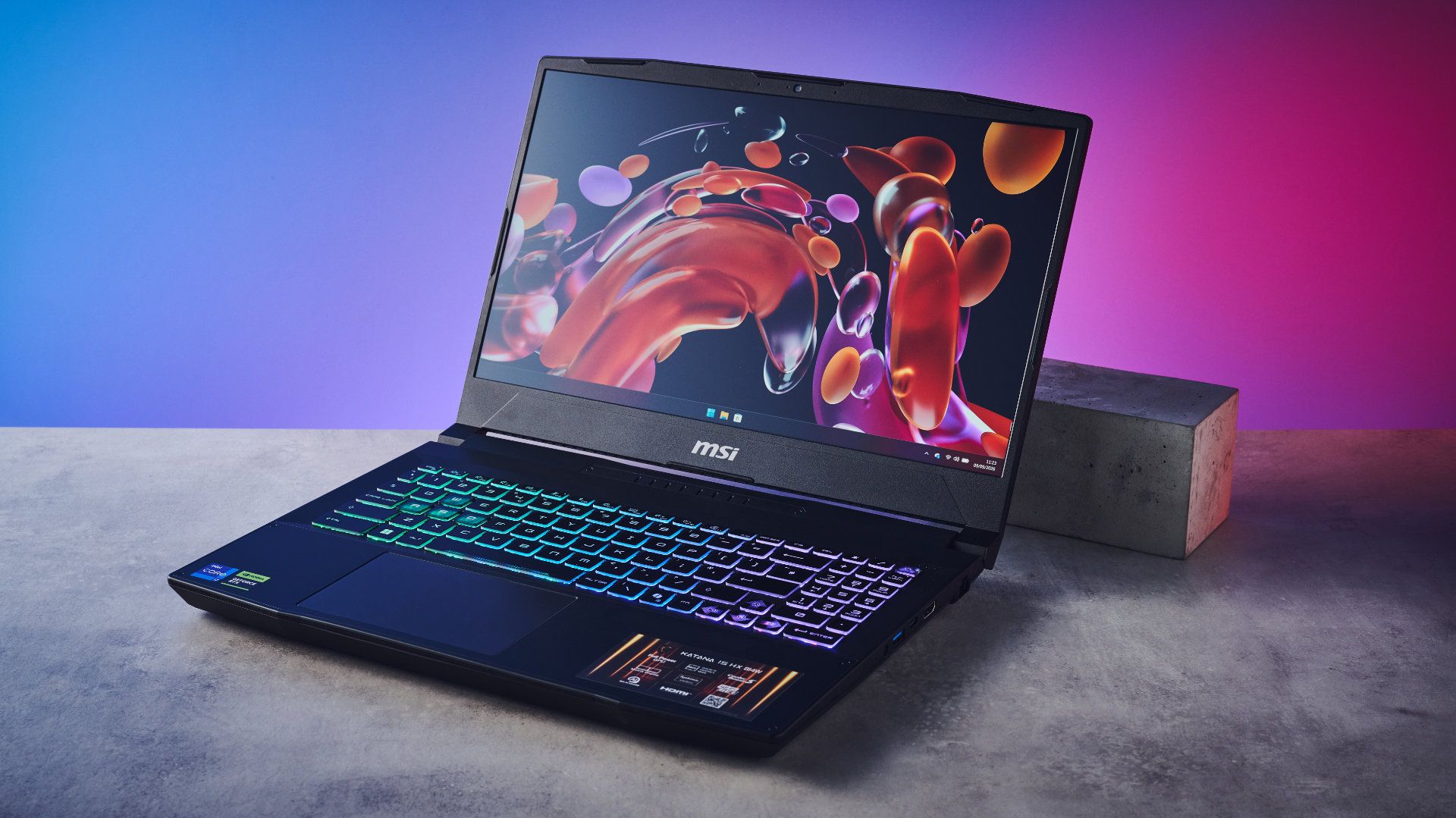
Tom's Guide Verdict If you want a powerful gaming laptop but you’re on a budget, the MSI Katana 15 HX B14W is worth considering. It features a vivid QHD display with great color accuracy, and it boasts excellent performance across gaming (165Hz refresh rate) and productivity. Benchmark results are solid, as is the build quality. The laptop doesn’t cost an arm and leg either. But it doesn’t have the brightest screen, and battery life isn’t very long. Pros +Vivid QHD display and great color accuracy +Strong gaming performance with 165Hz +Subtle design and great build quality +Good for everyday use +Reasonably priced Cons -Not the brightest display -Short-ish battery life Why you can trust Tom's Guide Our writers and editors spend hours analyzing and reviewing products, services, and apps to help find what's best for you. Find out more about how we test, analyze, and rate. You don’t have to burn a hole in your pocket to get strong performance, and the MSI Katana 15 HX B14W proves it. The 15 HX B14W is excellent for casual gaming, thanks to its 165Hz refresh rate, and it’s good for productivity, too, with strong performance across the benchmark board. Its design is subtle while the build quality is solid. I also love the wide color coverage and accuracy, and all of these things come together to deliver one of the best budget laptops.But few things in life are perfect, and the 15 HX B14W isn’t one of them. Its screen is a little dim, even at peak brightness, and it appears slightly washed out. Battery life is nothing to write home about either.Should you still buy it? Read my full MSI Katana 15 HX B14W review to find out.Latest Videos FromTom's GuideMSI Katana 15 HX B14W review: Specs Swipe to scroll horizontally Specs MSI Katana 15 HX B14W (starting) MSI Katana 15 HX B14W (top level configuration) Price $1,284 / £1,299 $1,999 / £1,799 CPU Intel Core i7 14650HX Intel Core i9 14900HX GPU NVIDIA GeForce RTX 5050 NVIDIA GeForce RTX 5070 Display 15.6-inch (2560 x 1440), QHD, Non-Touch, 165Hz 15.6-inch (2560 x 1440), QHD, Non-Touch, 165Hz Memory 16GB 32GB Storage 512GB 1TB Ports 3x USB-A 3.2 Gen 2, 1x USB-C 3.2 Gen 2 / DisplayPort, 1x HDMI 2.1, 1x ethernet, 1x 3.5mm headphones jack, 1x power adapter 3x USB-A 3.2 Gen 2, 1x USB-C 3.2 Gen 2 / DisplayPort, 1x HDMI 2.1, 1x ethernet, 1x 3.5mm headphones jack, 1x power adapter Connectivity Intel Wi-Fi 6E, Bluetooth 5.3 Intel Wi-Fi 6E, Bluetooth 5.3 Size 14.13 x 10.31 x 1 inches 14.13 x 10.31 x 1 inches Weight 5.29lbs 5.29lbs MSI Katana 15 HX B14W review: Cheat sheetWhat is it? A budget gaming laptop with a 15.6-inch QHD display and 165Hz refresh rateWho is it for? Casual gamers on a budgetHow much does it cost? The MSI Katana 15 HX B14W starts at $1,284 / £1,299What do we like? The QHD display’s color coverage and accuracy, strong gaming and everyday performance on a budget, and the subtle designWhat don’t we like? The dim display, and short battery lifeMSI Katana 15 HX B14W review: The upsThere’s a lot to love about the MSI Katana 15 HX B14W. It sports a subtle design, its color rendition is fantastic, and it boasts strong performance across gaming and productivity. Oh, and it doesn’t cost a lot either.Subtle design, solid build (Image credit: Tom's Guide)I’ll be honest: I’m not a huge fan of loud laptops laden with RGB lighting on their lids to tell the world that you are, in fact, a Gamer with a capital G. The MSI Katana 15 HX B14W keeps things low-key and subtle with its inconspicuous design. Branding’s limited to the MSI dragon on the lid, which is black and blends in with the laptop’s all-black design. Though the laptop is made entirely of plastic, it doesn’t feel cheap, tacky or too plasticky. The matte finish is lovely, and feels great to slide your fingers across (don’t look at me like that, you’ve done it, too).The 15 HX B14W packs a 15.6-inch QHD non-touch screen, so the laptop measures 14.13 x 10.31 x 1 inches. It’s slightly bigger than the Alienware 16X Aurora ($2,499) and the HyperX Omen 15 ($1,099), also 15- and 16-inch laptops. While it isn’t as compact as, say, a 13-inch MacBook Air M5 ($1,099), the 15 HX B14W slides into most backpacks, and at 5.29lbs, I had no issues carrying it to and from work. (Image credit: Tom's Guide)The 15 HX B14W’s design is as practical as it’s good-looking. There are plenty of ports for hooking up keyboards, mice, headsets, and other peripherals. All the ports are located along the left and right edges instead of ‘round the back, like on the Alienware 16X Aurora or the Acer Predator Helios Neo 16 AI ($1,699). On the left, you’ll find two USB-A 3.2 Gen 2 ports, and a third is located on the right, along with USB-C 3.2 Gen 2 / DisplayPort, HDMI 2.1 and ethernet ports. There’s also a 3.5mm jack for headphones and external microphones.Tom's Guide: Direct to Your InboxGet instant access to breaking news, the hottest reviews, great deals and helpful tips.Beautiful QHD display (Image credit: Tom's Guide)There’s no point in spending money — regardless of the amount — on a laptop that doesn’t feature a stunning display. Thankfully, the MSI Katana 15 HX B14W does, and it’s a joy to look at, work on, and play your favorite games on. Its 15.6-inch QHD screen has a resolution of 2560 x 1440, and it has a refresh rate of 165Hz which, for casual gamers, should suffice.I’ll discuss the 15 HX B14W’s gaming performance in detail shortly, though, and for now, I’d like to talk about the vivid screen. Whether I was gaming or watching videos on YouTube, I thoroughly enjoyed the color rendition. The 15 HX B14W does a great job of displaying deep, rich blues and reds, inky blacks, and textured pastels. I felt immersed in the games I played and the videos I watched on YouTube.It’s important to note that the 15 HX B14W doesn’t come with an OLED screen, regardless of the configuration, and if an OLED display is a necessity for you, I’d recommend the HyperX Omen 15 or the Alienware 16 Area-51 ($2,529). Swipe to scroll horizontally Even though it doesn’t feature an OLED panel, the 15 HX B14W goes above and beyond when it comes to color coverage and accuracy. In my lab testing, the 15 HX B14W covered 151.3% of the sRGB color space and 107.1% of the wider DCI P3 gamut. MSI’s offering trumps nearly all of its competitors, barring the HyperX Omen 15. At 151.3% sRGB coverage, colors don’t appear oversaturated, nor do they carry a neon effect.Alongside wide color coverage, you’re also getting superb color accuracy. The 15 HX B14W achieved a Delta-E score of 0.07. Delta-E is basically a numerical representation of how much two colors differ, and the closer the score to zero, the better. The 15 HX B14W 0.07 score means that colors displayed on its screen are as accurate as they can be. It also upstages its competitors, as you can see above. The differences are fairly negligible, though.Strong performance across the board (Image credit: Tom's Guide)For a gaming laptop that costs under $1,500, the MSI Katana 15 HX B14W puts in a strong performance across the board. This depends on the configuration you settle for, of course, but my review unit didn’t let me down, regardless of what I did on the laptop. It came fitted with an Intel Core i7 14650HX CPU, an NVIDIA GeForce RTX 5060 graphics card, 16GB of RAM, and a 512GB SSD.Running multiple applications, having over 20 tabs open in Microsoft Edge, and having Steam running in the background wasn’t an issue for the 15 HX B14W. I didn’t experience any unresponsiveness or lag, but it should be noted that its fans can get quite loud. Thankfully, I didn’t experience any overheating. The same can’t be said for the similarly priced Acer Predator Helios Neo 16 AI, which I was benchmarking at the same time as the 15 HX B14W. The Neo 16 AI’s fans, air ducts and keyboard got quite hot, in comparison. Swipe to scroll horizontally After using the laptop for a while, I benchmarked the 15 HX B14W to see how it fared against its rivals. On Geekbench 7, which tests overall CPU performance, the 15 HX B14W pulled in a solid multi-core score of 16,584, outclassing the HyperX Omen 15 and the MacBook Neo ($699) — though the latter is underpowered and is more of a productivity-focused notebook. That’s still respectable for a budget gaming laptop. The Acer Predator Helios Neo 16 AI takes the crown here, with an impressive multi-core score of 23,100.I then conducted our Handbrake video editing test, which transcodes a 4K video to 1080P, and the 15 HX B14W did so in three minutes and 24 seconds. That’s on par with the HyperX Omen 15 and the Alienware 16X Aurora. The 15 HX B14W also blows past both the MacBook Neo and the MacBook Air M5. Well played, MSI. Swipe to scroll horizontally Last but not least, I ran the SSD BlackMagic Disk Speed to measure the 15 HX B14W’s write and read speeds. Again, the 15 HX B14W performed decently here, with 3,490 write and 3,902 read speeds (both measured in MBps). That’s solid SSD performance for a laptop that starts at $1,284 / £1,299. In everyday use, the 15 HX B14W didn’t give me much to complain about. The laptop booted up in seconds, as did applications, and transferring files from one folder to another was quick, too. This is an excellent everyday laptop for those on a budget.Excellent for gaming (Image credit: Tom's Guide)The MSI Katana 15 HX B14W is a powerful and competent gaming laptop, boasting a 165Hz refresh rate and the latest NVIDIA GeForce RTX 50-series graphic cards. At its native resolution of 2560 x 1440 and thanks to DLSS 4.5, running the best Steam games without any issues is a walk in the park for the 15 HX B14W. Visuals are nothing short of stunning, and as I mentioned earlier, there’s no unresponsiveness or jittering. Swipe to scroll horizontally Game FPS (various settings) Counter-Strike 2 159fps Forza Horizon 5 54fps F1 25 30fps I ran a few in-game benchmark tests to see how the 15 HX B14W fared, and it performed formidably. Counter-Strike 2 ran comfortably at 159fps, close to the laptop’s 165Hz refresh rate. This didn’t come as a surprise to me as Counter-Strike 2 isn’t the most demanding game — so how did the 15 HX B14W perform in more challenging titles? (Image credit: Tom's Guide)Pretty well, actually! With the highest graphics settings enabled in Forza Horizon 5, the in-game benchmark reported an average framerate of 54fps. F1 25, on the other hand, ran at 30fps in Ultra High (lifelike) graphics mode. Both games are extremely system-hungry and intensive, but I didn’t experience any lag or issues when playing them.All three framerates were recorded with the resolution set to 1440P, and you’re bound to get even better fps at 1080P, if it’s raw performance you’re after. The 15 HX B14W holds its own against the likes of the HyperX Omen 15. For a budget laptop, the 15 HX B14W really doesn’t let you down.Reasonably priced (Image credit: Tom's Guide)If you’re a casual gamer or even a student on a budget, the MSI Katana 15 HX B14W is one of the best gaming laptops you can buy today. Though not without its faults (more on that shortly), this is still a formidable notebook that delivers without breaking the bank. The 15 HX B14W starts at $1,284 at Best Buy U.S. / £1,299 at Currys U.K. This basic configuration features NVIDIA GeForce RTX 5050 graphics card, 16GB memory, and a 512GB SSD.Unlike the Alienware 16X Aurora whose price skyrockets the more you add to it, the 15 HX B14W’s topline configuration doesn’t leave a hole in your pocket. Priced at $1,999 at Best Buy U.S. / £1,799 at Currys U.K., it packs an NVIDIA GeForce RTX 5070 GPU, 32GB memory, and a 1TB SSD. It’s worth keeping an eye out for discounts, too, especially during Black Friday sales.The 15 HX B14W is also cheaper than some of its primary competition, like the Alienware 16X Aurora ($2,499), the Acer Predator Helios Neo 16 AI ($1,699), and the Alienware 16 Area-51 ($2,529).MSI Katana 15 HX B14W review: The downsThere isn’t a lot wrong with the MSI Katana 15 HX B14W, but it’s worth noting that its screen isn’t the brightest, and battery life is short.Not the brightest display (Image credit: Tom's Guide)Though the MSI Katana 15 HX B14W boasts excellent color coverage and accuracy (as discussed earlier), its panel isn’t the brightest. It appears slightly washed out and dim. My lab tests confirmed the Katana 15 HX B14W’s poor performance, especially against its competitors. Swipe to scroll horizontally In my lab testing, the Katana 15 HX B14W reached a peak brightness of just 262.2 nits which is pretty poor, bluntly put. All of its competitors outperform it — by a mile, at least. The similarly priced Acer Predator Helios Neo 16 AI has a peak brightness of 520.8 nits, while even the cheaper MacBook Neo is almost twice as bright.Even with the brightness turned all the way up, I struggled to see the screen properly under bright office lights, and with sunlight coming through the windows right behind my chair in the office. I found my four-year-old MacBook Air M2 ($1,099) brighter than the 15 HW B14W — it reached a peak brightness of 495 nits in our lab tests!Short-ish battery life (Image credit: Tom's Guide)Gaming laptops, especially those that don’t cost a fortune, aren’t always known for their long battery life. Most of them need to be kept plugged in constantly if you’re playing intensive games, like Cyberpunk 2077 or Forza Horizon 6. The MSI Katana 15 HX B14W is no different. Its battery life is nothing to write home about. Swipe to scroll horizontally In our in-house battery test where the laptop continuously browses the web and streams videos with brightness set to just 150 nits, the 15 HX B14W lasted five hours and nine minutes. Not great, given that all it was doing was pretty light work. When playing Cyberpunk 2077, I got a low battery notification after just over an hour. (Image credit: Tom's Guide)While neither of those figures are good, it’s important to note that other gaming laptops struggle just as much. The Alienware 16X Aurora, for instance, is pricier than the 15 HX B14W and lasts just a minute over three hours. The HyperX Omen 15 enables you to surf the web for nearly nine hours on a single charge, but gaming quickly drops to 45 minutes, according to our real-world testing.You can see other competitors’ battery performance in the table above. The 15 HX B14W, then, isn’t an anomaly, and its short runtime isn’t necessarily a dealbreaker.MSI Katana 15 HX B14W review: Verdict (Image credit: Tom's Guide)I’ve thoroughly enjoyed testing the MSI Katana 15 HX B14W for gaming and work. Its 165Hz refresh rate delivers smooth motion across video games, while the CPU and NVIDIA GeForce RTX 50-series GPU ensure responsiveness and speed. You also get exceptional color coverage and accuracy, making the 15 HX B14W fit for watching movies and photo editing.While the 15 HX B14W doesn’t feature the brightest screen or the longest battery life, they aren’t dealbreakers. You’re still getting a competent gaming laptop that doesn’t break the bank while delivering stunning visuals. For students going back to school, casual gamers on a budget, and everyone else in between, the 15 HX B14W easily warrants a recommendation. Nikita is a Senior Writer on the Reviews team at Tom's Guide. She's a lifelong gaming and photography enthusiast, always on the lookout for the latest tech. Having worked as a Sub Editor and Writer for Canon EMEA, she has interviewed photographers from all over the world and working in different genres.When she’s not working, Nikita can usually be found sinking hours into RPGs on her PS5, flying a drone (she's a licensed drone pilot), at a concert, or watching F1. Her work has appeared in several publications including Motor Sport Magazine, NME, Marriott Bonvoy, The Independent, and Metro. You can follow her photography account on Instagram here. You must confirm your public display name before commenting Please logout and then login again, you will then be prompted to enter your display name.
The MSI Katana 15 HX B14W gives Acer and Alienware a run for their money — it’s one of the best budget gaming laptops in 2026
Full Article
Original Source
Read the full article at Tomsguide →KhanList aggregates and links to publicly available news content. We do not host full articles from third-party sources. Always verify important information with original sources.