
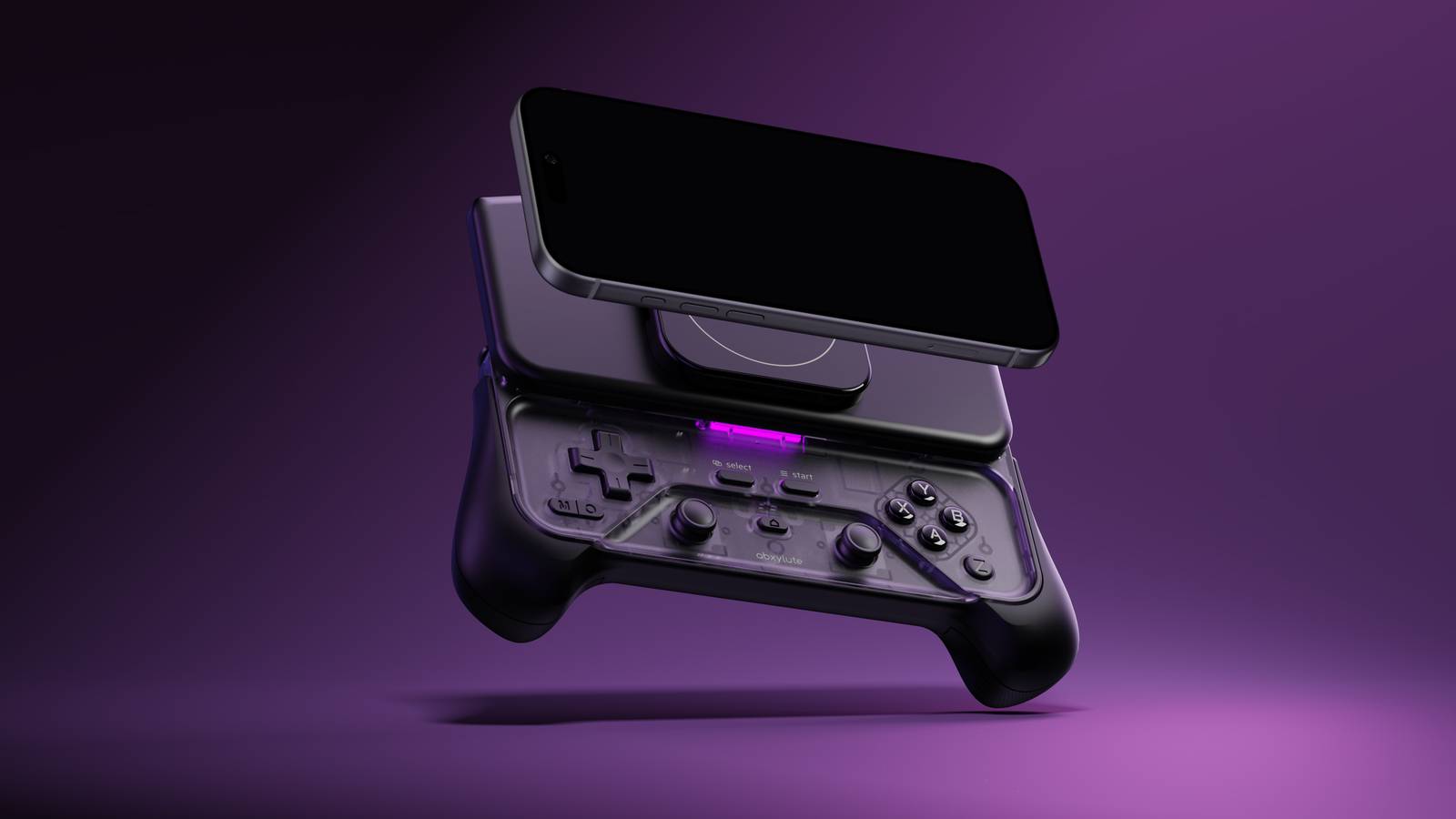
Published Nov 11, 2026, 12:01 PM EST Gaming on the go feels so much better with the abxylute M6, and you won't have to clean your screen every few minutes. Abxylute M6 Mobile Controller Review - The Ideal Christmas Gift For The Mobile Gamer In Your Family We’ve come a long way since Snake was the pinnacle of mobile gaming. Today’s phones are portable computers capable of running console-quality titles, both natively and through cloud streaming, but often these can be frustrating to play with touch controls which sorely impact the overall experience. With its M6 model, live now on Kickstarter, abxylute aims to deliver the comfort of playing with a controller alongside the convenience of portability. On first impressions, the abxylute M6 is a sleek piece of kit, reminiscent of hardware like the Xperia Play. Your MagSafe or equivalent-enabled phone attaches via a powerful magnet, which then slides upwards to reveal the controller underneath. The magnetic island itself can be slid left or right to fit the magnetic area of your phone, and even removed and carried separately if you find it adds just a bit too much bulk in your pocket. This marks a change from the usual telescopic mobile controllers which place the buttons to the sides of your phone, making for a very wide device, instead keeping the footprint to around the same size as a regular DualSense or Xbox controller. My M6 came with an extra attachable grip for even more comfortable holding, something I would very much come to depend on during testing. Whatever Your Game, The M6 Has It Covered The M6 comes with three pairing modes depending on what you are playing: PS Mode for Remote Play and PlayStation emulators, Xinput Mode for anything Xbox or PC, and NS Mode that turns the M6 into a useful extra Pro Controller for Nintendo emulation. Connecting the M6 to my phone was an easy process - I first selected the mode, held the Pair button until the LED began flashing, then selected the controller in my phone’s Bluetooth settings. My phone treated all three modes as separate controllers, but once connected for the first time, all three paired almost instantly each time I wanted to use the M6. When it was time to stop, I simply slid the top down to sever the connection after a few seconds. Other features include vibration that isn’t too overpowering, a programmable macro button that can do pretty much anything you ask of it, and turbo mode on just about any button. With abxylute’s dedicated mobile app, you can map the controls to touchscreen games, and even import your local games and emulators for easy access. It goes without saying that it supports a wide range of games that already have native controller support. Overall I was impressed by the build quality of the M6. The face and shoulder buttons had a clickiness to them that I like, while the linear triggers were satisfyingly springy. The M6 uses 20° capacitive joysticks, and while they felt highly responsive, they also felt a little too loose for my liking at first. I was using a Pixel 8 Pro, and while this phone doesn’t have a magnetic component, the M6 came with an adhesive-backed magnetic ring I could attach to my phone. I also use a case with a magnetic ring built in, and the M6 had no issues holding either firmly in place. All-in-all, I liked what the M6 had to offer in terms of ergonomics and quality, and appreciated that I could have the screen and controls centrally in my field of view at the same time. More Control On The Go, But Take Breaks Now, how does it perform when it’s actually being used? I firstly tested the following native Android games - Asphalt Legends, GRID Autosport, Fortnite, Final Fantasy Tactics: The War of the Lions, and Warframe - for a good spread of control schemes. These all worked flawlessly out of the box on the Xinput pairing mode, with no customisation needed, as they recognised the Xbox controller and adapted accordingly. I used PlayStation Remote Play next, opting for a game that requires extreme precision at all times: PGA Tour. Golf games are a passion of mine, but I was a bit hesitant. I expected a double-kick of Bluetooth and streaming latency to impact my experience, but outside of the standard remote play delay, I couldn’t fault the controller one bit. I wanted to, when I shanked my first shot on the Old Course of St. Andrews straight into the drink, but in reality I was just rusty. Once I’d found my groove again, the birdies flocked back to roost. For a different kind of stress test I fired up my current game, Yakuza 3, also via PS Remote Play. This requires constant mashing of buttons and stick movement, and for the large part the controller performed really well. Generally speaking, the M6 performed almost perfectly across all the games I tested, with one slight gripe - stick sensitivity. They were a little too loose for my liking - in GRID, this meant the car swaying all over the track, making precision cornering harder than it perhaps should have been. For Fortnite, Warframe, and Yakuza, the sensitivity meant that the camera was constantly moving, and I found it hard to target enemies as a result. In the former two games the camera sensitivity can be altered in the settings, which helped, but in Yakuza this wasn’t an option. Your mileage may vary here, and players more used to stick-based action games will likely manage just fine. What I did notice with the action games was that the holding position needed to constantly use the shoulder buttons, reaching over the triggers, meant that the controller naturally tipped backwards. Because it was already top-heavy, this meant that I needed to apply more force with my ring and little fingers to hold it in place. For short gaming sessions this wouldn’t be an issue, but for longer stints this would leave my wrists feeling fatigued, and I’d need to take breaks. The included grip is essential here, giving that added leverage to hold the controller in place without tipping, and it was more manageable when I could rest my arms against a table or my lap. I’d like to see a version of the grip that has slightly larger ‘handles’, so that your hold acts more as a counterweight without the strain. Victory Comes With Fewer Smudges The final game I tested was League of Legends: Wild Rift. I’m a long-time player of the PC game, but always hesitant with Wild Rift because I disliked the touch controls. The abxylute app guided me through a tutorial on mapping, and once I’d figured out the control scheme I wanted to use, it was actually a game-changing experience. I could move about as fluidly as if I was using a mouse, and abilities activated instantly. I was a much more effective player, securing kills and controlling the map compared to when I used touch controls, and it made for the best time I had with the M6 overall. I can see myself committing to playing more Wild Rift now I know I have this tool available. As part of testing, I also gave the M6 to my nephew Toby, as he’s a serial mobile gamer and far closer to the target demographic than I am. He tested Roblox natively and Forza Horizon 6 through Xbox Remote Play on his Samsung phone, and while he had similar gripes with the ergonomics, the M6 ultimately got his seal of approval. He liked the feel of the buttons and the build quality, and was surprised by the apparent lack of noticeable latency. He felt it was a controller best suited for shorter stints, something I think encapsulates the mobile gamer of today perfectly. The abxylute M6 is an excellent piece of kit for what it aims to do, and while it has some minor drawbacks, these don’t get in the way of actually playing games. It’s something you can keep in a jacket pocket or a small bag when you’re on the move, and enjoy a short session largely without hassle or having to deal with touch controls and grubby screens afterwards. I’d have no qualms getting Toby one of these for Christmas, and it’s seriously making me consider mobile gaming as a viable option for the many bus trips I take rather than the numerous dedicated handhelds I already own. abxylute M6 Brand abxylute Platform Android, iOS Battery 500mAh rechargable Connectivity Bluetooth 5.3 Programmable Yes Extra Buttons Macro control button, fully customisable Z button Pros & Cons Build quality will stand the test of time and use Similar size to regular controllers means it is generally comfortable to use Easy to pair, customise, and program Flexibility in use, from native Android/iOS games to streaming and emulation Can be a game-changing experience, once you work out touchscreen mapping Shoulder button ergonomics mean long sessions could cause fatigue in certain types of game Slightly sensitive sticks mean control is perhaps too precise depending on the game
The Abxylute M6 Is An Ideal Bluetooth Mobile Controller For Those On The Go
Full Article
Original Source
Read the full article at Thegamer →KhanList aggregates and links to publicly available news content. We do not host full articles from third-party sources. Always verify important information with original sources.