
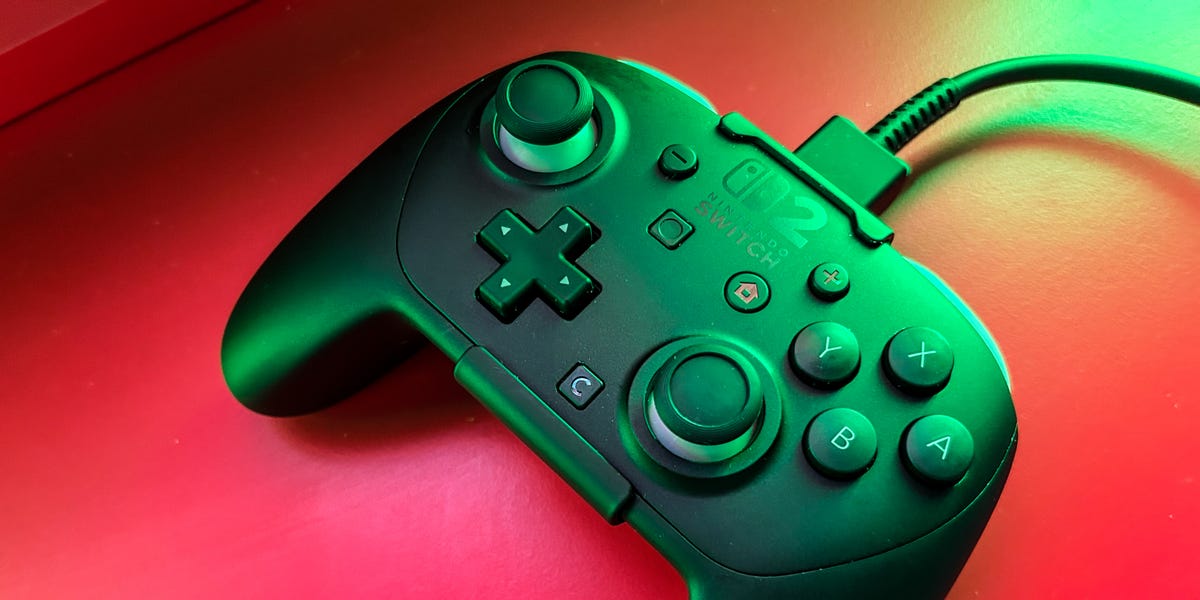
6 min readAfter launching in 2025, the Nintendo Switch 2 became the fastest-selling console in the company’s history, and the market for Switch 2 accessories and protective cases has raced to keep pace. While the Joy-Con 2 bundled with the console are a solid step up from the originals, offering a larger, more comfortable design, to truly enjoy the console’s best games, a dedicated gamepad with a proper D-pad is the way to go for docked play.Best Overall: 8BitDo Pro 3Best Budget: PowerA Advantage Wired ControllerBest Nintendo: Nintendo Switch 2 Pro ControllerBest Charging Grip: JSAUX Magnetic Charging GripBest Premium: GuliKit TT ProThe good news is that the field is deeper and cheaper right now. Third-party makers like 8BitDo and GameSir now match or beat Nintendo on stick durability while undercutting it on price. The catch is Nintendo saves some of its best new tricks — GameChat, HD Rumble 2, amiibo scanning — for its own hardware. Below are the controllers worth buying today, from the full-featured Switch 2 Pro Controller to premium third-party options.How We SelectedWe’ve been gaming on the Switch and Switch 2 since the consoles hit shelves, and we’ve been using compatible controllers just as long. That hands-on time is what helped shape this list. Years of testing various pads has taught us what to look for and what stands out in a crowded market of options. For this list, we looked at things like stick durability, controller features, and customizability options, as well as compatibility beyond the Switch 2, which can let you game across platforms. Many of the options we picked often go on sale, so keep that in mind as you shop.ProsDrift-resistant TMR sticks and switchable analog/digital trigger locksPlenty of extras, including Hall effects triggers, back paddle buttons, swappable magnetic ABXY buttons, and three onboard profilesConsRather jarring rumble featuresKey SpecsConnectionWireless (Bluetooth + 2.4GHz), USB-C wiredSticksTMRBattery Life1,000mAhMotion / GyroYesAmiibo (NFC)NoAudio JackNoExtra Buttons4 (2 rear bumpers + L4/R4)The 8BitDo Pro 3 offers a premium experience for less than the Switch 2 Pro Controller. The headline feature is its TMR (tunneling magnetoresistance) sticks, which aren’t susceptible to drift, promising better long-term performance. Meanwhile, the shoulder triggers feature Hall effect sensors, and each has a physical switch that flips it between full analog pull and a short, clicky digital press. This lets you customize the experience on a game by game basis.There are two paddle buttons on the back near the grips, and you can easily rearrange the magnetic ABXY buttons into Switch or Xbox layouts. Speaking of different layouts, the Pro 3 works across Switch, Switch 2, PC, and mobile devices. Additionally, it supports three onboard profiles for saving custom button remaps through 8BitDo’s Ultimate Software V2 app, and it comes with a charging dock, which also stores the 2.4GHz dongle.The Pro 3 also has extra L4/R4 bumpers and a tactile D-pad for retro gaming. That said, there are a few downsides, including a haphazard rumble that can feel rather jarring, and there’s no headphone jack for wired audio.ProsHall effect sticks resist driftC button for GameChat, plus two mappable back buttonsConsWired only, and it only works while the Switch 2 is dockedKey SpecsConnectionWired (USB-C, 10-ft cable)SticksHall effectBattery LifeN/AMotion / GyroNoAmiibo (NFC)NoAudio JackYes (3.5mm)Extra Buttons2 rear bumpers (remappable)The PowerA Advantage is an officially licensed controller that offers Hall effect thumbsticks at a budget price. Similar to the Switch 2 Pro Controller, it has a C button for GameChat, plus two mappable back buttons you can program on the fly. And, unlike the 8BitDo Pro 3, the PowerA has a 3.5mm headphone jack for wired audio.The catch is that the PowerA is wired-only, and it only works while the Switch 2 is docked. That said, it comes with a 10-foot USB-C cable that provides plenty of leeway to sit on your couch while you play. Although it’s officially licensed, it doesn’t support amiibo and can’t wake the console, but it’s still a reliable, affordable option.ProsTwo remappable rear buttons, plus a 3.5mm headphone jackFantastic ergonomics and up to 40 hours of batteryConsPotentiometer sticks carry drift riskKey SpecsConnectionWireless (Bluetooth), USB-C wiredSticksPotentiometerBattery Life~40 hours (3.5-hr charge)Motion / GyroYesAmiibo (NFC)YesAudio JackYes (3.5mm)Extra Buttons2 rear bumpers (remappable)Nintendo’s own pad is the most complete controller you can buy for the Switch 2, and one of the nicest to hold. It’s a refinement of the beloved original Pro Controller, with a soft matte shell, reassuring weight, and a full-size layout that stays comfortable through longer sessions. What sets it apart is a dedicated C button that opens GameChat instantly, two rear remappable bumpers, and a 3.5mm jack for wired audio.The controller also supports HD Rumble 2, built-in amiibo scanning, motion controls, and roughly 40 hours of battery that recharges in just a few hours. The one real knock is the stick hardware, which uses potentiometer sticks rather than the drift-resistant Hall effect or TMR units on third-party options. At $89.99, it’s also one of the priciest options around, but also Nintendo’s best.ProsDesign holds the Joy-Con 2 at a comfortable angleBuilt-in USB-C port lets you charge and playConsDoesn’t include rear bumpersKey SpecsConnectionN/ASticksN/ABattery LifeN/AMotion / GyroNoAmiibo (NFC)NoAudio JackNoExtra ButtonsNoThe Joy-Con 2 are perfectly good controllers on their own, but Nintendo’s Joy-Con grip isn’t the most comfortable. JSAUX’s grip snaps your Joy-Con 2 onto either side using the same magnetic connection as the console, holding them at an angle that mimics a traditional gamepad.A built-in USB-C port charges both Joy-Con while you play, so a dead controller never interrupts game night, and red/green LEDs show player number and charge status. It’s slim, light, durable, and plays nicely with third-party Joy-Con cases and grips installed. Unfortunately, it doesn’t feature rear bumpers, something Nintendo’s grip offers.ProsTension-adjustable TMR sticksSwitchable Hall/microswitch triggersConsNo 3.5mm headphone jackKey SpecsConnectionWireless (Bluetooth, 2.4GHz adapter), USB-C wiredSticksTMRBattery Life950mAhMotion / GyroYes (6-axis)Amiibo (NFC)NoAudio JackNoExtra Buttons4 (removable metal rear paddles) The Gulikit TT Pro is a great pick for enthusiasts who want a heavily customizable pad. The controller has 720-degree tension-adjustable TMR sticks that let you dial in exactly how much resistance you want. Making a stick more resistant makes small movements feel more precise, while a looser setting is great for platformers or fighting games.The top triggers can switch between a full analog Hall effect pull and a fast microswitch click, and GuliKit’s magnetic-levitation motors offer three selectable vibration modes with adjustable intensity. The TT Pro also features a box full of accessories, including four removable back paddles, two D-pad styles, spare Switch and PC buttons, a case, and a multi-function adapter that lets Xbox and PlayStation pads connect to the Switch 2. It’s a lot of controller for the price, and the perfect option for anyone who likes to dial in their experience before playing.ProsComfortable and well-built, with full motion controlsExcellent battery lifeConsNo headphone jack or rear bumpersKey SpecsConnectionWireless (Bluetooth), USB-C wiredSticksPotentiometerBattery Life~40 hoursMotion / GyroYesAmiibo (NFC)YesAudio JackNoExtra ButtonsNoneIf you’re still using a first-gen Switch, the original Pro Controller is still the one to buy. It’s one of the most beloved controllers Nintendo has made, and the company has made some doozies over the years. It’s far more comfortable than the Joy-Con for longer gaming sessions, with a substantial, ergonomic body, well-spaced buttons, and a classic Nintendo D-pad.You get full motion controls, HD rumble, amiibo scanning, and around 40 hours of battery life, so you only have to charge it about once a month, depending on how much you game. It still pairs with the Switch 2 too, just without the new C button, GameChat, and HD Rumble 2.What to ConsiderStick type matters for long-term durabilityNintendo’s own pads still use potentiometer sticks, which rely on physical carbon contacts that wear down and eventually send phantom “drift” signals. That means if you’re playing a game like Super Mario Odyssey, Mario might slowly walk on his own without you touching the stick. The good news is most third-party pads have moved to contactless Hall effect or newer TMR sticks that read movement magnetically, so they don’t experience the same drift issues. If you go with a Nintendo controller, it’s not guaranteed you’ll experience drift, but it’s a very real possibility.Nintendo wins on featuresNintendo controllers typically offer features you can’t get anywhere else, even with licensed pads. For instance, only the Switch 2 Pro Controller offers the C button for GameChat, HD Rumble 2, built-in amiibo scanning, and a headphone jack in a single package. Some third-party options may offer a C button for GameChat, a headphone jack, and a variation of rumble features, but not in the way you get with Nintendo’s pad.Customization may be worth paying forSwitch 2 controllers offer a surprising amount of customization features, including extra rear paddles, remappable buttons, swappable layouts, and onboard profiles. Officially licensed options like the PowerA Advantage add a pair of programmable back buttons you can set on the fly.A more advanced option like the 8BitDo Pro 3 has swappable magnetic ABXY buttons, extra bumpers, and three onboard profiles that save your remaps to the controller itself. The GuliKit TT Pro has four metal rear paddles, interchangeable D-pads and keycaps, and triggers that toggle between a full analog pull and a quick digital click.Being able to customize your controller can be great if you like to tinker, but if you prefer to just pick up and play, it may not be worth it to pay for the extra features.Harry Rabinowitz is a writer, editor, and columnist covering the latest and greatest products in the gaming industry. He also works to tell educational and entertaining stories about tech, entertainment, home goods, and more. When he’s not learning or writing something new, he’s probably heading to the library for a new graphic novel to read.
The 6 Best Nintendo Switch Controllers to Improve Your Gaming Experience
Full Article
Original Source
Read the full article at Popularmechanics →KhanList aggregates and links to publicly available news content. We do not host full articles from third-party sources. Always verify important information with original sources.