
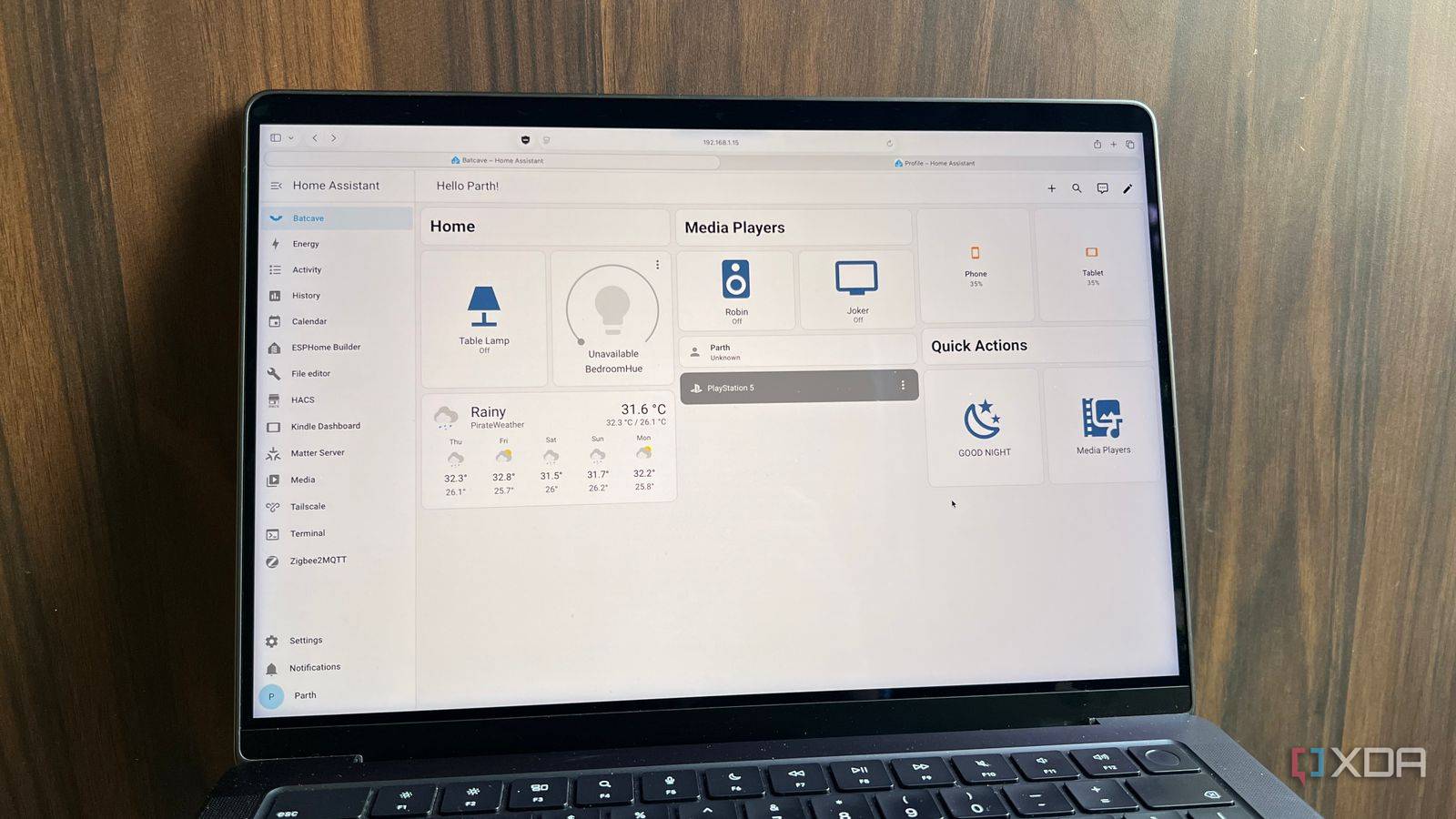
Published Sep 5, 2026, 12:30 PM EDT Parth, a seasoned tech writer, wields the keyboard (or pen) with finesse to unravel the intricacies of both Windows and Mac operating systems. He has covered evergreen content on mobile devices and computers for multiple publications over the last six years. You can find his work on AndroidPolice, GuidingTech and TechWiser. Whether it’s demystifying system updates, deciphering error codes, or exploring hidden features, Parth’s prose guides readers through the binary maze. When not immersed in tech jargon, you’ll find him sipping chai, pondering the next software review, and occasionally indulging in a friendly debate about mechanical keyboards. I have installed plenty of Docker containers that looked exciting for a week and then quietly disappeared from my routine. The two I value most are the complete opposite. One quietly runs much of my smart home, while the other keeps my network cleaner without requiring constant attention. Together, both Home Assistant and Pi-hole probably handle 90% of what I want from my homelab. Pi-hole My network’s silent cleanup crew Pi-hole is one of those services that sounds boring until I actually remove it from my setup. Then I notice the difference almost immediately. In simple terms, Pi-hole acts as a network-wide DNS filter. Instead of installing ad blockers on every browser and device I own, I can handle much of that filtering in one place. My phones, laptops, tablets, smart TVs, and other connected devices all benefit from the same setup. That alone makes it one of the most useful containers running in my homelab. What I like even more is how little attention it needs once everything is configured. I point my network to Pi-hole, add the blocklists I want, make a few tweaks, and leave it running. From there, it quietly blocks unwanted domains, trackers, and plenty of annoying requests in the background. I don’t have to keep opening the dashboard every day or constantly adjust settings to get value from it. That said, the dashboard is excellent when I do need it. Pi-hole gives me a clean overview of DNS queries, block requests, top clients, frequently requested domains, and more. I can quickly see which device is making the most requests or spot something unusual on my network. The interface is easy to use and understand. I also like having control over exactly what gets blocked. If Pi-hole breaks something, I can whitelist the domain. If I find another annoying tracker, I can blacklist it. I can also group devices and apply different rules depending on what I want. That flexibility is useful when I have so many different gadgets connected to my network. This is why I consider Pi-hole one of the containers doing the real heavy lifting in my homelab. It is not something I open because I want to use a cool self-hosted app. It sits underneath everything else and improves the experience across my entire network without reminding me that it is there. Home Assistant The brain behind my smart home Home Assistant is the other container that earns its place in my homelab every single day. The biggest reason I rely on it is simple: I don’t want my smart home split across five different apps. It works with thousands of services, devices, and companies, which makes it easier to connect the different parts of my smart home without being locked into one ecosystem. Lights in one app, plugs in another, sensors somewhere else, and routines buried in yet another service quickly become annoying. Home Assistant brings everything into one place. Once I connect my devices and services, I can control most of my smart home from a single dashboard. I like Home Assistant’s interface. I can create dashboards for different rooms, keep my most-used controls on the main screen, and glance at things like lights, temperature, sensors, switches, and other devices without digging through menus. Home Assistant is also quite customizable. I am not stuck with whatever interface a smart-home brand wants me to use. But automations are where Home Assistant really starts doing the heavy lifting. I can build rules once and let Home Assistant handle them. For instance, I can turn lights on at a specific time, switch devices off when nobody is home, trigger actions when a sensor changes, or build routines that involve several devices at once. These automations take some time to set up, but after that, I stop thinking about them altogether. I also appreciate how much visibility it gives me. I can check device states, look at history, monitor sensors, and quickly figure out what happened when something does not behave as expected. That makes troubleshooting much easier than jumping between several manufacturer apps. Another major advantage is the Home Assistant community. It is large, active, and constantly contributing integrations, guides, ideas, and troubleshooting help. Two services I never touch The deeper I get into self-hosting, the more convinced I am that most homelabs are overbuilt. More containers, dashboards, and automation do not automatically make a setup better; often, they create more things to babysit. Home Assistant and Pi-hole easily clear that bar. They solve problems I actually care about and keep earning their place without demanding much in return. They are not the flashiest services I run, but they are easily the ones doing the most work.
The 2 set-and-forget Docker containers that do 90% of the heavy lifting in my homelab
Full Article
Original Source
Read the full article at Xda-developers →KhanList aggregates and links to publicly available news content. We do not host full articles from third-party sources. Always verify important information with original sources.