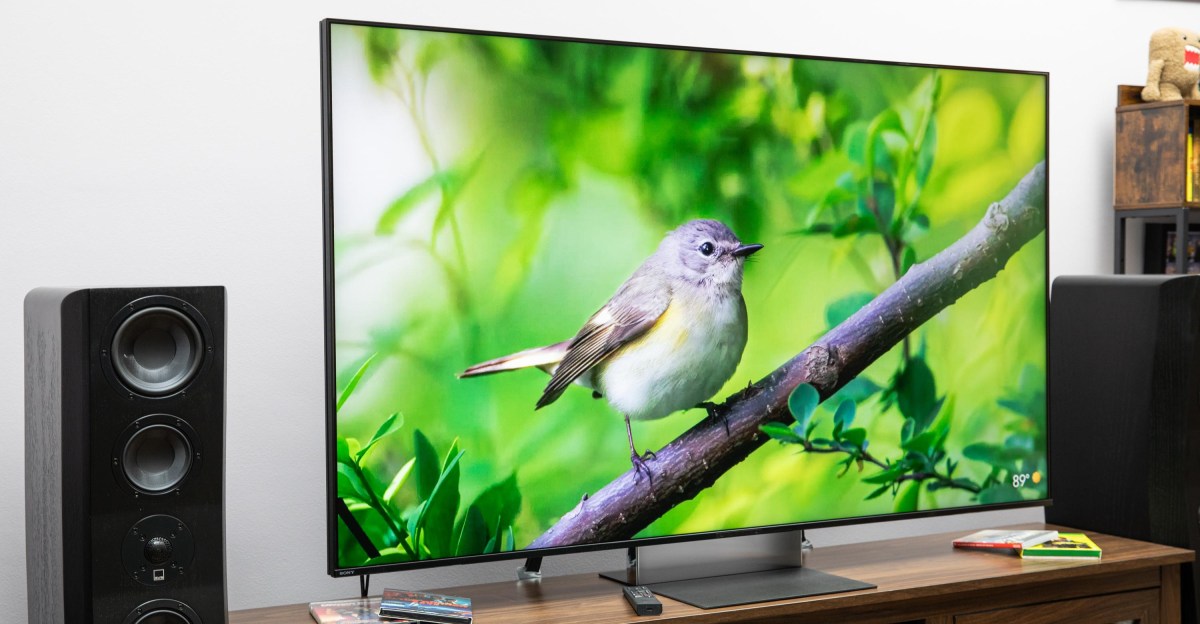
The Sony Bravia 9 II is the most anticipated new TV in years. It’s an amazing RGB LED TV. I watched Dungeons & Dragons: Honor Among Thieves on the new Bravia with my son, who has been getting into the roleplaying game but had never seen the movie. The landscapes of Faerûn looked natural and real, while the magic cast by the Red Wizards of Thay was vibrant and colorful. Specular highlights in HDR really pop. I saw it with Xenk’s glowing sword as he fought in the Underdark in Honor Among Thieves, but also in the explosions as Furiosa flees across the desert in Mad Max: Fury Road and the sun reflecting off the waves in The Meg.The Bravia 7 II I reviewed in May was already an impressive RGB LED TV. The Bravia 9 II has more dimming zones and an anti-reflective screen, and it gets brighter than the 7 II, but the 65-inch 9 II is also $1,000 more expensive, and the price difference increases as screen size goes up. So, is Sony’s flagship Bravia 9 II worth the extra money?$3600The GoodExcellent color accuracyPlenty of brightness for any roomIncredible light-diffusing matte screenSame cool lenticular stand as Bravia 7 IIThe BadMore expensive than flagship OLEDsIt’s LED, so there’s still some blooming, especially off axisSony showed off an early prototype of its RGB LED backlight technology at its Tokyo headquarters back in early 2025, and even at that stage, it was impressive. Every time there’s a new display technology, Sony’s flagship TVs tend to be the best, thanks in part to the company’s industry-leading processing and upscaling. The Bravia 8 II is the latest in a string of top-tier Sony QD-OLED TVs, and the original Bravia 9 was the best mini-LED when it launched in 2024. So with RGB LED TVs the big TV story of 2026, expectations are high for the Bravia 9 II.Only two of the HDMI ports are 2.1, but at least there’s an ATSC 3.0 tuner.Like the Bravia 7 II (and a lot of the new high-end TVs out this year), the Bravia 9 II uses RGB LEDs for its backlight. Instead of the blue backlight that LED TVs have been using for years, it has clusters of individual red, green, and blue LEDs that blend their light to create a wider range of colors than those blue LED TVs were capable of.The Bravia 9 II has the same processor as the 7 II. They both have the same awesome lenticular stand — the coolest TV stands I’ve seen in a long time — and both have HDMI 2.1 on just two of their four ports. Maybe next year Sony will catch up with the rest of the high end and finally offer four HDMI 2.1 ports.The Bravia 9 II is also as good as or better than the 7 II in grayscale and color performance (although it has the same issue in SDR mode with reds being oversaturated and not as bright as they should be). In Professional mode, the TV’s gamma and EOTF tracking is even better than the 7 II, so shadows are suitably detailed and images have proper depth. Colors like sky blue, foliage, and especially skin tones all look wonderful. And while grayscale measures (and looks) a little blue, I wasn’t bothered by it in anything I watched.Its great color accuracy, high light output, and anti-reflective screen make it the best bright-room TV availableThe Bravia 9 II can get bright: I measured highlights in HDR at 3,800 nits, and a full-field white screen at 885. The Bravia 7 II maxed out at 2,200 nits for highlights, although it has nearly the same full-field brightness at 848 nits. So for everything but the brightest of specular highlights, the two Sony RGB LED TVs have similar real-world brightness. There are TVs that get brighter — such as the TCL X11L — but with the vast majority of content out there, the 9 II is plenty bright with both HDR and SDR (if you turn it up from its default in Professional mode, which is set for dark-room viewing, or change to the slightly less accurate Cinema mode).The picture processing algorithms also control how well it uses its brightness and color and help to set Sony’s image quality apart from other TVs. With the curtains open and sunlight beaming through the windows, I watched a handful of World Cup games from an ATSC 3.0 antenna, and the Bravia 9 II’s image detail was easy to see.The anti-reflective screen is amazing at scattering ambient light without affecting black level.In addition to the picture performance, a few features distinguish the Bravia 9 II from the 7 II.The most noticeable upgrade is the anti-reflection screen, which is the best I’ve ever seen. Bright lamps or windows are reduced to a dim glow that’s incredibly difficult to see when anything is playing on the TV. Even when the TV is off, light reflections on the screen don’t draw my attention. The effect degrades the more off angle you get, but it wasn’t distracting until close to 70 degrees off axis, which is a pretty severe angle to watch TV at, even with a big group of friends over.Sony Bravia 9 II specsDisplay type: RGB LEDHDR formats: Dolby Vision, HDR10, HLGOS: Google TVHDMI inputs: 2 x HDMI 2.1 (one with eARC); 2 x HDMI 2.0Audio support: Dolby Atmos, DTS: XGaming features: 4K/120Hz, ALLM, VRRSizes available (inches): 65, 75, 85, 115It also has more dimming zones than the 7 II. More dimming zones allow for a finer control of backlight transition from light to dark parts of the screen, and usually lead to less blooming (where bright light bleeds into a dark section next to it). That is mostly true on the Bravia 9 II. From straight on, or slightly off angle, the 9 II handles blooming very well. There’s a slight glow around subtitles or a very dim haze around fireworks. The blooming was a bit more prominent at the far ends of my 8-foot couch, but it’s better than the Bravia 7 II or other RGB LED TVs (although not better than the TCL X11L mini-LED TV). It’s still an LED TV, and there will always be some degree of blooming.When I stood more off angle next to my couch, though, the blooming got worse — and not just around subtitles. I noticed both white and color bleeding into neighboring colors. Apple TV has a Peanuts screen saver, which is mostly Snoopy doing things on or around his doghouse. From an off angle, I could see the white from his body extend into the yellow background. I wouldn’t suggest the Bravia 9 II primarily for big groups, as friends at one side will get a different viewing experience than those toward the middle. This isn’t something I remember seeing on the Bravia 7 II, and since the accentuated blooming happens off axis, I wonder if it’s related to the anti-reflective coating on the screen.The Bravia 9 II includes a USB-C rechargeable remote and has the same lenticular stand as the Bravia 7 II.The TV uses Google TV as its OS, and it was quick and easy to use during my time with it.A slot in the back of the TV’s stand routes the cables behind the lenticular screen so they aren’t seen from the front.The combination of excellent brightness and great color accuracy makes images really engaging.Even with the minor off-angle issues, there isn’t any question that the Sony Bravia 9 II is the best RGB LED TV available. Its great color accuracy, high light output, and anti-reflective screen make it the best bright-room TV available. But the 65-inch sample I had in for review, which is the smallest available size, is $3,600, while the Bravia 7 II is $2,600 at 65 inches, and is available in sizes as small as 50 inches. Even the 65-inch Sony Bravia 8 II OLED is $3,000.I loved my time with the Sony Bravia 9 II, and I’m sure anyone would enjoy having one in their house. Even so, there are other TVs I prefer, even within Sony’s own product line. The Bravia 8 II, which gets you the pixel-level control only an OLED can deliver, would be my first choice. Contrast is still king to our eyes, and OLED still leads in that category. If you really want an RGB LED TV and don’t want to splurge on the 9 II, the Bravia 7 II gets you most of the way there (without the anti-reflective screen). The one use case where the Bravia 9 II wins out is in a space where reflections are a major concern. There’s no denying the Bravia 9 II is a great achievement in LED TV performance. But I’m still going to recommend an OLED for most people.Photography by John Higgins / The VergeHow I test TVsI set up each TV in my living room on my home theater credenza. I stream movies and shows through the TV’s apps and from an Apple TV, play discs on a Magnetar UDP900 MkII 4K Blu-Ray player (including the Spears & Munsil Ultra HD Benchmark disc) and movies from a Kaleidescape Strato E player, and play games on my Xbox Series X and PlayStation 5. This is done at different times of the day and under different lighting conditions, with curtains open, with lamps and overhead lights on, or with blackout curtains up to keep the room dark. While I am a certified ISF Level 3 calibrator, I do not calibrate the TVs before measurement, as the overwhelming majority of TV owners don’t bother. So it’s important to know how well the TVs perform out of the box, with minor tweaks in the menu anyone can do.For measurement, I use Portrait Displays’ Calman color calibration software, a Murideo 8K Seven pattern generator, an X-rite i1 Pro 3 spectrophotometer, Portrait Displays’ C6 HDR5000 colorimeter, a Konica Minolta LS-100 luminance meter, and Leo Bodnar 4K lag tester.Follow topics and authors from this story to see more like this in your personalized homepage feed and to receive email updates.John Higgins
Sony’s flagship RGB LED TV is incredible
Full Article
📰 Original Source
Read full article at Theverge →KhanList aggregates and links to publicly available news content. We do not host full articles from third-party sources. Always verify important information with original sources.