
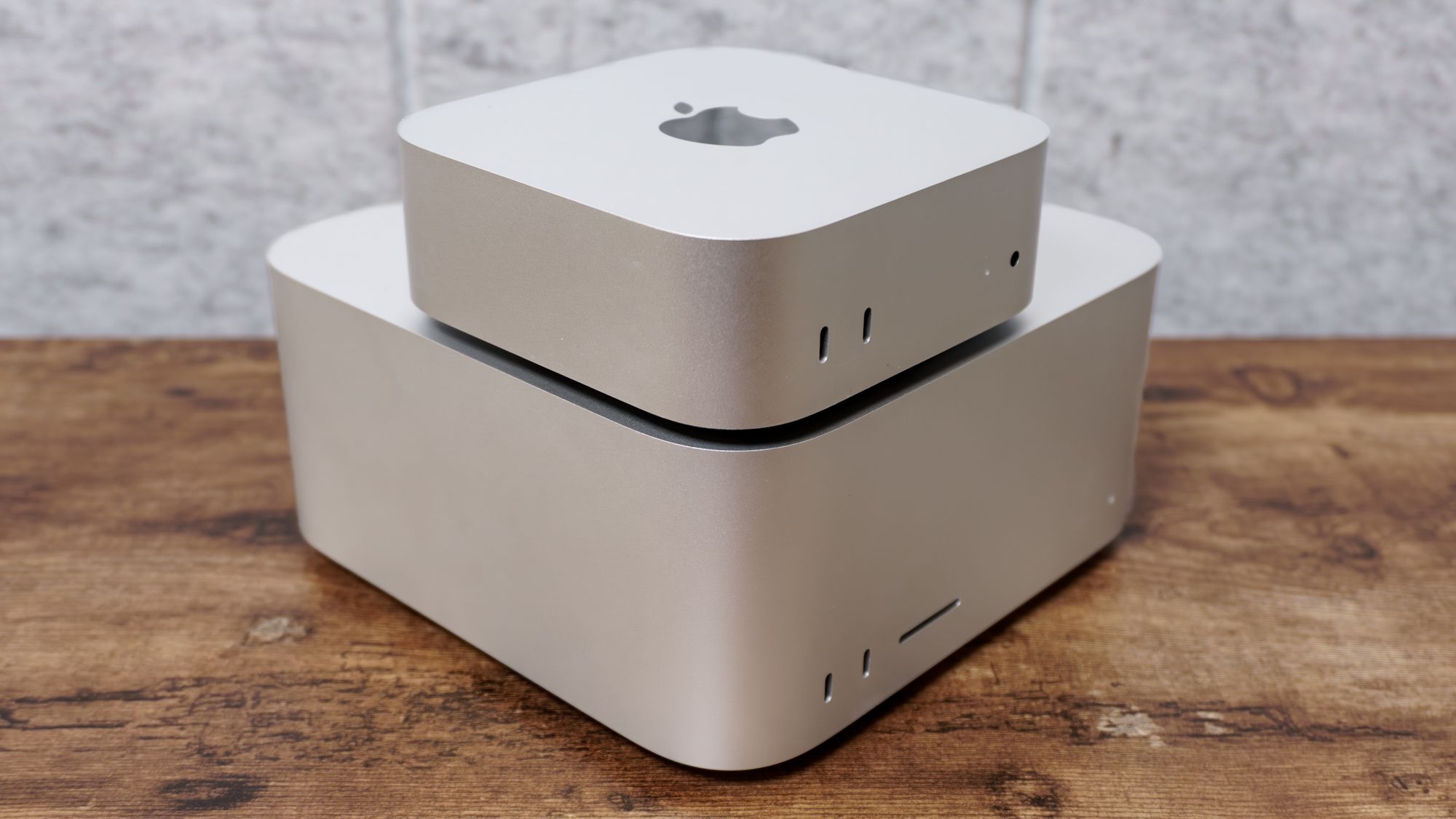
(Image credit: Tom's Guide) The new Mac mini and Mac Studio are here! While these Apple desktop computers retain the same design as their respective predecessors, each has been refreshed with the latest M-series chips and connectivity options. If you’re brand-new to Apple desktops or simply want to switch from one of the best MacBooks, these are the computers for you.As you can read in our Mac mini M6 review and Mac Studio M5 Ultra review, these are highly capable machines for everyday work and heavy workloads. But depending on your specific needs (and budget), one might be a better choice than the other. That’s where I come in.So, should you buy the Mac mini or the Mac Studio? Below, I’ll detail the key differences between Apple’s Macs to help you decide which one is right for you.Mac mini vs Mac Studio: PriceAside from performance (which we’ll get to shortly), the biggest difference between the Mac mini and Mac Studio is price. Sure, both are more expensive than their previous models, but even with that in mind, there is a substantial price gap between these two Macs.The Mac mini with the M6 chip is the most affordable option at $899. If you want more power, you can opt for a model with an M5 Pro chip starting at $1,699. Upgrading the RAM and storage will naturally raise the price by hundreds or even thousands of dollars.The Mac Studio starts at $2,499 for the model with an M5 Max chip. The M5 Ultra chip model costs $5,499. As with the Mac mini, upgrading memory and storage will increase the price.Mac mini vs Mac Studio: Design (Image credit: Tom's Guide)Neither the Mac mini nor the Mac Studio received a major redesign from prior models. Still, it’s worth detailing their designs, as one might be a better fit for your setup over the other.Sign up to the Tom's iGuide weekly newsletter with coverage on everything from product launches to software updates, this is your go-to source for the latest updates on all the best Apple content.As its name suggests, the Mac mini is the smaller of the two, measuring 5 x 5 x 2 inches and weighing 1.5 pounds. Due to its diminutive size, finding a spot for it on your desk shouldn’t be much of an issue. Heck, if you have an Apple Studio XDR Display, you can even rest it on the monitor’s stand, though cable management might be a tad tricky. (Image credit: Tom's Guide)At 7.7 x 7.7 x 3.7 inches and up to 8 pounds, the Mac Studio is definitely the bigger cousin of the Mac mini. That said, it’s still a relatively small PC — especially if you’re used to enormous desktops. It can’t sit neatly on the Studio Display’s stand like the Mac mini, but I didn’t have trouble positioning it on my desk at work.Both the Mac mini and Mac Studio are relatively small computers, but if you want the smallest Mac possible, then the mini is the way to go.Mac mini vs Mac Studio: Performance (Image credit: Tom's Guide)The next major divide between these Macs is performance. Though both can handle everyday work and even heavier workloads, one is significantly more powerful, which could make it more enticing (or necessary) for hardcore power users or professionals.The Mac mini we reviewed packs an M6 chip and 24GB of RAM, while the Mac Studio I tested has an M5 Ultra chip and a whopping 256GB of RAM. Neither is configured like its respective starting model, and there's a huge RAM gap between them. Keep that in mind as I detail the results of the performance tests we conducted. Swipe to scroll horizontally Processor benchmarks Header Cell - Column 0 Mac mini Mac Studio M5 Ultra Geekbench 6 single-core CPU 4,708 4,318 Geekbench 6 multi-core CPU 21,405 37,777 On the Geekbench 6 CPU benchmark, the Mac mini and Mac Studio have roughly similar single-core performance. However, the Mac Studio is the undisputed winner in multi-core performance. That said, the mini’s multi-core performance is still extremely impressive. Swipe to scroll horizontally SSD benchmarks Header Cell - Column 0 Mac mini M6 Mac Studio M5 Ultra Blackmagic read 6577 13902 Blackmagic write 6371 14283 HandBrake video editing test (MM:SS) 2:41 1:05 In the Blackmagic SSD speed tests, the Mac Studio greatly outperformed the Mac mini with faster read and write times. The same is true for the HandBrake test, which converts a 25GB 4K video file to 1080p. Basically, if you’re transferring files or rendering videos, the Mac Studio can perform those tasks much faster. Swipe to scroll horizontally Gaming benchmarks (@ 4K) Header Cell - Column 0 Mac mini M6 Mac Studio M5 Ultra Alienware Area-51 Desktop Assassin’s Creed Shadows 14 47 fps 140 fps Borderlands 3 48 73 fps 119 fps Cyberpunk 2077 30 77 fps 56 fps Neither the Mac mini nor the Mac Studio can compete with the best gaming PCs, but it shouldn’t surprise you that the Mac Studio runs games better at higher resolutions and frame rates. That isn’t to say you can't play games on the Mac mini, especially with Apple Silicon-optimized titles, but don’t expect games to run smoothly above 1080p.Mac mini vs Mac Studio: Which one to buy? (Image credit: Tom's Guide)Choosing between a Mac mini and a Mac Studio comes down to two things: price and necessity.If you mainly use a computer for everyday tasks like web browsing, Google Docs, or watching videos, the Mac mini is the machine for you. The same is also true if you’re on a tighter budget. In short, the Mac mini is the better option for most folks who want a Mac desktop.Conversely, if you’re a professional video editor, want to run heavy AI workloads on device, or just want an extremely powerful Mac, then the Mac Studio is a no-brainer—especially if money is no object. And if you are a professional, the Mac Studio will likely pay for itself over time by speeding up your workflow and saving you time and money. Follow Tom's Guide on Google News and add us as a preferred source to get our up-to-date news, analysis, and reviews in your feeds. More from Tom's GuideI asked the head of Android why people will pay a premium for its new MacBook alternativeI've been testing the iPhone 18 Pro Max and iPhone 18 Pro — your 10 biggest questions answeredApple's $250 million class action settlement website is now open — here's how eligible iPhone owners can file a claim and how much they'll get Tony is a computing writer at Tom’s Guide covering laptops, tablets, Windows, and iOS. During his off-hours, Tony enjoys reading comic books, playing video games, reading speculative fiction novels, and spending too much time on X/Twitter. His non-nerdy pursuits involve attending Hard Rock/Heavy Metal concerts and going to NYC bars with friends and colleagues. His work has appeared in publications such as Laptop Mag, PC Mag, and various independent gaming sites.
Should you buy a Mac mini or a Mac Studio? I’ll help you decide which Apple desktop to get
Full Article
Original Source
Read the full article at Tomsguide →KhanList aggregates and links to publicly available news content. We do not host full articles from third-party sources. Always verify important information with original sources.