
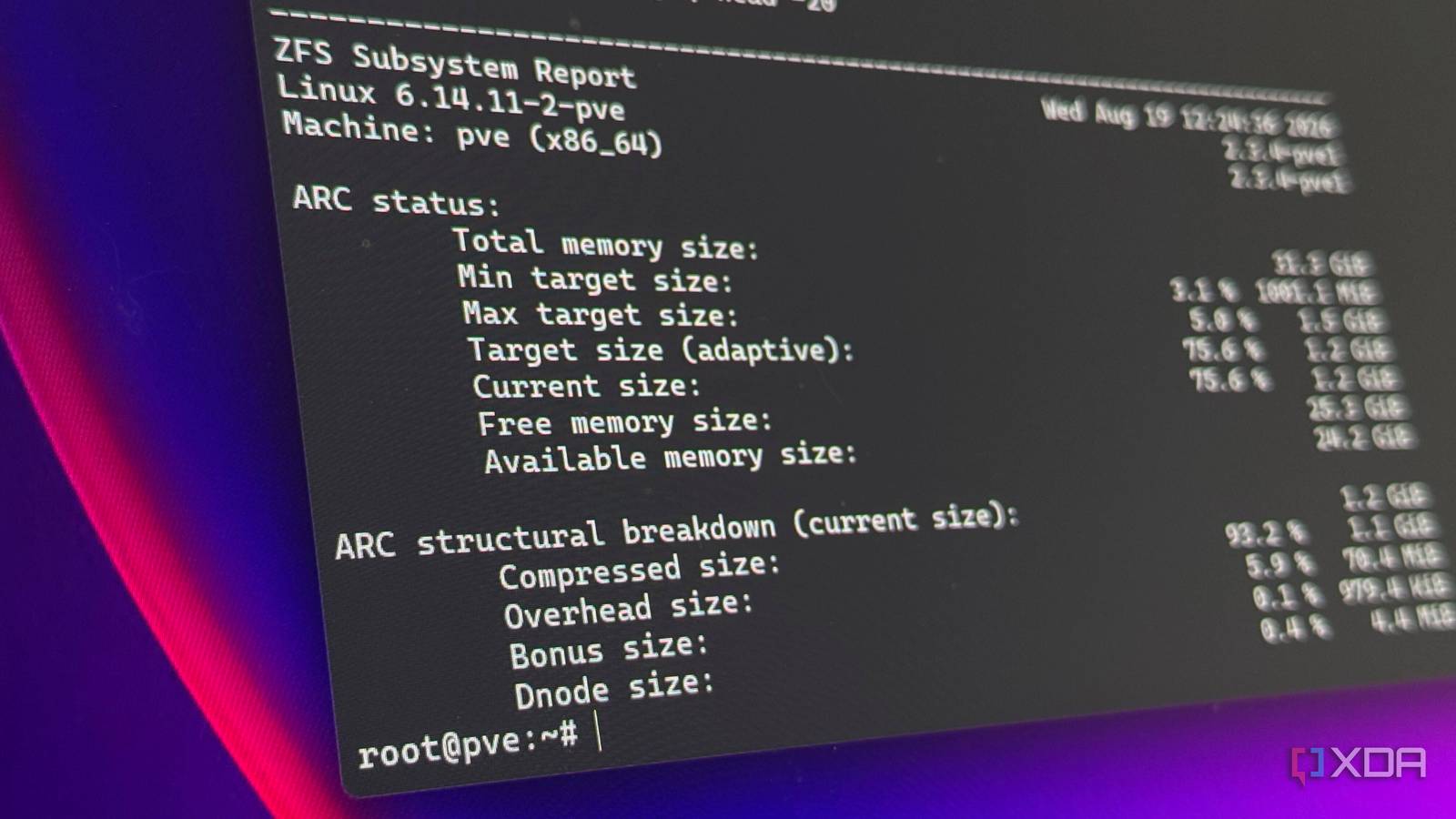
Published Aug 22, 2026, 9:00 AM EDT His love of PCs and their components was born out of trying to squeeze every ounce of performance out of the family computer. Tinkering with his own build at age 10 turned into building PCs for friends and family, fostering a passion that would ultimately take shape as a career path. Besides being the first call for tech support for those close to him, Ty is a computer science student, with his focus being cloud computing and networking. He also competed in semi-pro Counter-Strike for 8 years, making him intimately familiar with everything to do with peripherals. Setting up native ZFS on Proxmox asks you quite a few questions during setup, especially compared to other file systems. It wants to know which disks, what RAID level you're after, compression, pool name, and so on. What it doesn't mention is that the file system you just created is going to claim a significant share of your system's RAM, and this is by design. The amount of RAM it takes is based on a single line in a file you probably wouldn't have seen unless you read through the documentation. How ZFS actually works What ARC is, and how it affects your RAM ZFS is somewhat unusual in the fact that it's simultaneously a file system and a volume manager. It handles the pool of storage, the redundancy portion, the checksums, and the copy-on-write bits as one integrated system, in contrast to running another file system on top of a separate RAID layer, for instance. This tight integration is why most people really like it, and an additional effect of these features is a dedicated caching layer it brings rather than leaning on the kernel's. That cache is called Adaptive Replacement Cache, or ARC. It lives in your system memory and holds recently read data, so subsequent reads don't have to touch the disks as much. It's managed completely inside the ZFS kernel module, and that "adaptive" part of the name refers to how it decides on what stays in the cache. Rather than simply dumping whatever was touched least recently, it attempts to maintain a balance between frequently accessed data and data that has been accessed recently, which are two distinctly different categories. Also, in classic ZFS fashion, the metadata is also cached along with the file contents, which is also precisely why a pool full of small files can benefit from ARC even more than one that holds a bunch of large ones. Now, the caveat as far as Proxmox is concerned, is important: ARC RAM usage doesn't get reported as part of the Linux page cache, but as normal memory usage. A perfectly healthy ZFS host can look like it's about to run out of memory when it's doing exactly what it was designed to do. That ARC cache is also reclaimable, because when something else needs memory, ZFS will give it back, but it does so on its own terms. The default ARC behavior has changed Depending on your Proxmox version Here's where it can get a bit weird, and it depends on when you started your home lab. The ARC is a property of the ZFS module, not of any one individual pool of storage. It's one cache pool shared across everything ZFS related on one machine. This also means that if you created a pool after install like I did, it's drawing from the same cache no matter what the pool looks like. The ceiling comes from the installer, and since Proxmox 8.1, it calculates 10% of your system's physical RAM, up to a maximum of 16 GB. This value is written to /etc/modprobe.d/zfs.conf as a raw byte value, and this happens even if you don't select ZFS as your root file system. Earlier versions of Proxmox only did this if you selected ZFS, but now it creates that value in case you decide to create a pool later. Anything before 8.1 predates this behavior entirely, but despite that, you would think that it would prompt for an ARC value you before you're able to create a pool. However, since the zfs.conf file was never created, it'll fall to whatever OpenZFS itself defaults to, which used to be half of your physical memory. That has since changed, and OpenZFS adopted a formula that grants ARC the "greater of all-but-one gigabyte" or five-eighths of RAM, with the former being the winner on most machines. When you put all of this together, the scenario of an uncapped host that upgraded from Proxmox 8 to 9 seems a lot more realistic, and it's actually where a significant portion of users find themselves. My ARC cache was set to about 1.55 GB, because when I had first installed Proxmox, my lab only had 16 GB of physical memory. Even though I've created a 8 TB mirror of two enterprise SAS drives and increased my RAM to 32 GB, that line hasn't changed. A ceiling this low does cost me performance in cases of repeated access, like small reads and metadata that would be better handled by memory. This is actually the opposite problem to what I'm describing, but the point stands, and the ARC value you set can affect the performance of more than just storage. What it does to your VMs can be devastating to performance ARC can be a RAM hog if you let it The first sign that something is amiss with your ARC settings isn't a VM failing, but likely the memory graph. Your host reads 90% memory usage, but none of the VMs show that they're using that much RAM. On Proxmox VE 9, you can at least now see ARC statistics right under normal memory usage, but in prior versions, you had to dig a bit more. If your guests have ballooning enabled (a minimum memory value lower than the max), your system will compare host usage against a target and pull memory from your VMs until the host drops below that line. You can easily remedy this on systems with a large ARC allocation with the command pvenode config set --ballooning-target , with the value being a percentage. If you start a large VM without doing this and your host has no swap, the kernel has even less room to absorb a spike while ARC shrinks, which is bad news for performance. It pays to read the documentation All of this is detailed on the Proxmox wiki and OpenZFS man pages, but it's not explained to you when you're choosing a root file system or setting up your first ZFS pool. If you want to check for yourself where your ARC situation lies, you can run cat /etc/modprobe.d/zfs.conf and arc_summary, and both of those will tell you what ZFS is doing under the hood with regard to your memory.
Proxmox has a ZFS setting nobody touches, and it could be starving your home lab of performance
Full Article
Original Source
Read the full article at Xda-developers →KhanList aggregates and links to publicly available news content. We do not host full articles from third-party sources. Always verify important information with original sources.