
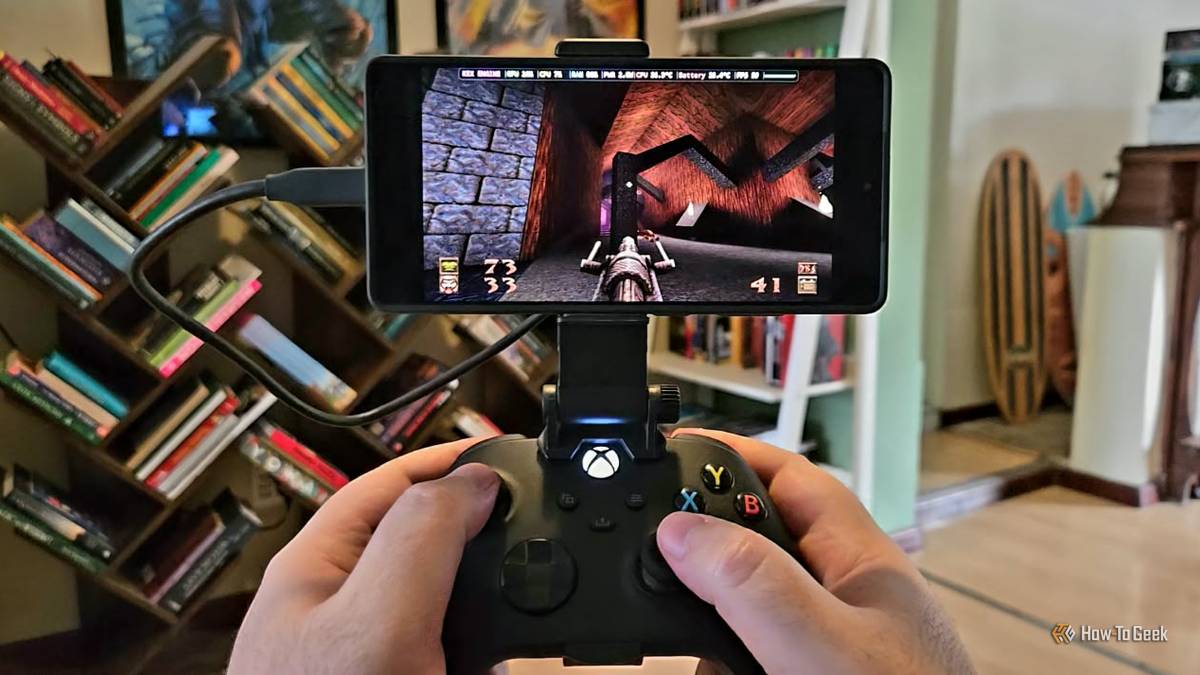
Published Oct 18, 2026, 4:30 PM EDT Sydney Butler is a technology writer with over 20 years of experience as a freelance PC technician and system builder and over a decade as a professional writer. He's worked for more than a decade in user education. On How-To Geek, he writes commerce content, guides, opinions, and specializes in editing hardware and cutting edge technology articles. Sydney started working as a freelance computer technician around the age of 13, before which he was in charge of running the computer center for his school. (He also ran LAN gaming tournaments when the teachers weren't looking!) His interests include VR, PC, Mac, gaming, 3D printing, consumer electronics, the web, and privacy. He holds a Master of Arts degree in Research Psychology with a minor in media and technology studies. His masters dissertation examined the potential for social media to spread misinformation. Outside of How-To Geek, he hosts the Online Tech Tips YouTube Channel, and writes for Online Tech Tips, Switching to Mac, and Helpdesk Geek. Sydney also writes for Expert Reviews UK. He also has bylines at 9to5Mac, 9to5Google, 9to5Toys, Tom's Hardware, MakeTechEasier, and Laptop Mag. For years, I've asked myself why I keep buying flagship phones. Sure, the cameras are awesome, and I enjoy the high-end OLED screens for streaming, but there's so much horsepower that it's genuinely hard to use it all. There are some decent native ports of console games, like Alien: Isolation, that will use the latest phone processor power to give you a smooth, sharp, and detailed gaming experience, but by and large the chips in my S25 Ultra sit idle. But then I started seeing more and more videos of PC games emulated on phones, and not just little indie games with 2D graphics. Proper AAA titles from various eras! Valve and Apple paved the way They built it, we came Just as a note, "emulation" might not be exactly the right term for what's going on here. It depends on the specific method you're using. It's not like an entire PC is being emulated on your phone and then runs the game. Instead, x86-CPU games are run through a translation layer, along with the Windows code. So that's the same thing as Apple's M-series of Arm-based computers using Rosetta II to translate apps written for Intel Macs so the Apple Silicon Macs can use them. That handles the CPU part of the process, but PC games running on your Android phone also need to handle the Windows side of the equation. Compatibility layers translate Windows functions into their Android equivalents, just like the Steam Deck does with Linux and technologies like Proton. In fact, for a lot of the games you'll play on your phone this way, it's literally using Proton. After all, don't forget that the beating heart of Android is the Linux Kernel! While Valve and Apple may not have invented these methods, they've both gone a long way to showing that it can be done reliably, and with minimal performance overhead. It's so easy now Even a dummy like me can do it I've been meaning to try this for months, and I've been watching YouTube tutorials on different ways to play PC games on Android to prepare. However, I put it off because it seemed like I would have to fiddle, tinker, sideload, and do lots of groundwork to get it going. I love that kind of stuff, but time is a limited resource these days. However, in this case, it seems my procrastination has paid off, because, thanks to apps like Winlator, GameNative, and GameHub, it's dead easy to do. If you already have a Steam or Epic Games Store account with some games, you can be playing a PC game on your Android device within minutes after reading this, depending on your internet speed. I went with GameHub because it seemed easiest. You just open the app, log into your Steam Account (at your own risk!) and download some games. I love that the compatibility tool only shows reviews from people with the same phone specs as you, which makes it pretty trustworthy if there are a fair number of reviews. The performance is, frankly, shocking I was expecting a slideshow The first thing I loaded up was Quake (the latest remastered version), and it was no different from installing and playing the game on a Steam Deck or PC. It downloaded, I started it, and I could load my Steam Cloud save and keep playing. Even though this is the remastered version of the game, my S25 Ultra didn't break a sweat. It was locked at 60fps, with about 25% GPU usage and 13% CPU usage. The reported power draw was just over 2W! Even though I was worried about battery drain, it was perfectly reasonable. Next, I tried Metal Gear Solid: Revengeance, which is a PS3-era game. This also just hits 60fps at medium settings, and mostly stays there, with between 80–100% CPU usage. It was wonderfully responsive, and I could totally play through it all this way. I then got the bright idea of hooking up my phone to an old Samsung G3 1080p gaming monitor I had lying around in a closet, and it also worked just fine. Which means you could bring your phone home, dock it to a monitor, and keep playing your PC games. With mouse, keyboard, and gamepad support. Samsung Galaxy S26 Ultra Brand Samsung SoC Snapdragon 8 Elite Gen 5 Get the new Galaxy S26 Ultra with AI smarts and an all-new privacy display. It's big, powerful, packed with AI, and you'll love the S-Pen stylus. Display 6.9-inch Dynamic Super AMOLED 2X RAM 12 or 16 GB Storage 256GB, 512GB, or 1TB Battery 5,000 mAh Operating System Android Front camera 12MP f/2.2 Rear camera 200MP f/1.4 main, 50MP f/1.9 ultrawide, 10MP f/2.4 telephoto, 50MP f/2.9 telephoto Dimensions 163.6 x 78.1 x 7.9 mm (6.44 x 3.07 x 0.31 in) Colors Violet, Sky Blue, Black, White, Silver Shadow, Pink Gold Weight 214g Charge speed 60W wired Super Fast Charging, 25W wireless Stylus S-Pen Storage is the big catch So little room for activities I really wanted to play Grand Theft Auto V on my phone, just as I've seen people do online, but my phone is only a 256GB model and, like most phones, does not allow for SD card expansion. Metal Gear Solid: Revengeance uses 10% of my phone's storage by itself! My phone has the processing power and RAM to run PS4-era games or modern titles on low settings, but it doesn't have the space to store them. Now, you do have external storage options. I couldn't get this to work in the time I had to test it for this article, but GameHub lets you import games from your PC without copying them to internal storage. For example, you can copy a game's folder from your Steam installation to a USB-C flash drive, then use GameHub's import function to run it directly from the external drive. Unfortunately, the Google Play Store version of GameHub has this feature stripped out, which means you need to sideload the APK from the GameHub site, which not everyone will feel comfortable with. If you have an SD card slot, you're fine, other than perhaps it being too slow for some games, but most of us don't have SD card slots. Even if you do get this to work (apparently both Winlator and GameNative have similar options), I, for one, don't want an external drive hanging off my phone while playing! It's far from perfect, but even further from bad I honestly expected PC game emulation on my phone to be a neat tech demo, not something I'd actually use. However, it works! Obviously, you'll get the same sort of compatibility bugs that SteamOS runs into here and there, but that's going to improve over time. This whole exercise has really fired up my imagination. Maybe there's no Switch 3 in my future. Maybe I actually have a reason to buy a flagship phone again. And maybe I'll get a 512GB or 1TB phone and actually have a use for that storage...
PC emulation on Android is incredible, but there's a catch
Full Article
Original Source
Read the full article at Howtogeek →KhanList aggregates and links to publicly available news content. We do not host full articles from third-party sources. Always verify important information with original sources.