
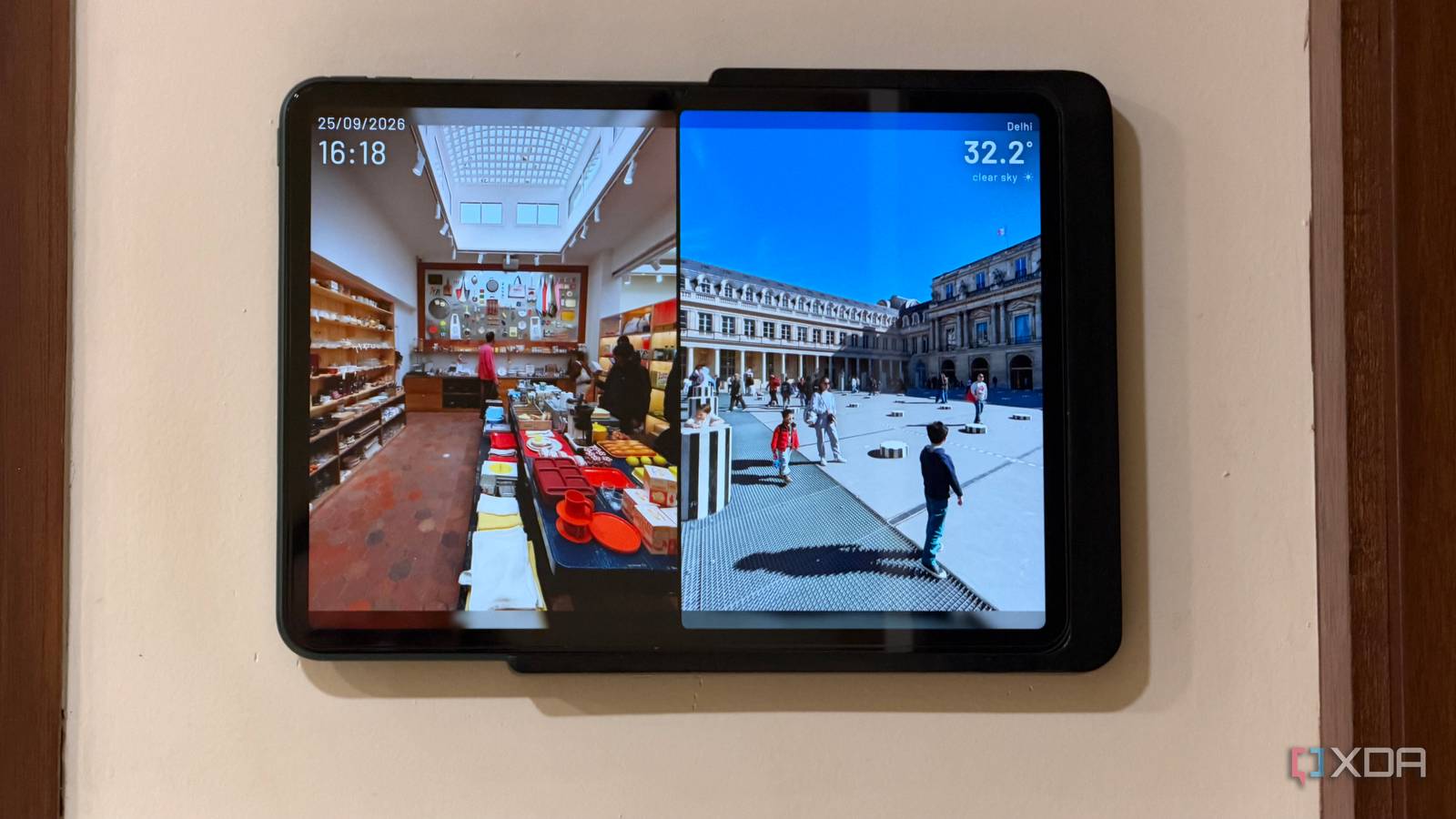
Published Sep 26, 2026, 12:30 PM EDT Dhruv Bhutani has been writing about consumer technology since 2008, offering deep insights into the personal technology landscape through features and opinion pieces. He writes for XDA-Developers, where he focuses on topics like productivity, networking, self-hosting, and more. Over the years, his work has also appeared in leading publications such as Android Police, Android Authority, CNET, PCMag, and more. Outside of his professional work, Dhruv is an avid fan of horror media spanning films and literature, enjoys fitness activities, collects vinyl records, and plays the guitar. My Immich photo library runs into hundreds of thousands of photos. It's a compilation of nearly every single photograph I've ever used. But like every photo archive, the problem is that I only view these photos when I actively go looking for them. For a system as smart as this, that has always felt like a bit of a waste. I should be able to randomly chance upon moments from all my old travels and experiences. But I did not want another dedicated smart display to surface these photos. So, I installed Immich Kiosk instead. This self-hosted tool turns any browser into a dedicated photo slideshow powered by your Immich library. In my case, I've set it up as the screensaver on my dedicated Home Assistant tablet, making it an always-visible photo kiosk. The setup is simple, barely takes minutes, and it's amazing how much control it gives me over how these photos are displayed where I want. Turning my always-on tablet into a photo display Setting up Immich Kiosk takes minutes The obvious problem that Immich Kiosk solves is that my photo library is tucked away on hard drives. I have a lot of photos in Immich, but no matter how good the photo management is, it does nothing to solve the problem of visibility. Meanwhile, my always-on tablet is the perfect target for these photos. It has a screen, Wi-Fi, and a browser. All the ingredients you need to set up a fully connected photo display. I can leave the tablet up on its wall-mounted dock, or just pull it down and move it where I want, and it'll continue pulling images from my Immich library. The setup is extremely simple. Immich Kiosk is a particularly lightweight service that runs in a Docker container. Once set up, just add in your Immich API key, and you're good to go. Open the Immich Kiosk URL in your tablet, phone, or any browser, and that's all you need to do. The software lets you control how quickly images change, the transitions you want, and even how you want the image displayed. Most images tend to be 4:3, and most displays are not. You can center images or stretch them to fill the screen, depending on your preferences. You can also adjust the fade and cross-fade styles. Similarly, Immich Kiosk lets you pull up two images simultaneously if you're viewing vertically oriented images and can choose from a series of grids to make it look even more appealing. Plenty of other configuration options make the app even better for a tablet. Immich Kiosk can prevent a browser from dimming the screen so that your content looks bright and contrasty all the time. Similarly, there's burn-in protection if you're using an OLED screen. Granular controls make Immich Kiosk generally useful Curating what shows up on your photo display A photo kiosk is a great idea, but it needs to have granular control to truly make sense. I don't need it displaying random photos of receipts, screenshots, or work photos. That's where Immich Kiosk's granular control steps in, and it does this using a combination of environment variables and URL flags. For example, I can point the frame at specific Immich albums. That gives me an easy way to create a curated collection for the display. Kiosk can pull from selected albums, and you can even set it to shuffle through images instead of displaying them in the same order. In my use, I generally create an album for recent trips, point the tablet at that album, and let it shuffle through photos all day long. The people filtering is where the experience gets elevated even further. It taps into Immich's built-in image recognition, and Kiosk can use those people as a source for the slideshow. Instead of manually building an album containing every photo of a particular person, it can use that as the recognition data and let you create bespoke slideshows. Further, you can select multiple people as well, so if you want a slideshow of images where two specific people show up, that's doable too. This flexibility goes both ways, and you can exclude specific people from showing up on slideshows. The easiest way to see your photo library in action All said and done, Immich Kiosk is a fantastic project that I didn't expect to use as much as I do. It solves an everyday problem by tapping into my existing photo archive. That ensures no data duplication, and I don't have to manually update images. Immich handles the ingest, while Immich Kiosk handles displaying it effectively. And because Kiosk works with the albums, people, and other Immich filters already in my library, I don't have to create a whole new selection. Kiosk has all the data it needs to create a fully curated and customized experience. I've been looking for a solution to my photo access problem for a while, and it took just a few minutes with the self-hosted Immich Kiosk app to pull it off better than I ever expected. Immich Kiosk Immich Kiosk is a self-hosted display tool that turns any screen into a photo frame powered directly by your Immich library.
My tablet became an Immich-powered photo frame in less than 5 minutes
Full Article
Original Source
Read the full article at Xda-developers →KhanList aggregates and links to publicly available news content. We do not host full articles from third-party sources. Always verify important information with original sources.