
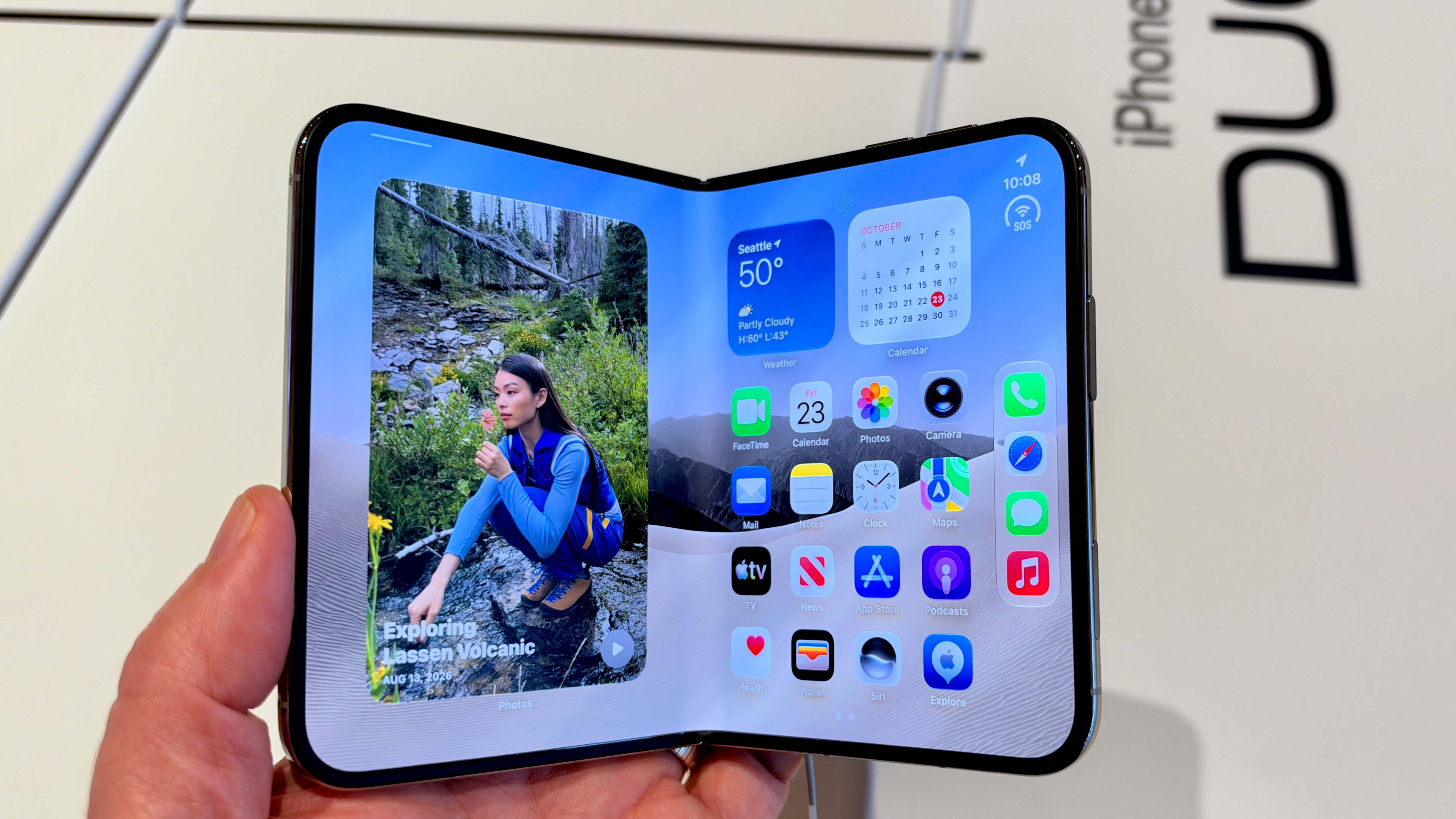
Using an iPhone Duo with my own hands turned out to be a remarkably different experience than I imagined. After watching (too many of) the first YouTube videos and reading reviews last week, I feel like I have a pretty good handle on what the iPhone Duo is: a small iPad Mini, a squat iPhone that transforms into a big iPhone. I appreciated the translucent window animation when you unfold it. I smiled at the interior glow when the alarm went off in tent mode. Those are all features. I was looking for experience. You can’t get that from watching videos. To be up front, I’d already decided that the iPhone Duo isn’t the new iPhone for me. As a photographer (and author of a book about iPhone photography), the camera features of the iPhone 18 Pro are objectively superior to what the iPhone Duo offers. And the $2,000 price is a big ask. I’d written off the iPhone Duo as someone else’s luxury. Now, though, my hands-on time has me wondering if there’s room in my pockets for a Duo. I spent about 20 minutes with a model at the Apple University Village store in Seattle, so these are first impressions. I defer to my colleague, senior technology reporter Abrar Al-Heeti, who has the most hands-on experience with the iPhone Duo out of anyone at CNET, for her review. “If anything, the Duo’s high cost and limited availability only reinforce that Apple’s foldable isn’t for everyone,” wrote Al-Heeti. “Personally, I have no plans of switching back to a slab phone anytime soon.” Yes, the opening animation is wonderful I would go so far as to say that the Duo’s opening effect is everything. It doesn’t need to exist. No one is fooled into thinking the front glass is actually translucent, and if you want to get pedantic, what appears on the inner screen isn’t exactly what you saw on the front screen. That doesn’t matter. The iPhone Duo’s opening effect is magical.Abrar Al-Heeti/CNET/Screenshot by Jeff Carlson/CNET The transition is polished in a way that is quintessentially Apple. There’s a bit of whimsy, the welcome surprise of something you haven’t seen a phone do before and didn’t expect it to do. The iPhone Duo itself is not necessary. You can buy perfectly capable, affordable phones that do what you already need a phone to do. But that’s not the point. It shows us and other companies that a foldable phone doesn’t have to just be the same phone experience with a bigger screen. Multitasking is a new gesture to learn I had to ask an eagerly helpful Apple employee how to do this. With the Duo’s 7.6-inch main screen open, you can set a separate app on each half of the screen. I expected that a half-swipe from the bottom would trigger it, but it brought up the app switcher interface instead. Instead, you start with the half-swipe and then drag your finger toward the left or right half of the screen. It’s a novel iOS control specifically for the Duo, but it has iPadOS SplitView vibes – just bypassing needing to use the dock or app window traffic light buttons. I’m sure people will learn it quickly, but it’s still a new gesture in iOS and iPadOS land. Browsing apps is a subtle improvement With the iPhone Duo closed, the home screen is like every other iPhone: swiping left lets you view other app screens until you get to the App Library, which puts apps into categories. On the inner screen, home screen apps hang out on the right side (keeping that translucent glass effect of the opening animation, above), leaving the left side app-free. (Apple’s demo model had a full-screen-size Photos widget in that space.) Swipe left, however, and the apps slide over to make room for the next “screen” of apps, and so on until the App Library drifts in. Navigating the home screen on the iPhone Duo. The easy design solution would be for the very large screen to just show all the apps when you open the phone. Why waste all the pixels on the left side? Big screen means more stuff! But that would be disorienting. The object permanence of the apps you were just looking at breaks – do they shift to the left so now you’re looking at different apps? Do other apps take up the space at left, even though they’re not “first-page” apps? No. Because Apple has set expectations for the experience based on the opening animation. Activating cameras on the screens can require an extra swipe One thing, in practice, I didn’t catch in videos was how the iPhone Duo handles which screen is used for the camera’s viewfinder. It has four cameras: a selfie camera on the front screen, the main and ultrawide cameras on the back and an under-display selfie camera on the interior. One great advantage of foldables is being able to open the phone so the front screen shows what the back cameras are seeing – when taking selfies, this means you can use the higher-quality cameras while still seeing how you’re framed. It can also be used as a preview for the subject; you’re taking the photo and looking at the expansive inner screen, while they get to see how you’re framing them in case they have suggestions. As a photographer, that’s slightly horrifying, because although I’m fine with showing the person some in-progress shots, I don’t want them art-directing me. But I can see how it would be helpful when you’ve asked another person to take your picture; so often I get well-meaning images with acres of space around the edges, and my friends and I as small figures in the middle. You can activate the outer screen as a camera viewfinder by sliding the unlock control.Jeff Carlson/CNET On the iPhone Duo, the front screen displays a Slide to Open control to unlock it for use with the Camera app. It’s reminiscent of the very first iPhone’s unlock mechanism. That way, you’re not accidentally activating the screen. Another way to choose what the outer display shows is by using the Outer Display control on the inner screen.Jeff Carlson/CNET There’s also a mode control in the top-left corner of the Camera app to specify the role the outer display will play: Duo Preview (described above), Kid Cue (a random Snoopy animation to draw the attention of youngsters who otherwise wouldn’t aim their faces toward the camera long enough for a good shot). There’s also an option to turn the screen off. So, so swirly My last hands-on impression also centers on experience, but not in the way I’m sure Apple would like. Unlike prior iPhones, the Duo has many different states, which Apple calls “poses.” The accelerometer tracks not only whether the phone is held vertically or horizontally, but also the angle at which the device is folded and positioned. The phone can be opened and viewed vertically, for example, and then you bend the screen into a 90-degree angle like a laptop – it changes the content, such as playing a movie on the “top” screen and its playback controls on the “bottom” screen. Netflix on the iPhone DuoKerry Wan/CNET Perhaps the settings need more tuning, but in the several minutes I had with the phone, it seemed to spend a lot more time spinning its interface from horizontal to vertical to upside down. It wasn’t glitching; it was trying to keep up as I turned, folded, unfolded and used the phone. The canonical definition of “up” on a phone slips away on a device so adaptable. Even more, you need to use the feel of the hardware buttons (which are in unusual locations compared with current iPhones). Are customers stricken by iPhone Duo vertigo going to return their devices? Not likely. Because, like the multitasking gesture and the translucent opening effect, they’ll adapt to the new experiences the Duo is delivering. I’ve been here before After 20 minutes of being an iPhone Duo detective, I am genuinely considering getting one. This isn’t without precedent: When the original iPhone arrived, I fawned over the design and features in the same way as I’m doing here, but I didn’t need one, especially since my Palm Treo was a perfectly good smartphone. Within a few months, the Treo found its new home in a desk drawer, and I’ve owned iPhones ever since. I’m not saying I’m going to place an iPhone Duo order, but I can’t not say that, either. If you’re wondering about the iPhone Duo’s durability, something I couldn’t really test in 20 minutes, CNET has designed and constructed a custom machine called the Fold-a-Phone that is currently hard at work testing how many times Apple’s foldable can be opened and closed.
My iPhone Duo In-Store Experience Almost Has Me Convinced I Need One
Full Article
Original Source
Read the full article at Cnet →KhanList aggregates and links to publicly available news content. We do not host full articles from third-party sources. Always verify important information with original sources.