
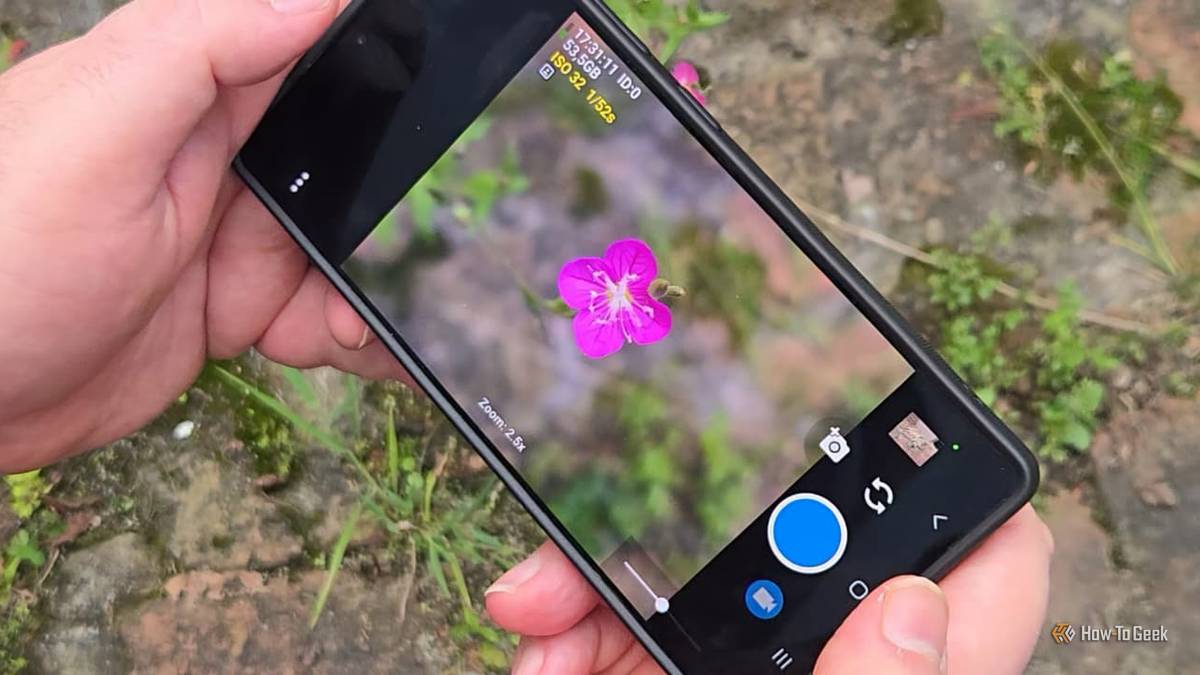
Published Oct 25, 2026, 6:30 AM EDT Sydney Butler is a technology writer with over 20 years of experience as a freelance PC technician and system builder and over a decade as a professional writer. He's worked for more than a decade in user education. On How-To Geek, he writes commerce content, guides, opinions, and specializes in editing hardware and cutting edge technology articles. Sydney started working as a freelance computer technician around the age of 13, before which he was in charge of running the computer center for his school. (He also ran LAN gaming tournaments when the teachers weren't looking!) His interests include VR, PC, Mac, gaming, 3D printing, consumer electronics, the web, and privacy. He holds a Master of Arts degree in Research Psychology with a minor in media and technology studies. His masters dissertation examined the potential for social media to spread misinformation. Outside of How-To Geek, he hosts the Online Tech Tips YouTube Channel, and writes for Online Tech Tips, Switching to Mac, and Helpdesk Geek. Sydney also writes for Expert Reviews UK. He also has bylines at 9to5Mac, 9to5Google, 9to5Toys, Tom's Hardware, MakeTechEasier, and Laptop Mag. Do our phone cameras really record what they see, or do they embellish? We're living in the age of computational photography, after all, and with modern AI technology, it's possible to take a raw photo and turn it into anything. It's like applying an Instagram AI filter to your memories. That's not necessarily a problem, but it does create a bit of discomfort for me in some cases. Different phone companies certainly have their own flavors of photo processing. So a Pixel Phone, iPhone, and Samsung Galaxy phone can all take a photo of the same subject and have very different looks and feels. Some of that is down to the raw optics, but most of it is algorithmic secret sauce, if you ask me. My phone and I disagreed about what a good photo looks like Sometimes being unpolished is better Credit: Samsung Do you remember the whole controversy about Samsung phones taking photos of the moon? Basically, when the AI detected that you were trying to take a photo of the moon, it used deep learning to show you what the moon would have looked like if the camera was actually capable of seeing it. So you can take a photo that the optics of the phone aren't really capable of. Samsung isn't the only company that does this, and they've all been exposed through clever folks who have managed to trick the phones into thinking an object is the moon when it isn't. Now, there's no arguing that the AI-enhanced image isn't better than the raw one. But is that what you want? If the answer is "yes", that's fine, but it does remind me of how people of my parents' generation are "restoring" family photos with AI where the folks in the image are strangers. They look almost, but not quite, like the actual person who was photographed. In short, sometimes I'd like the option to just see what the camera sees, not what an AI thinks I should see. Samsung Galaxy S26 Ultra Brand Samsung SoC Snapdragon 8 Elite Gen 5 Get the new Galaxy S26 Ultra with AI smarts and an all-new privacy display. It's big, powerful, packed with AI, and you'll love the S-Pen stylus. Display 6.9-inch Dynamic Super AMOLED 2X RAM 12 or 16 GB Storage 256GB, 512GB, or 1TB Battery 5,000 mAh Operating System Android Front camera 12MP f/2.2 Rear camera 200MP f/1.4 main, 50MP f/1.9 ultrawide, 10MP f/2.4 telephoto, 50MP f/2.9 telephoto Dimensions 163.6 x 78.1 x 7.9 mm (6.44 x 3.07 x 0.31 in) Colors Violet, Sky Blue, Black, White, Silver Shadow, Pink Gold Weight 214g Charge speed 60W wired Super Fast Charging, 25W wireless Stylus S-Pen Samsung’s off switches deserve a chance You have some control To be fair to Samsung, you can disable a lot of this stuff. You can turn off the Scene Optimizer, which is (among other things) responsible for the AI-enhanced moon shots. You can also turn down "Quality Optimization" to its minimum setting, but not turn it off. There's also Auto HDR and "Picture softening." Once you've switched all of that off, you're about as close as you're going to get using the Samsung app. Of course, "Pro mode" gives you more precise control over the camera settings, and in my case, helps a lot with macro shots. The regular automatic app mode is unreliable at detecting when you want to photograph a small subject like an insect. This certainly moves us closer to the ground truth of what the camera sensor captured, but using a third-party app we can narrow the gap even further. Open Camera gave me a different way to use the same hardware It's a matter of perspective That brings us to Open Camera, which is available through F-Droid and the Google Play Store. It has more than 100M downloads on the Play Store alone, so it's not some niche little app at this point. This is an open-source camera app for Android devices that strips away most of the hand-holding between you and your camera hardware. Now, I don't want to create the idea that Open Camera completely removes all processing. There are several algorithms for face detection, edge detection, denoising, and so on. However, you can tune these individually to your taste. Besides, this is a far cry from the generative AI neural net filters you get from the big mainstream apps. The interface is stripped down, but the options and information are overwhelming. This is not a minimalist UI. Most people don't need to know the lens spec and resolution of each sensor they select, for example, but Open Camera puts that front and center. Open Camera makes it easier to get the photos I want From photon to eyeball For me, the key reason I might use Open Camera instead of the default Samsung camera app is that I have better control over the focus of each lens. Even compared to Samsung's Pro mode. I like to take photos of subjects close up, and it's simply harder to get right with the default app. I have no problem admitting that the photos I get using Open Camera do not look as polished as those captured using Samsung's technology. However, it does mean that when I use something like Snapseed, I'm not just piling image processing on even more image processing. I'm not abandoning Samsung's app either Again, I don't have anything against how Samsung and other major phone makers process photos using their apps. As long as everyone is clear on what they are getting from the deal. If I want to take a photo that I'm going to share online right away or message to a friend or family member, I'm still opening the Samsung app. However, if I actually want to take some time and edit and tune a photo before using it, I think Open Camera is the more likely app to get a tap from me.
My Galaxy phone butchered my photos with AI I didn't ask for, so I switched to a FOSS camera app instead
Full Article
Original Source
Read the full article at Howtogeek →KhanList aggregates and links to publicly available news content. We do not host full articles from third-party sources. Always verify important information with original sources.